Understand Mobile and Remote Access Certificate Requirements and Apache Traffic Server History

Available Languages
Introduction
This document describes certificate upload requirements on CUCM for Mobile and Remote Access.
Background Information
The Cisco Expressway uses the Apache Traffic Server (ATS). The traffic server is a very important component in traversal solutions, primarily used for these features:
- Certificate verification: It performs certificate verification of Cisco Unified Communications Manager (CUCM), IM & Presence, and Unity server nodes for MRA services.
- Proxying and caching: It acts as a fast, scalable caching proxy server for HTTP/HTTPS traffic.
On Expressway Version 14.0.2
Traffic server (ATS) starts seeing slight enforcement of 'certificate verification' when it talks to CUCM during MRA provisioning.
Requirement was documented under CSCvz45074 where the Root certificates which signed Expressway Core server certificates, must be uploaded on CUCM as Tomcat-Trust and CallManager Trust: https://cdetsng.cisco.com/summary/#/defect/CSCvz45074.
- Traffic Server Enforces Certificate Verification.
- Before upgrading to X14.0.2 release, ensure that this certificate requirement is met.
Requirement - The Certificate Authority (CA) chain (Root + Intermediary) which signed the Expressway-C certificate must be added to the tomcat-trust and CallManager-trust list of CUCM, even if the Unified Communications Manager (UCM) is in non-secure mode.
Reason - The traffic server service in Expressway sends its certificate whenever a server UCM requests it. These requests are for services running on ports other than 8443 (for example, ports 6971, 6972, and so on). This enforces certificate verification even if UCM is in non-secure mode. For more information, see Mobile and Remote Access Through Expressway Deployment Guide.
Behaviour on Versions Earlier to 14.0.8
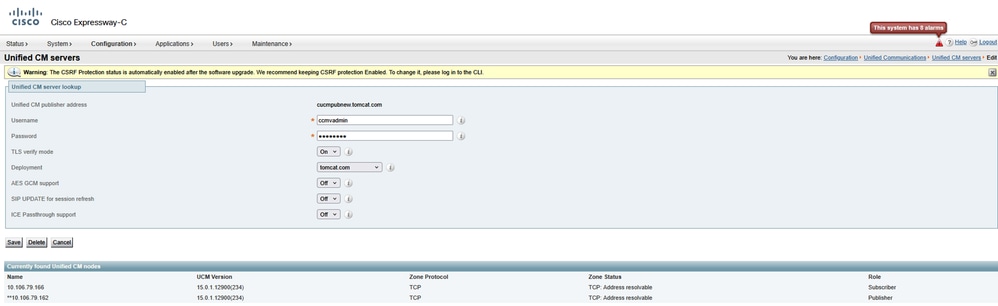
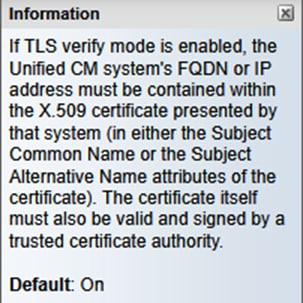
The traffic server on Expressway-C that handles secure HTTPS bidirectional connections between Expressway-C and Unified Communication nodes did not verify the certificate that was presented by the remote end. Under MRA configuration, there is an option to have TLS certificate verification by the configuration of the TLS Verify Mode to 'On' when either CUCM, IM & P, or Unity servers are added under Configuration > Unified Communications > Unified CM servers/IM and Presence Service nodes/Unity Connection servers. The configuration option is shown in the next screenshot, which indicates that it verifies the FQDN or IP in the SAN as well as the validity of the certificate and whether it is signed by a trusted CA.
There was also a known issue where two certificates with same CN name cannot be loaded on Expressway trust store. This limitation caused two issues:
1. If you chose to load call manager certificate on Expressway Trust store, TLS verify 'On' will fail while adding CUCMs.
2: If you chose to load Tomcat certificate on Expressway Trust store, secure SIP registration on 5061 will fail.
This behaviour is documented in CSCwa12894.
Also, this TLS certificate verification check is only done at the discovery of the CUCM/IM & P/Unity servers and not at the time during MRA client provisioning.
Drawback of this configuration, is that it only verifies it for the publisher address you add in. It does not validate if the certificate on the subscriber nodes has been correctly set up as it retrieves the subscriber node information (FQDN or IP) from the database of the publisher node.
Behaviour on Versions 14.0.8 and Later
Starting X14.0.8 version onwards, the Expressway server performs TLS certificate verification for every single HTTPS request that is made through the traffic server. This means it also perform this when the TLS Verify Mode is set to 'Off' during the discovery of the CUCM/IM & P/Unity nodes. When the verification does not succeed, the TLS handshake does not complete and the request fails which can lead to loss of functionality like redundancy, failover issues, or complete login failures for example. Also, with TLS Verify Mode set to 'On', it does not guarantee that all connections work fine as covered in the example later.
The exact certificates that the Expressway checks towards the CUCM/IM & P/Unity nodes are as shown on the section of the MRA guide.
Section
Certificate Requirements > Certificate Exchange Requirements
Due to these changes in the way communication takes place between Expressway-Core and CUCM, it must be ensured that:
1. You recommend that you use CA-signed certificates for Mobile and Remote Access.
2. Each Unified CM cluster must trust the Expressway-C certificate. For each cluster, ensure:
- If Mixed mode is enabled — The Expressway-C certificate must be installed to the CallManager-trust and Tomcat-trust store on Unified CM.
- If Mixed mode is disabled — The root CA certificate that signs the Expressway-C certificate must be installed to the CallManager-trust and Tomcat-trust store on Unified CM. Then, restart these: • Tomcat Service • CallManager Service • HA Proxy Service (if using TLS on Tomcat).
On Expressway - Core, ensure these actions are taken:
- Expressway-C must trust the certificates presented by each Unified CM and IM and Presence Service cluster.
The trust store of Expressway-C must include the root CA certificate that signs the Unified CM and IM and Presence Service certificates for all UC clusters.

Note: Ensure that you add all root and intermediate CA certificates or full CA chain used to sign the Expressway-C certificate to the Tomcat-trust and CallManager-trust list of Cisco Unified Communications Manager (UCM), even though the UCM is operating in the non-secure mode.
Reason - The traffic server service in Expressway sends its certificate whenever a server (UCM) requests it. These requests are for services running on ports other than 8443 (for example, ports 6971, 6972, and so on). This enforces certificate verification even if UCM is in non-secure mode.
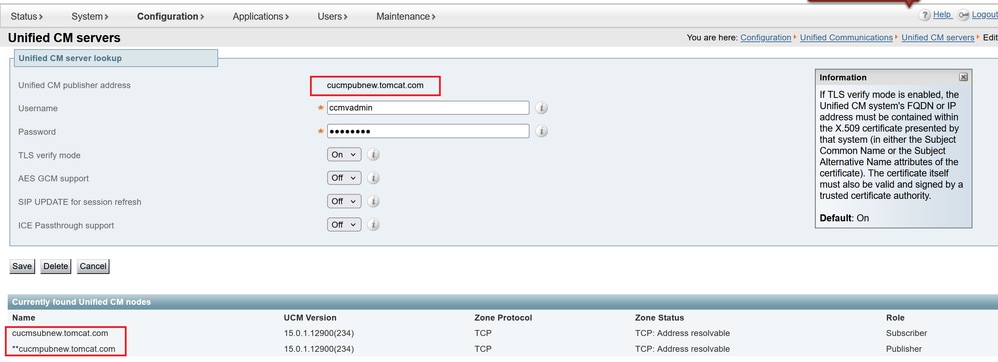
The way CUCM address is added under System > Server plays a very important role in adding CUCM/IMP on Expressway core under Configuration > Unified Communications > Unified CM servers/IM and Presence Service nodes.
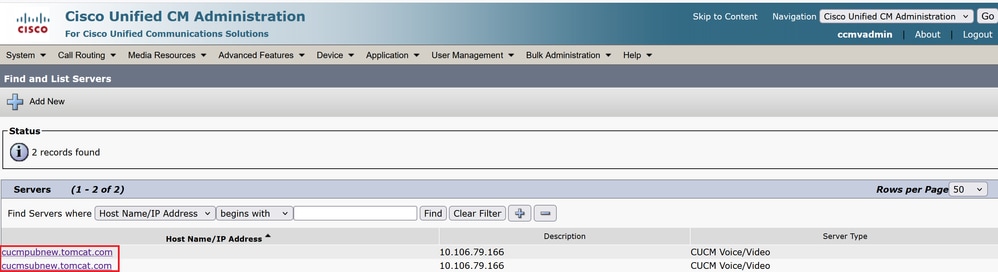
CUCM must always be added with FQDN and not hostname or IP address. If its sighted that CUCM is added under System > Server as Hostname/IP address
during TLS handshake, TLS verification 'On' will fail and CUCM cluster will not be added on Expressway-Core.
This image shows CUCM added as hostname:
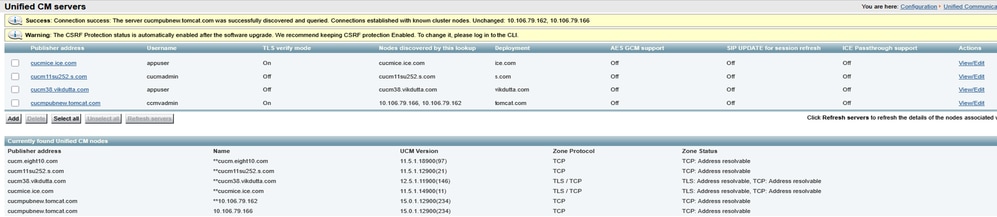
This figure shows CUCM added on Expressway-Core with FQDN with TLS verify Mode = ON:
There was also a change introduced in X14.2 which will present ciphers during a TLS handshake (client hello) in diffrent preference order. This depended on the upgrade path and caused unexpected TLS connections after a software upgrade. It can be that before the upgrade during TLS handshake, it requested for the Cisco Tomcat or Cisco CallManager certificate from CUCM. But that after the upgrade, it requested for the ECDSA variant (which is the more secure cipher variant than RSA). The Cisco Tomcat-ECDSA or Cisco CallManager-ECDSA certificates can be signed by a different CA or just still self-signed certificates (the default).
This cipher preference order change is not always relevant to you as it depends on the upgrade path as shown from the Expressway X14.2.1 release notes. In short, you can see from Maintenance > Security > Ciphers for each of the cipher lists whether it does prepend ECDHE-RSA-AES256-GCM-SHA384 or not. If it does not, then it prefers the newer ECDSA cipher over the RSA cipher. If it does, then you have the behavior as previous with RSA that has the higher preference then.
The next screenshot shows in red box ECDSA cipher advertised by Expressway core during TLS negotiation message in Client hello, '#IF TLS_ECDHE_ECDSA_WITH_AES_256_GCM_SHA384' gets chosen by Remote responder (CUCM) in server hello, then TLS negotiation will fail if:
ROOT CA certificates or actual ECDSA certificates from Responder, that is, CUCM is not installed on Expressway Trust store in this case.
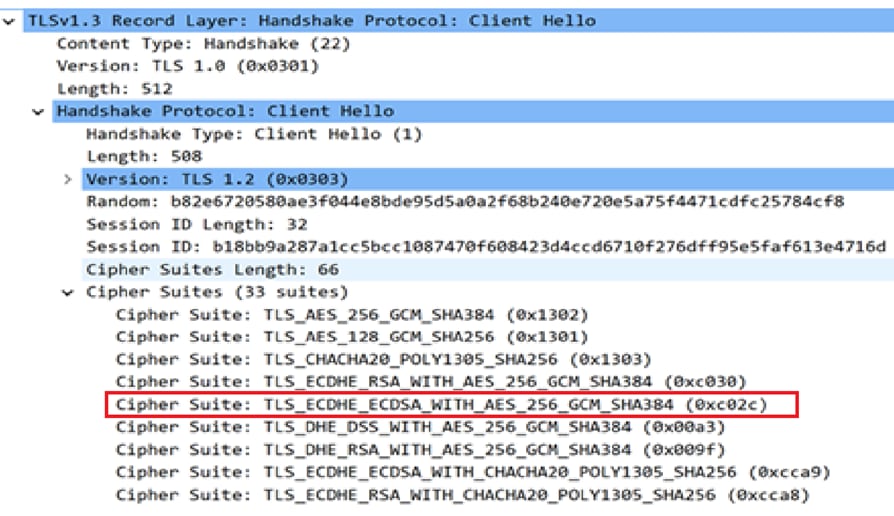
Alternatively, you can also modify Expressway Ciphers so that ECDSA does not take precedence.
1. Modify SIP cipher by appending GCM-Sha384 open SSL string.
'ECDHE-RSA-AES256-GCM-SHA384:EECDH:EDH:HIGH:......:!MD5:!PSK:!eNULL:!aNULL:!aDH'
2. Add + in order to move the cipher at last preference or add ! in order to disable ECDSA permanently.
Cipher: 'EECDH:EDH:HIGH:-AES256+SHA:!MEDIUM:!LOW:!3DES:!MD5:!PSK:!eNULL:!aNULL:!aDH:+ECDSA'
3. Add Root and intermediate CA certificate which signed ECDSA certificate on CUCM or add Tomcat-ECDSA certificate on Expressway trust store (in some cases).
However, due to change in cipher precedence, post upgrade, MRA deployments can break, so TAC will have to perform the earlier mentioned workaround to make things work again.
With introduction of TLS 1.3, it becomes even more difficult to check what certificates are getting exchanged in wireshark.
Behaviour on Versions x15.3
For SIP interface only, you can choose to have RSA or ECDSA ciphers.
With X15.x TLS 1.3 has been enforced. As seen on field, RSA algorithm is chosen mostly over ECDSA. Customers who upgrade to x15.2 now can choose
between RSA and ECDSA algorithm with this command set:
xConfiguration SIP Advanced TlsSignatureAlgoPrefRsa: On/Off
TlssignatureAlgoPrefRSA will only work if SIP interface has TLS 1.3
xConfiguration SIP Advanced SipTlsVersions: 'TLSv1.3'
Note: This is eligible for SIP interface only as of now. Traffic Server and Tomcat considerations on 8443 remains unchanged as documented earlier.
Cipher suits sent out during 'client hello' by Expressway to CUCM will be as shown when RSA is chosen.
- Signature Algorithm: rsa_pss_rsae_sha512 (0x0806)
- Signature Algorithm: rsa_pss_rsae_sha384 (0x0805)
- Signature Algorithm: rsa_pss_rsae_sha256 (0x0804)
- Signature Algorithm: ecdsa_secp521r1_sha512 (0x0603)
- Signature Algorithm: ecdsa_secp384r1_sha384 (0x0503)
- Signature Algorithm: ecdsa_secp256r1_sha256 (0x0403)
The earlier configuration will work in Tandem on what configuration you have chosen on CUCM to TLS ciphers under Enterprise Parameters > Security Parameters.

Also, it is important to note that during a broken TLS handshake over TLS 1.3 between Expressway-C and CUCM, the errors printed in diagnostic logs or PCAP are not very helpful. It is worth enabling these debugs while working with TAC, so that component prints clear errors to troubleshoot.
xConfiguration Logger Developer developer.trafficserver.http Level: 'DEBUG'
xConfiguration Logger Developer developer.trafficserver.http_trans Level: 'DEBUG'
xConfiguration Logger Developer developer.trafficserver.iocore Level: 'DEBUG'
xConfiguration Logger Developer developer.trafficserver.ssl Level: 'DEBUG'
What to Expect when CallManager Shares One Certificate with Multiple Services
Things change slightly with reuse of certificate on CUCM.
Starting from CUCM 14.0, you can reuse, Tomcat and Tomcat ECDSA certificates as CallManager and CallManager ECDSA.
Tomcat certificate can be reused as CallManager certificate.
Tomcat-ECDSA certificate can be reused as CallManager-ECDSA certificate.
This makes life easy.
1. Multiple services on CUCM now use one certificate, which brings the cost of certificate down.
2. Less management of certificates.
3. If you need to upload Tomcat/CallManager or Tomcat-ECDSA/CallManager-ECDSA certificate (for any reason) on Expressway-Core trust store, it will be just one certificate which you need to upload. There will not be a problem of having a same CN name issue (talked earlier in this document).
Note: Reuse of certificate will only happen when Tomcat and Tomcat-ECDSA are multisan certificates.
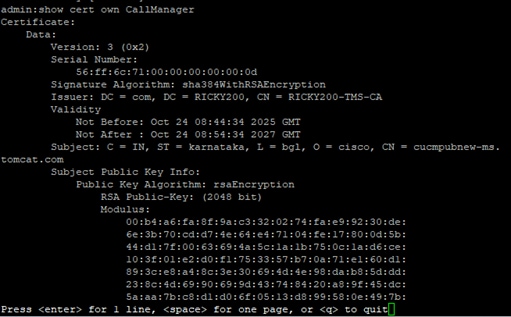
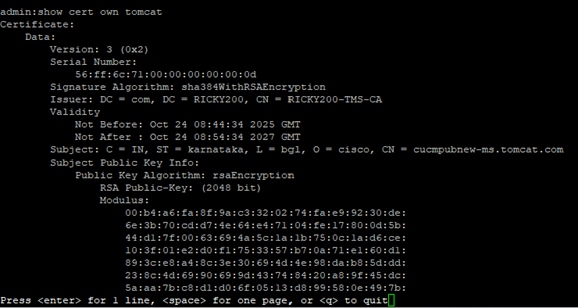
Post Reuse, CallManager, and CallManager ECDSA server certificates are not visible on CUCM trust store. You can validate certificate reuse from CLI by running commands:
show cert own CallManager
show cert own tomcat
Steps to Reuse Certificate
Generating Tomcat CSR pub add.
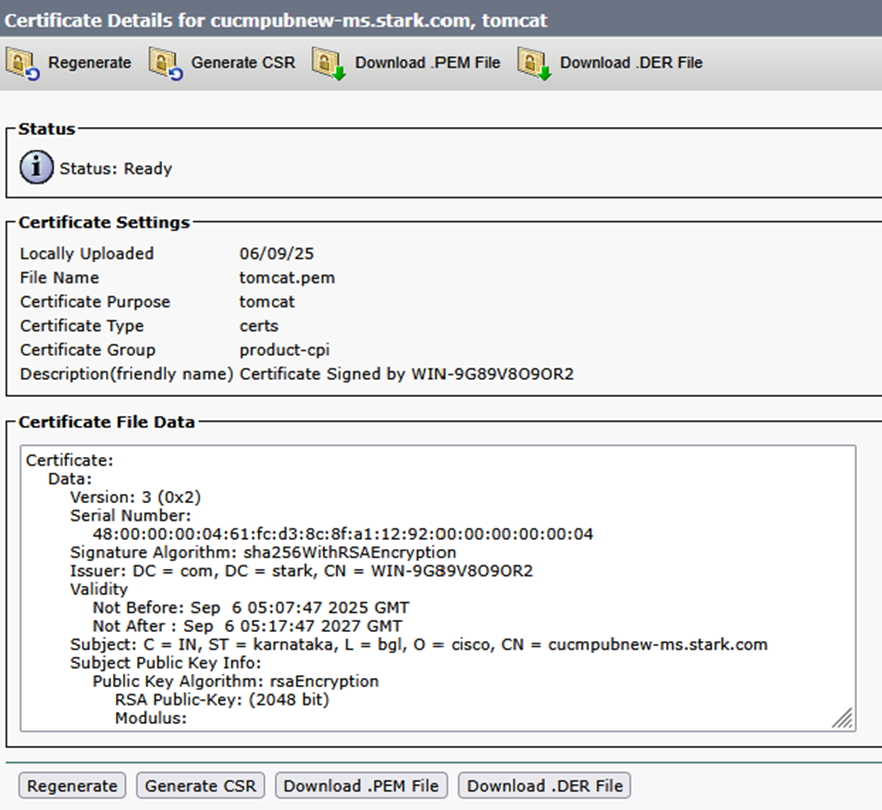
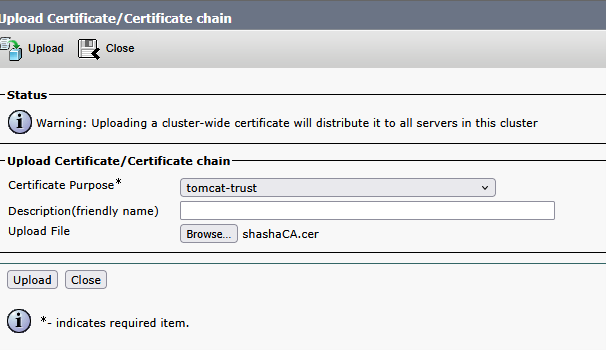
Upload CA certificate which will sign Tomcat certificate on CUCM as Tomcat-trust.
Once Tomcat certificate is signed, upload on publisher. Restart relevant services as prompted.
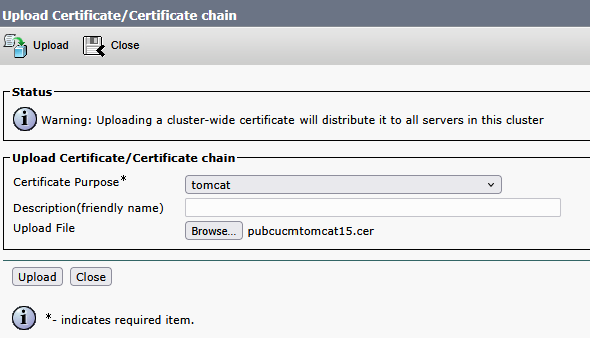
Once Tomcat certificate is signed, upload on publisher. Restart relevant services as prompted.
Success: Certificate Uploaded. Perform a Disaster Recovery backup so the latest backup contains the uploaded certificate.
Restart the Cisco Tomcat web service using the CLI 'utils service restart Cisco Tomcat' on all cluster nodes (UCM/IMP). Restart Cisco UDS Tomcat and Cisco AXL Tomcat web services using the CLI 'utils service restart Cisco UDS Tomcat' and 'utils service restart Cisco AXL Tomcat' on all the UCM cluster nodes. Also, restart the Cisco DRF Master and Cisco DRF Local services on the publisher node. Restart only the Cisco DRF Local service on the subscriber node(s).
Tomcat certificate is now signed by CA.

In order to reuse Tomcat certificate as CallManager certificate now.
Click Reuse Certificate.

Choose Tomcat in dropdown and check CallManager certificate.
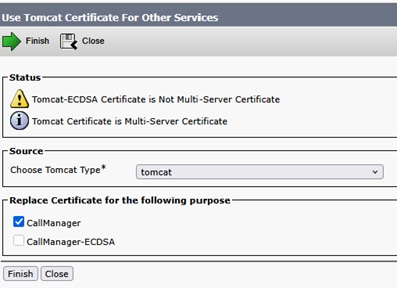
Click Finish.
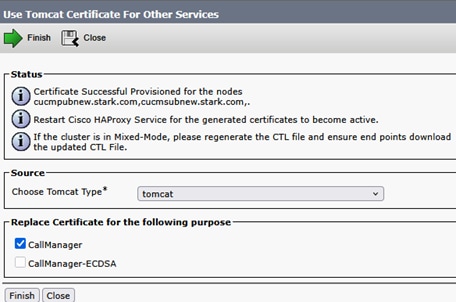
Tomcat certificate is now reused as CallManager certificate. This can be validated from CLI.
CallManager certificate Serial Number (SN): 56:ff:6c:71:00:00:00:00:00:0d.
Tomcat certificate SN: 56:ff:6c:71:00:00:00:00:00:0d.
Perform same steps on Subscriber.
Lets sign ECDSA certificate now so that it can be reused as CallManager-ECDSA.
Current Tomcat-ECDSA certificate is self signed.

Sign multisan CSR for Tomcat-ECDSA certificate.
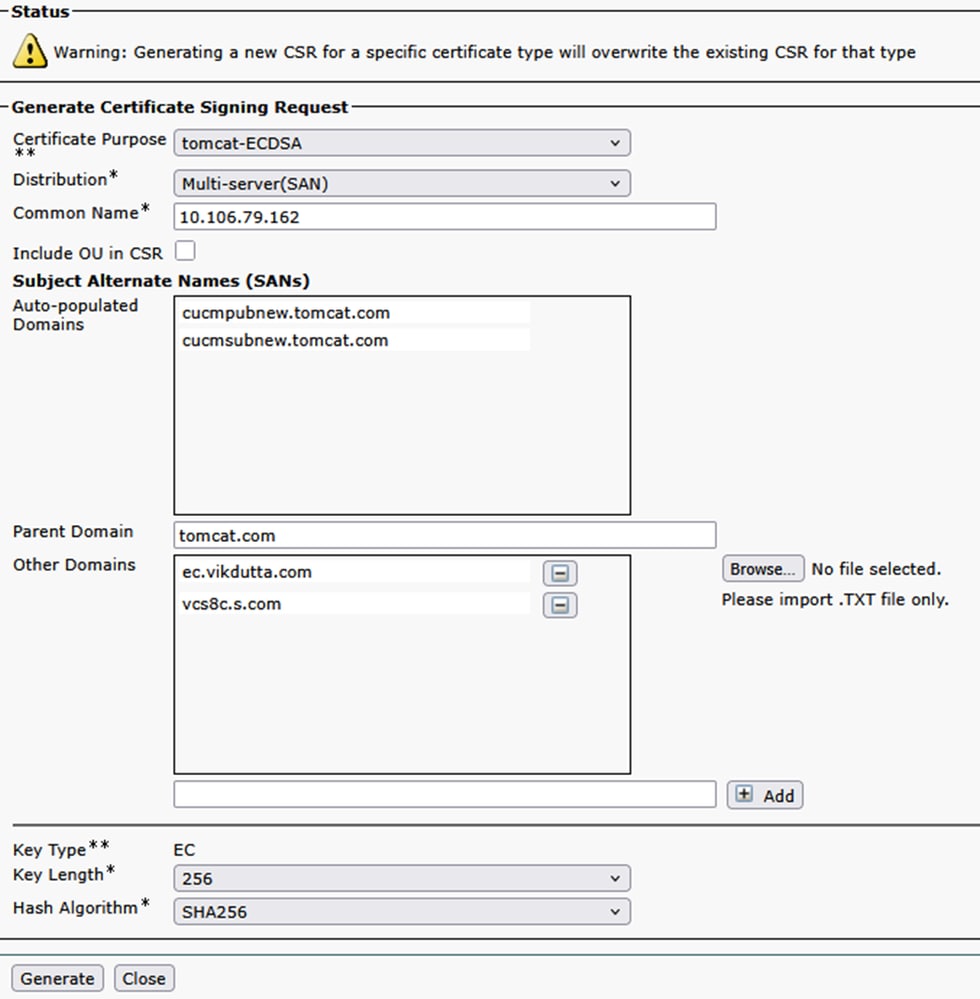
Sign the certificate using CSR and upload.
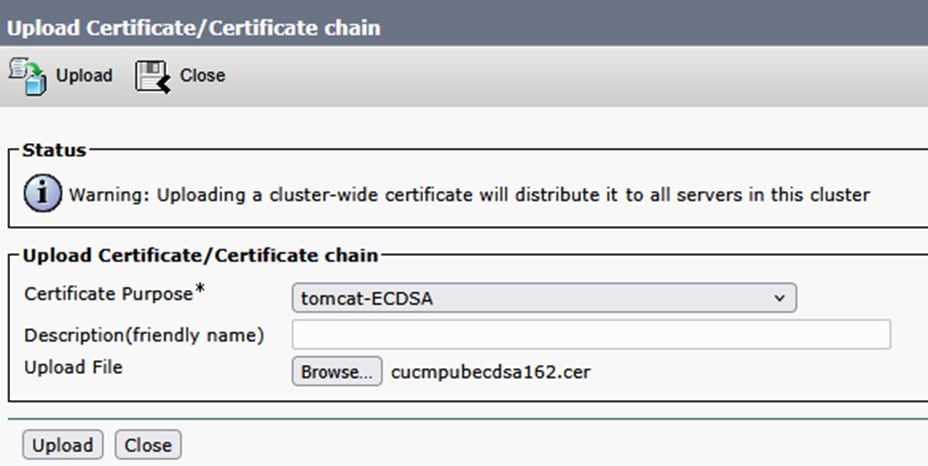
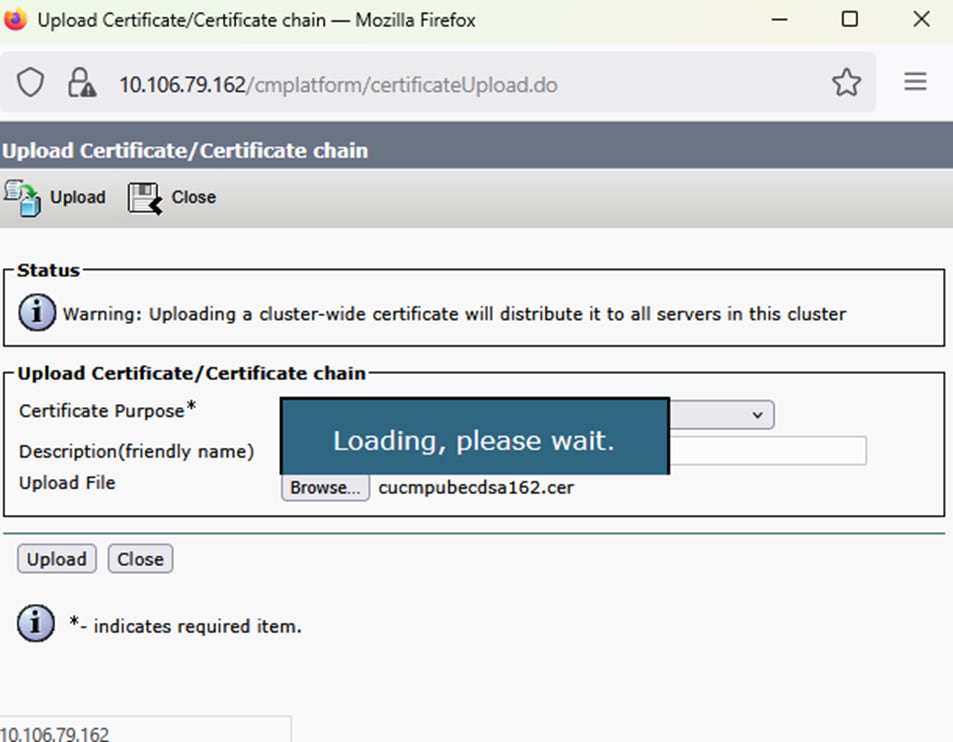
Upload successful. Restart relevent services as prompted.
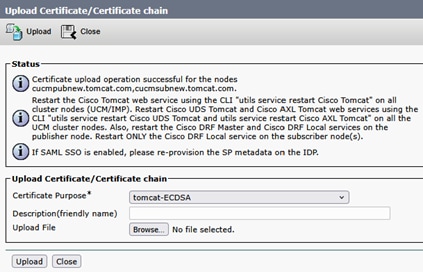
Tomcat and Tomcat-ECDSA signed by CA.

Now reuse Tomcat-ECDSA as CallManager-ECDSA certificate.
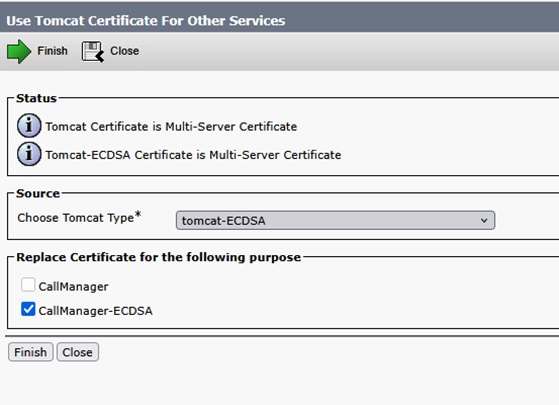
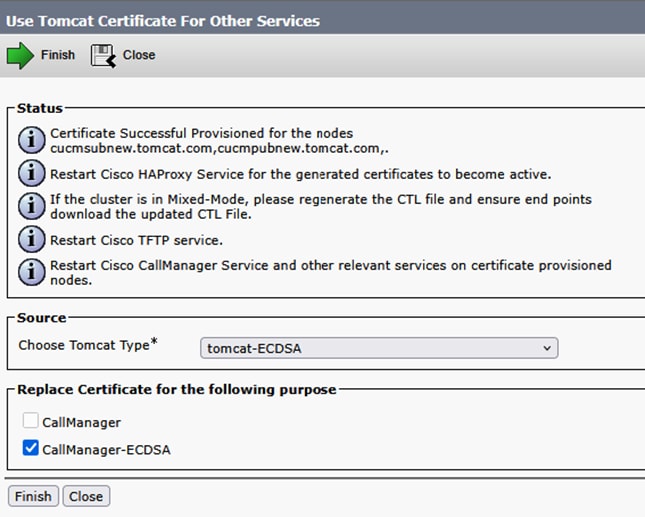
Upload successful. Restart relevant services as prompted.
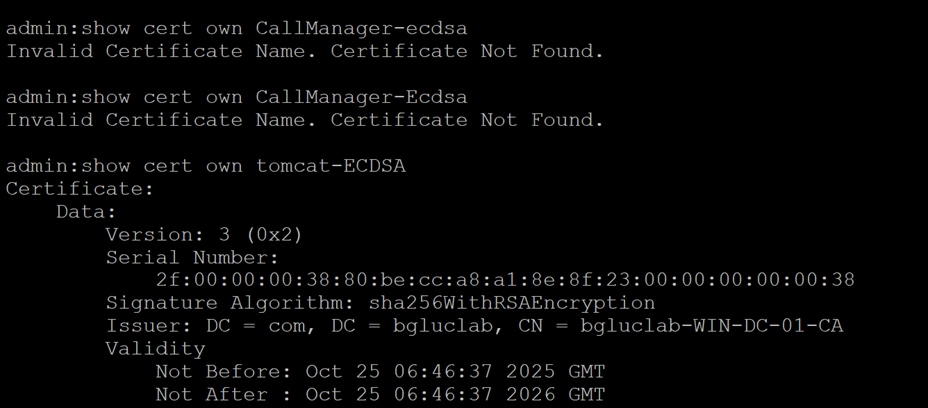
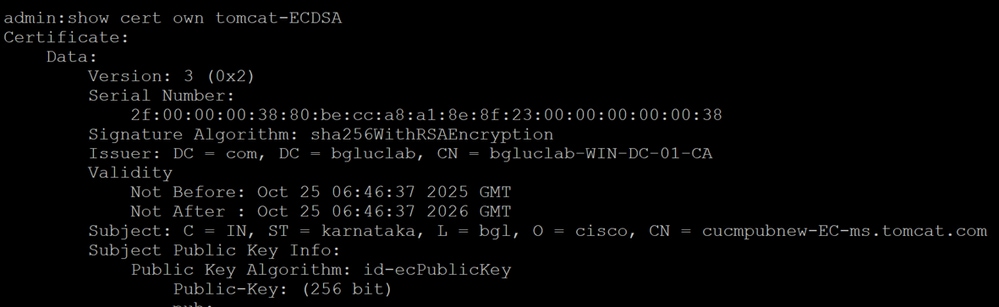
Verify certificates from CLI.
CallManager-ECDSA certificate SN: 2f:00:00:00:38:80:be:cc:a8:a1:8e:8f:23:00:00:00:00:00:38.
Tomcat-ECDSA certificate SN: 2f:00:00:00:38:80:be:cc:a8:a1:8e:8f:23:00:00:00:00:00:38.
Since you are now using one certificate for two services, that is, Tomcat certificate for Tomcat and CallManager services, and, Tomcat-ECDSA for Tomcat-ECDSA and CallManager-ECDSA services, it has becomes less cumbersome to upload certificates on Expressway trust store (If need be to upload).
Having TLS verify 'On' while adding UCM on expressway-core for MRA, has been easier than ever before. Just by adding one Tomcat certificate CA or server certificate will do the job (because certificate is shared now between CallManager and Tomcat service).
If an upgrade to x14.2 or later has caused an outage for Mobile Remote Access, you can also refer to this comprehensive document to Troubleshoot the issue.
Apache Traffic Server Version History
In order to check the version on your server login to root and run ~ # /apache2/bin/httpd -v.
Expressway x8.11.4
Server version: Apache/2.4.34 (Unix)
Server built: Nov 12 2018 19:04:23
Expressway x12.6
Server version: Apache/2.4.43 (Unix)
Server built: May 26 2020 18:27:21
Expressway x14.0.8
Server version: Apache/2.4.53 (Unix)
Server built: May 4 2022 08:52:57
Expressway x15.3
Server version: Apache/2.4.62 (Unix)
Server built: Jul 16 2025 12:10:19
Expressway x15.4
Server version: Apache/2.4.65 (Unix)
Server built: Jan 14 2026 06:41:03
Expressway x15.5
Server version: Apache/2.4.66 (Unix)
Server built: Mar 16 2026 15:57:19
Revision History
| Revision | Publish Date | Comments |
|---|---|---|
1.0 |
10-Feb-2026
|
Initial Release |
 Feedback