Implement and Verify POAP on Nexus 9000 Platform
Available Languages
Contents
Introduction
This document describes PowerOn Auto Provisioning (POAP) on Cisco Nexus 9000 switches running Cisco NX-OS.
Prerequisites
Requirements
Cisco recommends that you have basic knowledge of these topics:
- Cisco NX-OS command-line interface (CLI)
- Basic Internet Protocol version 4 (IPv4) addressing and Layer 3 connectivity
- Dynamic Host Configuration Protocol (DHCP) fundamentals
- Basic Hypertext Transfer Protocol (HTTP) and Trivial File Transfer Protocol (TFTP) concepts
Components Used
| Component | Platform / Software | Version / Value | Purpose |
|---|---|---|---|
| Nexus switch | N9K-C9336C-FX2 | NX-OS 10.6(2) | POAP device |
| Provisioning server | Ubuntu Server | 24.04.5 LTS | External provisioning infrastructure |
| DHCP/TFTP service | dnsmasq | 2.91 | Provides DHCP and TFTP services |
The information in this document was created from the devices in a specific lab environment. All of the devices used in this document started with a cleared (default) configuration. If your network is live, ensure that you understand the potential impact of any command.
Topology
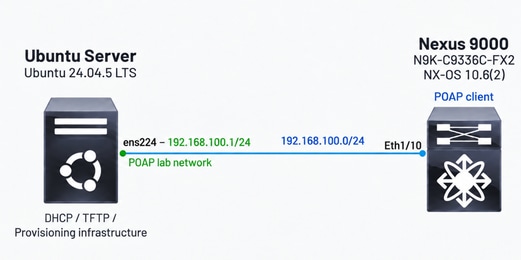
The lab uses a Cisco Nexus 9000 switch connected directly to an Ubuntu server that provides the external provisioning infrastructure.
The objective is to keep the topology simple so that the POAP workflow can be observed without additional network devices between the Nexus switch and the provisioning server.
Ethernet1/10 on the Nexus switch is connected directly to ens224 on the Ubuntu server.
Background Information
Deploying a new Cisco Nexus switch requires an initial configuration before the device can participate in the network.
PowerOn Auto Provisioning (POAP) automates this bootstrap process. When a supported Nexus switch boots without a startup configuration, Cisco NX-OS can enter POAP mode, obtain temporary network information through DHCP, retrieve a provisioning script, and use that script in order to provision the required software image and device configuration.
POAP is primarily associated with initial, or Day-0, provisioning because the switch can obtain the resources required for deployment without requiring the complete configuration to be entered manually through the CLI.
Manual Provisioning Versus POAP
Without POAP, the initial deployment of a Nexus switch can require manual interaction in order to configure network connectivity, transfer configuration files, and prepare the required Cisco NX-OS software image.
With POAP, the switch can automatically discover the provisioning infrastructure and retrieve the resources required for deployment.
High-Level POAP Workflow
At a high level, POAP begins when a supported Nexus switch boots without a startup configuration. The switch starts the provisioning process and attempts to obtain the network information required in order to access the provisioning infrastructure.
After network connectivity is established, the switch retrieves and runs the POAP script. The script determines the software image and configuration resources associated with the device and controls the remaining provisioning operations.
Cisco defines the POAP process in five primary phases:
- Power-up
- USB discovery
- DHCP discovery
- Script execution
- Post-installation reload
The next section describes the role of each phase during the provisioning process.
POAP Architecture and Workflow
POAP operates as a staged bootstrapping process in Cisco NX-OS. Each phase performs a specific function required for automatic device provisioning.
Understanding these phases provides the foundation for the implementation and verification workflow described later in this document.
Power-Up Phase
When a Nexus switch powers up, Cisco NX-OS loads the installed software image and searches for a startup configuration.
If a startup configuration exists, the switch continues the normal boot process. If no startup configuration is found, POAP mode starts.
During startup, NX-OS displays a prompt that provides the option for aborting POAP and continuing with the normal interactive setup. POAP continues without user intervention.
If POAP continues, the front-panel interfaces are placed in their default configuration before the discovery process begins.
| Condition | Result |
|---|---|
| Startup configuration is present. | NX-OS continues the normal boot process. |
| Startup configuration is not present. | POAP mode starts. |
| POAP is manually aborted. | NX-OS enters the normal interactive setup. |
| POAP continues. | The process proceeds with USB discovery. |
USB Discovery Phase
After POAP starts, NX-OS searches accessible USB devices for provisioning resources.
If a POAP script is found on a USB device, NX-OS starts script execution. If a usable script is not found, POAP proceeds with DHCP discovery.
USB-based provisioning is part of the POAP workflow; however, the implementation in this document focuses on network-based provisioning through DHCP.
DHCP Discovery Phase
If a POAP script is not found during USB discovery, the switch starts DHCP discovery.
During this phase, the switch sends DHCP Discover messages through the available front-panel interfaces or the management interface in order to locate a DHCP server that can provide the information required for POAP.
The Cisco Nexus DHCP client uses the switch serial number in the client identifier. This information can be used by the provisioning infrastructure in order to identify the device and provide the bootstrap information required for the provisioning process.
DHCP Exchange
The DHCP negotiation uses the standard Discover, Offer, Request, Acknowledgment (DORA) process:
| DHCP Message | Purpose |
|---|---|
| Discover | The Nexus switch searches for an available DHCP server. |
| Offer | The DHCP server provides network and POAP-related information. |
| Request | The switch requests the selected DHCP offer. |
| Acknowledgment | The DHCP server confirms the lease and assigns the IP address. |
Information Obtained Through DHCP
For network-based POAP, the DHCP exchange provides the temporary network information and bootstrap parameters required in order to locate the POAP script.
The DHCP Discover message requests information that includes:
- TFTP server name or address
- Boot file name
The boot file name identifies the POAP script that the switch retrieves after DHCP negotiation completes.
DHCP does not provide the final Cisco Nexus configuration. It provides the bootstrap information required in order to establish temporary connectivity and locate the provisioning script.
DHCP Lease and Offer Validation
POAP requires a minimum DHCP lease period of 3600 seconds.
Receiving a DHCP Offer does not automatically mean that DHCP discovery succeeds. The offer must meet the requirements expected by POAP before the switch continues with the DHCP Request and Acknowledgment exchange.
If no valid offer is received, an IP address is not assigned through that offer.
POAP Device Identification
Beginning with Cisco NX-OS Release 7.0(3)I7(4), POAP supports the DHCP User Class option defined by RFC 3004.
For DHCPv4, POAP uses User Class Option 77 with this value: Cisco-POAP
This value identifies the DHCP request as originating from the POAP process.
The Cisco-POAP value can be observed later in the packet capture used during verification.
POAP Script Retrieval
After DHCP negotiation completes, the switch uses the provisioning information received from the DHCP server in order to locate and retrieve the POAP script.
In the standard network-based workflow used in this document, the DHCP information identifies the TFTP server and boot file that contains the provisioning script. After temporary network connectivity is established, Cisco NX-OS downloads the script from the provisioning server.
The POAP script contains the logic required in order to determine and process the software image and configuration resources associated with the device.
Cisco provides a reference POAP script written in Python. The script can be customized in order to match the provisioning environment.
POAP Script Integrity
The Cisco reference POAP script includes an MD5 checksum.
When the script is modified, the embedded checksum must be recalculated before the script is used for POAP.
The checksum preparation procedure is described later in the Prepare File Integrity Information section.
Script Execution Phase
After the POAP script is downloaded and validated, Cisco NX-OS runs the script locally on the switch.
The reference script can perform provisioning tasks such as:
- Identify the switch.
- Select the device-specific configuration.
- Retrieve and validate the configuration.
- Determine the target Cisco NX-OS image.
- Retrieve or validate the software image.
- Prepare the configuration for replay.
- Complete the provisioning workflow.
The downloaded configuration is not necessarily applied immediately during script execution.
Cisco NX-OS can stage the configuration and apply it after the switch boots with the target software image. The configuration is therefore processed in the software environment for which it was prepared.
Software Image Processing
The POAP script can determine whether the target Cisco NX-OS image is already available locally.
If the required image is not present, the script can retrieve it from the provisioning infrastructure.
If the required image is already available, the script can validate the existing file and avoid downloading another copy.
In the validated implementation, the target image was already present in bootflash:. The script validated the image before continuing with the remaining provisioning operations.
Post-Installation Reload Phase
After script execution completes, the switch enters the post-installation reload phase.
During this phase, the switch restarts and boots with the target Cisco NX-OS software image when a software image change is part of the provisioning process.
The switch then applies, or replays, the downloaded configuration. After the configuration is successfully applied, Cisco NX-OS copies the running configuration to the startup configuration.
This sequence ensures that the provisioned configuration is processed in the software environment for which it was prepared.
Configuration Replay
Configuration replay is the process in which Cisco NX-OS applies the configuration downloaded during POAP after the switch restarts.
The configuration file is not necessarily applied when it is initially downloaded. Instead, POAP can stage the configuration during script execution and apply it after the target Cisco NX-OS image becomes active.
The process can be summarized as follows:
| Stage | Action |
|---|---|
| Script execution | Retrieves the required software image and configuration. |
| Post-installation reload | Restarts the switch after provisioning operations. |
| Configuration replay | Applies the downloaded configuration. |
| Configuration persistence | Copies the running configuration to the startup configuration. |
This separation between configuration retrieval and configuration application is an important part of the POAP workflow.
POAP Requirements
Network-based POAP requires external infrastructure in order to provide temporary network connectivity and access to the provisioning resources.
For the standard POAP workflow, the required infrastructure includes:
- A DHCP server that provides the network information required during bootstrap.
- A TFTP server that provides the POAP script.
- One or more servers that provide the required Cisco NX-OS software images and device configuration files.
The network information obtained through DHCP is used during the POAP provisioning process.
Configure POAP
This section describes the components required in order to implement network-based PowerOn Auto Provisioning (POAP) on a Cisco Nexus 9000 switch.
POAP relies on external DHCP and file-transfer services in order to provide temporary network connectivity and access to the provisioning resources. Configuration of third-party server platforms is outside the scope of this document.
The examples in this section use the topology described previously in order to demonstrate the POAP implementation.
Provisioning Infrastructure Requirements
For the validated implementation, the provisioning infrastructure provides the temporary network information and file-transfer services required by the Nexus switch during POAP.
The DHCP infrastructure must provide the information required in order to establish temporary connectivity and locate the POAP script. POAP requires a DHCP lease of at least 3600 seconds.
| Information | Purpose |
|---|---|
| IP address | Provides temporary network connectivity during POAP. |
| Subnet mask | Defines the temporary IP subnet. |
| Default gateway | Provides connectivity to provisioning resources when routing is required. |
| TFTP server name or address | Identifies the server from which the POAP script is retrieved. |
| Boot file name | Identifies the POAP script that the Nexus switch downloads. |
After a valid DHCP offer is selected, the Nexus switch completes the DHCP negotiation and uses the assigned network information during the provisioning process.
For the validated example in this document, the provisioning infrastructure uses these values:
| Parameter | Lab Value |
|---|---|
| POAP network | 192.168.100.0/24 |
| Provisioning server | 192.168.100.1 |
| DHCP address range | 192.168.100.100–192.168.100.110 |
| DHCP lease | 2 hours |
| TFTP server | 192.168.100.1 |
| POAP script | poap.py |
| Nexus interface | Ethernet1/10 |
The provisioning server used in this example runs Ubuntu and provides the DHCP and TFTP services required for the implementation. Detailed configuration of the third-party server software is outside the scope of this document.
Prepare the POAP Script
Cisco provides a reference POAP script developed in Python. Modify the user-editable options in order to match the provisioning environment.
The POAP script acts as the provisioning orchestrator. After the Nexus switch downloads and validates the script, the script determines how the switch retrieves and processes the configuration and software image resources required for provisioning.
For the validated implementation, these options are used:
options = { "username": "root", "password": "password", "hostname": "192.168.100.1", "transfer_protocol": "tftp", "mode": "serial_number", "target_system_image": "nxos64-cs.10.6.2.F.bin", "config_path": "/", "target_image_path": "/", }
The values shown in this example correspond to the lab environment. Production values depend on the provisioning infrastructure and deployment requirements.
| Option | Lab Value | Purpose |
|---|---|---|
| hostname | 192.168.100.1 | Identifies the server from which the provisioning files are retrieved. |
| transfer_protocol | tftp | Defines the file-transfer protocol. |
| mode | serial_number | Uses the switch serial number in order to select the device-specific configuration file. |
| target_system_image | nxos64-cs.10.6.2.F.bin | Defines the target Cisco NX-OS image. |
| config_path | / | Defines the path that contains the device configuration. |
| target_image_path | / | Defines the path that contains the target software image. |
The reference script requires hostname, username, and password when files are retrieved from a remote server. The example uses TFTP, which does not provide username and password authentication; however, the reference script still validates the presence of these parameters during initialization.
Configure Device Identification
The validated implementation uses:
"mode": "serial_number"
In serial_number mode, the script retrieves the serial number of the local switch and uses it in order to determine the corresponding configuration filename.
For example:
Switch serial number: FDO262921L3
Configuration file: conf.FDO262921L3
The configuration filename uses this format: conf.<serial-number>
The same poap.py script can therefore support multiple Nexus switches while each switch retrieves its own device-specific configuration.
Example Provisioning Logic
At a high level, the validated script performs this sequence:
Identify the switch. ↓ Select conf.<serial-number>. ↓ Retrieve and validate the configuration. ↓ Determine the target Cisco NX-OS image. ↓ Validate or retrieve the image. ↓ Prepare the configuration for replay. ↓ Complete the provisioning workflow.
The POAP script does not contain the complete device configuration. It contains the logic and parameters required in order to locate, validate, and process the provisioning resources.
Prepare the Device Configuration
The device configuration file contains the Cisco NX-OS configuration that POAP provisions on the target Nexus switch.
For the switch used in this example, serial_number mode selects this configuration file:
Serial number: FDO262921L3
Configuration file: conf.FDO262921L3
The configuration file contains the commands required in order to establish the intended Day-0 configuration.
For the validated implementation, the configuration contains an administrative user, a hostname, and a loopback interface:
username admin password <removed> role network-admin hostname N9K-POAP-SW1 interface loopback100 description POAP-VALIDATION ip address 10.255.255.100/32 no shutdown
The configuration is intentionally minimal in order to simplify verification of the provisioning workflow.
After POAP completes, the hostname, administrative account, and Loopback100 interface provide clear indicators that the device-specific configuration was successfully applied.
Administrative Access Consideration
The provisioned configuration must include the administrative access required after POAP completes.

Caution: Ensure that the device configuration contains a valid administrative user and password. POAP can complete successfully even if the provisioned configuration does not provide valid administrative access.
During the initial lab validation, the device configuration contained the hostname and Loopback100 interface but did not contain an administrative user. POAP completed successfully; however, administrative access was not available after provisioning.
POAP completion confirms that the provisioning workflow completed successfully. It does not confirm that the Day-0 configuration contains every setting required in order to operate and access the switch.
Prepare File Integrity Information
The reference POAP workflow uses MD5 checksums in order to verify the integrity of provisioning resources before processing by the Nexus switch.
POAP compares the expected checksum with the checksum calculated from the corresponding file. Matching values confirm that the file contains the expected data.
The validated implementation uses integrity information for these resources:
| Resource | Integrity Information | Purpose |
|---|---|---|
| POAP script | MD5 value embedded in poap.py | Validates the script before execution. |
| Device configuration | conf.FDO262921L3.md5 | Validates the downloaded device configuration. |
| Cisco NX-OS image | nxos64-cs.10.6.2.F.bin.md5 | Validates the target software image. |
The disable_md5 option in the reference script controls MD5 validation. The default value is False.
Update the POAP Script MD5
The reference POAP script contains an MD5 value near the beginning of the file:
#md5sum="<md5-value>"
After the script content is modified, the embedded checksum must be recalculated before the script is used for POAP.
For the script used in this implementation, the checksum was updated with:
f=poap.py cat "$f" | sed '/^#md5sum/d' > "$f.md5" sed -i "s/^#md5sum=.*/#md5sum=\"$(md5sum "$f.md5" | sed 's/ .*//')\"/" "$f" rm -f "$f.md5"
The resulting script contained:
#md5sum="e4dd91fd4296d40abd2f6187152cd86e"
During POAP, Cisco NX-OS calculates the checksum of the downloaded script and compares it with the embedded value before script execution.
Prepare the Configuration File MD5
The reference script can use a separate MD5 file in order to verify the device configuration.
For this implementation:
Configuration file:
conf.FDO262921L3
Integrity file:
conf.FDO262921L3.md5
The integrity file must contain the checksum associated with the current version of conf.FDO262921L3.
After the configuration is downloaded, the script calculates its checksum and compares it with the expected value before the configuration is processed.
If the device configuration changes, update the corresponding MD5 information before the next POAP attempt.
Prepare the Cisco NX-OS Image MD5
The reference script can also validate the target Cisco NX-OS image.
For this implementation:
Target image:
nxos64-cs.10.6.2.F.bin
Integrity file:
nxos64-cs.10.6.2.F.bin.md5
The integrity file contains:
ce50c3f0e387bee578e615a373a4ede0 nxos64-cs.10.6.2.F.bin
In the validated implementation, the target image was already present in bootflash:. The POAP script calculated the MD5 checksum of the existing image and compared it with the value obtained from the provisioning server.
Because both values matched, the image file did not need to be downloaded again.

Note: MD5 validation verifies file integrity. It does not encrypt the provisioning files or provide authentication by itself.
Start POAP
POAP runs during system startup when the switch does not have a startup configuration and system-wide POAP is enabled.
Before the provisioning process starts, verify the POAP state:
N9K-POAP-SW1# show system poap System-wide POAP is enabled
Cisco NX-OS allows POAP to be disabled globally with system no poap. In order to enable POAP again, use system poap or clear the POAP disable flag with write erase poap.
Remove the Startup Configuration
Standard POAP starts when the switch boots without a startup configuration.
In a controlled lab environment, run:
switch# write erase

Warning: This command erases the startup-configuration.
Do you wish to proceed anyway? (y/n) [n] y
The default write erase operation removes the startup configuration from persistent memory. It does not erase the running configuration or boot variables.
Verify that the startup configuration is no longer present:
switch# show startup-config No startup configuration
Caution: write erase removes the saved switch configuration. Use this procedure only when the configuration can be safely removed or restored.
In order to avoid losing administrative access after POAP, ensure that the device configuration prepared in the previous section contains the required administrative credentials.
Reload the Switch
After the startup configuration is removed, reload the switch.
If Cisco NX-OS prompts to save the current running configuration, do not save it. Saving the running configuration recreates the startup configuration and prevents the standard POAP trigger condition.
During startup, Cisco NX-OS initializes POAP and provides an option in order to abort the process:
Abort Power On Auto Provisioning [yes - continue with normal setup, no - continue with Power On Auto Provisioning] (yes/no)[no]:
In order to continue with POAP, accept the default no option.
POAP Initialization
After POAP initializes, the switch first checks for USB-based provisioning resources. If a usable USB provisioning script is not found, POAP proceeds with network-based discovery.
The validated implementation generated these messages:
2026 Sep 22 18:21:23 switch %$ VDC-1 %$ %POAP-2-POAP_INITED: [FDO262921L3-88:FC:5D:BA:D7:7F] - POAP process initialized 2026 Sep 22 18:21:41 switch %$ VDC-1 %$ %POAP-2-POAP_INFO: [FDO262921L3-88:FC:5D:BA:D7:7F] - USB Initializing Success 2026 Sep 22 18:21:41 switch %$ VDC-1 %$ %POAP-2-POAP_INFO: [FDO262921L3-88:FC:5D:BA:D7:7F] - USB disk not detected
POAP then starts IPv4 DHCP discovery:
2026 Sep 22 18:23:54 switch %$ VDC-1 %$ %POAP-2-POAP_INFO: [FDO262921L3-88:FC:5D:BA:D7:7F] - Start DHCP v4 session 2026 Sep 22 18:23:54 switch %$ VDC-1 %$ %POAP-2-POAP_DHCP_DISCOVER_START: [FDO262921L3-88:FC:5D:BA:D7:7F] - POAP DHCP Discover phase started
Obtain Bootstrap Network Information
After a valid DHCP response is received, Cisco NX-OS displays the temporary network parameters and the location of the POAP script.
The validated implementation produced:
2026 Sep 22 18:23:58 switch %$ VDC-1 %$ %POAP-2-POAP_INFO: Recieved DHCP offer from server ip - 192.168.100.1 2026 Sep 22 18:24:02 switch %$ VDC-1 %$ %POAP-2-POAP_INFO: [FDO262921L3-88:FC:5D:BA:D7:7F] - Using DHCP, valid information received over Eth1/10 from 192.168.100.1 2026 Sep 22 18:24:02 switch %$ VDC-1 %$ %POAP-2-POAP_INFO: [FDO262921L3-88:FC:5D:BA:D7:7F] - Assigned IP address: 192.168.100.108 2026 Sep 22 18:24:02 switch %$ VDC-1 %$ %POAP-2-POAP_INFO: [FDO262921L3-88:FC:5D:BA:D7:7F] - Netmask: 255.255.255.0 2026 Sep 22 18:24:02 switch %$ VDC-1 %$ %POAP-2-POAP_INFO: [FDO262921L3-88:FC:5D:BA:D7:7F] - Default Gateway: 192.168.100.1 2026 Sep 22 18:24:02 switch %$ VDC-1 %$ %POAP-2-POAP_INFO: [FDO262921L3-88:FC:5D:BA:D7:7F] - Script Server: 192.168.100.1 2026 Sep 22 18:24:02 switch %$ VDC-1 %$ %POAP-2-POAP_INFO: [FDO262921L3-88:FC:5D:BA:D7:7F] - Script Name: poap.py
At this stage, DHCP discovery is complete. The switch has temporary network connectivity and the information required in order to locate the POAP script.
Download and Start the POAP Script
The switch retrieves the POAP script identified during DHCP discovery:
2026 Sep 22 18:24:14 switch %$ VDC-1 %$ %POAP-2-POAP_INFO: [FDO262921L3-88:FC:5D:BA:D7:7F] - The POAP Script download has started 2026 Sep 22 18:24:14 switch %$ VDC-1 %$ %POAP-2-POAP_INFO: [FDO262921L3-88:FC:5D:BA:D7:7F] - The POAP Script is being downloaded from [copy tftp://192.168.100.1/poap.py bootflash:scripts/script.sh vrf default ] 2026 Sep 22 18:24:15 switch %$ VDC-1 %$ %POAP-2-POAP_SCRIPT_DOWNLOADED: [FDO262921L3-88:FC:5D:BA:D7:7F] - Successfully downloaded POAP script file
After script retrieval completes, POAP proceeds with script validation and execution. The reference script then controls device identification, configuration retrieval, software image processing, configuration staging, and the remaining provisioning operations.
Verify
Use the information in this section in order to verify each major stage of the POAP workflow.
POAP can be verified from multiple perspectives. The Nexus console and POAP logs provide information about the internal provisioning process, while DHCP server logs and packet captures provide additional visibility into the network exchanges.
The validated implementation uses these sources in order to correlate the provisioning workflow:
| Verification Source | Information Provided |
|---|---|
| Nexus console | POAP initialization, DHCP discovery, script execution, reload, and configuration replay |
| Nexus POAP logs | Detailed initialization and script execution information |
| DHCP server logs | DHCP negotiation and file-transfer activity |
| Packet capture | DHCP and TFTP exchanges |
| Running and startup configuration | Final provisioning result |
Note: The outputs in this section were collected during controlled POAP validation attempts. A later attempt was used in order to validate the final Day-0 configuration with administrative access. The original timestamps and log messages are preserved in the examples.
Third-party server logs and packet captures are included only as additional verification sources. Configuration of third-party software is outside the scope of this document.
Verify POAP Initialization
During system startup, verify that POAP initializes successfully.
The Nexus console displays the initialization event:
2026 Sep 22 18:21:23 switch %$ VDC-1 %$ %POAP-2-POAP_INITED: [FDO262921L3-88:FC:5D:BA:D7:7F] - POAP process initialized
This message confirms that the switch entered the POAP workflow.
POAP then checks for USB-based provisioning resources:
2026 Sep 22 18:21:41 switch %$ VDC-1 %$ %POAP-2-POAP_INFO: [FDO262921L3-88:FC:5D:BA:D7:7F] - USB Initializing Success 2026 Sep 22 18:21:41 switch %$ VDC-1 %$ %POAP-2-POAP_INFO: [FDO262921L3-88:FC:5D:BA:D7:7F] - USB disk not detected
In this example, no USB provisioning resource is available. POAP therefore continues with network-based discovery.
The switch subsequently starts DHCP discovery:
2026 Sep 22 18:23:54 switch %$ VDC-1 %$ %POAP-2-POAP_INFO: [FDO262921L3-88:FC:5D:BA:D7:7F] - Start DHCP v4 session 2026 Sep 22 18:23:54 switch %$ VDC-1 %$ %POAP-2-POAP_DHCP_DISCOVER_START: [FDO262921L3-88:FC:5D:BA:D7:7F] - POAP DHCP Discover phase started
These messages confirm the transition from USB discovery to network-based DHCP discovery.
Verify the POAP Log Files
POAP stores initialization and script execution logs in bootflash:. These files provide additional information about the provisioning process after the console events are generated.
N9K-POAP-SW1# dir bootflash: | include poap 5664 Sep 22 19:52:10 2026 20260922195156_poap_24710_script.log 87366 Sep 22 19:58:48 2026 20260922_194902_poap_24710_init.log N9K-POAP-SW1#
The _init.log file contains information related to POAP initialization and discovery.
The _script.log file contains detailed information generated during execution of the POAP script.
When multiple POAP attempts exist, use the timestamp in the filename in order to correlate each file with the corresponding provisioning attempt.
Verify DHCP Discovery
After POAP enters the DHCP discovery phase, verify that the Nexus switch receives valid bootstrap network information.
The Nexus console confirms that DHCP discovery started and that valid information was received through Ethernet1/10:
2026 Sep 22 18:23:54 switch %$ VDC-1 %$ %POAP-2-POAP_INFO: [FDO262921L3-88:FC:5D:BA:D7:7F] - Start DHCP v4 session 2026 Sep 22 18:23:54 switch %$ VDC-1 %$ %POAP-2-POAP_DHCP_DISCOVER_START: [FDO262921L3-88:FC:5D:BA:D7:7F] - POAP DHCP Discover phase started 2026 Sep 22 18:23:58 switch %$ VDC-1 %$ %POAP-2-POAP_INFO: Recieved DHCP offer from server ip - 192.168.100.1 2026 Sep 22 18:24:02 switch %$ VDC-1 %$ %POAP-2-POAP_INFO: [FDO262921L3-88:FC:5D:BA:D7:7F] - Using DHCP, valid information received over Eth1/10 from 192.168.100.1 2026 Sep 22 18:24:02 switch %$ VDC-1 %$ %POAP-2-POAP_INFO: [FDO262921L3-88:FC:5D:BA:D7:7F] - Assigned IP address: 192.168.100.108 2026 Sep 22 18:24:02 switch %$ VDC-1 %$ %POAP-2-POAP_INFO: [FDO262921L3-88:FC:5D:BA:D7:7F] - Netmask: 255.255.255.0 2026 Sep 22 18:24:02 switch %$ VDC-1 %$ %POAP-2-POAP_INFO: [FDO262921L3-88:FC:5D:BA:D7:7F] - Default Gateway: 192.168.100.1 2026 Sep 22 18:24:02 switch %$ VDC-1 %$ %POAP-2-POAP_INFO: [FDO262921L3-88:FC:5D:BA:D7:7F] - Script Server: 192.168.100.1 2026 Sep 22 18:24:02 switch %$ VDC-1 %$ %POAP-2-POAP_INFO: [FDO262921L3-88:FC:5D:BA:D7:7F] - Script Name: poap.py
The output confirms that POAP selected Ethernet1/10, obtained the temporary address 192.168.100.108, and received the gateway, script server, and script filename required for the next provisioning stage.
Verify the DHCP Exchange
DHCP server logs provide an additional view of the bootstrap exchange.
The validated example recorded:
vendor class: Cisco N9K-C9336C-FX2 user class: Cisco-POAP DHCPDISCOVER(ens224) 88:fc:5d:ba:d7:7f DHCPOFFER(ens224) 192.168.100.108 88:fc:5d:ba:d7:7f DHCPREQUEST(ens224) 192.168.100.108 88:fc:5d:ba:d7:7f DHCPACK(ens224) 192.168.100.108 88:fc:5d:ba:d7:7f
The server also identified the POAP bootstrap information:
option: 67 bootfile-name poap.py option:150 tftp-server-address 192.168.100.1 option: 3 router 192.168.100.1
The logs confirm the complete Discover, Offer, Request, and Acknowledgment exchange. The logs also show the Cisco-POAP user class, script filename, TFTP server address, and default gateway associated with the provisioning request.
Verify DHCP with a Packet Capture
A packet capture can be used in order to verify the DHCP exchange directly on the network.
For the validated example, the capture was reviewed with:
sudo tcpdump -nn -vvv -r /tmp/poap-run1.pcap \ 'udp port 67 or udp port 68'
The capture showed:
DHCP-Message (53), length 1: Discover Vendor-Class (60), length 20: "Cisco N9K-C9336C-FX2" DHCP-Message (53), length 1: Offer DHCP-Message (53), length 1: Request Requested-IP (50), length 4: 192.168.100.108 DHCP-Message (53), length 1: ACK
The packet capture confirms the Discover, Offer, Request, and Acknowledgment sequence observed in the DHCP server logs.
Verify POAP Script Retrieval
After DHCP discovery completes, verify that the Nexus switch retrieves the POAP script from the server identified during the DHCP exchange.
The Nexus console indicates when the script download starts:
2026 Sep 22 18:24:14 switch %$ VDC-1 %$ %POAP-2-POAP_INFO: [FDO262921L3-88:FC:5D:BA:D7:7F] - The POAP Script download has started 2026 Sep 22 18:24:14 switch %$ VDC-1 %$ %POAP-2-POAP_INFO: [FDO262921L3-88:FC:5D:BA:D7:7F] - The POAP Script is being downloaded from [copy tftp://192.168.100.1/poap.py bootflash:scripts/script.sh vrf default ] 2026 Sep 22 18:24:15 switch %$ VDC-1 %$ %POAP-2-POAP_SCRIPT_DOWNLOADED: [FDO262921L3-88:FC:5D:BA:D7:7F] - Successfully downloaded POAP script file
These messages confirm that the switch retrieved poap.py from the TFTP server discovered through DHCP.
Verify Script Retrieval with a Packet Capture
A packet capture provides direct confirmation of the TFTP requests generated during script execution.
For the validated example, run:
sudo tcpdump -nn -r /tmp/poap-run1.pcap 'udp dst port 69' reading from file /tmp/poap-run1.pcap, link-type EN10MB (Ethernet), snapshot length 262144 13:38:17.012862 IP 192.168.100.108.58485 > 192.168.100.1.69: TFTP, length 16, RRQ "poap.py" octet 13:38:19.955108 IP 192.168.100.108.58550 > 192.168.100.1.69: TFTP, length 29, RRQ "conf.FDO262921L3.md5" octet 13:38:20.651491 IP 192.168.100.108.58680 > 192.168.100.1.69: TFTP, length 25, RRQ "conf.FDO262921L3" octet 13:38:21.737101 IP 192.168.100.108.58866 > 192.168.100.1.69: TFTP, length 35, RRQ "nxos64-cs.10.6.2.F.bin.md5" octet
The first request confirms that the temporary POAP address 192.168.100.108 contacted the provisioning server at 192.168.100.1 and requested poap.py. The subsequent requests show the progression toward device configuration and image validation.
Verify the POAP Script Integrity
Before the downloaded script is executed, Cisco NX-OS validates the MD5 checksum embedded in the script.
The validated example produced:
2026 Sep 22 18:24:15 switch %$ VDC-1 %$ %POAP-2-POAP_INFO: [FDO262921L3-88:FC:5D:BA:D7:7F] - Script file size 113107, MD5 checksum e4dd91fd4296d40abd2f6187152cd86e 2026 Sep 22 18:24:15 switch %$ VDC-1 %$ %POAP-2-POAP_INFO: [FDO262921L3-88:FC:5D:BA:D7:7F] - MD5 checksum received from the script file is e4dd91fd4296d40abd2f6187152cd86e 2026 Sep 22 18:24:15 switch %$ VDC-1 %$ %POAP-2-POAP_SCRIPT_STARTED_MD5_VALIDATED: [FDO262921L3-88:FC:5D:BA:D7:7F] - POAP script execution started(MD5 validated)
The matching values confirm that the downloaded script passed the integrity check before execution started.
At this stage, control passes from POAP initialization to the provisioning logic contained in the downloaded script.
Verify Device-Specific Configuration Retrieval
After the POAP script starts, verify that the script identifies the Nexus switch and selects the corresponding device configuration.
In serial_number mode, the reference script uses the local switch serial number in order to determine the configuration filename.
The validated example generated:
Setting source cfg filename based-on serial number
serial number FDO262921L3
Selected conf file name : conf.FDO262921L3
The output confirms that the script identified the local serial number and selected conf.FDO262921L3.
Verify Configuration File Retrieval
After the configuration filename is selected, the script retrieves the corresponding MD5 information:
2026 Sep 22 18:24:17 switch %$ VDC-1 %$ %USER-1-SYSTEM_MSG: - Logfile name: /bootflash/20260922182417_poap_23243_script.log - script.sh 2026 Sep 22 18:24:17 switch %$ VDC-1 %$ %USER-1-SYSTEM_MSG: - Found 1 POAP script logs - script.sh 2026 Sep 22 18:24:17 switch %$ VDC-1 %$ %USER-1-SYSTEM_MSG: - Setting source cfg filename based-on serial number - script.sh 2026 Sep 22 18:24:17 switch %$ VDC-1 %$ %USER-1-SYSTEM_MSG: - serial number FDO262921L3 - script.sh 2026 Sep 22 18:24:17 switch %$ VDC-1 %$ %USER-1-SYSTEM_MSG: - Selected conf file name : conf.FDO262921L3 - script.sh 2026 Sep 22 18:24:17 switch %$ VDC-1 %$ %USER-1-SYSTEM_MSG: S/N[FDO262921L3]-MAC[88:FC:5D:BA:D7:7F] - Verifying freespace in bootflash - script.sh 2026 Sep 22 18:24:17 switch %$ VDC-1 %$ %USER-1-SYSTEM_MSG: S/N[FDO262921L3]-MAC[88:FC:5D:BA:D7:7F] - Free bootflash space is 106776296.0 KB - script.sh 2026 Sep 22 18:24:17 switch %$ VDC-1 %$ %USER-1-SYSTEM_MSG: S/N[FDO262921L3]-MAC[88:FC:5D:BA:D7:7F] - Single image is set - script.sh 2026 Sep 22 18:24:17 switch %$ VDC-1 %$ %USER-1-SYSTEM_MSG: S/N[FDO262921L3]-MAC[88:FC:5D:BA:D7:7F] - Copying config file - script.sh 2026 Sep 22 18:24:17 switch %$ VDC-1 %$ %USER-1-SYSTEM_MSG: S/N[FDO262921L3]-MAC[88:FC:5D:BA:D7:7F] - Copying MD5 information - script.sh 2026 Sep 22 18:24:17 switch %$ VDC-1 %$ %USER-1-SYSTEM_MSG: S/N[FDO262921L3]-MAC[88:FC:5D:BA:D7:7F] - Starting Copy of MD5. src=/conf.FDO262921L3.md5 dest = /bootflash/conf.FDO262921L3.md5 - script.sh 2026 Sep 22 18:24:17 switch %$ VDC-1 %$ %USER-1-SYSTEM_MSG: S/N[FDO262921L3]-MAC[88:FC:5D:BA:D7:7F] - File transfer_protocol = tftp - script.sh
The integrity file is downloaded and stored in bootflash: 2026 Sep 22 18:24:17 switch %$ VDC-1 %$ %USER-1-SYSTEM_MSG: S/N[FDO262921L3]-MAC[88:FC:5D:BA:D7:7F] - *** Downloaded file is of size 51 *** - script.sh 2026 Sep 22 18:24:17 switch %$ VDC-1 %$ %USER-1-SYSTEM_MSG: S/N[FDO262921L3]-MAC[88:FC:5D:BA:D7:7F] - Renamed /bootflash/conf.FDO262921L3.md5.tmp to /bootflash/conf.FDO262921L3.md5 - script.sh
The script then retrieves the device configuration:
2026 Sep 22 18:24:17 switch %$ VDC-1 %$ %USER-1-SYSTEM_MSG: S/N[FDO262921L3]-MAC[88:FC:5D:BA:D7:7F] - INFO: Starting Copy of Config File to /bootflash/poap_conf.cfg - script.sh 2026 Sep 22 18:24:17 switch %$ VDC-1 %$ %USER-1-SYSTEM_MSG: S/N[FDO262921L3]-MAC[88:FC:5D:BA:D7:7F] - Copying file options source=/conf.FDO262921L3 destination=/bootflash/poap_conf.cfg login_timeout=120 destination_tmp=poap_conf.cfg.tmp - script.sh 2026 Sep 22 18:24:17 switch %$ VDC-1 %$ %USER-1-SYSTEM_MSG: S/N[FDO262921L3]-MAC[88:FC:5D:BA:D7:7F] - Transfering using tftp from /conf.FDO262921L3 to bootflash:/poap_conf.cfg.tmp hostname 192.168.100.1 vrf default - script.sh 2026 Sep 22 18:24:17 switch %$ VDC-1 %$ %USER-1-SYSTEM_MSG: S/N[FDO262921L3]-MAC[88:FC:5D:BA:D7:7F] - Command is : terminal dont-ask ; terminal password <removed> ; copy tftp://root@192.168.100.1/conf.FDO262921L3 bootflash:/poap_conf.cfg.tmp vrf default - script.sh 2026 Sep 22 18:24:18 switch %$ VDC-1 %$ %USER-1-SYSTEM_MSG: S/N[FDO262921L3]-MAC[88:FC:5D:BA:D7:7F] - *** Downloaded file is of size 120 *** - script.sh
These messages confirm that the device-specific configuration was successfully retrieved and stored locally for processing.
Verify Configuration Retrieval with a Packet Capture
The packet capture provides independent confirmation of the TFTP requests generated by the Nexus switch.
For the validated example:
sudo tcpdump -nn -r /tmp/poap-run1.pcap 'udp dst port 69' reading from file /tmp/poap-run1.pcap, link-type EN10MB (Ethernet), snapshot length 262144 13:38:19.955108 IP 192.168.100.108.58550 > 192.168.100.1.69: TFTP, length 29, RRQ "conf.FDO262921L3.md5" octet 13:38:20.651491 IP 192.168.100.108.58680 > 192.168.100.1.69: TFTP, length 25, RRQ "conf.FDO262921L3" octet
The sequence confirms that the switch requested the configuration integrity file before retrieving the device configuration.
The TFTP server log also recorded both transfers:
Sep 22 14:26:36 calo-ubuntu24-00505692aeaf dnsmasq-tftp[144902]: sent /srv/tftp/conf.FDO262921L3.md5 to 192.168.100.108 Sep 22 14:26:37 calo-ubuntu24-00505692aeaf dnsmasq-tftp[144902]: sent /srv/tftp/conf.FDO262921L3 to 192.168.100.108
Verify Configuration Integrity
After the configuration is downloaded, the script calculates its MD5 checksum and compares it with the expected value.
The provisioning attempt shown in this example produced:
2026 Sep 22 18:24:18 switch %$ VDC-1 %$ %USER-1-SYSTEM_MSG: S/N[FDO262921L3]-MAC[88:FC:5D:BA:D7:7F] - Verifying MD5 checksum - script.sh 2026 Sep 22 18:24:18 switch %$ VDC-1 %$ %USER-1-SYSTEM_MSG: S/N[FDO262921L3]-MAC[88:FC:5D:BA:D7:7F] - file name is bootflash:poap_conf.cfg - script.sh 2026 Sep 22 18:24:18 switch %$ VDC-1 %$ %USER-1-SYSTEM_MSG: S/N[FDO262921L3]-MAC[88:FC:5D:BA:D7:7F] - INFO: md5sum a1a51058d79de0348c6cd1934e08acb4 (recalculated) - script.sh 2026 Sep 22 18:24:18 switch %$ VDC-1 %$ %USER-1-SYSTEM_MSG: S/N[FDO262921L3]-MAC[88:FC:5D:BA:D7:7F] - Verifying MD5 checksum of /bootflash/poap_conf.cfg (size 120) - script.sh 2026 Sep 22 18:24:18 switch %$ VDC-1 %$ %USER-1-SYSTEM_MSG: S/N[FDO262921L3]-MAC[88:FC:5D:BA:D7:7F] - md5given = a1a51058d79de0348c6cd1934e08acb4 md5calculated = a1a51058d79de0348c6cd1934e08acb4 - script.sh 2026 Sep 22 18:24:18 switch %$ VDC-1 %$ %USER-1-SYSTEM_MSG: S/N[FDO262921L3]-MAC[88:FC:5D:BA:D7:7F] - MD5 match for file = /bootflash/poap_conf.cfg - script.sh
The matching values confirm that the configuration downloaded during this provisioning attempt matched its corresponding integrity information.
Verify Configuration Processing
After the integrity check succeeds, the script determines how the configuration must be prepared for the target Cisco NX-OS image.
In this example:
026 Sep 22 18:24:18 switch %$ VDC-1 %$ %USER-1-SYSTEM_MSG: S/N[FDO262921L3]-MAC[88:FC:5D:BA:D7:7F] - Split Config file - script.sh 2026 Sep 22 18:24:18 switch %$ VDC-1 %$ %USER-1-SYSTEM_MSG: S/N[FDO262921L3]-MAC[88:FC:5D:BA:D7:7F] - Target image supports bootstrap replay. Split config is not required. - script.sh 2026 Sep 22 18:24:18 switch %$ VDC-1 %$ %USER-1-SYSTEM_MSG: S/N[FDO262921L3]-MAC[88:FC:5D:BA:D7:7F] - Skip split config as it isn't needed with nxos64-cs.10.6.2.F.bin - script.sh
The output confirms that the target image supports bootstrap replay and that configuration splitting is not required for this provisioning attempt.
At this stage, the device-specific configuration has been identified, retrieved, validated, and prepared for the remaining POAP workflow.
Verify Image Processing
After the device configuration is retrieved and validated, verify how the POAP script processes the target Cisco NX-OS image.
The validated implementation uses: nxos64-cs.10.6.2.F.bin
The script first retrieves the corresponding MD5 information:
2026 Sep 22 18:24:18 switch %$ VDC-1 %$ %USER-1-SYSTEM_MSG: S/N[FDO262921L3]-MAC[88:FC:5D:BA:D7:7F] - Starting Copy of MD5. src=/nxos64-cs.10.6.2.F.bin.md5 dest = /bootflash/nxos64-cs.10.6.2.F.bin.md5 - script.sh 2026 Sep 22 18:24:18 switch %$ VDC-1 %$ %USER-1-SYSTEM_MSG: S/N[FDO262921L3]-MAC[88:FC:5D:BA:D7:7F] - File transfer_protocol = tftp - script.sh
The MD5 file is then stored in bootflash:
2026 Sep 22 18:24:19 switch %$ VDC-1 %$ %USER-1-SYSTEM_MSG: S/N[FDO262921L3]-MAC[88:FC:5D:BA:D7:7F] - *** Downloaded file is of size 57 *** - script.sh 2026 Sep 22 18:24:19 switch %$ VDC-1 %$ %USER-1-SYSTEM_MSG: S/N[FDO262921L3]-MAC[88:FC:5D:BA:D7:7F] - Renamed /bootflash/nxos64-cs.10.6.2.F.bin.md5.tmp to /bootflash/nxos64-cs.10.6.2.F.bin.md5 - script.sh
The script reads the checksum received from the provisioning server:
2026 Sep 22 18:24:19 switch %$ VDC-1 %$ %USER-1-SYSTEM_MSG: S/N[FDO262921L3]-MAC[88:FC:5D:BA:D7:7F] - MD5 for system image from server: ce50c3f0e387bee578e615a373a4ede0 - script.sh
It then calculates the checksum of the image already present in bootflash:
2026 Sep 22 18:24:19 switch %$ VDC-1 %$ %USER-1-SYSTEM_MSG: S/N[FDO262921L3]-MAC[88:FC:5D:BA:D7:7F] - Verifying MD5 checksum - script.sh 2026 Sep 22 18:24:19 switch %$ VDC-1 %$ %USER-1-SYSTEM_MSG: S/N[FDO262921L3]-MAC[88:FC:5D:BA:D7:7F] - file name is bootflash:nxos64-cs.10.6.2.F.bin - script.sh 2026 Sep 22 18:24:30 switch %$ VDC-1 %$ %USER-1-SYSTEM_MSG: S/N[FDO262921L3]-MAC[88:FC:5D:BA:D7:7F] - INFO: md5sum ce50c3f0e387bee578e615a373a4ede0 (recalculated) - script.sh 2026 Sep 22 18:24:30 switch %$ VDC-1 %$ %USER-1-SYSTEM_MSG: S/N[FDO262921L3]-MAC[88:FC:5D:BA:D7:7F] - Verifying MD5 checksum of /bootflash/nxos64-cs.10.6.2.F.bin (size 2952914432) - script.sh 2026 Sep 22 18:24:30 switch %$ VDC-1 %$ %USER-1-SYSTEM_MSG: S/N[FDO262921L3]-MAC[88:FC:5D:BA:D7:7F] - md5given = ce50c3f0e387bee578e615a373a4ede0 md5calculated = ce50c3f0e387bee578e615a373a4ede0 - script.sh
The script confirms that the existing image matches the expected image:
2026 Sep 22 18:24:30 switch %$ VDC-1 %$ %USER-1-SYSTEM_MSG: S/N[FDO262921L3]-MAC[88:FC:5D:BA:D7:7F] - MD5 match for file = /bootflash/nxos64-cs.10.6.2.F.bin - script.sh 2026 Sep 22 18:24:30 switch %$ VDC-1 %$ %USER-1-SYSTEM_MSG: S/N[FDO262921L3]-MAC[88:FC:5D:BA:D7:7F] - File /bootflash/nxos64-cs.10.6.2.F.bin already exists and MD5 matches - script.sh
The matching values confirm that the required Cisco NX-OS image was already present in bootflash: and passed the integrity check. Therefore, another copy of the image did not need to be downloaded.
Verify the Image MD5 Retrieval
The packet capture also confirms that the Nexus requested the image integrity file:
sudo tcpdump -nn -r /tmp/poap-run1.pcap 'udp dst port 69' reading from file /tmp/poap-run1.pcap, link-type EN10MB (Ethernet), snapshot length 262144 13:38:21.737101 IP 192.168.100.108.58866 > 192.168.100.1.69: TFTP, length 35, RRQ "nxos64-cs.10.6.2.F.bin.md5" octet
The TFTP server log recorded the same transfer:
Sep 22 14:26:38 calo-ubuntu24-00505692aeaf dnsmasq-tftp[144902]: sent /srv/tftp/nxos64-cs.10.6.2.F.bin.md5 to 192.168.100.108
These outputs confirm retrieval of nxos64-cs.10.6.2.F.bin.md5 from the provisioning server.
Verify the Software Installation Workflow
Although the image file did not need to be downloaded, the reference script continued with the Cisco NX-OS installation workflow.
The validated example generated:
2026 Sep 22 18:24:31 switch %$ VDC-1 %$ %USER-1-SYSTEM_MSG: S/N[FDO262921L3]-MAC[88:FC:5D:BA:D7:7F] - Done copying the second scheduled cfg - script.sh 2026 Sep 22 18:24:31 switch %$ VDC-1 %$ %USER-1-SYSTEM_MSG: S/N[FDO262921L3]-MAC[88:FC:5D:BA:D7:7F] - terminal dont-ask ; install all nxos bootflash:/nxos64-cs.10.6.2.F.bin no-reload non-interruptive - script.sh
The existing image passed the integrity check and did not require another file transfer. However, the reference script still invoked the software installation process against the validated image.
Note: An existing image and matching MD5 can prevent an unnecessary image download. This does not necessarily mean that the remaining software installation workflow is skipped.
After the software processing completes, POAP continues with the remaining provisioning operations and prepares the switch for reload.
Verify Configuration Replay
After the POAP script completes successfully, verify that the switch proceeds with the reload and configuration replay process.
The validated example reported successful script execution and then a reload:
2026 Sep 22 18:31:08 switch %$ VDC-1 %$ %POAP-2-POAP_SCRIPT_EXEC_SUCCESS: [FDO262921L3-88:FC:5D:BA:D7:7F] - POAP script execution success 2026 Sep 22 18:31:09 switch %$ VDC-1 %$ %POAP-2-POAP_RELOAD_DEVICE: [FDO262921L3-88:FC:5D:BA:D7:7F] - Reload device
These messages confirm completion of the script execution phase and the transition to the post-installation reload phase.
After the switch restarts, Cisco NX-OS detects the POAP replay file:
2026 Sep 22 18:33:49 %$ VDC-1 %$ %DAEMON-2-SYSTEM_MSG: <<%ASCII-CFG-2-CONF_CONTROL>> Poap replay /bootflash/poap_replay01.cfg - ascii_cfg_server[17165]
The bootstrap replay then started and completed:
2026 Sep 22 18:34:26 %$ VDC-1 %$ %ASCII-CFG-2-CONFIG_REPLAY_STATUS: Bootstrap Replay Started. 2026 Sep 22 18:34:27 %$ VDC-1 %$ %ASCII-CFG-2-CONFIG_REPLAY_STATUS: Bootstrap Replay Done.
These events confirm that Cisco NX-OS started processing the configuration staged during POAP.
Verify the ASCII Configuration Replay
After bootstrap replay completes, NX-OS processes the provisioned configuration.
The controlled validation attempts generated these messages:
2026 Sep 22 18:35:42 switch %$ VDC-1 %$ %ASCII-CFG-2-CONFIG_REPLAY_STATUS: Ascii Replay Started. 2026 Sep 22 18:35:44 N9K-POAP-SW1 %$ VDC-1 %$ %ASCII-CFG-2-CONFIG_REPLAY_STATUS: Ascii Replay Done. 2026 Sep 22 20:03:26 switch %VDC_MGR-5-VDC_HOSTNAME_CHANGE: vdc 1 hostname changed to N9K-POAP-SW1 2026 Sep 22 20:03:27 N9K-POAP-SW1 %ETHPORT-5-IF_UP: Interface loopback100 is up 2026 Sep 22 20:03:28 N9K-POAP-SW1 %ASCII-CFG-2-CONFIG_REPLAY_STATUS: Ascii Replay Done. 2026 Sep 22 20:03:29 N9K-POAP-SW1 %ASCII-CFG-2-CONF_CONTROL: System ready
The messages show the ASCII configuration replay and provide direct evidence that the provisioned configuration was applied.
The hostname changed to N9K-POAP-SW1, and Loopback100 became operational as part of the provisioned configuration.
Verify POAP Completion
After configuration replay completes, Cisco NX-OS saves the resulting configuration.
2026 Sep 22 19:24:03 N9K-POAP-SW1 %$ VDC-1 %$ %ASCII-CFG-2-CONF_CONTROL: System ready [########################################] 100% Copy complete, now saving to disk (please wait)... Copy complete. Auto provisioning complete
The Auto provisioning complete message confirms completion of the POAP workflow.
At this stage, verify the resulting running configuration and startup configuration in order to confirm that the intended Day-0 configuration is active and persistent.
Verify the Provisioned Configuration
After POAP completes, verify that the intended Day-0 configuration is active and persistent. Confirm the provisioned hostname, administrative account, interface configuration, Cisco NX-OS image, and system-wide POAP state.
N9K-POAP-SW1# show hostname N9K-POAP-SW1 N9K-POAP-SW1# show user-account admin user:admin this user account has no expiry date roles:network-admin N9K-POAP-SW1# show ip interface brief IP Interface Status for VRF "default"(1) Interface IP Address Interface Status Lo100 10.255.255.100 protocol-up/link-up/admin-up N9K-POAP-SW1# show running-config interface loopback100 !Command: show running-config interface loopback100 !Running configuration last done at: Tue Sep 22 20:03:48 2026 !Time: Tue Sep 22 23:17:52 2026 version 10.6(2) Bios:version 05.53 interface loopback100 description POAP-VALIDATION ip address 10.255.255.100/32 N9K-POAP-SW1# show startup-config interface loopback100 !Command: show startup-config interface loopback100 !Time: Tue Sep 22 23:17:57 2026 !Startup config saved at: Tue Sep 22 20:03:48 2026 version 10.6(2) Bios:version 05.53 interface loopback100 description POAP-VALIDATION ip address 10.255.255.100/32 N9K-POAP-SW1# show startup-config | include username username admin password 5 <removed> role network-admin N9K-POAP-SW1# show version | include NXOS NXOS: version 10.6(2) [Feature Release] Host NXOS: version 10.6(2) NXOS image file is: bootflash:///nxos64-cs.10.6.2.F.bin NXOS compile time: 11/30/2025 12:00:00 [12/12/2025 12:10:23] NXOS boot mode: LXC N9K-POAP-SW1# show system poap System-wide POAP is enabled
The output confirms that the device-specific configuration was applied successfully and saved to the startup configuration.
It also confirms that the switch is running the expected Cisco NX-OS image and that system-wide POAP remains enabled.
Conclusion
This document describes the main POAP components and workflow, including DHCP discovery, script retrieval and execution, device-specific configuration selection, file integrity validation, Cisco NX-OS image processing, and configuration replay.
The validated implementation demonstrates how a Cisco Nexus 9000 switch can obtain the required provisioning resources, apply a Day-0 configuration, and persist the resulting configuration.
The verification process also demonstrates how console messages, POAP logs, server logs, and packet captures can be correlated in order to confirm each major stage of the provisioning workflow.
Revision History
| Revision | Publish Date | Comments |
|---|---|---|
1.0 |
12-Oct-2026
|
Initial Release |

 Feedback
Contact Cisco
- Open a Support Case

- (Requires a Cisco Service Contract)