Troubleshoot Secure Syslog on Nexus Platform
Available Languages
Contents
Introduction
This document describes how to troubleshoot Secure Syslog over Transport Layer Security (TLS) between Cisco Nexus switches and third-party servers.
Prerequisites
Requirements
Cisco recommends that you have knowledge of these topics:
NX-OS Platforms
Secure Syslog
Basic Public Key Infrastructure (PKI) knowledge
Components Used
| N9K1 | N9K-C9336C-FX2 | 10.4(7) |
| Syslog server | Ubuntu Server | rsyslog 8.2112 | OpenSSL 3.x |
The information in this document was created from the devices in a specific lab environment. All of the devices used in this document started with a cleared (default) configuration. If your network is live, ensure that you understand the potential impact of any command.
Topology
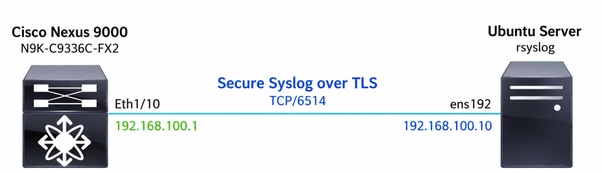
Background Information
Traditional Syslog
Traditional Syslog transmits log messages over UDP (default port 514) or TCP without encryption. Since the communication is sent in clear text, log messages can potentially be intercepted or modified while in transit. Traditional Syslog also does not provide server authentication.
Secure Syslog
Secure Syslog uses TCP with TLS (default port 6514) in order to provide encrypted transmission of syslog messages. Before any log message is sent, the client and the server establish a TLS session, during which the server presents its certificate and the client validates the certificate chain against a trusted Certificate Authority (CA). Once the TLS handshake is successfully completed, syslog messages are transmitted through the encrypted channel.
Unlike Traditional Syslog, Secure Syslog depends not only on IP connectivity but also on a successful TLS handshake, certificate validation, and cipher negotiation before any syslog message can be exchanged.
Certificate Chain
A certificate chain is the sequence of certificates used in order to establish trust between the server certificate and a trusted Root Certificate Authority (Root CA). During the TLS handshake, the Syslog server presents its server certificate along with any required intermediate CA certificates. The Cisco Nexus switch uses its trusted Root CA to validate the entire certificate chain.
A certificate chain is not always required.
The certificates presented by the Syslog server depend on how its PKI has been implemented. For example:
Self-signed certificate: The server presents only its own certificate. In this case, the Cisco Nexus switch must trust that self-signed certificate directly.
CA-signed certificate without intermediate CAs: The server presents only its server certificate because it was signed directly by a trusted Root CA.
CA-signed certificate with intermediate CAs: The server presents its server certificate together with one or more intermediate CA certificates, allowing the Cisco Nexus switch to build a complete chain of trust up to the trusted Root CA.
Regardless of the PKI design, the Cisco Nexus switch must be able to validate the certificate presented by the server before the TLS session can be established.
If any required certificate in the trust chain is missing, invalid, expired, or issued by an untrusted CA, the TLS handshake fails and the Secure Syslog connection cannot be established.
Why Are Certificates Required
Secure Syslog relies on TLS in order to provide encryption and server authentication. Before any syslog message is transmitted, the Cisco Nexus switch must verify that it is communicating with the intended Syslog server and not with an unauthorized device.
Certificates provide this trust by allowing the Nexus switch to authenticate the identity of the Syslog server before establishing the encrypted session. Once the certificate chain has been successfully validated, a secure TLS channel is created and all subsequent syslog messages are transmitted through the encrypted connection.
Without a valid certificate and a trusted certificate chain, Secure Syslog cannot establish the TLS session, preventing log messages from being exchanged securely.
Secure Syslog TLS Handshake
Before any syslog message is transmitted, the Cisco Nexus switch and the Syslog server must successfully establish a TLS session. During the TLS handshake, both devices negotiate the TLS parameters, establish a shared encryption key, and authenticate the identity of the Syslog server through certificate validation.
Only after the TLS handshake is successfully completed are syslog messages transmitted through the encrypted connection.
The TLS handshake consists of these phases:
| Step |
Description |
|---|---|
| 1. TCP Connection |
The Cisco Nexus switch establishes a TCP connection to the Secure Syslog server (default port 6514). |
| 2. Client Hello |
The Nexus initiates the TLS handshake by sending the supported TLS versions, cipher suites, and random values. |
| 3. Server Hello |
The Syslog server selects the TLS version and cipher suite used for the session. |
| 4. Certificate Exchange |
The Syslog server presents its server certificate and, if required, any intermediate CA certificates. |
| 5. Certificate Validation |
The Nexus validates the server certificate against the configured trusted CA. Validation includes checking the certificate chain, expiration dates, issuer, and server identity through the Common Name (CN) and Subject Alternative Name (SAN). |
| 6. Key Exchange |
Both peers exchange cryptographic information in order to derive the shared session keys used for encryption. |
| 7. Finished Messages |
Each peer verifies that the handshake completed successfully and that both sides derived the same cryptographic keys. |
| 8. Secure Syslog Transmission |
Once the TLS session is established, syslog messages are transmitted as encrypted TLS Application Data records. |
Relevant Configuration
Cisco Nexus Configuration
The Cisco Nexus switch must be configured with the Secure Syslog destination, a trustpoint containing the trusted CA, and the appropriate source interface.
switch(config)# crypto ca trustpoint SYSLOG-TLS-LAB-CA
switch(config-trustpoint)# crypto ca authenticate SYSLOG-TLS-LAB-CA
input (cut & paste) CA certificate (chain) in PEM format;
end the input with a line containing only END OF INPUT :
-----BEGIN CERTIFICATE-----
<paste>
-----END CERTIFICATE-----

END OF INPUT

Do you accept this certificate? [yes/no]:y
logging server syslog.lab.local 6 secure port 6514 use-vrf default
logging source-interface Eth1/10
Ubuntu Syslog Server Configuration
The Syslog server used in this document is an Ubuntu Server running rsyslog with TLS support enabled.
The server configuration includes these functions:
Listen for Secure Syslog connections on TCP port 6514.
Present a TLS server certificate during the TLS handshake.
Use a private key associated with the server certificate.
Provide the required certificate chain (when applicable) to Cisco Nexus during the TLS handshake.
Store received Secure Syslog messages in a local log file.
The PKI implementation used in this document consists of: Server Certificate > Intermediate CA > Root CA
The Cisco Nexus switch imports and trusts the Root CA certificate through a trustpoint, allowing it to validate the certificate chain presented by the Syslog server.

Note: A certificate chain is not mandatory for every deployment. Depending on the PKI implementation, the Syslog server can present only a self-signed certificate, a server certificate signed directly by a Root CA, or a server certificate accompanied by one or more intermediate CA certificates.
Troubleshooting
Objective
The objective of this troubleshooting procedure is to isolate and identify failures that prevent Cisco Nexus NX-OS switches from successfully establishing a Secure Syslog TLS connection with a Syslog server.
The workflow validates each stage of the communication process, beginning with IP connectivity and progressing through TCP connectivity, TLS negotiation, certificate validation, and finally Secure Syslog message transmission. By verifying each layer independently, it is possible to quickly determine where the communication fails.
Topology Explanation
The topology used in this document consists of a Cisco Nexus switch configured as the Secure Syslog client and an Ubuntu server running rsyslog configured as the Secure Syslog server.
The Cisco Nexus switch initiates a TCP connection to the Syslog server on port 6514. After the TCP connection is established, both devices perform the TLS handshake. During this process, the Syslog server presents its server certificate and any required intermediate CA certificates. The Nexus switch validates the certificate chain against the trusted Root CA configured in its trustpoint.
Once the TLS handshake completes successfully, the encrypted session is established and the Nexus switch begins transmitting Secure Syslog messages to the Syslog server.
The troubleshooting methodology presented in this document uses the same communication sequence as the connection establishment, allowing each phase of the process to be validated independently.
Step 1. Verify Secure Syslog Configuration
Verify that Secure Syslog is correctly configured on the Cisco Nexus switch and that the switch recognizes the configured Syslog server.
switch# show logging server
Logging server: enabled.         >>>>>>>> Secure Syslog is enabled.
{syslog.lab.local}               >>>>>>>> The correct destination (IP address or Fully Qualified Domain Name (FQDN)) is configured.
server status: No errors found   >>>>>>> No configuration errors are reported.
server severity: notifications
server facility: local7
server VRF: default
server port: 6514               >>>>>>> The destination port is 6514.
server transport: secure        >>>>>>> The transport is secure.
switch#
Step 2. Verify Trustpoint Configuration
Verify that the Cisco Nexus switch trusts the CA used to sign the Syslog server certificate.
Verify:
The expected Trustpoint exists.
The Root CA certificate is installed.
Any required Intermediate CA certificates are present.
Certificates are not expired.
Certificate fingerprints match the expected values.
switch# show crypto ca certificates
Trustpoint: SYSLOG-TLS-LAB-CA
CA certificate 0:
subject=C = US, ST = California, L = San Jose, O = "Cisco Systems, Inc.", OU = DCRS, CN = Cisco Lab Intermediate CA, emailAddress = tac@cisco.com
issuer=C = US, ST = California, L = San Jose, O = "Cisco Systems, Inc.", OU = DCRS, CN = Cisco Lab Root CA, emailAddress = tac@cisco.com
serial=4959A9F5A8D174553E0FB4FA01A21DDC2C085F12
notBefore=Jun 30 20:47:09 2026 GMT
notAfter=Jun 29 20:47:09 2031 GMT
SHA1 Fingerprint=24:8A:3A:C0:7C:61:53:3B:BE:A7:BB:51:12:FD:7E:B3:D7:AB:44:4C
purposes: sslserver sslclient

CA certificate 1:
subject=C = US, ST = California, L = San Jose, O = "Cisco Systems, Inc.", OU = DCRS, CN = Cisco Lab Root CA, emailAddress = tac@cisco.com
issuer=C = US, ST = California, L = San Jose, O = "Cisco Systems, Inc.", OU = DCRS, CN = Cisco Lab Root CA, emailAddress = tac@cisco.com
serial=3BC9CD3374C4A29A6794AAAEBFA270E3116C3D55
notBefore=Jun 30 20:43:04 2026 GMT
notAfter=Jun 27 20:43:04 2036 GMT
SHA1 Fingerprint=C8:AC:81:89:AA:A5:89:13:CA:01:5C:A9:90:15:3E:78:22:DD:34:A5
purposes: sslserver sslclient

switch#
If the appropriate CA certificate is missing or invalid, certificate validation fails during the TLS handshake.
Step 3. Verify IP Connectivity
Verify Layer 3 connectivity between the Cisco Nexus switch and the Secure Syslog server.
Verify:
- Successful Internet Control Message Protocol (ICMP) reachability.
- Correct Domain Name System (DNS) resolution.
- No routing issues.
- No packet loss.
switch# ping syslog.lab.local
PING syslog.lab.local (192.168.100.10): 56 data bytes
64 bytes from 192.168.100.10: icmp_seq=0 ttl=63 time=0.672 ms
64 bytes from 192.168.100.10: icmp_seq=1 ttl=63 time=0.331 ms
64 bytes from 192.168.100.10: icmp_seq=2 ttl=63 time=0.295 ms
64 bytes from 192.168.100.10: icmp_seq=3 ttl=63 time=0.286 ms
64 bytes from 192.168.100.10: icmp_seq=4 ttl=63 time=0.285 ms

--- syslog.lab.local ping statistics ---
5 packets transmitted, 5 packets received, 0.00% packet loss
round-trip min/avg/max = 0.285/0.373/0.672 ms
switch#
If IP connectivity fails, no TCP connection can be established.
Step 4. Verify TLS Connectivity
Verify end-to-end TLS connectivity between the Cisco Nexus switch and the Secure Syslog server.
This step validates multiple stages of the Secure Syslog connection, including:
TCP connectivity
TLS negotiation
Server certificate presentation
Certificate chain
Certificate validation
Cipher suite negotiation
Because these operations occur as part of the TLS handshake, all of them can be verified with a single command.
switch# run bash sudo ip netns exec default openssl s_client -connect 192.168.100.10:6514 -CAfile /bootflash/ca-chain.crt
What Does This Command Verify
| Validation |
Description |
|---|---|
| TCP Connectivity |
Verifies that the Nexus can establish a TCP connection to the Syslog server. |
| TLS Handshake |
Confirms that both peers successfully negotiate a TLS session. |
| Server Certificate |
Displays the certificate presented by the Syslog server. |
| Certificate Chain |
Displays any intermediate CA certificates sent by the server. |
| TLS Version |
Shows the negotiated TLS version. |
| Cipher Suite |
Displays the negotiated encryption algorithm. |
| Certificate Validation |
When the |
Expected Successful Output
switch# run bash sudo ip netns exec default openssl s_client -connect 192.168.100.10:6514 -CAfile /bootflash/ca-chain.crt
CONNECTED(00000003) >>>>> this confirms that the TCP connection has been established.
Can't use SSL_get_servername
depth=2 C = US, ST = California, L = San Jose, O = "Cisco Systems, Inc.", OU = DCRS, CN = Cisco Lab Root CA, emailAddress = tac@cisco.com
verify return:1
depth=1 C = US, ST = California, L = San Jose, O = "Cisco Systems, Inc.", OU = DCRS, CN = Cisco Lab Intermediate CA, emailAddress = tac@cisco.com
verify return:1
depth=0 C = US, ST = California, L = San Jose, O = "Cisco Systems, Inc.", OU = DCRS, CN = syslog.lab.local, emailAddress = tac@cisco.com
verify return:1
---
Certificate chain >>>>>>>>>>>
0 s:C = US, ST = California, L = San Jose, O = "Cisco Systems, Inc.", OU = DCRS, CN = syslog.lab.local, emailAddress = tac@cisco.com
i:C = US, ST = California, L = San Jose, O = "Cisco Systems, Inc.", OU = DCRS, CN = Cisco Lab Intermediate CA, emailAddress = tac@cisco.com
1 s:C = US, ST = California, L = San Jose, O = "Cisco Systems, Inc.", OU = DCRS, CN = Cisco Lab Intermediate CA, emailAddress = tac@cisco.com
i:C = US, ST = California, L = San Jose, O = "Cisco Systems, Inc.", OU = DCRS, CN = Cisco Lab Root CA, emailAddress = tac@cisco.com
---
Server certificate
-----BEGIN CERTIFICATE-----
<snip>
-----END CERTIFICATE-----
subject=C = US, ST = California, L = San Jose, O = "Cisco Systems, Inc.", OU = DCRS, CN = syslog.lab.local, emailAddress = tac@cisco.com

issuer=C = US, ST = California, L = San Jose, O = "Cisco Systems, Inc.", OU = DCRS, CN = Cisco Lab Intermediate CA, emailAddress = tac@cisco.com

---
Acceptable client certificate CA names
C = US, ST = California, L = San Jose, O = "Cisco Systems, Inc.", OU = DCRS, CN = Cisco Lab Root CA, emailAddress = tac@cisco.com
Client Certificate Types: RSA sign, ECDSA sign
Requested Signature Algorithms: RSA+SHA256:RSA-PSS+SHA256:RSA-PSS+SHA256:ECDSA+SHA256:Ed25519:RSA+SHA384:RSA-PSS+SHA384:RSA-PSS+SHA384:ECDSA+SHA384:Ed448:RSA+SHA512:RSA-PSS+SHA512:RSA-PSS+SHA512:ECDSA+SHA512:RSA+SHA1:ECDSA+SHA1
Shared Requested Signature Algorithms: RSA+SHA256:RSA-PSS+SHA256:RSA-PSS+SHA256:ECDSA+SHA256:Ed25519:RSA+SHA384:RSA-PSS+SHA384:RSA-PSS+SHA384:ECDSA+SHA384:Ed448:RSA+SHA512:RSA-PSS+SHA512:RSA-PSS+SHA512:ECDSA+SHA512:RSA+SHA1:ECDSA+SHA1
Peer signing digest: SHA256
Peer signature type: RSA-PSS
Server Temp Key: X25519, 253 bits
---
SSL handshake has read 4177 bytes and written 392 bytes
Verification: OK >>>>>>>>
---
New, TLSv1.2, Cipher is ECDHE-RSA-AES256-GCM-SHA384
Server public key is 4096 bit
Secure Renegotiation IS supported
Compression: NONE
Expansion: NONE
No ALPN negotiated
SSL-Session:
Protocol : TLSv1.2.                          >>>>>>>>>>>> The negotiated protocol
Cipher : ECDHE-RSA-AES256-GCM-SHA384         >>>>>>>>>>>> The negotiated cipher
Session-ID: E67D3C91AB57212C16C2A240668CBC5BA1720BC5DA6AD69C69B209C90E828483
Session-ID-ctx:
Master-Key: 5C45FC4ACE18657DBCDC0946A68A9BE480ECB0CF24313C56C3067EA9D23D68EB5090A4DFE36D4E4CB72BA282D0AB8BC3
PSK identity: None
PSK identity hint: None
SRP username: None
Start Time: 1782867300
Timeout : 7200 (sec)
Verify return code: 0 (ok).                 >>>>>>>>>> indicates that the certificate chain was successfully validated.
Extended master secret: yes
---
switch#
Packet Capture Correlation
The openssl s_client output can be correlated with packet captures obtained using Ethanalyzer in order to verify each phase of the TLS handshake.
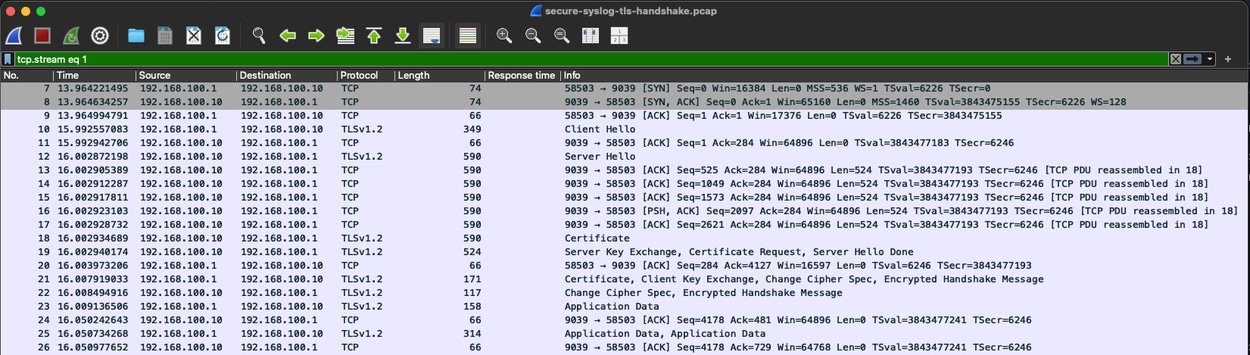
Secure Syslog TLS Handshake Capture
TLS Handshake Flow
Cisco Nexus               Syslog Server
------------              -------------

TCP SYN ------------------------------->
<---------------------- TCP SYN/ACK
TCP ACK ------------------------------->
Client Hello -------------------------->
<---------------------- Server Hello
<---------------------- Certificate
<---------------------- (Intermediate CA)
<---------------------- Server Key Exchange
<---------------------- Server Hello Done
Client Key Exchange ------------------->
Change Cipher Spec -------------------->
Finished ------------------------------>
<---------------------- Change Cipher Spec
<---------------------- Finished
==== Secure TLS Session Established =====
Encrypted Syslog Messages -------------->
The TLS handshake must complete successfully before any syslog message can be exchanged. If the handshake fails, Secure Syslog traffic is never generated.
In order to perform this verification, open two CLI sessions to the Cisco Nexus switch. In the first session, initiate the TLS connection with this command:
switch# run bash sudo ip netns exec default openssl s_client -connect 192.168.100.10:6514 -CAfile /bootflash/ca-chain.crt
At the same time, in the second CLI session, start an Ethanalyzer capture in order to monitor the TLS exchange:
switch# ethanalyzer local interface inband display-filter "tcp.port==6514" limit-captured-frames 0
Capturing on 'ps-inb'
3 2026-07-01 00:55:00.194836329 192.168.100.1 → 192.168.100.10 TCP 74 18553 → 6514 [SYN] Seq=0 Win=42340 Len=0 MSS=1460 SACK_PERM TSval=2103467794 TSecr=0 WS=1024
4 2026-07-01 00:55:00.195053907 192.168.100.10 → 192.168.100.1 TCP 74 6514 → 18553 [SYN, ACK] Seq=0 Ack=1 Win=65160 Len=0 MSS=1460 SACK_PERM TSval=2037038418 TSecr=
2103467794 WS=128
5 2026-07-01 00:55:00.195110969 192.168.100.1 → 192.168.100.10 TCP 66 18553 → 6514 [ACK] Seq=1 Ack=1 Win=43008 Len=0 TSval=2103467794 TSecr=2037038418
6 2026-07-01 00:55:00.195361105 192.168.100.1 → 192.168.100.10 TLSv1 353 Client Hello
7 2026-07-01 00:55:00.195478134 192.168.100.10 → 192.168.100.1 TCP 66 6514 → 18553 [ACK] Seq=1 Ack=288 Win=64896 Len=0 TSval=2037038419 TSecr=2103467795
8 2026-07-01 00:55:00.204176209 192.168.100.10 → 192.168.100.1 TLSv1.2 1514 Server Hello
9 2026-07-01 00:55:00.204200237 192.168.100.1 → 192.168.100.10 TCP 66 18553 → 6514 [ACK] Seq=288 Ack=1449 Win=41984 Len=0 TSval=2103467803 TSecr=2037038428
10 2026-07-01 00:55:00.204207757 192.168.100.10 → 192.168.100.1 TCP 1514 6514 → 18553 [ACK] Seq=1449 Ack=288 Win=64896 Len=1448 TSval=2037038428 TSecr=2103467795 [TC
P segment of a reassembled PDU]
11 2026-07-01 00:55:00.204219906 192.168.100.1 → 192.168.100.10 TCP 66 18553 → 6514 [ACK] Seq=288 Ack=2897 Win=40960 Len=0 TSval=2103467803 TSecr=2037038428
12 2026-07-01 00:55:00.204225215 192.168.100.10 → 192.168.100.1 TLSv1.2 1296 Certificate, Server Key Exchange, Certificate Request, Server Hello Done
13 2026-07-01 00:55:00.204234417 192.168.100.1 → 192.168.100.10 TCP 66 18553 → 6514 [ACK] Seq=288 Ack=4127 Win=39936 Len=0 TSval=2103467803 TSecr=2037038428
14 2026-07-01 00:55:00.206544194 192.168.100.1 → 192.168.100.10 TLSv1.2 171 Certificate, Client Key Exchange, Change Cipher Spec, Encrypted Handshake Message
15 2026-07-01 00:55:00.206818190 192.168.100.10 → 192.168.100.1 TLSv1.2 117 Change Cipher Spec, Encrypted Handshake Message
14 16 2026-07-01 00:55:00.249090950 192.168.100.1 → 192.168.100.10 TCP 66 18553 → 6514 [ACK] Seq=393 Ack=4178 Win=43008 Len=0 TSval=2103467848 TSecr=2037038430
17 60 2026-07-01 00:56:10.555097655 192.168.100.1 → 192.168.100.10 TCP 66 18553 → 6514 [ACK] Seq=394 Ack=4179 Win=43008 Len=0 TSval=2103538154 TSecr=2037108779
61 2026-07-01 00:56:10.887874467 192.168.100.1 → 192.168.100.10 TLSv1.2 226 Application Data
19 62 2026-07-01 00:56:10.888066832 192.168.100.10 → 192.168.100.1 TCP 66 6514 → 60177 [ACK] Seq=1 Ack=161 Win=501 Len=0 TSval=2037109112 TSecr=155223
19 65 2026-07-01 00:56:13.891148284 192.168.100.1 → 192.168.100.10 TLSv1.2 189 Application Data
21 66 2026-07-01 00:56:13.891341818 192.168.100.10 → 192.168.100.1 TCP 66 6514 → 60177 [ACK] Seq=1 Ack=284 Win=501 Len=0 TSval=2037112115 TSecr=155253
The packet capture must display the complete TLS handshake sequence, including the TCP three-way handshake, Client Hello, Server Hello, Certificate, Key Exchange, Finished messages, and, if the handshake completes successfully, encrypted TLS Application Data records carrying the Secure Syslog messages.
Verify Secure Syslog Message Transmission
Verify that Secure Syslog messages are successfully transmitted from the Cisco Nexus switch to the Syslog server after the TLS session has been established.
A successful TLS handshake confirms that the encrypted channel has been created; however, it does not guarantee that syslog messages are being generated or delivered.
This step validates the complete Secure Syslog workflow by generating a test message and confirming its transmission and reception.
Generate a Test Syslog Message
switch# logit test1-FromN9K
2026 Jul 1 01:04:04 switch %$ VDC-1 %$ %LOCAL0-2-SYSTEM_MSG: systest from 0: test1-FromN9K - vsh.bin[15528]

switch# logit test2-FromN9K
2026 Jul 1 01:12:44 switch %$ VDC-1 %$ %LOCAL0-2-SYSTEM_MSG: systest from 0: test2-FromN9K - vsh.bin[15528]
This command generates a local syslog message that must be transmitted to the configured Secure Syslog server over the existing TLS session.
Verify Encrypted TLS Application Data
If an Ethanalyzer capture is already running (as described in the previous section), verify that new TLS Application Data packets are transmitted after the test message is generated.
switch# ethanalyzer local interface inband display-filter "tcp.port==6514" limit-captured-frames 0
25 483 2026-07-01 01:05:33.547471509 192.168.100.1 → 192.168.100.10 TLSv1.2 199 Application Data
27 484 2026-07-01 01:05:33.547728284 192.168.100.10 → 192.168.100.1 TCP 66 6514 → 60177 [ACK] Seq=1 Ack=707 Win=501 Len=0 TSval=2037671773 TSecr=160847
27 489 2026-07-01 01:05:40.582487840 192.168.100.1 → 192.168.100.10 TLSv1.2 198 Application Data
29 490 2026-07-01 01:05:40.582705431 192.168.100.10 → 192.168.100.1 TCP 66 6514 → 60177 [ACK] Seq=1 Ack=839 Win=501 Len=0 TSval=2037678808 TSecr=160918
The presence of TLS Application Data indicates that the syslog messages are being transmitted through the encrypted TLS session. Because the payload is encrypted, Ethanalyzer cannot decode the contents of the syslog message.
Note: After the TLS handshake completes successfully, all syslog messages are encapsulated within encrypted TLS Application Data records. Their contents are not visible in packet captures.
Verify Message Reception on the Syslog Server
On the Syslog server, verify that the message has been successfully received and written to the destination log file.
calo@calo-ubuntu22 ~ % sudo tail -20 /var/log/remote.log 8:03:45
Jun 30 20:04:36 192.168.100.1 : 2026 Jul 1 01:05:40 UTC: %LOCAL0-2-SYSTEM_MSG: systest from 0: test1-FromN9K - vsh.bin[15528]
Jun 30 20:11:41 192.168.100.1 : 2026 Jul 1 01:12:45 UTC: %LOCAL0-2-SYSTEM_MSG: systest from 0: test2-FromN9K - vsh.bin[15528]
The presence of the generated test message confirms that:
The Cisco Nexus switch successfully generated the syslog message.
The message was transmitted over the encrypted TLS session.
The Syslog server successfully decrypted and processed the message.
The Secure Syslog configuration is operating correctly end-to-end.
The appearance of TLS Application Data in Ethanalyzer confirms that the TLS session is actively carrying encrypted application traffic. However, the definitive proof that Secure Syslog is functioning correctly is the successful reception of the generated syslog message on the Syslog server.
Conclusion
Secure Syslog on Cisco Nexus switches depends on successful IP and TCP connectivity, TLS negotiation, certificate validation, and encrypted message delivery. Verifying each layer independently helps isolate the point of failure and distinguish connectivity, TLS, certificate, and message transmission problems. A successful TLS handshake confirms that the encrypted session is established, while reception of a generated test message on the Syslog server confirms end-to-end Secure Syslog operation.
Revision History
| Revision | Publish Date | Comments |
|---|---|---|
1.0 |
01-Oct-2026
|
Initial Release |

 Feedback
Contact Cisco
- Open a Support Case

- (Requires a Cisco Service Contract)