Troubleshoot External DHCP on EVPN VxLAN Cat9000
Available Languages
Contents
Introduction
This document describes how to troubleshoot DHCP issues in External EVPN VxLAN environments on Cat9000 platforms.
Prerequisites
Requirements
Cisco recommends that you have knowledge of these topics:
- Virtual eXtensible LAN on Cat9000 Platforms
- Discovery Host Configuration Protocols on VxLAN environments
- Border Gateway Protocol (BGP)
For more information on these topics, refer to:
- Chapter: Configuring DHCP Relay in a BGP EVPN VXLAN Fabric Cat9300
- Chapter: Configuring DHCP Relay in a BGP EVPN VXLAN Fabric Cat9400
- Chapter: Configuring DHCP Relay in a BGP EVPN VXLAN Fabric Cat9500
- Chapter: Configuring DHCP Relay in a BGP EVPN VXLAN Fabric Cat9600
Components Used
The information in this document is based on Cisco IOS XE software.
The information in this document was created from the devices in a specific lab environment. All of the devices used in this document started with a cleared (default) configuration. If your network is live, ensure that you understand the potential impact of any command.
Network Diagram
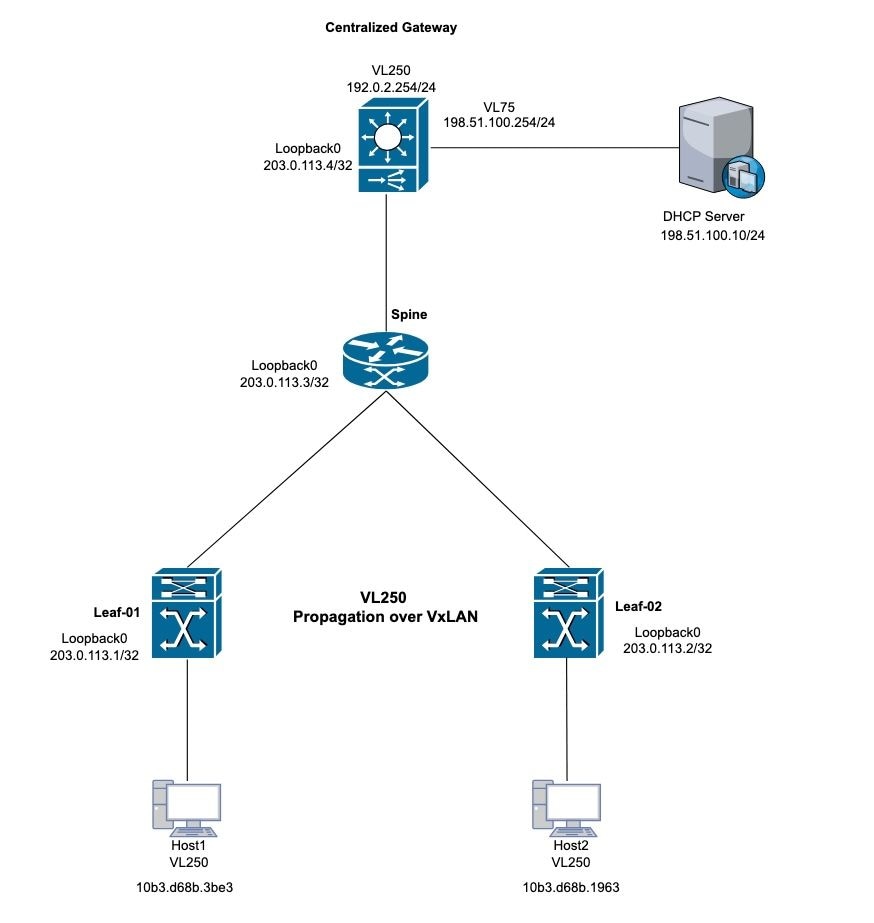 DHCP VxLAN Topology
Case Study 1: Unable to Obtain an IP Address from the External Server (Centralized Gateway Inside the Fabric)
This topology uses the VxLAN Layer 2 for VLAN 250. The host requires IP addresses from the external DHCP server.
Leaf-01 Verification
Step 1. On Leaf-1, verify MAC address learning for local hosts.
Step 2. Additionally, confirm that the default gateway MAC address is learned. Ensure both the learned MAC addresses and the default gateway IP address are correctly installed as entries in the BGP table.
Leaf-1#show mac address-table address 10b3.d68b.3be3 (host mac address)
            Mac Address Table
-------------------------------------------

Vlan    Mac Address     Type     Ports
----   -----------      -------- -----
250    10b3.d68b.3be3   DYNAMIC  Twe1/0/1

Centralized-Gateway#show interface vlan 250 | include bia (remote mac address)
Hardware is Ethernet SVI, address is 3473.2db8.bee3 (bia 3473.2db8.bee3)
Leaf-1#show bgp l2vpn evpn 10b3.d68b.3be3 (local mac address)
BGP routing table entry for [2][203.0.113.1:250][0][48][10B3D68B3BE3][0][*]/20, version 3
Paths: (1 available, best #1, table evi_250)
 Advertised to update-groups:
    2
Refresh Epoch 1
Local
  0.0.0.0 (via default) from 0.0.0.0 (203.0.113.1)
    Origin incomplete, localpref 100, weight 32768, valid, sourced, local, best
    EVPN ESI: 00000000000000000000, Label1 10250
    Extended Community: RT:10:250 ENCAP:8
    Local irb vxlan vtep:
     vrf:not found, l3-vni:0
     local router mac:0000.0000.0000
     core-irb interface:(not found)
     vtep-ip:203.0.113.1
   rx pathid: 0, tx pathid: 0x0
   Updated on Oct 14 2025 22:27:32 UTC

Leaf-1#show bgp l2vpn evpn 3473.2db8.bee3 (remote mac address)
BGP routing table entry for [2][203.0.113.1:250][0][48][34732DB8BEE3][32][192.0.2.254]/24, version 9
Paths: (1 available, best #1, table evi_250)
  Flag: 0x100
  Not advertised to any peer
  Refresh Epoch 4
  Local, imported path from [2][203.0.113.4:250][0][48][34732DB8BEE3][32][192.0.2.254]/24 (global)
    203.0.113.4 (metric 3) (via default) from 203.0.113.3 (203.0.113.3)
      Origin incomplete, metric 0, localpref 100, valid, internal, best
      EVPN ESI: 00000000000000000000, Label1 10250
      Extended Community: RT:10:250 ENCAP:8 EVPN DEF GW:0:0
      Originator: 203.0.113.4, Cluster list: 203.0.113.3
      rx pathid: 0, tx pathid: 0x0
      Updated on Oct 14 2025 14:48:35 UTC
BGP routing table entry for [2][203.0.113.4:250][0][48][34732DB8BEE3][32][192.0.2.254]/24, version 8
Paths: (1 available, best #1, table EVPN-BGP-Table)
  Flag: 0x100
  Not advertised to any peer
  Refresh Epoch 4
  Local
    203.0.113.4 (metric 3) (via default) from 203.0.113.3 (203.0.113.3)
      Origin incomplete, metric 0, localpref 100, valid, internal, best
      EVPN ESI: 00000000000000000000, Label1 10250
      Extended Community: RT:10:250 ENCAP:8 EVPN DEF GW:0:0
      Originator: 203.0.113.4, Cluster list: 203.0.113.3
      rx pathid: 0, tx pathid: 0x0
      Updated on Oct 14 2025 14:48:35 UTC
Step 3. Validate the MAC address learning between Leaf-1 and the Default Gateway. Leaf-1 learns local MAC addresses via the trunk port and the remote MAC addresses via BGP.
Leaf-1#show l2route evpn mac
EVI         ETag  Prod    Mac Address                                          Next Hop(s) Seq Number
----- ---------- ----- -------------- ---------------------------------------------------- ----------
250            0 L2VPN 10b3.d68b.3b81                                         Twe1/0/1:250          0
250            0 L2VPN 10b3.d68b.3be3                                         Twe1/0/1:250          0 (Host local mac address)
250            0   BGP 3473.2db8.bee3                                  V:10250 203.0.113.4          0 (CGW SVI mac address)
Step 4. Verify the default gateway learning on the Leaf-1 switch within the L2VPN EVPN instance.
Leaf-1#show l2vpn evpn default-gateway
Valid Default Gateway Address                  EVI  VLAN  MAC Address    Source
----- --------------------------------------- ----- ----- -------------- -----------
Y     192.0.2.254                             250   250   3473.2db8.bee3 203.0.113.4
Step 5. If the VxLAN perspective is correct, proceed to DHCP to troubleshoot.
Step 6. Confirm the DORA process from Leaf-1 to the DHCP gateway. On Leaf-01, enable debug the ip dhcp snooping packet and verify if the Discovery generates log entries. If log generation does not occur, enable packet captures on the interface that connect to the PC.
Leaf-1#debug ip dhcp snooping packet
DHCP Snooping Packet debugging is on
Leaf-1#
*Oct 21 19:33:16.358: DHCP_SNOOPING: received new DHCP packet from input interface (TwentyFiveGigE1/0/1)
*Oct 21 19:33:16.358: DHCP Memory dump is printed for process packet
<snip>
*Oct 21 19:33:16.367: DHCP_SNOOPING: process new DHCP packet, message type: DHCPDISCOVER, input interface: Twe1/0/1, MAC da: ffff.ffff.ffff, MAC sa: 10b3.d68b.3be3, IP da: 255.255.255.255, IP sa: 0.0.0.0, DHCP ciaddr: 0.0.0.0, DHCP yiaddr: 0.0.0.0, DHCP siaddr: 0.0.0.0, DHCP giaddr: 0.0.0.0, DHCP chaddr: 10b3.d68b.3be3, efp_id: -1865499306, vlan_id: 250, bootpflag:0x32768(Broadcast)
*Oct 21 19:33:16.367: DHCP_SNOOPING: add relay information option.
*Oct 21 19:33:16.367: DHCP_SNOOPING: Encoding opt82 CID in vlan-mod-port format
*Oct 21 19:33:16.367: DHCP_SNOOPING:VxLAN : vlan_id 250 VNI 10250 mod 1 port 1
*Oct 21 19:33:16.367: DHCP_SNOOPING: Encoding opt82 RID in MAC address format
*Oct 21 19:33:16.367: DHCP_SNOOPING: binary dump of relay info option, length: 26 data:
0x52 0x18 0x1 0xC 0x1 0xA 0x0 0x8 0x0 0x0 0x28 0xA 0x1 0x1 0x0 0x0 0x2 0x8 0x0 0x6 0x4C 0x5D 0x3C 0xEB 0x43 0x40
*Oct 21 19:33:16.367: DHCPS BRIDGE PAK: vlan=250 platform_flags=1
*Oct 21 19:33:16.367: DHCP_SNOOPING: bridge packet get invalid mat entry: FFFF.FFFF.FFFF, packet is flooded to ingress VLAN: (250)
*Oct 21 19:33:16.367: DHCP_SNOOPING: L2RELAY: sent unicast packet to default gw: 3473.2db8.bee3 vlan 0 src intf TwentyFiveGigE1/0/1
*Oct 21 19:33:20.058: DHCP_SNOOPING: received new DHCP packet from input interface (TwentyFiveGigE1/0/1)
*Oct 21 19:33:20.058: DHCP Memory dump is printed for process packet
Step 7. If debug does not trigger, perform a packet capture for validation. Use the specified syntax to capture ingress Discovery packets:
monitor capture <name> interface <int> in match ipv4 protocol udp any range 67 68 any range 67 68 start
monitor capture <name> stop
monitor capture export file flash:<name>.pcap
show monitor capture <name> buffer display-filter "eth.addr==[mac address]" detailed

Note: Capture the display filter strings that adhere to the Wireshark filter syntax.
Leaf-1#monitor capture cap interface twe1/0/1 in match ipv4 protocol udp any range 67 68 any range 67 68 start
Started capture point : cap
Leaf-1#
*Oct 21 22:57:04.719: %BUFCAP-6-ENABLE: Capture Point cap enabled.
Leaf-1#
Leaf-1#monitor capture cap stop
Capture statistics collected at software:
        Capture duration - 96 seconds
        Packets received - 10
        Packets dropped - 0
        Packets oversized - 0

Bytes dropped in asic - 0

Capture buffer will exists till exported or cleared

Stopped capture point : cap

*Oct 21 22:58:40.810: %BUFCAP-6-DISABLE: Capture Point cap disabled.

Leaf-1#show monitor capture cap buffer display-filter "eth,addr==10:b3:d6:8b:3b:e3" detailed
Starting the packet display ........ Press Ctrl + Shift + 6 to exit
Frame 1: 371 bytes on wire (2968 bits), 371 bytes captured (2968 bits) on interface /tmp/epc_ws/wif_to_ts_pipe, id 0
    Interface id: 0 (/tmp/epc_ws/wif_to_ts_pipe)
        Interface name: /tmp/epc_ws/wif_to_ts_pipe
    Encapsulation type: Ethernet (1)
    Arrival Time: Oct 21, 2025 22:57:07.843851000 UTC
     [Time shift for this packet: 0.000000000 seconds]
    Epoch Time: 1761087427.843851000 seconds
  <snip>
    [Protocols in frame: eth:ethertype:vlan:ethertype:ip:udp:dhcp]
Ethernet II, Src: 10:b3:d6:8b:3b:e3 (10:b3:d6:8b:3b:e3), Dst: ff:ff:ff:ff:ff:ff (ff:ff:ff:ff:ff:ff)
   Destination: ff:ff:ff:ff:ff:ff (ff:ff:ff:ff:ff:ff)
       Address: ff:ff:ff:ff:ff:ff (ff:ff:ff:ff:ff:ff)
       .... ..1. .... .... .... .... = LG bit: Locally administered address (this is NOT the factory default)
       .... ...1 .... .... .... .... = IG bit: Group address (multicast/broadcast)
   Source: 10:b3:d6:8b:3b:e3 (10:b3:d6:8b:3b:e3)
       Address: 10:b3:d6:8b:3b:e3 (10:b3:d6:8b:3b:e3)
       .... ..0. .... .... .... .... = LG bit: Globally unique address (factory default)
       .... ...0 .... .... .... .... = IG bit: Individual address (unicast)
   Type: 802.1Q Virtual LAN (0x8100)
802.1Q Virtual LAN, PRI: 0, DEI: 0, ID: 250
    000. .... .... .... = Priority: Best Effort (default) (0)
    ...0 .... .... .... = DEI: Ineligible
    .... 0000 1111 1010 = ID: 250
Type: IPv4 (0x0800)

<snip>

User Datagram Protocol, Src Port: 68, Dst Port: 67
    Source Port: 68
    Destination Port: 67
    Length: 333
    Checksum: 0xdf55 [unverified]
    [Checksum Status: Unverified]
    [Stream index: 0]
    [Timestamps]
        [Time since first frame: 0.000000000 seconds]
        [Time since previous frame: 0.000000000 seconds]
Dynamic Host Configuration Protocol (Discover)
Message type: Boot Request (1)
Hardware type: Ethernet (0x01)
Hardware address length: 6
Hops: 0
Transaction ID: 0x3bd7aadb
Seconds elapsed: 7
Bootp flags: 0x8000, Broadcast flag (Broadcast)
    1... .... .... .... = Broadcast flag: Broadcast
    .000 0000 0000 0000 = Reserved flags: 0x0000
Client IP address: 0.0.0.0
Your (client) IP address: 0.0.0.0
Next server IP address: 0.0.0.0
Relay agent IP address: 0.0.0.0
Client MAC address: 10:b3:d6:8b:3b:e3 (10:b3:d6:8b:3b:e3)
Client hardware address padding: 00000000000000000000
Server host name not given
Boot file name not given
Magic cookie: DHCP
Option: (53) DHCP Message Type (Discover)
<snip>
Step 8. Validate VxLAN packet encapsulation via packet capture. Apply various filters for this validation. VxLAN employs UDP port 4789.
monitor capture cap interface <outgoing interface > out match ipv4 protocol udp any any eq 4789 (Interface that is pointing to the RR or VTEP via BGP)
Leaf-1#show ip bgp all summary
For address family: L2VPN E-VPN
<snip>
Neighbor       V           AS MsgRcvd MsgSent    TblVer InQ OutQ Up/Down   State/PfxRcd
203.0.113.3     4           10    4204    4122       365   0    0 2d13h            2

Leaf-1#show ip route 203.0.113.3
Routing entry for 203.0.113.3/32
Known via "ospf 1", distance 110, metric 2, type intra area
Last update from 172.x.x.2 on TwentyFiveGigE1/0/2, 2d13h ago
Routing Descriptor Blocks:
* 172.x.x.2, from 203.0.113.3, 2d13h ago, via TwentyFiveGigE1/0/2

Leaf-1#monitor capture cap interface twe1/0/2 out match ipv4 protocol udp any any eq 4789 start
*Oct 21 23:51:07.689: %BUFCAP-6-ENABLE: Capture Point cap enabled.

Leaf-1#show monitor capture cap buffer display-filter "eth.addr==10:b3:d6:8b:3b:e3" detailed
Starting the packet display ........ Press Ctrl + Shift + 6 to exit

Frame 1: 443 bytes on wire (3544 bits), 443 bytes captured (3544 bits) on interface /tmp/epc_ws/wif_to_ts_pipe, id 0
    Interface id: 0 (/tmp/epc_ws/wif_to_ts_pipe)
        Interface name: /tmp/epc_ws/wif_to_ts_pipe
    Encapsulation type: Ethernet (1)
    Arrival Time: Oct 21, 2025 23:51:34.848693000 UTC
    [Time shift for this packet: 0.000000000 seconds]
    Epoch Time: 1761090694.848693000 seconds
   <snip>
   [Protocols in frame: eth:ethertype:ip:udp:vxlan:eth:ethertype:ip:udp:dhcp]
Ethernet II, Src: 00:00:00:00:00:00 (00:00:00:00:00:00), Dst: 00:00:00:00:00:00 (00:00:00:00:00:00)
    Destination: 00:00:00:00:00:00 (00:00:00:00:00:00)
        Address: 00:00:00:00:00:00 (00:00:00:00:00:00)
        .... ..0. .... .... .... .... = LG bit: Globally unique address (factory default)
        .... ...0 .... .... .... .... = IG bit: Individual address (unicast)
    Source: 00:00:00:00:00:00 (00:00:00:00:00:00)
        Address: 00:00:00:00:00:00 (00:00:00:00:00:00)
        .... ..0. .... .... .... .... = LG bit: Globally unique address (factory default)
        .... ...0 .... .... .... .... = IG bit: Individual address (unicast)
Type: IPv4 (0x0800)
Internet Protocol Version 4, Src: 203.0.113.1, Dst: 203.0.113.4
    0100 .... = Version: 4
    .... 0101 = Header Length: 20 bytes (5)
    Differentiated Services Field: 0x00 (DSCP: CS0, ECN: Not-ECT)
        0000 00.. = Differentiated Services Codepoint: Default (0)
        .... ..00 = Explicit Congestion Notification: Not ECN-Capable Transport (0)
<snip>
User Datagram Protocol, Src Port: 65479, Dst Port: 4789
    Source Port: 65479
    Destination Port: 4789
    Length: 409
    [Checksum: [missing]]
    [Checksum Status: Not present]
    [Stream index: 0]
    [Timestamps]
        [Time since first frame: 0.000000000 seconds]
        [Time since previous frame: 0.000000000 seconds]
Virtual eXtensible Local Area Network
Flags: 0x0800, VXLAN Network ID (VNI)
    0... .... .... .... = GBP Extension: Not defined
    .... .... .0.. .... = Don't Learn: False
    .... 1... .... .... = VXLAN Network ID (VNI): True
    .... .... .... 0... = Policy Applied: False
    .000 .000 0.00 .000 = Reserved(R): 0x0000
Group Policy ID: 0
VXLAN Network Identifier (VNI): 10250
Reserved: 0
<snip>
User Datagram Protocol, Src Port: 68, Dst Port: 67
    Source Port: 68
    Destination Port: 67
    Length: 359
    Checksum: 0x767d [unverified]
    [Checksum Status: Unverified]
    [Stream index: 1]
    [Timestamps]
         [Time since first frame: 0.000000000 seconds]
         [Time since previous frame: 0.000000000 seconds]
Dynamic Host Configuration Protocol (Discover)
    Message type: Boot Request (1)
    Hardware type: Ethernet (0x01)
    Hardware address length: 6
    Hops: 0
    Transaction ID: 0xd4c42ec1
    Seconds elapsed: 0
    Bootp flags: 0x8000, Broadcast flag (Broadcast)
        1... .... .... .... = Broadcast flag: Broadcast
        .000 0000 0000 0000 = Reserved flags: 0x0000
    Client IP address: 0.0.0.0
    Your (client) IP address: 0.0.0.0
    Next server IP address: 0.0.0.0
    Relay agent IP address: 0.0.0.0
    Client MAC address: 10:b3:d6:8b:3b:e3 (10:b3:d6:8b:3b:e3)
    Client hardware address padding: 00000000000000000000
    Server host name not given
    Boot file name not given
    Magic cookie: DHCP
Centralized Gateway Verification
Step 1. Validate the Host MAC address learned on BGP and the L2 EVPN routes (this step mirrors the initial Leaf verification procedure).
Centralized-Gateway#show bgp l2vpn evpn 10b3.d68b.3be3 (remote host mac address)
BGP routing table entry for [2][203.0.113.1:250][0][48][10B3D68B3BE3][0][*]/20, version 12
Paths: (1 available, best #1, table EVPN-BGP-Table)
  Not advertised to any peer
  Refresh Epoch 1
  Local
 203.0.113.1 (metric 3) (via default) from 203.0.113.3 (203.0.113.3) (learned via RR)
  Origin incomplete, metric 0, localpref 100, valid, internal, best
  EVPN ESI: 00000000000000000000, Label1 10250
  Extended Community: RT:10:250 ENCAP:8
  Originator: 203.0.113.1, Cluster list: 203.0.113.3
  rx pathid: 0, tx pathid: 0x0
  Updated on Oct 27 2025 17:53:37 UTC
BGP routing table entry for [2][203.0.113.4:250][0][48][10B3D68B3BE3][0][*]/20, version 14
Paths: (1 available, best #1, table evi_250)
  Not advertised to any peer
  Refresh Epoch 1
  Local, imported path from [2][203.0.113.1:250][0][48][10B3D68B3BE3][0][*]/20 (global)
    203.0.113.1 (metric 3) (via default) from 203.0.113.3 (203.0.113.3)
    Origin incomplete, metric 0, localpref 100, valid, internal, best
    EVPN ESI: 00000000000000000000, Label1 10250
    Extended Community: RT:10:250 ENCAP:8
    Originator: 203.0.113.1, Cluster list: 203.0.113.3
    rx pathid: 0, tx pathid: 0x0
    Updated on Oct 27 2025 17:53:37 UTC

Centralized-Gateway#show l2route evpn mac mac-address 10b3.d68b.3be3
EVI         ETag  Prod    Mac Address                                          Next Hop(s) Seq Number
----- ---------- ----- -------------- ---------------------------------------------------- ----------
250            0   BGP 10b3.d68b.3be3                                  V:10250 203.0.113.1          0
Step 2. Verify the DHCP relay information and DHCP snooping configuration on the centralized gateway.
Centralized-Gateway#show running-config | section dhcp
ip dhcp-relay source-interface Loopback0
ip dhcp relay information option vpn
ip dhcp relay information option
ip dhcp compatibility suboption link-selection standard
ip dhcp compatibility suboption server-override standard
ip dhcp snooping vlan 250
ip dhcp snooping
Step 3. Verify connectivity to the DHCP server and source a ping from the VLAN 250 interface.
Centralized-Gateway#ping 198.51.100.10 source vlan 250
Type escape sequence to abort.
Sending 5, 100-byte ICMP Echos to 198.51.100.10, timeout is 2 seconds:
Packet sent with a source address of 192.0.2.254
!!!!!
Success rate is 100 percent (5/5), round-trip min/avg/max = 1/1/1 ms
Step 4. Perform a packet capture to validate if the Discovery messages from the remote hosts reach the centralized gateway.
Centralized-Gateway#monitor capture cap interface vlan250 in match ipv4 protocol udp any range 67 68 any range 67 68
Centralized-Gateway#monitor capture cap start
Started capture point : cap
Centralized-Gateway#show monitor capture cap buffer display-filter "eth.addr==10:b3:d6:8b:3b:e3" detailed
Starting the packet display ........ Press Ctrl + Shift + 6 to exit

Frame 1: 401 bytes on wire (3208 bits), 401 bytes captured (3208 bits) on interface /tmp/epc_ws/wif_to_ts_pipe, id 0
    Interface id: 0 (/tmp/epc_ws/wif_to_ts_pipe)
        Interface name: /tmp/epc_ws/wif_to_ts_pipe
    Encapsulation type: Ethernet (1)
    Arrival Time: Oct 27, 2025 20:43:30.774923000 UTC
    [Time shift for this packet: 0.000000000 seconds]
    Epoch Time: 1761597810.774923000 seconds
 <snip>
    [Protocols in frame: eth:ethertype:cmd:ethertype:ip:udp:dhcp]
Ethernet II, Src: 10:b3:d6:8b:3b:e3 (10:b3:d6:8b:3b:e3), Dst: 34:73:2d:b8:be:e3 (34:73:2d:b8:be:e3)
    Destination: 34:73:2d:b8:be:e3 (34:73:2d:b8:be:e3)
        Address: 34:73:2d:b8:be:e3 (34:73:2d:b8:be:e3)
        .... ..0. .... .... .... .... = LG bit: Globally unique address (factory default)
        .... ...0 .... .... .... .... = IG bit: Individual address (unicast)
    Source: 10:b3:d6:8b:3b:e3 (10:b3:d6:8b:3b:e3)
        Address: 10:b3:d6:8b:3b:e3 (10:b3:d6:8b:3b:e3)
        .... ..0. .... .... .... .... = LG bit: Globally unique address (factory default)
        .... ...0 .... .... .... .... = IG bit: Individual address (unicast)
   Type: CiscoMetaData (0x8909)
<snip>
Internet Protocol Version 4, Src: 0.0.0.0, Dst: 255.255.255.255
    0100 .... = Version: 4
    .... 0101 = Header Length: 20 bytes (5)
    Differentiated Services Field: 0x00 (DSCP: CS0, ECN: Not-ECT)
        0000 00.. = Differentiated Services Codepoint: Default (0)
        .... ..00 = Explicit Congestion Notification: Not ECN-Capable Transport (0)
    Total Length: 379
    Identification: 0x0230 (560)
    Flags: 0x00
        0... .... = Reserved bit: Not set
        .0.. .... = Don't fragment: Not set
        ..0. .... = More fragments: Not set
    Fragment Offset: 0
    Time to Live: 255
    Protocol: UDP (17)
    Header Checksum: 0xb842 [validation disabled]
    [Header checksum status: Unverified]
    Source Address: 0.0.0.0
    Destination Address: 255.255.255.255
User Datagram Protocol, Src Port: 68, Dst Port: 67
    Source Port: 68
    Destination Port: 67
    Length: 359
    Checksum: 0x8f64 [unverified]
    [Checksum Status: Unverified]
    [Stream index: 0]
    [Timestamps]
        [Time since first frame: 0.000000000 seconds]
        [Time since previous frame: 0.000000000 seconds]
    UDP payload (351 bytes)
Dynamic Host Configuration Protocol (Discover)
    Message type: Boot Request (1)
    Hardware type: Ethernet (0x01)
    Hardware address length: 6
    Hops: 0
    Transaction ID: 0xf23af863
    Seconds elapsed: 0
    Bootp flags: 0x8000, Broadcast flag (Broadcast)
        1... .... .... .... = Broadcast flag: Broadcast
        .000 0000 0000 0000 = Reserved flags: 0x0000
    Client IP address: 0.0.0.0
    Your (client) IP address: 0.0.0.0
    Next server IP address: 0.0.0.0
    Relay agent IP address: 0.0.0.0
    Client MAC address: 10:b3:d6:8b:3b:e3 (10:b3:d6:8b:3b:e3)
    Client hardware address padding: 00000000000000000000
    Server host name not given
    Boot file name not given
    Magic cookie: DHCP
    Option: (53) DHCP Message Type (Discover)
        Length: 1
        DHCP: Discover (1)
    Option: (57) Maximum DHCP Message Size
        Length: 2
        Maximum DHCP Message Size: 1200
    Option: (61) Client identifier
        Length: 27
        Type: 0
    Client Identifier: cisco-10b3.d68b.3be3-Vl250
<snip>
Step 5. Conduct a subsequent packet capture on the switch. Verify the Discovery egress and Offer ingress.
Centralized-Gateway#no monitor capture cap
Centralized-Gateway#monitor capture cap interface vlan 75 both match ipv4 protocol udp any range 67 68 any range 67 68
Centralized-Gateway#monitor capture cap start
Started capture point : cap

Centralized-Gateway#monitor capture cap stop
Capture statistics collected at software:
        Capture duration - 78 seconds
        Packets received - 0
        Packets dropped - 0
        Packets oversized - 0
Bytes dropped in asic - 0
Step 6. If the packet capture shows no packets, proceed with the DHCP debug and validate the packet status on the platform.
Centralized-Gateway#debug ip dhcp snooping packet
<snip>
*Oct 27 22:20:24.444: DHCP_SNOOPING: process new DHCP packet, message type: DHCPDISCOVER, input interface: Tu0, MAC da: 3473.2db8.bee3, MAC sa: 10b3.d68b.3be3, IP da: 255.255.255.255, IP sa: 0.0.0.0, DHCP ciaddr: 0.0.0.0, DHCP yiaddr: 0.0.0.0, DHCP siaddr: 0.0.0.0, DHCP giaddr: 0.0.0.0, DHCP chaddr: 10b3.d68b.3be3, efp_id: -1137609462, vlan_id: 250, bootpflag:0x32768(Broadcast)
*Oct 27 22:20:24.445: DHCPS BRIDGE PAK: vlan=250 platform_flags=1
*Oct 27 22:20:24.445: DHCP_SNOOPING: Packet destined to SVI Mac:3473.2db8.bee3
*Oct 27 22:20:24.445: DHCP_SNOOPING: bridge packet send packet to cpu port: Vlan250.
*Oct 27 22:20:24.445: DHCP_SNOOPING: bridge packet send packet to port: GigabitEthernet1/0/2, pak_vlan 250.
*Oct 27 22:20:27.952: DHCP_SNOOPING: received new DHCP packet from input interface (Tunnel0)
*Oct 27 22:20:27.952: DHCP Memory dump is printed for process packet.

Centralized-Gateway#debug ip dhcp server packet detail
*Oct 27 22:27:58.009: DHCPD: BOOTREQUEST from 0063.6973.636f.2d31.3062.332e.6436.3862.2e33.6265.332d.566c.3235.30 forwarded to 198.51.100.10.
*Oct 27 22:28:02.008: DHCPD: tableid for 192.0.2.254 on Vlan250 is 0
*Oct 27 22:28:02.008: DHCPD: client's VPN is .
*Oct 27 22:28:02.008: DHCPD: No option 125
*Oct 27 22:28:02.008: DHCPD: Option 124: Vendor Class Information
*Oct 27 22:28:02.008: DHCPD: Enterprise ID: 9
*Oct 27 22:28:02.008: DHCPD: Vendor-class-data-len: 13
*Oct 27 22:28:02.008: DHCPD: Data: 43393330304C2D3234502D3447
*Oct 27 22:28:02.008: DHCPD: Option 125 not present in the msg.
*Oct 27 22:28:02.008: DHCPD: Option 125 not present in the msg.
*Oct 27 22:28:02.008: DHCPD: Looking up binding using address 192.0.2.254
*Oct 27 22:28:02.008: DHCPD: setting giaddr to 192.0.2.254.
*Oct 27 22:28:02.008: DHCPD: relay information option before replacing suboptions
*Oct 27 22:28:02.008: DHCPD: 5218010c010a00080000280a01010000020800064c5d3ceb4340
*Oct 27 22:28:02.008: DHCPD: replacing suboptions in relay information option.
*Oct 27 22:28:02.008: DHCPD: relay information option content (add/replace):
*Oct 27 22:28:02.008: DHCPD: 52060504c00002fe
*Oct 27 22:28:02.008: DHCPD: giaddr changed to 203.0.113.4
Step 7. Verify the interfaces that connect to the DHCP server include the specified command (this prevents the DHCP packet drop).
Centralized-Gateway#sh running-config interface gi1/0/2
Building configuration...

Current configuration : 149 bytes
!
interface GigabitEthernet1/0/2
description to L2_switch
switchport trunk allowed vlan 75,250
switchport mode trunk
ip dhcp snooping trust
end
Note: The ip dhcp snooping trust command applies only to Layer 2 trunk interfaces.
Problem Solution
VxLAN configuration functions as expected. However, the DHCP server relay send DHCP replies to IP address 203.0.113.4. The DHCP server lacked reachability to this IP address. This lack of connectivity resulted in unicast packet drops at the Centralized Gateway.
To resolve this issue, a new Loopback 1 interface was configured, and a route for the IP address was established to provide connectivity with this Loopback relay address.
DHCP logs:
DHCP-Server#debug ip dhcp server packet detail
DHCP server packet detail debugging is on.
*Oct 28 00:23:43.464: DHCPD: DHCPDISCOVER received from client 0063.6973.636f.2d31.3062.332e.6436.3862.2e33.6265.332d.566c.3235.30 through relay 203.0.113.4.DHCPD: Setting only requested parameters
*Oct 28 00:23:43.464: DHCPD: Option 125 not present in the msg.
*Oct 28 00:23:43.465: DHCPD: egress Interfce GigabitEthernet0/0/4.75
*Oct 28 00:23:43.465: DHCPD: unicasting BOOTREPLY for client 10b3.d68b.3be3 to relay 203.0.113.4.

DHCP-Server#ping 203.0.113.4
Type escape sequence to abort.
Sending 5, 100-byte ICMP Echos to 203.0.113.4, timeout is 2 seconds:
.....
Success rate is 0 percent (0/5)
DHCP-Server#
Centralized Gateway: Configure connectivity to the new Loopback interface for relay function.
Centralized-Gateway#configure terminal
Enter configuration commands, one per line. End with CNTL/Z.
Centralized-Gateway(config)#interface loopback 1
Centralized-Gateway(config-if)#ip address 198.51.100.25 255.255.255.255
Centralized-Gateway(config-if)#router eigrp 1
Centralized-Gateway(config-router)#network 198.51.100.25 0.0.0.0
Centralized-Gateway(config-router)#exit
Centralized-Gateway(config)#no ip dhcp-relay source-interface Loopback0
Centralized-Gateway(config)#ip dhcp-relay source-interface Loopback1

DHCP-Server#ping 198.51.100.25
Type escape sequence to abort.
Sending 5, 100-byte ICMP Echos to 198.51.100.25, timeout is 2 seconds:
!!!!!
Success rate is 100 percent (5/5), round-trip min/avg/max = 1/2/9 ms
DHCP-Server#
Case Study 2: Unable to Obtain an IP Address from the External Server (Centralized Gateway Outside the Fabric)
This topology utilizes VXLAN Layer 2 for VLAN 250. The host obtains its IP address from an external DHCP server located outside the fabric.
 External DHCP VxLAN Topology
Leaf-01 Verification
Step 1. On Leaf-1, verify the correct advertisement on the default-gateway. Since the DHCP Server is located outside the VxLAN Fabric, this is a key requirement for the correct functionality of the IP address assignment.
Leaf-1#show l2vpn evpn default-gateway
Valid Default Gateway Address EVI VLAN MAC Address Source
----- --------------------------------------- ----- ----- -------------- -----------
Step 2. If the previous output is empty, proceed with DHCP troubleshooting. Verify that the relevant DHCP snooping configurations are present on the Leaf devices.
Leaf-1#show running-config | section dhcp
ip dhcp relay information option vpn
ip dhcp relay information option
ip dhcp compatibility suboption link-selection standard
ip dhcp compatibility suboption server-override standard
ip dhcp snooping vlan 250
ip dhcp snooping
Leaf-2#show running-config | section dhcp
ip dhcp relay information option vpn
ip dhcp relay information option
ip dhcp compatibility suboption link-selection standard
ip dhcp compatibility suboption server-override standard
ip dhcp snooping vlan 250
ip dhcp snooping
Step 3. If a device is actively requesting an IP address using DHCP, enable the appropriate debugging command to validate the packet status on the platform.
*Dec 6 22:42:19.568: DHCP_SNOOPING: received new DHCP packet from input interface (TwentyFiveGigE1/0/1)
*Dec 6 22:42:19.568: DHCP Memory dump is printed for process packet
<snip>
*Dec 6 22:42:19.578: DHCP_SNOOPING: process new DHCP packet, message type: DHCPDISCOVER, input interface: Twe1/0/1, MAC da: ffff.ffff.ffff, MAC sa: 10b3.d68b.3be3, IP da: 255.255.255.255, IP sa: 0.0.0.0, DHCP ciaddr: 0.0.0.0, DHCP yiaddr: 0.0.0.0, DHCP siaddr: 0.0.0.0, DHCP giaddr: 0.0.0.0, DHCP chaddr: 10b3.d68b.3be3, efp_id: 1984524378, vlan_id: 250, bootpflag:0x32768(Broadcast)
*Dec 6 22:42:19.578: DHCP_SNOOPING: add relay information option.
*Dec 6 22:42:19.578: DHCP_SNOOPING: Encoding opt82 CID in vlan-mod-port format
*Dec 6 22:42:19.578: DHCP_SNOOPING:VxLAN : vlan_id 250 VNI 10250 mod 1 port 1
*Dec 6 22:42:19.578: DHCP_SNOOPING: Encoding opt82 RID in MAC address format
*Dec 6 22:42:19.578: DHCP_SNOOPING: binary dump of relay info option, length: 26 data:
0x52 0x18 0x1 0xC 0x1 0xA 0x0 0x8 0x0 0x0 0x28 0xA 0x1 0x1 0x0 0x0 0x2 0x8 0x0 0x6 0x4C 0x5D 0x3C 0xEB 0x43 0x40
*Dec 6 22:42:19.579: DHCPS BRIDGE PAK: vlan=250 platform_flags=1
*Dec 6 22:42:19.579: DHCP_SNOOPING: bridge packet get invalid mat entry: FFFF.FFFF.FFFF, packet is flooded to ingress VLAN: (250)
*Dec 6 22:42:19.579: DHCP_SNOOPING: L2RELAY: cannot find default gw for bd 250: src intf TwentyFiveGigE1/0/1
Note: The final debug message indicates the device was unable to identify the default gateway for VLAN 250.
Leaf-02 Verification
Since Leaf-2 is the active border leaf inside the VxLAN Fabric, it is responsible in forwarding the information related to the default-gateway.
Step 1. Proceed to validate the capability of L2VPN EVPN to advertise the default-gateway.
Leaf-2#show l2vpn evpn summary
L2VPN EVPN
EVPN Instances (excluding point-to-point): 1
VLAN Based: 1
Vlans: 1
BGP: ASN 65000, address-family l2vpn evpn configured
Router ID: 203.0.113.2
Global Replication Type: Ingress
ARP/ND Flooding Suppression: Enabled
Connectivity to Core: UP
MAC Duplication: seconds 180 limit 5
MAC Addresses: 5
Local: 3
Remote: 2
Duplicate: 0
IP Duplication: seconds 180 limit 5
IP Addresses: 2
Local: 2
Remote: 0
Duplicate: 0
Advertise Default Gateway: No
Default Gateway Addresses: 0
Local: 0
Remote: 0
Maximum number of Route Targets per EAD-ES route: 200
Multi-home aliasing: Enabled
Multi-home send proxy MAC/IP: Enabled
Multi-home device ID: 0000.5e00.0101
Global IP Local Learn: Enabled
IP local learning limits
IPv4: 4 addresses per-MAC
IPv6: 12 addresses per-MAC
IP local learning timers
Down: 10 minutes
Poll: 1 minutes
Reachable: 5 minutes
Stale: 30 minutes
Auto route-target: vni-based
Advertise Multicast: No
Global Anycast Gateway MAC: No
Step 2. The previous output validates Leaf-2 is not advertising the Default-Gateway towards the other Leaf-1 inside the same VxLAN Fabric. Proceed with the configuration needed to perform the correct advertisement.
Leaf-2(config)#l2vpn evpn
Leaf-2(config-evpn)#default-gateway advertise
Step 3. Once the configuration is added, the L2VPN EVPN capability must be enabled.
Leaf-2#show l2vpn evpn summary
--snip--
Advertise Default Gateway: Yes
Step 4. Once enabled, configure the adequate advertisement for the default-gateway to the other Leaf inside the VxLAN Fabric.
Problem Solution 1
L2VPN EVPN and DHCP Snooping configuration functions as expected. However, the default-gateway advertisement is not being performed. Therefore, the end devices connected to Leaf-1 cannot receive an IP address from the DHCP server.
To resolve this issue, the advertisement must be configured.
Step 1. Configure an ACL, along with a route-map to advertise the default-gateway via BGP to the other Leaf devices on the network.
Leaf-2(config)#ip access-list extended GW250
Leaf-2(config-ext-nacl)#10 permit ip host 192.0.2.254 any (permit the IP address if the GW)

Leaf-2(config)#route-map CGW
Leaf-2(config-route-map)#match ip address GW250
Leaf-2(config-route-map)#match evpn route-type 2-mac-ip
Leaf-2(config-route-map)#set extcommunity default-gw

Leaf-2(config)#router bgp 65000
Leaf-2(config-router)#address-family l2vpn evpn
Leaf-2(config-router-af)#neighbor 203.0.113.3 route-map CGW out
Step 2. After the previous configuration is added, verify Leaf-1 to view the correct default-gateway advertisement.
Leaf-1#show l2vpn evpn default-gateway
Valid Default Gateway Address                 EVI   VLAN  MAC Address    Source
----- --------------------------------------- ----- ----- -------------- -----------
  Y   192.0.2.254                             250   250   3473.2db8.bee3 203.0.113.2
Note: On the Border VTEP, verifying the default gateway displays an empty value. This is expected behavior, as the Centralized Gateway is directly connected to the Border VTEP.
Leaf-2#show l2vpn evpn default-gateway
Valid Default Gateway Address EVI VLAN MAC Address Source
----- --------------------------------------- ----- ----- -------------- -----------
Now the Leaf devices are correctly showing the default-gateway advertisement. Verify if the end devices are correctly receiving the IP address from DHCP.
Host 1 Verification
Step 1. On Host 1, request an IP address via DHCP:
Host1#show running-config interface vlan 250
Building configuration...
Current configuration : 42 bytes
!
interface Vlan250
ip address dhcp
end
Step 2. Validate if the IP address was correctly assigned:
Host1#show ip interface brief | include DHCP
Vlan250   unassigned   YES    DHCP    up    up
Step 3. If the IP address is not assigned correctly after the default gateway was properly advertised by the Border Leaf, proceed with DHCP troubleshooting.
Leaf 2 Verification
Step 1. Enable debugging for DHCP, specifically for DHCP snooping, to observe how the device processes packets when forwarding them outside of the VXLAN fabric.
Leaf-2#debug ip dhcp snooping packet
DHCP Snooping Packet debugging is on
Step 2. Restart the DHCP process on the Host device and review the logs:
Leaf-2#debug ip dhcp snooping packet
*Dec 12 20:11:43.891: DHCP_SNOOPING: received new DHCP packet from input interface (Tunnel0)
*Dec 12 20:11:43.891: DHCP Memory dump is printed for process packet
<snip>
*Dec 12 20:11:43.902: DHCP_SNOOPING: process new DHCP packet, message type: DHCPDISCOVER, input interface: Tu0, MAC da: 3473.2db8.bee3, MAC sa: 10b3.d68b.3be3, IP da: 255.255.255.255, IP sa: 0.0.0.0, DHCP ciaddr: 0.0.0.0, DHCP yiaddr: 0.0.0.0, DHCP siaddr: 0.0.0.0, DHCP giaddr: 0.0.0.0, DHCP chaddr: 10b3.d68b.3be3, efp_id: -2136403878, vlan_id: 250, bootpflag:0x32768(Broadcast)
*Dec 12 20:11:43.902: DHCPS BRIDGE PAK: vlan=250 platform_flags=1
*Dec 12 20:11:43.902: DHCP_SNOOPING: bridge packet output port set is null, packet is dropped.
Step 3. The previous log(s) indicate the packet is being dropped. This message means the DHCP snooping feature on the switch has received a DHCP packet that cannot be forwarded because the output port is invalid. This typically occurs when DHCP snooping is unable to determine the appropriate egress port for forwarding the DHCP packet.
Step 4. To solve this, the interface pointing towards the Centralized Gateway must be configured as trusted.
Leaf-2(config)#interface fortyGigabitEthernet 2/0/1
Leaf-2(config-if)#ip dhcp snooping trust
Step 5. Validate if the IP address assignment via DHCP is working as expected now.
Leaf-2#debug ip dhcp snooping packet
*Dec 12 20:33:54.156: DHCP Memory dump is printed for process packet

<snip>
*Dec 12 20:33:54.167: DHCP_SNOOPING: process new DHCP packet, message type: DHCPDISCOVER, input interface: Tu0, MAC da: 3473.2db8.bee3, MAC sa: 10b3.d68b.3be3, IP da: 255.255.255.255, IP sa: 0.0.0.0, DHCP ciaddr: 0.0.0.0, DHCP yiaddr: 0.0.0.0, DHCP siaddr: 0.0.0.0, DHCP giaddr: 0.0.0.0, DHCP chaddr: 10b3.d68b.3be3, efp_id: -2136403878, vlan_id: 250, bootpflag:0x32768(Broadcast)
*Dec 12 20:33:54.167: DHCPS BRIDGE PAK: vlan=250 platform_flags=1
*Dec 12 20:33:54.167: DHCP_SNOOPING: bridge packet send packet to port: FortyGigabitEthernet2/0/1, pak_vlan 250.
Step 6. The evidence indicates the device now correctly identifies the physical interface through the DHCPDISCOVER packet and must be forwarded as the interface is marked as trusted from the DHCP snooping perspective. However, the IP address assignment is still not functioning as expected.
Centralized Gateway Verification
Step 1. With the Border Leaf now forwarding DHCP packets through the appropriate interface, if the IP address assignment continues to fail, proceed with the standard DHCP troubleshooting procedures.
Centralized-Gateway#debug ip dhcp server packet
DHCP server packet debugging is on.

*Dec 12 20:39:36.029: DHCPD: tableid for 192.0.2.254 on Vlan250 is 0
*Dec 12 20:39:36.029: DHCPD: client's VPN is .
*Dec 12 20:39:36.029: DHCPD: No option 125
*Dec 12 20:39:36.029: DHCPD: Option 124: Vendor Class Information
*Dec 12 20:39:36.029: DHCPD: Enterprise ID: 9
*Dec 12 20:39:36.029: DHCPD: Vendor-class-data-len: 13
*Dec 12 20:39:36.029: DHCPD: Data: 43393330304C2D3234502D3447
*Dec 12 20:39:36.029: DHCPD: inconsistent relay information.
*Dec 12 20:39:36.029: DHCPD: relay information option exists, but giaddr is zero
Step 2. Based on the debug output from the Centralized Gateway and the results of the packet capture, additional configuration is required to prevent the device from discarding packets when the giaddr field is set to zero.
When a DHCP packet is received with the relay information option present but the gateway IP address (giaddr) is set to all zeros, the DHCP relay agent, by default, drops the packet. To address this behavior, configure the ip dhcp relay information trusted command.
Step 3. To verify the device is receiving the packet, perform a packet capture:
Configure an Access-list to filter the interested traffic.
Extended IP access list dhcp
 10 permit udp any any eq 67
 20 permit udp any eq 67 any

Configure the capture.
Centralized-Gateway#monitor capture tac interface gigabitethernet1/0/1 both access-list dhcp buffer size 10
Centralized-Gateway#monitor capture cap start
Started capture point : cap

Centralized-Gateway#monitor capture cap stop
Capture statistics collected at software:
 Capture duration - 58 seconds
 Packets received - 6
 Packets dropped - 0
 Packets oversized - 0
 Bytes dropped in asic - 0

Centralized-Gateway#show monitor capture cap buffer display-filter "eth.addr==10:b3:d6:8b:3b:e3" detailed
Starting the packet display ........ Press Ctrl + Shift + 6 to exit

Frame 1: 397 bytes on wire (3176 bits), 397 bytes captured (3176 bits) on interface /tmp/epc_ws/wif_to_ts_pipe, id 0
    Interface id: 0 (/tmp/epc_ws/wif_to_ts_pipe)
        Interface name: /tmp/epc_ws/wif_to_ts_pipe
    Encapsulation type: Ethernet (1)
    Arrival Time: Dec 12, 2025 18:35:21.821468000 UTC
    [Time shift for this packet: 0.000000000 seconds]
    Epoch Time: 1765564521.821468000 seconds
    [Time delta from previous captured frame: 0.000000000 seconds]
    [Time delta from previous displayed frame: 0.000000000 seconds]
    [Time since reference or first frame: 0.000000000 seconds]
    Frame Number: 1
    Frame Length: 397 bytes (3176 bits)
    Capture Length: 397 bytes (3176 bits)
    [Frame is marked: False]
    [Frame is ignored: False]
    [Protocols in frame: eth:ethertype:vlan:ethertype:ip:udp:dhcp]
Ethernet II, Src: 10:b3:d6:8b:3b:e3 (10:b3:d6:8b:3b:e3), Dst: 34:73:2d:b8:be:e3 (34:73:2d:b8:be:e3)
    Destination: 34:73:2d:b8:be:e3 (34:73:2d:b8:be:e3)
        Address: 34:73:2d:b8:be:e3 (34:73:2d:b8:be:e3)
        .... ..0. .... .... .... .... = LG bit: Globally unique address (factory default)
        .... ...0 .... .... .... .... = IG bit: Individual address (unicast)
    Source: 10:b3:d6:8b:3b:e3 (10:b3:d6:8b:3b:e3)
        Address: 10:b3:d6:8b:3b:e3 (10:b3:d6:8b:3b:e3)
        .... ..0. .... .... .... .... = LG bit: Globally unique address (factory default)
        .... ...0 .... .... .... .... = IG bit: Individual address (unicast)
    Type: 802.1Q Virtual LAN (0x8100)
802.1Q Virtual LAN, PRI: 0, DEI: 0, ID: 250
    000. .... .... .... = Priority: Best Effort (default) (0)
    ...0 .... .... .... = DEI: Ineligible
    .... 0000 1111 1010 = ID: 250
    Type: IPv4 (0x0800)
Internet Protocol Version 4, Src: 0.0.0.0, Dst: 255.255.255.255
    0100 .... = Version: 4
    .... 0101 = Header Length: 20 bytes (5)
    Differentiated Services Field: 0x00 (DSCP: CS0, ECN: Not-ECT)
        0000 00.. = Differentiated Services Codepoint: Default (0)
        .... ..00 = Explicit Congestion Notification: Not ECN-Capable Transport (0)
    Total Length: 379
    Identification: 0x4b04 (19204)
    Flags: 0x00
        0... .... = Reserved bit: Not set
        .0.. .... = Don't fragment: Not set
        ..0. .... = More fragments: Not set
    Fragment Offset: 0
    Time to Live: 255
    Protocol: UDP (17)
    Header Checksum: 0x6f6e [validation disabled]
    [Header checksum status: Unverified]
    Source Address: 0.0.0.0
    Destination Address: 255.255.255.255
User Datagram Protocol, Src Port: 68, Dst Port: 67
    Source Port: 68
    Destination Port: 67
    Length: 359
    Checksum: 0x2ae5 [unverified]
    [Checksum Status: Unverified]
    [Stream index: 0]
    [Timestamps]
        [Time since first frame: 0.000000000 seconds]
        [Time since previous frame: 0.000000000 seconds]
    UDP payload (351 bytes)
Dynamic Host Configuration Protocol (Discover)
    Message type: Boot Request (1)
    Hardware type: Ethernet (0x01)
    Hardware address length: 6
    Hops: 0
    Transaction ID: 0xe9986585
    Seconds elapsed: 0
    Bootp flags: 0x8000, Broadcast flag (Broadcast)
        1... .... .... .... = Broadcast flag: Broadcast
        .000 0000 0000 0000 = Reserved flags: 0x0000
    Client IP address: 0.0.0.0
    Your (client) IP address: 0.0.0.0
    Next server IP address: 0.0.0.0
    Relay agent IP address: 0.0.0.0
    Client MAC address: 10:b3:d6:8b:3b:e3 (10:b3:d6:8b:3b:e3)
    Client hardware address padding: 00000000000000000000
    Server host name not given
    Boot file name not given
    Magic cookie: DHCP
    Option: (53) DHCP Message Type (Discover)
        Length: 1
        DHCP: Discover (1)
    Option: (57) Maximum DHCP Message Size
        Length: 2
        Maximum DHCP Message Size: 1200
    Option: (61) Client identifier
        Length: 27
        Type: 0
        Client Identifier: cisco-10b3.d68b.3be3-Vl250
Step 4. According to the previous packet capture, the DHCP packet is correctly received by the device.
Problem Solution 2
Step 1. Based on the debug output from the Centralized Gateway and the results of the packet capture, additional configuration is required to prevent the device from discarding packets when the giaddr field is set to zero.
When a DHCP packet is received with the relay information option present, but the gateway IP address (giaddr) is set to all zeros, the DHCP relay agent typically drops the packet.
To address this behavior, configure the ip dhcp relay information trusted command.
Centralized-Gateway(config)#interface vlan 250
Centralized-Gateway(config-if)#ip dhcp relay information trusted
Step 2. Proceed with verification requesting an IP address from Host 1.
Host1#
*Dec 12 21:32:12.659: %DHCP-6-ADDRESS_ASSIGN: Interface Vlan250 assigned DHCP address 192.0.2.1, mask 255.255.255.0, hostname Host1

Leaf-2#
*Dec 12 21:36:03.232: DHCP_SNOOPING: received new DHCP packet from input interface (Tunnel0)
<snip>
*Dec 12 21:36:03.243: DHCP_SNOOPING: process new DHCP packet, message type: DHCPDISCOVER, input interface: Tu0, MAC da: 3473.2db8.bee3, MAC sa: 10b3.d68b.3be3, IP da: 255.255.255.255, IP sa: 0.0.0.0, DHCP ciaddr: 0.0.0.0, DHCP yiaddr: 0.0.0.0, DHCP siaddr: 0.0.0.0, DHCP giaddr: 0.0.0.0, DHCP chaddr: 10b3.d68b.3be3, efp_id: -2136403878, vlan_id: 250, bootpflag:0x32768(Broadcast)
*Dec 12 21:36:03.243: DHCPS BRIDGE PAK: vlan=250 platform_flags=1
*Dec 12 21:36:03.243: DHCP_SNOOPING: bridge packet send packet to port: FortyGigabitEthernet2/0/1, pak_vlan 250.
*Dec 12 21:36:03.245: DHCP_SNOOPING: received new DHCP packet from input interface (FortyGigabitEthernet2/0/1)
<snip>
*Dec 12 21:36:03.255: DHCP_SNOOPING: process new DHCP packet, message type: DHCPOFFER, input interface: Fo2/0/1, MAC da: ffff.ffff.ffff, MAC sa: 3473.2db8.bee3, IP da: 255.255.255.255, IP sa: 192.0.2.254, DHCP ciaddr: 0.0.0.0, DHCP yiaddr: 192.0.2.1, DHCP siaddr: 0.0.0.0, DHCP giaddr: 192.0.2.254, DHCP chaddr: 10b3.d68b.3be3, efp_id: -2136403878, vlan_id: 250, bootpflag:0x32768(Broadcast)
*Dec 12 21:36:03.255: DHCP_SNOOPING: binary dump of option 82, length: 26 data:
0x52 0x18 0x1 0xC 0x1 0xA 0x0 0x8 0x0 0x0 0x28 0xA 0x1 0x1 0x0 0x0 0x2 0x8 0x0 0x6 0x4C 0x5D 0x3C 0xEB 0x43 0x40
*Dec 12 21:36:03.256: DHCP_SNOOPING: binary dump of extracted circuit id, length: 14 data:
0x1 0xC 0x1 0xA 0x0 0x8 0x0 0x0 0x28 0xA 0x1 0x1 0x0 0x0
*Dec 12 21:36:03.256: DHCP_SNOOPING: binary dump of extracted remote id, length: 10 data:
0x2 0x8 0x0 0x6 0x4C 0x5D 0x3C 0xEB 0x43 0x40
*Dec 12 21:36:03.256: actual_fmt_cid OPT82_FMT_CID_VXLAN_MOD_PORT_INTF global_opt82_fmt_rid OPT82_FMT_RID_DEFAULT_GLOBAL global_opt82_fmt_cid OPT82_FMT_CID_DEFAULT_GLOBAL cid: sub_option_length 12
*Dec 12 21:36:03.256: dhcp_snooping_platform_is_local_dhcp_packet: VXLAN-MOD-PORT opt82 vni 10250, vlan_id 250
*Dec 12 21:36:03.256: DHCP_SNOOPING: opt82 data indicates not a local packet
*Dec 12 21:36:03.256: DHCP_SNOOPING: EVPN enabled Ex GW:fabric relay can't parse option 82 data of the message,it is either in wrong format or not inserted by local switch
*Dec 12 21:36:03.256: DHCP_SNOOPING: client address lookup failed to locate client interface, retry lookup using packet mac DA: ffff.ffff.ffff
*Dec 12 21:36:03.256: DHCP_SNOOPING: lookup packet destination port failed to get mat entry for mac: 10b3.d68b.3be3 vlan_id 250
*Dec 12 21:36:03.256: DHCP_SNOOPING: L2RELAY: Ex GW unicast bridge packet to fabric: vlan id 250 from Fo2/0/1
<snip>
*Dec 12 21:36:03.401: DHCP_SNOOPING: process new DHCP packet, message type: DHCPREQUEST, input interface: Tu0, MAC da: 3473.2db8.bee3, MAC sa: 10b3.d68b.3be3, IP da: 255.255.255.255, IP sa: 0.0.0.0, DHCP ciaddr: 0.0.0.0, DHCP yiaddr: 0.0.0.0, DHCP siaddr: 0.0.0.0, DHCP giaddr: 0.0.0.0, DHCP chaddr: 10b3.d68b.3be3, efp_id: -2136403878, vlan_id: 250, bootpflag:0x32768(Broadcast)
*Dec 12 21:36:03.401: DHCPS BRIDGE PAK: vlan=250 platform_flags=1
*Dec 12 21:36:03.401: DHCP_SNOOPING: bridge packet send packet to port: FortyGigabitEthernet2/0/1, pak_vlan 250.
*Dec 12 21:36:03.402: DHCP_SNOOPING: received new DHCP packet from input interface (FortyGigabitEthernet2/0/1)
<snip>
*Dec 12 21:36:03.413: DHCP_SNOOPING: process new DHCP packet, message type: DHCPACK, input interface: Fo2/0/1, MAC da: ffff.ffff.ffff, MAC sa: 3473.2db8.bee3, IP da: 255.255.255.255, IP sa: 192.0.2.254, DHCP ciaddr: 0.0.0.0, DHCP yiaddr: 192.0.2.1, DHCP siaddr: 0.0.0.0, DHCP giaddr: 192.0.2.254, DHCP chaddr: 10b3.d68b.3be3, efp_id: -2136403878, vlan_id: 250, bootpflag:0x32768(Broadcast)
*Dec 12 21:36:03.413: DHCP_SNOOPING: binary dump of option 82, length: 26 data:
0x52 0x18 0x1 0xC 0x1 0xA 0x0 0x8 0x0 0x0 0x28 0xA 0x1 0x1 0x0 0x0 0x2 0x8 0x0 0x6 0x4C 0x5D 0x3C 0xEB 0x43 0x40
*Dec 12 21:36:03.413: DHCP_SNOOPING: binary dump of extracted circuit id, length: 14 data:
0x1 0xC 0x1 0xA 0x0 0x8 0x0 0x0 0x28 0xA 0x1 0x1 0x0 0x0
*Dec 12 21:36:03.413: DHCP_SNOOPING: binary dump of extracted remote id, length: 10 data:
0x2 0x8 0x0 0x6 0x4C 0x5D 0x3C 0xEB 0x43 0x40
*Dec 12 21:36:03.413: actual_fmt_cid OPT82_FMT_CID_VXLAN_MOD_PORT_INTF global_opt82_fmt_rid OPT82_FMT_RID_DEFAULT_GLOBAL global_opt82_fmt_cid OPT82_FMT_CID_DEFAULT_GLOBAL cid: sub_option_length 12
*Dec 12 21:36:03.413: dhcp_snooping_platform_is_local_dhcp_packet: VXLAN-MOD-PORT opt82 vni 10250, vlan_id 250
*Dec 12 21:36:03.413: DHCP_SNOOPING: opt82 data indicates not a local packet
*Dec 12 21:36:03.413: DHCP_SNOOPING: EVPN enabled Ex GW:fabric relay can't parse option 82 data of the message,it is either in wrong format or not inserted by local switch
*Dec 12 21:36:03.413: DHCP_SNOOPING: client address lookup failed to locate client interface, retry lookup using packet mac DA: ffff.ffff.ffff
*Dec 12 21:36:03.413: DHCP_SNOOPING: lookup packet destination port failed to get mat entry for mac: 10b3.d68b.3be3 vlan_id 250
*Dec 12 21:36:03.413: DHCP_SNOOPING: can't find client's destination port, packet is assumed to be not from local switch, no binding update is needed.
*Dec 12 21:36:03.413: DHCP_SNOOPING: client address lookup failed to locate client interface, retry lookup using packet mac DA: ffff.ffff.ffff
*Dec 12 21:36:03.413: DHCP_SNOOPING: lookup packet destination port failed to get mat entry for mac: 10b3.d68b.3be3 vlan_id 250
*Dec 12 21:36:03.413: DHCP_SNOOPING: L2RELAY: Ex GW unicast bridge packet to fabric: vlan id 250 from Fo2/0/1
Step 3. The IP Address has been correctly assigned and it is suggested to validate the same behavior from the perspective of Host 2.
Host2#
*Dec 12 21:13:03.926: %DHCP-6-ADDRESS_ASSIGN: Interface Vlan250 assigned DHCP address 192.0.2.2, mask 255.255.255.0, hostname Host2

Leaf-2#
*Dec 12 22:08:15.417: DHCP_SNOOPING: received new DHCP packet from input interface (FortyGigabitEthernet2/0/2)
<snip>
*Dec 12 22:08:15.428: DHCP_SNOOPING: process new DHCP packet, message type: DHCPDISCOVER, input interface: Fo2/0/2, MAC da: ffff.ffff.ffff, MAC sa: 10b3.d68b.1963, IP da: 255.255.255.255, IP sa: 0.0.0.0, DHCP ciaddr: 0.0.0.0, DHCP yiaddr: 0.0.0.0, DHCP siaddr: 0.0.0.0, DHCP giaddr: 0.0.0.0, DHCP chaddr: 10b3.d68b.1963, efp_id: -2136403878, vlan_id: 250, bootpflag:0x32768(Broadcast)
*Dec 12 22:08:15.428: DHCP_SNOOPING: add relay information option.
*Dec 12 22:08:15.428: DHCP_SNOOPING: Encoding opt82 CID in vlan-mod-port format
*Dec 12 22:08:15.428: DHCP_SNOOPING:VxLAN : vlan_id 250 VNI 10250 mod 2 port 2
*Dec 12 22:08:15.428: DHCP_SNOOPING: Encoding opt82 RID in MAC address format
*Dec 12 22:08:15.428: DHCP_SNOOPING: binary dump of relay info option, length: 26 data:
0x52 0x18 0x1 0xC 0x1 0xA 0x0 0x8 0x0 0x0 0x28 0xA 0x2 0x2 0x0 0x0 0x2 0x8 0x0 0x6 0x68 0x7D 0xB4 0xA8 0xAF 0x0
*Dec 12 22:08:15.428: DHCPS BRIDGE PAK: vlan=250 platform_flags=1
*Dec 12 22:08:15.428: DHCP_SNOOPING: bridge packet get invalid mat entry: FFFF.FFFF.FFFF, packet is flooded to ingress VLAN: (250)
*Dec 12 22:08:15.428: DHCP_SNOOPING: L2RELAY: cannot find default gw for bd 250: src intf FortyGigabitEthernet2/0/2
*Dec 12 22:08:15.430: DHCP_SNOOPING: received new DHCP packet from input interface (FortyGigabitEthernet2/0/1)
<snip>
*Dec 12 22:08:15.440: DHCP_SNOOPING: process new DHCP packet, message type: DHCPOFFER, input interface: Fo2/0/1, MAC da: ffff.ffff.ffff, MAC sa: 3473.2db8.bee3, IP da: 255.255.255.255, IP sa: 192.0.2.254, DHCP ciaddr: 0.0.0.0, DHCP yiaddr: 192.0.2.2, DHCP siaddr: 0.0.0.0, DHCP giaddr: 192.0.2.254, DHCP chaddr: 10b3.d68b.1963, efp_id: -2136403878, vlan_id: 250, bootpflag:0x32768(Broadcast)
*Dec 12 22:08:15.440: DHCP_SNOOPING: binary dump of option 82, length: 26 data:
0x52 0x18 0x1 0xC 0x1 0xA 0x0 0x8 0x0 0x0 0x28 0xA 0x2 0x2 0x0 0x0 0x2 0x8 0x0 0x6 0x68 0x7D 0xB4 0xA8 0xAF 0x0
*Dec 12 22:08:15.440: DHCP_SNOOPING: binary dump of extracted circuit id, length: 14 data:
0x1 0xC 0x1 0xA 0x0 0x8 0x0 0x0 0x28 0xA 0x2 0x2 0x0 0x0
*Dec 12 22:08:15.440: DHCP_SNOOPING: binary dump of extracted remote id, length: 10 data:
0x2 0x8 0x0 0x6 0x68 0x7D 0xB4 0xA8 0xAF 0x0
*Dec 12 22:08:15.440: actual_fmt_cid OPT82_FMT_CID_VXLAN_MOD_PORT_INTF global_opt82_fmt_rid OPT82_FMT_RID_DEFAULT_GLOBAL global_opt82_fmt_cid OPT82_FMT_CID_DEFAULT_GLOBAL cid: sub_option_length 12
*Dec 12 22:08:15.440: dhcp_snooping_platform_is_local_dhcp_packet: VXLAN-MOD-PORT opt82 vni 10250, vlan_id 250
*Dec 12 22:08:15.440: DHCP_SNOOPING: opt82 data indicates local packet
*Dec 12 22:08:15.440: DHCP_SNOOPING: remove relay information option.
*Dec 12 22:08:15.440: DHCP_SNOOPING opt82_fmt_cid_intf OPT82_FMT_CID_VXLAN_MOD_PORT_INTF opt82_fmt_cid_global OPT82_FMT_CID_DEFAULT_GLOBAL cid: sub_option_length 12
*Dec 12 22:08:15.440: DHCP_SNOOPING: VxLAN vlan_id 250 VNI 10250 mod 2 port 2
*Dec 12 22:08:15.440: DHCP_SNOOPING: mod 2 port 2 idb Fo2/0/2 found for 10b3.d68b.1963
*Dec 12 22:08:15.441: DHCP_SNOOPING: calling forward_dhcp_reply
*Dec 12 22:08:15.441: platform lookup dest vlan for input_if: FortyGigabitEthernet2/0/1, is NOT tunnel, if_output: NULL, if_output->vlan_id: 99999, pak->vlan_id: 250
*Dec 12 22:08:15.441: DHCP_SNOOPING opt82_fmt_cid_intf OPT82_FMT_CID_VXLAN_MOD_PORT_INTF opt82_fmt_cid_global OPT82_FMT_CID_DEFAULT_GLOBAL cid: sub_option_length 12
*Dec 12 22:08:15.441: DHCP_SNOOPING: VxLAN vlan_id 250 VNI 10250 mod 2 port 2
*Dec 12 22:08:15.441: DHCP_SNOOPING: mod 2 port 2 idb Fo2/0/2 found for 10b3.d68b.1963
*Dec 12 22:08:15.441: DHCP_SNOOPING: vlan 250 after pvlan check
<snip>
*Dec 12 22:08:15.930: DHCP_SNOOPING: process new DHCP packet, message type: DHCPREQUEST, input interface: Fo2/0/2, MAC da: ffff.ffff.ffff, MAC sa: 10b3.d68b.1963, IP da: 255.255.255.255, IP sa: 0.0.0.0, DHCP ciaddr: 0.0.0.0, DHCP yiaddr: 0.0.0.0, DHCP siaddr: 0.0.0.0, DHCP giaddr: 0.0.0.0, DHCP chaddr: 10b3.d68b.1963, efp_id: -2136403878, vlan_id: 250, bootpflag:0x32768(Broadcast)
*Dec 12 22:08:15.930: DHCP_SNOOPING: add relay information option.
*Dec 12 22:08:15.930: DHCP_SNOOPING: Encoding opt82 CID in vlan-mod-port format
*Dec 12 22:08:15.930: DHCP_SNOOPING:VxLAN : vlan_id 250 VNI 10250 mod 2 port 2
*Dec 12 22:08:15.930: DHCP_SNOOPING: Encoding opt82 RID in MAC address format
*Dec 12 22:08:15.930: DHCP_SNOOPING: binary dump of relay info option, length: 26 data:
0x52 0x18 0x1 0xC 0x1 0xA 0x0 0x8 0x0 0x0 0x28 0xA 0x2 0x2 0x0 0x0 0x2 0x8 0x0 0x6 0x68 0x7D 0xB4 0xA8 0xAF 0x0
*Dec 12 22:08:15.930: DHCPS BRIDGE PAK: vlan=250 platform_flags=1
*Dec 12 22:08:15.930: DHCP_SNOOPING: bridge packet get invalid mat entry: FFFF.FFFF.FFFF, packet is flooded to ingress VLAN: (250)
*Dec 12 22:08:15.930: DHCP_SNOOPING: L2RELAY: cannot find default gw for bd 250: src intf FortyGigabitEthernet2/0/2
*Dec 12 22:08:15.932: DHCP_SNOOPING: received new DHCP packet from input interface (FortyGigabitEthernet2/0/1)
<snip>
*Dec 12 22:08:15.940: DHCP_SNOOPING: process new DHCP packet, message type: DHCPACK, input interface: Fo2/0/1, MAC da: ffff.ffff.ffff, MAC sa: 3473.2db8.bee3, IP da: 255.255.255.255, IP sa: 192.0.2.254, DHCP ciaddr: 0.0.0.0, DHCP yiaddr: 192.0.2.2, DHCP siaddr: 0.0.0.0, DHCP giaddr: 192.0.2.254, DHCP chaddr: 10b3.d68b.1963, efp_id: -2136403878, vlan_id: 250, bootpflag:0x32768(Broadcast)
*Dec 12 22:08:15.943: DHCP_SNOOPING: binary dump of option 82, length: 26 data:
0x52 0x18 0x1 0xC 0x1 0xA 0x0 0x8 0x0 0x0 0x28 0xA 0x2 0x2 0x0 0x0 0x2 0x8 0x0 0x6 0x68 0x7D 0xB4 0xA8 0xAF 0x0
*Dec 12 22:08:15.943: DHCP_SNOOPING: binary dump of extracted circuit id, length: 14 data:
0x1 0xC 0x1 0xA 0x0 0x8 0x0 0x0 0x28 0xA 0x2 0x2 0x0 0x0
<snip>
Revision History
| Revision | Publish Date | Comments |
|---|---|---|
1.0 |
15-Jun-2026
|
Initial Release |

 Feedback
Contact Cisco
- Open a Support Case

- (Requires a Cisco Service Contract)