Frequently Asked Questions - Output Drops on Cisco Catalyst 9000 Series Switches
Available Languages
Contents
Introduction
This document provides answers to common questions regarding output drops on Cisco Catalyst 9000 Series switches.
Prerequisites
Requirements
Cisco recommends that you have a fundamental understanding of switching concepts, including interface buffering and Quality of Service (QoS) configurations.
Components Used
This document applies to all Cisco Catalyst 9000 Series switches and is not limited to specific hardware or software versions.
The information in this document was created from the devices in a specific lab environment. All of the devices used in this document started with a cleared (default) configuration. If your network is live, ensure that you understand the potential impact of any command.
Background Information
Output drops occur when an interface egress buffer is exhausted, resulting in packet loss and degraded network performance. Common causes include network congestion, traffic micro-bursts, misconfigurations, or hardware limitations. This FAQ document addresses common inquiries regarding output drops on Cisco Catalyst 9000 Series switches. It provides guidance on identifying root causes, troubleshooting methodologies, and recommended practices to restore network efficiency and reliability.
Q. What are output drops?
A. Output drops on Cisco Catalyst 9000 switches refer to the number of packets that are dropped and not transmitted out of an interface, even though the packets have been processed by the device. This occurs when the output queue of the interface becomes full. The switch interface has hardware buffers that temporarily store packets before they are transmitted or forwarded out of the port. When the rate of outgoing traffic exceeds the rate at which the hardware can transmit it, the buffers become full, and any additional packets arriving at the queue are dropped.
Q. Which command can be used to check output drops?
A. Use the command show interfaces <interface> and look for the total output drops counter, which indicates the number of packets dropped on the output queue of that interface.
Example:
GigabitEthernet1/0/1 is up, line protocol is up (connected)
  Input queue: 0/2000/0/0 (size/max/drops/flushes); Total output drops: 3089
  Queueing strategy: fifo
  Output queue: 0/40 (size/max)
Q. What are the common causes of output drops?
A. Output drops on Catalyst 9000 switches typically occur when packets are discarded before transmission due to various congestion or configuration issues. The common causes include:
- Traffic Micro-bursts: Sudden, high-intensity spikes in traffic that occur over milliseconds. Because standard network monitoring tools (like SNMP) often poll at 1-minute or 5-minute intervals, these bursts are often invisible to management software but are sufficient to exhaust the hardware egress buffers.
- Oversubscription: When the aggregate bandwidth of incoming traffic significantly exceeds the capacity of the outgoing interface, congestion is inevitable. This is common in scenarios where multiple high-speed ports (for example, 10G) send traffic to a single lower-speed port (for example, 1G).
- Buffer Constraints: Every interface has a finite amount of hardware buffer space. When the egress queue reaches its maximum capacity due to sustained congestion, the switch performs 'tail-dropping', where all subsequent incoming packets are discarded until space becomes available.
- Quality of Service (QoS) Misconfiguration: Incorrectly configured QoS policies — specifically aggressive policing or restrictive shaping — can lead to drops. If a policy is configured to cap traffic below the actual link capacity, packets exceeding that threshold will be dropped even if the physical link is not congested.
- Speed and Duplex Mismatches: Although less common with modern auto-negotiation, a mismatch between the switch port and the connected device can lead to inefficient transmission, increased collisions (in half-duplex), and subsequent queue saturation.
- Flow Control (IEEE 802.3x): If Flow Control is enabled, the switch can be instructed to pause transmission by the receiving device. If the pause frames are frequent, the egress of the switch buffers can fill up, leading to drops as the switch waits to resume transmission.
- Port-Channel Imbalance: If traffic in an EtherChannel/Port-Channel is not evenly distributed across member links, one interface can become congested while others remain underutilized.
Q. What are micro-bursts?
A. Micro-bursts are high-intensity, short-duration traffic spikes occurring over microseconds or milliseconds. They cause output drops by instantly exhausting the egress hardware buffers on Catalyst 9000 switches. Because standard monitoring tools average traffic over longer intervals, these bursts often remain invisible. This results in packet loss even when the average utilization of an interface appears well within capacity. Consequently, these transient spikes are a primary cause of congestion in high-speed network environments.
Q. Are output drops always a problem?
A. No, output drops can occur during short traffic bursts even in healthy networks. Modern switches use buffer-based queuing, and occasional drops can occur without impacting applications. Drops typically become problematic when:
-
Drops continuously increase
-
Applications experience latency or packet loss
-
TCP retransmissions increase
-
Real-time applications (VoIP/video) are affected
Q. Why do output drops occur even when the interface is not fully utilized?
A. Output drops can occur even when the interface utilization is well below the maximum bandwidth of the link (for example, below 1000 MBPS on a Gigabit interface). This happens because network traffic is not transmitted in a perfectly smooth and continuous flow. In an ideal scenario, every bit is transmitted evenly across the link, and all devices send traffic at precisely synchronized intervals. However, in real-world networks, devices transmit traffic whenever they need to. As a result, multiple packets can arrive at the switch at the same time and must be transmitted through the same outgoing interface. In order to handle this situation, switches use hardware buffers on each interface. These buffers temporarily store packets that arrive simultaneously so they can be transmitted sequentially over the link. If the volume of packets arriving at the interface at a given moment exceeds the available buffer capacity, the switch cannot store all of them. When this occurs, the excess packets are dropped, resulting in output drops.
This is why it is possible to observe output drops even when the average bandwidth utilization is relatively low (for example, 300 MBPS on a 1 GBPS interface). The average utilization can appear low, but short bursts of traffic can momentarily exceed the ability of the interface to transmit packets or exceed the available buffer capacity.
It is also important to note that interface utilization values displayed through SNMP monitoring tools or the show interface command are based on averaged traffic measurements over intervals such as 30 seconds or 5 minutes. These averages do not reflect very short traffic spikes that can occur within milliseconds.
Q. How can I control output drops without increasing the link speed?
A. You can manage and reduce output drops on Catalyst 9000 switches through several techniques without upgrading the physical link speed:
- Increase the SoftMax Multiplier (Quick Mitigation): In order to increase the number of buffers that a queue can request from the shared buffer pool, you can adjust the SoftMax threshold using the global configuration command qos queue-softmax-multiplier <100–1200>. The default value is 100. Setting this value to 1200 increases the ability of the queue to absorb microbursts by a factor of 12 compared to the default configuration.
This command increases the port queue thresholds so that the queue can consume additional buffer units from the shared buffer pool when needed. This is commonly used as a quick mitigation technique to reduce output drops caused by traffic bursts. However, because buffers are shared resources, the configuration assumes that microbursts do not occur simultaneously on all ports.
Per-Queue Buffer Modification (QoS Policy Tuning): If the SoftMax multiplier is insufficient, buffer allocation can be tuned at the queue level using QoS policy-maps. This allows administrators to allocate more buffer space to specific traffic classes, modify queue buffer ratios, and configure priority queues for critical traffic. This approach is useful when specific traffic types require dedicated buffer resources or when traffic profiles vary significantly.
Example:
policy-map QOS-POLICY
 class VOICE
  priority level 1
  queue-buffers ratio 50
 class class-default
  queue-buffers ratio 50
- Implement Quality of Service (QoS): It helps control packet drops by prioritizing critical network traffic during periods of congestion. It enables networks to prioritize latency-sensitive traffic such as voice and video, protect control-plane traffic, and ensure that important data is transmitted before lower-priority traffic. Typical QoS mechanisms include traffic classification, queue prioritization, queue buffer allocation, and congestion management. By applying these techniques, the network can ensure that less important traffic is dropped first, helping protect business-critical applications and maintain overall network performance.
- Traffic Shaping: Configure egress shaping on the interface to smooth out traffic bursts. By capping the transmission rate slightly below the physical line rate, you force the traffic to be buffered and sent at a consistent, predictable rate. This prevents the tail-drop behavior caused by sudden, high-speed micro-bursts.
Example:
policy-map SHAPE-POLICY
 class class-default
  shape average <rate>
- Optimize Load Distribution (Port-Channel Balancing): In an EtherChannel or Port-Channel configuration, uneven hashing can cause specific member links to become congested while others remain underutilized. By optimizing load-balancing algorithms, you ensure traffic is distributed evenly across all member links, which prevents congestion on individual interfaces and mitigates output drops.
Example:
port-channel load-balance src-dst-ip
Q. What is the ultimate solution for output drops?
A. The most effective solutions to eliminate output drops are:
- Increase Interface Line Speed: Upgrade the interface speed to provide higher egress bandwidth and reduce oversubscription. For example, move from a 1G interface to a 10G interface if available on the switch.
- Use Port Bundling (EtherChannel): Aggregate multiple physical links into a single logical link using port bundling, provided the connected device supports this feature. This increases overall bandwidth and helps distribute traffic load.
- Hardware Upgrade when necessary: If a higher-speed interface is not available on the switch and port bundling is unsupported by the connected device, consider upgrading the hardware platform to one with higher capacity or larger buffers.
Q. How can queue statistics be checked on an interface?
A. For Catalyst 9000 switches, detailed hardware queue statistics can be checked using the command show platform hardware fed active qos queue stats interface <port>. This command provides detailed statistics including buffer usage, enqueue counts, and drop counters per queue on the specified interface, helping to monitor queue performance and identify congestion or packet drops.
Example:
show platform hardware fed switch active qos queue stats interface Gig 1/0/1
DATA Port:0 Enqueue Counters
---------------------------------------------------------------------------------------------
Q Buffers          Enqueue-TH0          Enqueue-TH1          Enqueue-TH2             Qpolicer
  (Count)              (Bytes)              (Bytes)              (Bytes)              (Bytes)
- ------- -------------------- -------------------- -------------------- --------------------
0       0                    0                    0            384251797                    0
1       0                    0                    0         488393930284                    0
...
DATA Port:0 Drop Counters
-------------------------------------------------------------------------------------------------------------------------------
Q             Drop-TH0             Drop-TH1             Drop-TH2             SBufDrop              QebDrop         QpolicerDrop
               (Bytes)              (Bytes)              (Bytes)              (Bytes)              (Bytes)              (Bytes)
- -------------------- -------------------- -------------------- -------------------- -------------------- --------------------
0                    0                    0                    0                    0                    0                    0
1                    0                    0            192308101                    0                    0                    0
...
Q. How to confirm if QoS is causing output drops?
A. In order to verify whether QoS is responsible for output drops, check the QoS policy statistics using the command show policy-map interface <interface> and queue counters. If drop counters are increasing under a specific QoS class, the drops can be caused by QoS queue limits or policing. If possible, during a maintenance window, temporarily remove the QoS policy from the interface using the command no service-policy output <policy-name> and monitor whether output drops continue. If drops stop after removing the policy, it is likely that the QoS configuration is contributing to the drops.
Example:
sh policy-map interface gigabitEthernet 1/0/1
GigabitEthernet1/0/1
Service-policy output: TEST
Class-map: class-default (match-any)
0 packets
Match: any
Queueing
(total drops) 587230
(bytes output) 834545
...
Q. Can output drops occur on high-speed interfaces such as 10G or 40G?
A. Yes, even high-speed interfaces such as 10G or 40G can experience output drops when multiple high-rate flows converge on a single port, causing the interface buffers to become overwhelmed. Additionally, microbursts—short bursts of traffic that exceed the interface bandwidth — can quickly exhaust port buffers and lead to packet drops.
Q. Can output drops be caused by hardware faults?
A. Output drops are generally not caused by hardware faults. They typically result from traffic congestion, where the interface buffers become overwhelmed due to high traffic rates or microbursts. Hardware-related drops can occur but are usually linked to specific error conditions, which are rare compared to congestion-related drops. Therefore, output drops are mostly associated with network traffic conditions rather than hardware failures. Monitoring interface errors such as FCS/CRC errors can help identify hardware issues if present, but these are distinct from output drops caused by congestion.
Q. Can software bugs cause output drops?
A. Output drops caused by software defects are very rare and mostly cosmetic, not substantially impacting traffic. Most output drops are primarily caused by traffic congestion and buffer exhaustion.
Q. Can ECMP or load balancing reduce congestion?
A. Yes, Equal-Cost Multi-Path (ECMP) routing and load balancing reduce congestion by distributing traffic evenly across multiple equal-cost paths to a destination. This approach increases bandwidth utilization and prevents any single path from becoming a bottleneck.
Q. Do output drops affect UDP traffic differently than TCP?
A. Yes, output drops affect UDP traffic differently than TCP because UDP is a connectionless protocol that does not retransmit lost packets, so any packet loss directly impacts applications such as voice or video, which rely on timely delivery. In contrast, TCP includes retransmission mechanisms that attempt to recover lost packets, mitigating the impact of drops. Therefore, output drops can cause more noticeable degradation in UDP-based real-time applications, as lost packets are not recovered and can lead to quality issues.
Q. What is the difference between input drops and output drops?
A. Input drops on interfaces typically occur when the input queues become overwhelmed and cannot process packets fast enough, causing selective packet discarding based on the queuing algorithm. Output drops happen when packets are dropped while leaving an interface due to congestion in the output queue or buffer exhaustion. Input drops are related to ingress processing limits, whereas output drops are primarily caused by egress congestion and buffer overflow. These drops can be influenced by factors such as traffic bursts, platform limitations, and Quality of Service (QoS) configurations that manage congestion and buffer allocation.
Q. Can large backup jobs cause output drops?
A. Yes, large backup jobs, such as data backups, replication, or bulk transfers, often generate bursty traffic that can overwhelm interface buffers, leading to output drops. These bursts can cause temporary congestion on the egress interface, especially when the outgoing bandwidth is lower than the incoming traffic rate or when multiple high-rate flows converge on a single port.
Q. How can I identify if traffic bursts are causing output drops?
A. In order to confirm output drops caused by traffic bursts, you can use a SPAN session combined with Wireshark to capture and analyze the egress traffic on the affected interface while output drops are occurring. Observe these steps in order to verify output drops triggered by traffic bursts.
- Connect a laptop with Wireshark installed to an unused port on the switch.
- Configure SPAN on the switch to mirror the egress traffic of the interface experiencing output drops to the port where the laptop is connected.
monitor session 1 source interface <interface-id> Tx
monitor session 1 destination interface <interface-id>

Replace <interface-id> with the interface where output drops are seen for the source.
Replace <interface-id> with the interface connected to the laptop for the destination.
- Start the SPAN capture on the switch while output drops are actively incrementing to ensure relevant traffic is captured.
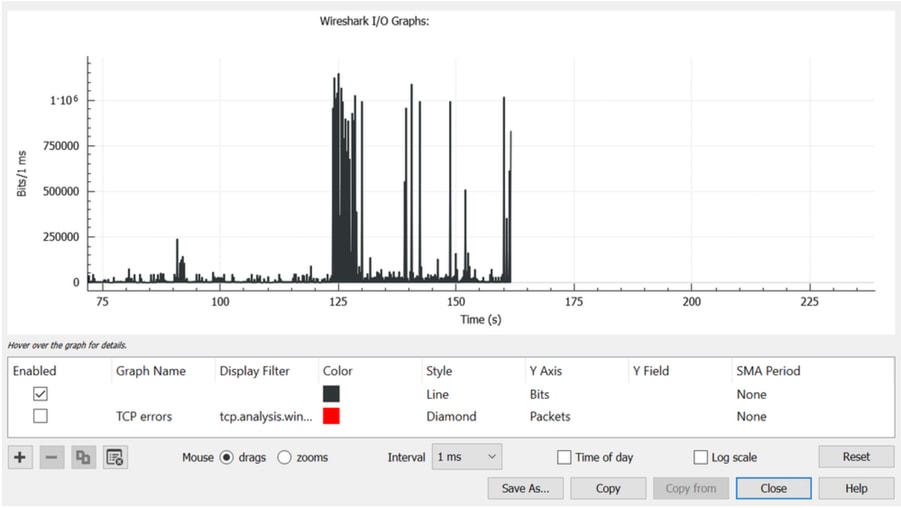
- Open the capture file in Wireshark, then navigate to Statistics > I/O Graph.
- Change the Interval from the default 1 second to 1 millisecond (1 ms).
- Click Reset in order to refresh the graph with the new interval.
- The graph will display traffic in bits per millisecond.
Look for traffic spikes that exceed the forwarding speed of the interface on a millisecond scale (for example, 1,000,000 bits/ms for a 1 GBPS interface). When traffic surpasses this forwarding speed, the switch buffers packets, which can cause congestion and output drops. Identify traffic bursts (microbursts) by observing spikes followed by periods of low or no traffic. In Wireshark, clicking on a spike selects the corresponding packets, allowing further analysis of the traffic that triggered the drops. The next image shows the updated I/O graph for an interface that experienced output drops.
Important Considerations
- Ensure the SPAN source and destination ports have the same or compatible speeds in order to avoid introducing additional drops.
- Capture traffic while output drops are actively increasing to capture relevant bursts.
- Embedded Packet Capture (EPC) is not recommended for this purpose as it limits capture rates and can miss bursts.
Common Misconceptions About Output Drops
Misconception: Any output drop means the network is malfunctioning.
Reality: A small number of output drops is normal in high-speed networks due to microbursts or short traffic spikes.
Misconception: If interface utilization is low, drops must not happen.
Reality: Utilization is measured as an average over time. Microbursts can temporarily exceed interface bandwidth, causing drops even when average utilization is low.
Misconception: Output drops mean the switch hardware is faulty.
Reality: Output drops are typically caused by traffic congestion or bursty traffic, not hardware issues.
Misconception: Increasing buffer allocation will prevent all drops.
Reality: Buffers only absorb temporary bursts. Persistent congestion will still result in packet drops.
Misconception: Only 1G interfaces experience output drops.
Reality: Drops can occur on 10G, 25G, 40G, or higher-speed interfaces when traffic bursts exceed available bandwidth or buffer capacity.
Misconception: QoS must eliminate all drops/prevents packet loss.
Reality: QoS prioritizes important traffic, but it can intentionally drop lower-priority traffic during congestion.
Misconception: Any output drop will cause user impact.
Reality: Many applications use TCP retransmission, which can recover from occasional packet drops without noticeable impact.
Misconception: Drops only occur when interfaces reach 100% utilization.
Reality: Drops can occur during short bursts of traffic, even if average utilization remains low.
Misconception: QoS configuration is always the cause of drops.
Reality: Most drops are caused by traffic patterns or oversubscription, not QoS policies.
Misconception: A healthy network must never have output drops.
Reality: In high-performance sxwitching environments, occasional drops are expected and normal.
Troubleshooting Guides
- Troubleshoot Output Drops on Catalyst 9000 Switches
- Understand Queue Buffer Allocation on Catalyst 9000 Switches
- Cisco Technical Support & Downloads
Revision History
| Revision | Publish Date | Comments |
|---|---|---|
1.0 |
22-Apr-2026
|
Initial Release |

 Feedback
Contact Cisco
- Open a Support Case

- (Requires a Cisco Service Contract)