Verify and Troubleshoot Stackwise on Catalyst 9200 and 9300
Available Languages
Contents
Introduction
This document describes how to troubleshoot common failure scenarios in Stackwise deployments of Catalyst 9200/9200L and 9300/9300L.
Prerequisites
Components Used
This section specifies the Product IDs (PIDs) and associated components relevant to Stackwise with the Catalyst 9000 family.
The information in this document was created from the devices in a specific lab environment. All of the devices used in this document started with a cleared (default) configuration. If your network is live, ensure that you understand the potential impact of any command.
Stackwise Platforms
Ring speed varies based on PIDs. These PIDs support Stackwise:
- Cisco Catalyst 9200 – Stackwise-160
- Cisco Catalyst 9200L – Stackwise-80
- Cisco Catalyst 9300 – Stackwise-480
- Cisco Catalyst 9300L – Stackwise-320
- Cisco Catalyst 9300X – Stackwise-1T
Stackwise Hardware
C9200/C9200L and C9300L PIDs stack kits that contain a stack adapter, which seats into the chassis and a cable and connects to the adaptor. C9300/9300X PID stack kits only require the cable.
Background Information
This article is applicable to Catalyst 9200/9200L, 9300/9300L and 9300X switches.
Stackwise architecture allows a stack of up to 8 switches in a ring topology to achieve a high density of stack bandwidth. The stack architecture expands the switches form factor, throughput, port density, redundancy, provides a single control, and management plane. It simplifies management while allowing for greater resiliency and scalability.
Troubleshoot and Verify Stackwise
Operational issues in established stacks often relate to silent reloads of one or all member devices, with stack merge a common reload reason. This section explains how stack ring instability can induce reloads and other problems, and how to validate the stack ring and troubleshoot related issues.
Stackwise Operation
Connect two or more (up to
Stack Discover Protocol (SDP) is used by switches connected to the stack topology for neighbor discover and role election. After bootup and before the switch software loads completely, there is a 120-second election window where members are discovered, where the active and standby roles are determined.
Active election is determined by the highest priority and then lowest MAC address. With active elected and all members discovered, the standby is elected with the same criteria – next highest priority or next lowest MAC. Some additional points to consider:
- Switch priority is manually configured and the change takes affect after reload.
- Switch numbers remain persistent after reload and if a member is removed.
- Switch number conflicts are resolved by the active.
- Switch numbers do not reflect the physical orientation of switches within the stack
Add or Replace a Member
Several factors must be considered when you implement a new stack or add a member to an established stack. Never connect a powered-on switch into a powered-on stack. Connect new member(s) while powered-down to avoid a stack-merge. These are other points to consider:
- Cisco IOS® XE version must match
- License level must match
- Operational mode (Install vs Bundle) must match
The auto-upgrade feature can be leveraged to resolve these conflict problems when you add a new switch. It is implemented with this command:
C9300-Stack#configure terminal
Enter configuration commands, one per line. End with CNTL/Z.
C9300-Stack(config)#software auto-upgrade enable
C9300-Stack(config)#end
C9300-Stack#
Troubleshoot Stackwise-Related Operational Problems
If communication between the active/standby and members is interrupted, reloads occur. Chronic instability can lead to a situation where the stack splits and merges. Most stack-related instability stems from misalignment of the physical stack media, the stack cables and/or stack adapters. If stack members are chronically unstable, reseat the stack hardware and ensure the cable thumb screws are hand tightened. Use verification commands provided later in this document to determine which member(s) are most impacted.
Problem - Unexpected Reload of One or More Members
The active and standby exchange control traffic between one another, and with the member devices. Reloads occur if communication between stack members and the standby/active is interrupted.
The last reload reason can be seen in the output of the command show version:
C9300-Stack#show version
Cisco IOS XE Software, Version 16.12.05b
Cisco IOS Software [Gibraltar], Catalyst L3 Switch Software (CAT9K_IOSXE), Version 16.12.5b, RELEASE SOFTWARE (fc3)
Technical Support: http://www.cisco.com/techsupport
Copyright (c) 1986-2021 by Cisco Systems, Inc.
Compiled Thu 25-Mar-21 13:21 by mcpre
<snip>
C9300-Stack uptime is 2 days, 1 hour, 18 minutes
Uptime for this control processor is 2 days, 1 hour, 20 minutes
System returned to ROM by Reload Command
System image file is "flash:packages.conf"
Last reload reason: stack merge
These are some common reload reasons when stack instability plays a role:
- Stack Merge
- EHSA Timeout
- Lost both Active and Standby
Run the show logging onboard switch <number> uptime detail command to view the uptime history of a specific switch within the stack:
C9300-Stack#show logging onboard switch 3 uptime detail
------------------------------------------------------------
UPTIME SUMMARY INFORMATION
------------------------------------------------------------
First customer power on : 06/23/2020 04:08:31
Total uptime : 1 years 0 weeks 6 days 23 hours 49 minutes
Total downtime : 0 years 12 weeks 6 days 11 hours 51 minutes
Number of resets : 84
Number of slot changes : 5
Current reset reason : Reload Command
Current reset timestamp : 09/26/2021 14:49:07
Current slot : 3
Chassis type : 22
Current uptime : 0 years 0 weeks 2 days 1 hours 0 minutes
------------------------------------------------------------
UPTIME CONTINUOUS INFORMATION
------------------------------------------------------------
Time Stamp | Reset | Uptime
MM/DD/YYYY HH:MM:SS | Reason | years weeks days hours minutes
------------------------------------------------------------
<snip>
09/06/2021 21:47:16 stack merge    0      0     0   14     0
09/06/2021 21:52:42 stack merge    0      0     0   0      0
09/06/2021 22:06:01 stack merge    0      0     0   0      10
<snip>
09/20/2021 15:48:38 Reload Command 0      0     0   0      25
09/20/2021 16:11:59 Reload Command 0      0     0   0      20
09/26/2021 14:49:07 stack merge    0      0     5   22     0
------------------------------------------------------------
The majority of stack instability related reloads can be resolved with a reseat of the stack hardware. Use verification commands to determine which switches are unstable, how often they reload, and reseat the stack hardware associated with this member.
The show switch stack-ports summary command can be used to quickly identify which devices are unstable:
C9300-Stack#show switch stack-ports summary
Sw#/Port# Port Status Neighbor Cable Length Link OK Link Active Sync OK #Changes to LinkOK In Loopback
------------------------------------------------------------
1/1       OK          2        50cm         Yes     Yes         Yes     1                     No
1/2       OK          3        50cm         Yes     Yes         Yes     6                     No
2/1       OK          3        50cm         Yes     Yes         Yes     8                     No
2/2       OK          1        50cm         Yes     Yes         Yes     6                     No
3/1       OK          1        50cm         Yes     Yes         Yes     6                     No
3/2       OK          2        50cm         Yes     Yes         Yes     1                     No
In this example, switch 2 experiences chronic reloads. You can see both stack ports on this switch show numerous changes to the link status. Switches 1 and 3 do as well, however, these values likely correlate with reloads of switch 2. Reseat the stack hardware that connects switch 1 to switch 2, and the hardware between 2 and 3. The connection between switches 1 and 3 did not flap.
Stack connections can be reseated while the stack runs, but ensure only one link is reseated at a time. Full disconnection of a member switch causes a stack merge upon reintroduction.
There are known software defects on earlier versions of code relevant to Stackwise. If problems persist after you reseat the stack hardware, upgrade to a recommended version or contact TAC. See also:
- Cisco bug ID CSCvq56135
- Cisco bug ID CSCvq48005
- Cisco bug ID CSCvr32460
- Cisco bug ID CSCvn30950
- Cisco bug ID CSCvo62414
There is also a known issue that impacts the stack hardware of Stackwise platforms, which manifests as an authentication failure. This is an example error message from a C9200L:
Stack Adapter Auth Fail : SIF_SERDES_CABLE_EASTBOUND
*** Stack adapter authentication failed on stack port 1 on switch 1

Error-2:
*** Stack adapter authentication failed on stack port 2 on switch 1
Stack Adapter Auth Fail : SIF_SERDES_CABLE_WESTBOUND
See also:
- Cisco bug ID CSCvs42280
- Cisco bug ID CSCvo12056
If this condition is encountered and persists beyond a reload, the component itself can be impacted. Contact the Technical Assistance Center (TAC) for assistance.
Problem - Cannot Add/Replace Member to Stack
If a member does not join, this suggests either the prerequisites for Stackwise have not been met, or there is a problem with the connection between the new member and the rest of the stack.
Ensure prerequisites for Stackwise are met:
- Software version for the new member must match the stack
- License level must match.
- Operational mode (Install vs Bundle) must match
- Stacks of mixed-PID switches are not supported (see data sheet for specific details)
Ensure the stack kit is properly installed; C9200L and C9300L require stack adaptors. Properly orient the hardware with thumbscrews, must be hand tightened. Be careful not to over-tighten the screws.
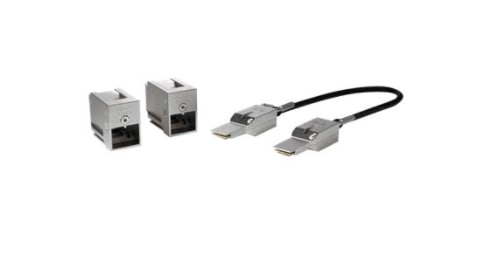 Stackwise-80 Stack Kit (C9200L)
With the C9300 stack kit, specifically the STACK-T1-XXCM, the cables are manufactured in such a way they can seat into the chassis upside-down. Ensure the Cisco logo faces upward, and you can fully seat the thumbscrews to avoid incorrect installation.
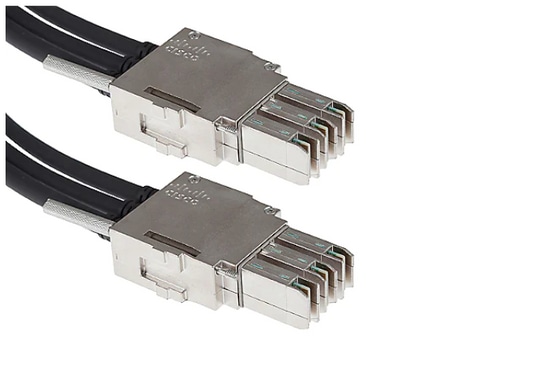 Stackwise-480 Cable Connection

Note: There is a Cisco logo that is milled into the metal. Ensure this logo is right side up and not upside down for proper installation.
If prerequisites are met, and the hardware is properly installed, verify the problematic switch recognizes the stack hardware. This output is specific to the C9200L:
Switch#show inventory
NAME: "c92xxL Stack", DESCR: "c92xxL Stack"
PID: C9200L-24P-4X , VID: V01 , SN: JAE2332006G

NAME: "Switch 1", DESCR: "C9200L-24P-4X" <<<---- This entry represents the chassis
PID: C9200L-24P-4X , VID: V01 , SN: JAE2332006G

NAME: "StackPort1/1", DESCR: "StackPort1/1" <<<--- This entry represents the 50CM cable connected in Stackport 1/1
PID: STACK-T4-50CM , VID: V01 , SN: LCC2325G3XW

NAME: "StackPort1/2", DESCR: "StackPort1/2" <<<--- This entry represents the 50CM cable connected in Stackport 1/2
PID: STACK-T4-50CM , VID: V01 , SN: LCC2325G410

NAME: "StackAdapter1/1", DESCR: "StackAdapter1/1"
PID: C9200-STACK , VID: V01 , SN: JAE2332133J <<<--- This entry represents the stack adapter in Stackport 1/1

NAME: "StackAdapter1/2", DESCR: "StackAdapter1/2"
PID: C9200-STACK , VID: V01 , SN: JAE23321DDK <<<--- This entry represents the stack adapter in Stackport 2/2
If the switch does not recognize one or more of the components of the stack kit, this must be further investigated; Contact TAC for assistance.
Problem - C9300X Mixed Stack Splits into Sub-rings/Mismatched Stack Speeds
High speed (1TB) is introduced with the C9300X. Mixed stacks of C9300X and non-high speed stacks are supported, though the stack ring speed for the entire stack in this case matches the speed of the slowest member.
Mismatches in the stack interface speed results in a split stack. Confirm the stack ring speedby running the show switch stack-ring speed command:
Device#show switch stack-ring speed
Stack Ring Speed         : 1000G
Stack Ring Configuration: Full
Stack Ring Protocol      : StackWise
Stack Ring Next-boot Speed: 1000G
Change the stack ring speed with switch stack-speed [high | low]:
Device# switch stack-speed high
Verify and Validate Stackwise
This section provides commands to verify and validate Stackwise to ensure the stack is set up correctly and operates as expected.
The command show switch detail provides information on the stack hardware, port status, and neighbor details. It also identifies the current active and standby switch and any member switches.
C9300-Stack#show switch detail
Switch/Stack Mac Address : 9077.ee4a.6b00 - Local Mac Address
Mac persistency wait time: Indefinite
H/W Current
Switch# Role Mac Address Priority Version State
------------------------------------------------------------
*1 Active 9077.ee4a.6b00 15 V03 Ready
2 Standby 7cad.4f5f.e000 1 V03 Ready
3 Member 9077.ee4a.6e00 1 V03 Ready

Stack Port Status Neighbors
Switch# Port 1 Port 2 Port 1 Port 2
--------------------------------------------------------
1        OK     OK         2      3
2        OK     OK         3      1
3        OK     OK         1      2
The command show switch stack-ports summary provides more information on the characteristics of the stack ring.
C9300-Stack#show switch stack-ports summary
Sw#/Port# Port Status Neighbor Cable Length Link OK Link Active Sync OK #Changes to LinkOK In Loopback
------------------------------------------------------------
1/1       OK          2        50cm         Yes     Yes         Yes     1                  No
1/2       OK          3        50cm         Yes     Yes         Yes     1                  No
2/1       OK          3        50cm         Yes     Yes         Yes     1                  No
2/2       OK          1        50cm         Yes     Yes         Yes     1                  No
3/1       OK          1        50cm         Yes     Yes         Yes     1                  No
3/2       OK          2        50cm         Yes     Yes         Yes     1                  No
The command show switch stack-bandwidth can quickly identify if the switch is in operation at half or full capacity.
C9300-Stack#show switch stack-bandwidth
Stack Current
Switch# Role Bandwidth State
------------------------------------------------------------
*1      Active  480G   Ready
 2      Standby 480G   Ready
 3      Member  480G   Ready
Contact TAC
If problems persist after remediation has been attempted, contact TAC. Ensure your TAC case is submitted with relevant data to prevent delay. Useful data sets include:
- Output - show technical-support
This utility provides output of a collection of relevant show commands. The output is verbose, keep this in mind when the utility is run. Redirect the output to file or otherwise save the output in text format and upload to your TAC case.
C9300-Stack#show tech-support
Archive file - Binary tracelog archive
This utility leverages the platform persistent trace capabilities. Use these commands to generate an archive, which is saved to local flash media.
C9300-Stack#request platform software trace slot switch 1 r0 archive
Creating archive file [flash:C9300-Stack_1_RP_0_trace_archive-20210929-151348.tar.gz]
Done with creation of the archive file: [flash:C9300-Stack_1_RP_0_trace_archive-20210929-151348.tar.gz]
C9300-Stack#request platform software trace slot switch 2 r0 archive
Creating archive file [flash-2:RP_0_trace_archive-20210929-151358.tar.gz]
Done with creation of the archive file: [flash-2:RP_0_trace_archive-20210929-151358.tar.gz]
C9300-Stack#request platform software trace slot switch 3 r0 archive
Creating archive file [flash-3:RP_0_trace_archive-20210929-151450.tar.gz]
Done with creation of the archive file: [flash-3:RP_0_trace_archive-20210929-151450.tar.gz]
The utility runs for each member. The filename and location is specified in the output of the utility. The file writes to the local flash media of the switch where the utility was run. Attach the files to the TAC case.
An unexpected reload is often preceded by a binary trace dump to local media. These archives are useful and represent data that can be missed in a manually-created archive.
Check within the flash/crash info of each member to see if relevant files have been written. Look for files written directly prior to when the system recovered.
Run the show version or show logging onboard switch <number> detail commands to determine the time when the system restarted.
C9300-Stack#show version

Cisco IOS XE Software, Version 16.12.01
Cisco IOS Software [Gibraltar], Catalyst L3 Switch Software (CAT9K_IOSXE), Version 16.12.1, RELEASE SOFTWARE (fc4)
Technical Support: http://www.cisco.com/techsupport
Copyright (c) 1986-2019 by Cisco Systems, Inc.
Compiled Tue 30-Jul-19 19:26 by mcpre
<snip>

<snip>
C9300-Stack uptime is 5 hours, 5 minutes
Uptime for this control processor is 4 hours, 50 minutes
System returned to ROM by SSO Switchover
System restarted at 14:04:40 EST Sun Feb 14 2021
System image file is "flash:packages.conf"
Last reload reason: stack merge
C9300-Stack#show logging onboard switch 2 uptime detail
------------------------------------------------------------
UPTIME SUMMARY INFORMATION
------------------------------------------------------------
First customer power on : 02/12/2020 00:56:09
Total uptime : 0 years 0 weeks 5 days 0 hours 28 minutes
Total downtime : 0 years 13 weeks 0 days 18 hours 31 minutes
Number of resets : 22
Number of slot changes : 1
Current reset reason : stack merge
Current reset timestamp : 02/14/2021 14:04:40
Current slot : 2
Chassis type : 52
Current uptime : 0 years 0 weeks 0 days 8 hours 0 minutes
------------------------------------------------------------
<snip>
Look for archives written that correspond with the system reload, or occur directly prior. File names that include system-report usually contain workable information that TAC can use for investigation.
TAC can identify additional archives of interest:
C9300-Stack#dir crashinfo:

-#- --length-- ---------date/time--------- path
2 16384 Feb 14 2021 18:51:37.0000000000 +00:00 tracelogs
3 1623 Feb 14 2021 14:02:08.0000000000 +00:00 tracelogs/flashutil_R0-0.7398_0.20210214190148.bin.gz
4 358 Feb 14 2021 14:02:08.0000000000 +00:00 tracelogs/binos_R0-0.6831_0.20210214190148.bin.gz
5 63823 Feb 12 2021 06:45:15.0000000000 +00:00 tracelogs/dmesg
6 10 Feb 12 2021 06:45:15.0000000000 +00:00 tracelogs/timestamp
7 935 Feb 14 2021 14:02:08.0000000000 +00:00 tracelogs/install_engine_R0-0.3330_0.20210214190144.bin.gz
8 730 Feb 14 2021 14:02:08.0000000000 +00:00 tracelogs/tdl_boottime_R0-0.6801_0.20210214190148.bin.gz
9 1149 Feb 14 2021 14:02:08.0000000000 +00:00 tracelogs/issu_boottime_R0-0.6809_0.20210214190148.bin.gz
<snip>
271 2509408 Feb 14 2021 13:41:46.0000000000 +00:00 system-report_2_20210214-134145-EST.tar.gz
272 1813204 Feb 14 2021 14:00:24.0000000000 +00:00 system-report_2_20210214-140023-EST.tar.gz
Summary
Immediately address chronic instability where one or more switches reload several times a day by a reseat of the stack kit.
For stack-related reloads where one or more members reload unexpectedly, determine which members are unstable and ensure these switches are properly connected to the stack. If problems persist, ensure your switches run the recommended code and engage TAC.
Related Information
- Cisco Stackwise Architecture on Catalyst 9200 Series Switches White Paper
- Catalyst 9300 Stackwise System Architecture White Paper
- Stacking and High Availability Configuration Guide, Cisco IOS XE Amsterdam 17.3.x (Catalyst 9200 Switches)
- Stacking and High Availability Configuration Guide, Cisco IOS XE Bengaluru 17.5.x (Catalyst 9300 Switches)
- Technical Support & Documentation - Cisco Systems
Revision History
| Revision | Publish Date | Comments |
|---|---|---|
4.0 |
07-Aug-2026
|
Updated spelling, grammar, inserted horizontal lines to separate sections for readability. |
3.0 |
11-May-2023
|
Added Legal Disclaimer.
Updated Introduction, Machine Translation, Style Requirements, Branding Requirements, Gerunds and Formatting. |
2.0 |
11-Feb-2022
|
Addressed problems flagged in CCW, and provided override reason for those remaining. |
1.0 |
11-Feb-2022
|
Initial Release |

 Feedback
Contact Cisco
- Open a Support Case

- (Requires a Cisco Service Contract)