Configure AutoQoS on Catalyst 9000 Switches
Available Languages
Introduction
This document describes how to configure AutoQoS on Catalyst 9000 switches.
Prerequisites
Requirements
There are no specific requirements for this document.
Components Used
The information in this document is based on these software and hardware versions:
- Catalyst 9000 Series switches
The information in this document was created from the devices in a specific lab environment. All of the devices used in this document started with a cleared (default) configuration. If your network is live, ensure that you understand the potential impact of any command.
Background Information
AutoQoS is a feature that simplifies the QoS deployment on the network by using templates that adheres to RFC 4594 recommendations for marking and provisioning medianet application classes.
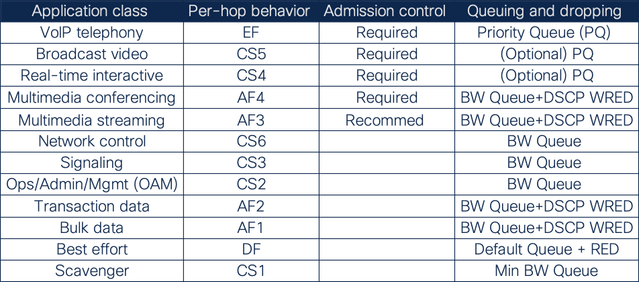 1 Application chart
Configure
These options are available to configure AutoQoS on Catalyst 9000 switches.
auto qos trust:This option configures the port to statically trust either CoS or DSCP.
- auto qos trust {cos | dscp} If neither CoS nor DSCP is explicitly specified, the auto qos trust command configures CoS-trust on Layer 2 switch ports and DSCP-trust on Layer 3 routed interfaces.
auto qos video:this option can be used for Cisco TelePresence Systems (with the cts keyword) as well as for Cisco IP video surveillance cameras (with the ip-camera keyword).
- auto qos video [cts | ip-camera]
auto qos classify {police}:This command generates a QoS configuration for untrusted interfaces. The configuration places a service-policy on the interface to classify traffic coming from untrusted desktops/devices and mark them accordingly.
- auto qos classify {police}
auto qos voip:This option provides legacy support for AutoQoS VoIP IP telephony deployments.
- auto qos voip [cisco-phone | cisco-softphone | trust]
If the port is connected to a Cisco IP Phone, the QoS labels of incoming packets are only trusted (conditional trust through CDP) when the telephone is detected.
Some configuration examples:
- Cisco IP phones
auto qos voip cisco-phone
- Cisco TelePresence Systems
auto qos video cts
- Cisco IP video surveillance cameras
auto qos video ip-camera
- Cisco digital media players
auto qos video media-player
This example features a catalyst 9300 switch with a Cisco IP phone connected on port GigabitEthernet1/0/1.
C9300#show platform
Switch  Ports    Model                Serial No.   MAC address     Hw Ver.       Sw Ver.
------  -----   ---------             -----------  --------------  -------       --------
 1       65     C9300-48U             FCW2152G03C  501c.b06e.d300  V01           17.09.05
Switch/Stack Mac Address : 501c.b06e.d300 - Local Mac Address
Mac persistency wait time: Indefinite
                                   Current
Switch#   Role        Priority      State
-------------------------------------------
*1       Active          1          Ready
C9300#show cdp neighbors

Capability Codes: R - Router, T - Trans Bridge, B - Source Route Bridge
                  S - Switch, H - Host, I - IGMP, r - Repeater, P - Phone,
                  D - Remote, C - CVTA, M - Two-port Mac Relay

Device ID        Local Intrfce     Holdtme    Capability  Platform  Port ID
SEPD4ADBDCE1516  Gig 1/0/1         176             H P M  IP Phone  Port 1

Total cdp entries displayed : 1
To enable AutoQoS, enter the interface configuration mode and add the command auto qos voip cisco-phone.
C9300(config)#interface gigabitEthernet 1/0/1
C9300(config-if)#auto qos voip cisco-phone
C9300(config-if)#end
After the configuration is applied, the next commands are automatically added to the port configuration.
C9300#show running-config interface gi1/0/1
Building configuration...

Current configuration : 199 bytes
!
interface GigabitEthernet1/0/1
trust device cisco-phone
auto qos voip cisco-phone
service-policy input AutoQos-4.0-CiscoPhone-Input-Policy
service-policy output AutoQos-4.0-Output-Policy
end
Observe that there is an input and output AutoQoS policy configured.
To verify and see the template policy in more detail, use the show policy-map command.
C9300#show policy-map interface gi1/0/1
GigabitEthernet1/0/1

Service-policy input: AutoQos-4.0-CiscoPhone-Input-Policy

 Class-map: AutoQos-4.0-Voip-Data-CiscoPhone-Class (match-any)
   0 packets
   Match: cos 5
   QoS Set
    dscp ef
   police:
       cir 128000 bps, bc 8000 bytes
     conformed 0 bytes; actions:
       transmit
     exceeded 0 bytes; actions:
       set-dscp-transmit dscp table policed-dscp
     conformed 0000 bps, exceeded 0000 bps

 Class-map: AutoQos-4.0-Voip-Signal-CiscoPhone-Class (match-any)
   0 packets
   Match: cos 3
   QoS Set
    dscp cs3
   police:
       cir 32000 bps, bc 8000 bytes
     conformed 0 bytes; actions:
       transmit
     exceeded 0 bytes; actions:
       set-dscp-transmit dscp table policed-dscp
     conformed 0000 bps, exceeded 0000 bps

 Class-map: AutoQos-4.0-Default-Class (match-any)
   0 packets
   Match: access-group name AutoQos-4.0-Acl-Default
   QoS Set
    dscp default

 Class-map: class-default (match-any)
   4 packets
   Match: any

Service-policy output: AutoQos-4.0-Output-Policy

  queue stats for all priority classes:
    Queueing
    priority level 1

    (total drops) 0
    (bytes output) 3913

 Class-map: AutoQos-4.0-Output-Priority-Queue (match-any)
   0 packets
   Match: dscp cs4 (32) cs5 (40) ef (46)
   Match: cos 5
   Priority: 30% (300000 kbps), burst bytes 7500000,

   Priority Level: 1

 Class-map: AutoQos-4.0-Output-Control-Mgmt-Queue (match-any)
   0 packets
   Match: dscp cs2 (16) cs3 (24) cs6 (48) cs7 (56)
   Match: cos 3
   Queueing

   queue-limit dscp 16 percent 80
   queue-limit dscp 24 percent 90
   queue-limit dscp 48 percent 100
   queue-limit dscp 56 percent 100
   (total drops) 0
   (bytes output) 0
   bandwidth remaining 10%
   queue-buffers ratio 10

 Class-map: AutoQos-4.0-Output-Multimedia-Conf-Queue (match-any)
   0 packets
   Match: dscp af41 (34) af42 (36) af43 (38)
   Match: cos 4
   Queueing

   (total drops) 0
   (bytes output) 0
   bandwidth remaining 10%
   queue-buffers ratio 10

 Class-map: AutoQos-4.0-Output-Trans-Data-Queue (match-any)
   0 packets
   Match: dscp af21 (18) af22 (20) af23 (22)
   Match: cos 2
   Queueing

   (total drops) 0
   (bytes output) 0
   bandwidth remaining 10%
   queue-buffers ratio 10

 Class-map: AutoQos-4.0-Output-Bulk-Data-Queue (match-any)
   0 packets
   Match: dscp af11 (10) af12 (12) af13 (14)
   Match: cos 1
   Queueing

   (total drops) 0
   (bytes output) 0
   bandwidth remaining 4%
   queue-buffers ratio 10

 Class-map: AutoQos-4.0-Output-Scavenger-Queue (match-any)
   0 packets
   Match: dscp cs1 (8)
   Queueing

   (total drops) 0
   (bytes output) 0
   bandwidth remaining 1%
   queue-buffers ratio 10

 Class-map: AutoQos-4.0-Output-Multimedia-Strm-Queue (match-any)
   0 packets
   Match: dscp af31 (26) af32 (28) af33 (30)
   Queueing

   (total drops) 0
   (bytes output) 0
   bandwidth remaining 10%
   queue-buffers ratio 10

 Class-map: class-default (match-any)
   0 packets
   Match: any
   Queueing

   (total drops) 0
   (bytes output) 1434
   bandwidth remaining 25%
   queue-buffers ratio 25
It is completely normal to see these logs when the Cisco IP phone is connected or disconnected in a port configure with AutoQoS.
%SWITCH_QOS_TB-5-TRUST_DEVICE_LOST: cisco-phone no longer detected on port Gi1/0/1, operational port trust state is now untrusted.
%SWITCH_QOS_TB-5-TRUST_DEVICE_DETECTED: cisco-phone detected on port Gi1/0/1, port configured trust state is now operational.

Note:
1. AutoQoS uses the conditional trust model that configures the interface to dynamically accept markings from endpoints that have met a specific condition, such as a successful Cisco Discovery Protocol negotiation.
2. The command auto qos voip cisco-phone cannot be configured for IP phones that support video because this option overwrites DSCP markings of video packets.
Revision History
| Revision | Publish Date | Comments |
|---|---|---|
2.0 |
29-Jun-2026
|
Recert |
1.0 |
26-Jul-2024
|
Initial Release |

 Feedback
Contact Cisco
- Open a Support Case

- (Requires a Cisco Service Contract)