Recover Password for Catalyst Fixed Configuration Switches

Available Languages
Introduction
This document describes the password recovery procedures for legacy Cisco Catalyst Layer 2 and Layer 3 fixed-configuration switches.
Prerequisites
Requirements
There are no specific requirements for this document.
Components Used
This document is based on the 2900XL/3500XL, 2940, 2950/2955, 2960, 2970, 3550, 3560, and 3750 Series Switches.

Note: This document is retained as a reference for password recovery on the legacy Cisco Catalyst switch series listed earlier. It does not cover current Cisco Catalyst platforms.
The information in this document was created from the devices in a specific lab environment. All of the devices used in this document started with a cleared (default) configuration. If your network is live, ensure that you understand the potential impact of any command.
Conventions
For more information on document conventions, refer to the Cisco Technical Tips Conventions.
Background Information
This document describes the password recovery procedure for the Cisco Catalyst Layer 2 fixed configuration switches 2900XL/3500XL, 2940, 2950/2955, 2960, and 2970 Series, and the Cisco Catalyst Layer 3 fixed configuration switches 3550, 3560, and 3750 Series.
Recovery Procedure
To recover the password:
1. Attach a terminal or PC with terminal emulation (for example, Hyper Terminal) to the console port of the switch.
Use these terminal settings:
-
Bits per second (baud): 9600
-
Data bits: 8
-
Parity: None
-
Stop bits: 1
-
Flow Control: Xon/Xoff
1. Unplug the power cable.
2. Power the switch and bring it to the switch: prompt:
For Series Switches 2900XL, 3500XL, 2940, 2950, 2960, 2970, 3550, 3560, and 3750 complete these steps:
3. Hold down the mode button located on the left side of the front panel, while you reconnect the power cable to the switch.
| Catalyst Switch Series |
LED Behavior and Mode Button Release Action |
|---|---|
| 2900XL, 3500XL, 3550 |
Release the Mode button when the LED over Port1X goes out. |
| 2940, 2950 |
Release the Mode button after approximately 5 seconds when the Status (STAT) LED goes out. When you release the Mode button, the SYST LED blinks amber. |
| 2960, 2970 |
Release the Mode button when the SYST LED blinks amber and then turns solid green. When you release the Mode button, the SYST LED blinks green. |
| 3560, 3750 |
Release the Mode button after approximately 15 seconds when the SYST LED turns solid green. When you release the Mode button, the SYST LED blinks green. |
Catalyst 3524XL
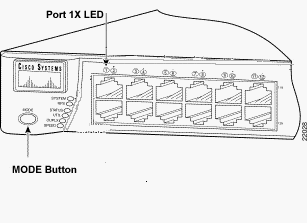 Catalyst 3524XL
Catalyst 2950-24
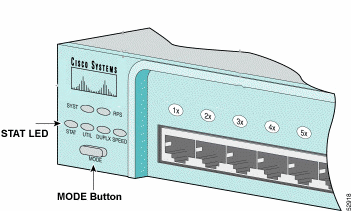 Catalyst 2950-24
For 2955 Series Switches Only:
The Catalyst 2955 series switches does not use an external mode button for password recovery. Instead, the switch boot loader uses the break-key detection to stop the automatic boot sequence for password recovery purposes. The break sequence is determined by the terminal application and operating system used. Hyperterm that runs on Windows 2000 uses Ctrl + Break. On a workstation that runs UNIX, Ctrl-C is the break key. The next example uses Hyperterm to break into switch: mode on a 2955.
C2955 Boot Loader (C2955-HBOOT-M) Version 12.1(0.0.514), CISCO DEVELOPMENT TEST
VERSION
Compiled Fri 13-Dec-02 17:38 by madison
WS-C2955T-12 starting...
Base ethernet MAC Address: 00:0b:be:b6:ee:00
Xmodem file system is available.
Initializing Flash...
flashfs[0]: 19 files, 2 directories
flashfs[0]: 0 orphaned files, 0 orphaned directories
flashfs[0]: Total bytes: 7741440
flashfs[0]: Bytes used: 4510720
flashfs[0]: Bytes available: 3230720
flashfs[0]: flashfs fsck took 7 seconds.
...done initializing flash.
Boot Sector Filesystem (bs:) installed, fsid: 3
Parameter Block Filesystem (pb:) installed, fsid: 4

*** The system will autoboot in 15 seconds ***
Send break character to prevent autobooting.


!--- Wait until you see this message before !--- you issue the break sequence.
!--- Ctrl+Break is entered using Hyperterm.


The system has been interrupted prior to initializing the flash file system to finish
loading the operating system software:

flash_init
load_helper
boot
switch:
4. Run the flash_init command.
switch: flash_init
Initializing Flash...
flashfs[0]: 143 files, 4 directories
flashfs[0]: 0 orphaned files, 0 orphaned directories
flashfs[0]: Total bytes: 3612672
flashfs[0]: Bytes used: 2729472
flashfs[0]: Bytes available: 883200
flashfs[0]: flashfs fsck took 86 seconds
....done Initializing Flash.
Boot Sector Filesystem (bs:) installed, fsid: 3
Parameter Block Filesystem (pb:) installed, fsid: 4
switch:

!--- This output is from a 2900XL switch. Output from
!--- other switches will vary slightly.
5. Run the load_helper command.
switch: load_helper
switch:
6. Run the dir flash: command.
The switch file system is displayed:
switch: dir flash:
Directory of flash:/
2    -rwx  1803357   <date>               c3500xl-c3h2s-mz.120-5.WC7.bin

!--- This is the current version of software.

4    -rwx  1131      <date>               config.text

!--- This is the configuration file.

5    -rwx  109       <date>               info
6    -rwx  389       <date>               env_vars
7    drwx  640       <date>               html
18   -rwx  109       <date>               info.ver
403968 bytes available (3208704 bytes used)
switch:

!--- This output is from a 3500XL switch. Output from
!--- other switches will vary slightly.
7. Enter rename flash:config.text flash:config.old to rename the configuration file.
switch: rename flash:config.text flash:config.old
switch:

!--- The config.text file contains the password
!--- definition.
8. Run the boot command to boot the system.
switch: boot
Loading "flash:c3500xl-c3h2s-mz.120-5.WC7.bin"...###############################
################################################################################
######################################################################
File "flash:c3500xl-c3h2s-mz.120-5.WC7.bin" uncompressed and installed, entry po
int: 0x3000
executing...

!--- Output suppressed.
!--- This output is from a 3500XL switch. Output from other switches
!--- will vary slightly.
9. Enter "n" at the prompt to abort the initial configuration dialog.
--- System Configuration Dialog ---
At any point you can enter a question mark '?' for help.
Use ctrl-c to abort configuration dialog at any prompt.
Default settings are in square brackets '[]'.
Continue with configuration dialog? [yes/no]: n

!--- Type "n" for no.

Press RETURN to get started.

!--- Press Return or Enter.

Switch>

!--- The Switch> prompt is displayed.
10. At the switch prompt, type en to enter enable mode.
Switch>en
Switch#
11. Type rename flash:config.old flash:config.text to rename the configuration file with its original name.
Switch#rename flash:config.old flash:config.text
Destination filename [config.text]

!--- Press Return or Enter.

Switch#
12. Copy the configuration file into memory.
Switch#copy flash:config.text system:running-config
Destination filename [running-config]?

!--- Press Return or Enter.

1131 bytes copied in 0.760 secs
Sw1#
The configuration file is now reloaded.
13. Overwrite the current passwords you do not know. Choose a strong password with at least one capital letter, one number, and one special character.
Sw1#configure terminal


!--- To overwrite existing secret password

Sw1(config)#enable secret <new_secret_password>


!--- To overwrite existing enable password

Sw1(config)#enable password <new_enable_password>


!--- To overwrite existing vty password

Sw1(config)#line vty 0 15
Sw1(config-line)#password <new_vty_password>

Sw1(config-line)#login


!--- To overwrite existing console password

Sw1(config-line)#line con 0
Sw1(config-line)#password <new_console_password>
14. Write the running configuration to the configuration file with the write memory command.
Sw1#write memory
Building configuration...
[OK]
Sw1#
Related Information
Revision History
| Revision | Publish Date | Comments |
|---|---|---|
2.0 |
08-Oct-2026
|
Updated spelling, grammar, inserted horizontal lines to separate sections for readability, this is a recert. |
1.0 |
04-May-2014
|
Initial Release |
 Feedback