Proactive RMA for Intersight Connected Devices
Available Languages
Introduction
This document describes the Proactive RMA system. Leveraging telemetry from connected products, Cisco is able to deliver a near effortless customer experience when products experience certain failures. With no human interaction, a Service Request (SR) and a Return Material Authorization (RMA) will be authorized proactively, to significantly reduce the amount of time from failure to replacement. This document covers information about this program, what actions customers must take, devices / issues that are covered by this program and available configurations (opt-out, contact configuration).
Requirements
- The impacted device must be connected and claimed to either Intersight Cloud directly or via connected virtual appliance (Appliance supported since July 2021). See the Intersight Getting Started guide to get a device connected and claimed. Private Virtual Appliances are not supported. Please read the Nutanix specific section for caveats and requirements for those devices.
- For Connected Virtual Appliances, Proactive RMA must be enabled, see here for more information on how to enable this.
- The impacted device must be covered under a valid support contract (Example: Smart Net Total Care - SNTC) which entitles hardware replacement.
- No license is required for Intersight SaaS (no-license tier), minimum of Essentials is required on the Connected Virtual Appliance (CVA).
Scope
All customers and all devices which meet the stated requirements are in scope. This program operates on an opt-out basis, although to operate on connected virtual appliances the Proactive RMA feature must be enabled. Aside from the failure types mentioned in this document, additional hardware failure scenarios / faults are in consideration for coverage in this program.
Memory Errors
UCS Memory Failures (DIMM Inoperable Fault F0185, IMM Fault code MemoryUnitUncorrectableError). These represent uncorrectable errors as well as DIMMs in the same channel to DIMMs that have experienced an uncorrectable error (UECC). While DIMMs that are in the same channel will experience an F0185 fault prior to 4.2(2a), they have not truly failed and will not be replaced. Please see Cisco bug ID CSCvt29521 for more information about this behavior. Note: All management modes (Standalone, UMM - UCSM Managed Mode, IMM - Intersight Managed Mode) are supported for this failure type.
Caveats:
- Servers that experience more than one Degraded/Inoperable DIMM fault are not covered - customers will have to manually open cases for these issues.
- Instances of Cisco bug ID CSCvo48003 (“M4 Blade - Patrol Scrubber logs DIMM address with 4k boundary”) or Cisco bug ID CSCvo48006 (“M4 Rack - Patrol Scrubber logs DIMM address with 4k boundary”) will be excluded. Customers can open a TAC Case for these and assess the bug impact in their environment.
UCS Drive Failures
UCS Disk Failures (UCS fault codes F1732, F0181, F0996 and IMM fault codes StoragePhysicalDiskFailed, StoragePhysicalDiskOffline, StoragePhysicalDiskPredictiveFailure, StoragePhysicalDiskSelfTestFail and StoragePhysicalDiskUnConfiguredBad) are covered by this feature. Drives in a Predictive Failure or Failed state raise these faults and are covered.
Caveats:
- Disks with faults but in an apparent non-failed state (example : foreign configuration, copyback, rebuilding, etc) will be excluded.
- Disks using a passthrough or non-RAID HBA storage controller or disks in JBOD mode will rarely have sufficient log evidence in the tech support files to determine if a disk has failed and will not be replaced if evidence cannot be found. A sub-set of disk failures on non-RAID HBA do create appropriate fault and have sufficient log evidence to be included. See both the Hyperflex Drive Failure and Nutanix Drive Failures sections for situations where HBA pass through drives will be supported.
Hyperflex Drive Failures
Permanently failed caching and persistent disks within Hyperflex (sometimes called: Blacklisted / Failed Permanently / Retired) are covered by this feature.
Note: The cluster will auto-heal and be healthy shortly after the disk fails, in these instances a disk must still be replaced.
Caveats:
- Clusters with more than one drive failure will not be operated on.
- Drives that match FN70234 will be excluded.
- Drives that match the Models affected by Cisco bug ID CSCvo58565 will be excluded.
C-Series Fan Failures
Fan failures within a C-Series server that is in standalone, UMM (UCSM Managed Mode) or IMM (Intersight Managed Mode) are supported. Fault codes: F0484, F0397, F0794 are in scope.
Caveats:
- Multiple fan failures at the same time are likely not truly fan hardware failure and are not supported at this time
- Transient fan failures will not generate a Proactive RMA Case
Fabric Interconnect Fan Failures
Fan failures within a Fabric Interconnect that is in UMM (UCSM Manged Mode) are supported. Fault codes: F0484, F0397 are in scope.
Caveats:
- IMM Managed FIs are not yet supported
- Multiple fan failures at the same time are likely not truly fan hardware failure and are not supported at this time
Nutanix Drive Failures
Failed drives in Nutanix clusters on Cisco hardware are supported.
Caveats:
- Nutanix cluster must be connected to Nutanix cloud
- Nutanix BreakFixContact email must be configured, or the hardware must be connected to Intersight.
- The user from either the BreakFixContact or from Intersight must be entitled to open cases for the contract covering the server in question.
What to Expect
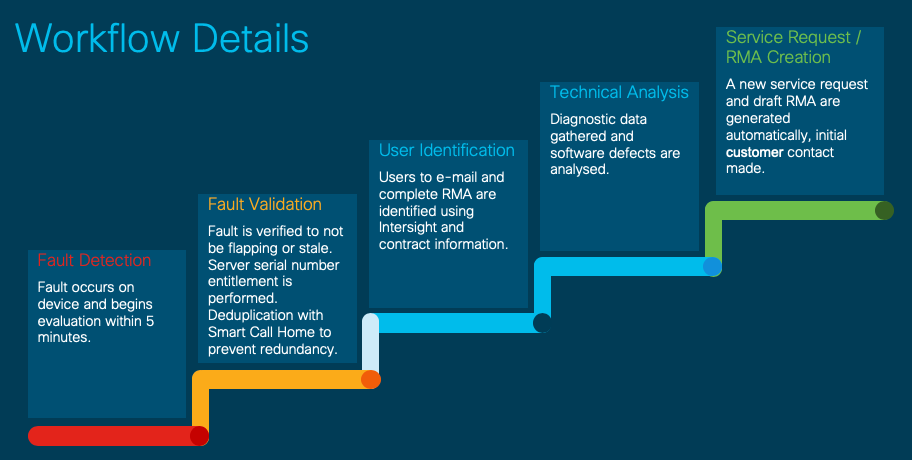
When a covered fault event occurs, an SR and an RMA are generated. Points of interest:
- Emails will be from sherholm@cisco.com.
- Case will be created with either the configured email (See the advanced configuration section below) or the last entitled user that logged into Intersight.
- The other users in the Intersight account who are entitled under the contract are copied on the email. If users are explicitly configured (via tags, see the Advanced Configuration (optional) section), only configured users will receive the email.
- Any entitled user can take ownership of the RMA and fill out the required details. Within the RMA tool there is a Transfer Ownership option.
- The Cisco RMA tool (Product Returns and Replacement - PRR) will send reminders to fill out the draft RMA to the user with whom the case was opened.
After service request creation, customers will receive an e-mail describing the issue and providing actionable steps, here is an example:
From: sherholm@cisco.com
To: bob@example.com
Subject: [Action Required] SR: 600000000 - Proactive Replacement of Memory Module [Connected via Intersight]

Hello Bob,

I am writing to let you know that Cisco has received a fault message from your Cisco UCS server connected by Cisco Intersight.
The fault indicates that a memory DIMM module has failed and needs replacing. I have automatically created a TAC Case for
you (SR 600000000) and have created the RMA to ship you the replacement DIMM. I  just need you to click the RMA link and
verify your shipping address so the replacement part can be shipped out to you: https://ibpm.cisco.com/rma/home/?RMANumber=800000000

Note: If you have difficulty loading the link above, please contact LSC at one of the following manners:
https://www.cisco.com/c/en/us/buy/logistics-support-center.html

Here is some more information about the failed DIMM and the server it's installed in:
Domain Name: ucs-domain
Domain IP Address: 192.0.2.1
Server Serial Number: SERIAL
Server Name: HOSTNAME
Server Service Profile: org-root/SERVICEPROFILENAME
Server User Label: USER_LABEL
Fault Description: DIMM DIMM_H1 on server 1/1 operability: inoperable
Link to server in Intersight: https://intersight.com/an/compute/physical-summaries/moid/server/
Link to Fault in Intersight: https://intersight.com/an/cond/alarms/?Moid=moid

Hardware replacement guide available here:
<link to replacement guide for the specific server type>

For more information on this feature of Intersight see:
<link to this document>

Please let me know if you have further questions,

Sincerely,

Sherlock
Technical Consulting Engineer, Virtual
Cisco Customer Experience
Email: sherholm@cisco.com
Benefits
- Significantly reduced effort to receive a replacement part.
- Auto creation of SR - faster reaction time to event.
- Pre-authorization of RMA.
- Ability to fill out RMA details right after contact.
- Automatic collection of targeted diagnostic data.
- Software defect exclusion - software failures which appear as hardware failures will not generate unnecessary RMAs.
Additional Details
Workflow Details
Advanced Configuration (optional)
Two advanced configuration options are supported at this time. Configuration options are set via tags within Intersight.
The tags discussed in this section can be configured at any of the listed objects within Intersight:
- Account (via GUI)
- Organization (via API)
- Target / Registered Device (via API)
For customers with the Connected Virtual Appliance, tags can be configured either on the appliance itself or on Intersight Cloud.
For more information on settings tags, please see the Setting Tags in Intersight document.
Explicitly Configure a Contact
Customers can explicitly configure the email address(es) they wish to be associated with both the SR and the RMA. The tag name/key is "AutoRMAEmail" and the value is a CSV list of emails that you wish to notify and entitle the case with. Proactive RMA will use a first match basis and analyze emails in a left-to-right manner. For example if you use "user@example.com,user2@example.com" user@example.com will be attempted first, however all emails will be copied.

Note: Warning: For a case to be opened at least one email in the CSV list must correlate to a valid CCO Account that is associated to the contract that the device serial number is covered under.
In other words, if none of the AutoRMAEmail addresses are on the contract which covers the device, then the AutoRMAEmail addresses will be ignored.
Proactive RMA will fall back to the default behavior of emailing everyone who has an Intersight account and is on the contract which covers the device.
Please note that Intersight has a character limit for tags of 255 characters. Because of this, Proactive RMA supports any tag that starts with AutoRMAEmail (eg: AutoRMAEmail1, AutoRMAEmail2) and will concatenate all of the values together.
If using the API to configure tags, the tag needs to look similar to:
{"Key":"AutoRMAEmail","Value":"email1@example.com,email2@example.com"}
See the Setting Tags in Intersight document discussing details on tags.
Opting out of Proactive RMAs
To opt out,
If using the API the tag must be as shown like.
{"Key":"AutoRMA","Value":"False"}
To opt back into Proactive RMAs (if opted out), users can either remove the tag entirely or change the tag to:
{"Key":"AutoRMA","Value":"True"}
Please note - Users do NOT need to opt-in via tags if they have not opted out, they are automatically enabled unless they have opted out.
FAQ
Q: What information will Cisco collect for these faults?
A: Fault Details (Time/Device/Etc.), Inventory information (Model / Serial / Firmware), applicable diagnostic data (eg: CIMC/UCSM/HX Tech Supports).
Q: What is the reaction time?
A: Cases are typically opened, and the RMA created, within one hour after fault occurs. This includes all time needed to generate and process the appropriate diagnostic data.
Q: Who can submit the RMA?
A: Any entitled user on the contract the device is covered by can submit the RMA, it does not need to be the same individual who is the contact on the TAC service request. The RMA is initially associated with one specific CCO account. Users who wish to fill out the RMA can click the "Actions" button in the top right hand corner on the RMA and select "Transfer Assignment". In the subsequent screen, leave your CCO populated in the input box and click "Submit".
Q: I am seeing an error when loading the RMA, how can I submit this RMA?
A: Occasionally stale cookies / browser cache can cause issues when loading the RMA, please first try loading the RMA in a private browsing window or a different browser. If the issue persists please email us back asking for help.
Revision History
| Revision | Publish Date | Comments |
|---|---|---|
5.0 |
17-Jan-2025
|
Addition of IMM supported features |
4.0 |
31-Jan-2023
|
Updating to include support for IMM for DIMM failures, C-Series fan failures and FI Fan Failures |
3.0 |
01-Sep-2021
|
Updating FAQs to include common issues with RMA submission |
2.0 |
31-Aug-2021
|
Additional functionality now described:
1. Intersight appliance adoption
2. UCS Drive Failure coverage
3. HX Drive Failure coverage |
1.0 |
14-Jan-2020
|
Initial Release |

 Feedback
Contact Cisco
- Open a Support Case

- (Requires a Cisco Service Contract)