Introduction
This document describes how to configure the Multi-org or MSP console for Umbrella to restrict a parent admin from modifying a specific child organization.
Overview
By default, administrators belonging to the parent organization have full admin access to all child organizations. However, in certain scenarios, you might wish to restrict a parent admin from modifying a specific child organization.
While this is not currently possible within the Multi-org or MSP consoles, it is possible to achieve the same result using the workaround described in this article.
Steps to restrict a parent admin
To restrict a parent admin from a specific child organization, use these steps:
- As a full admin to the child org (including an existing parent admin), log into the child organization's Umbrella Dashboard
- Under Admin > Accounts, click the 'Add' button in the top right.
- Enter the email address of the parent admin whom you would like to restrict, and assign the 'Block Page Bypass' role.
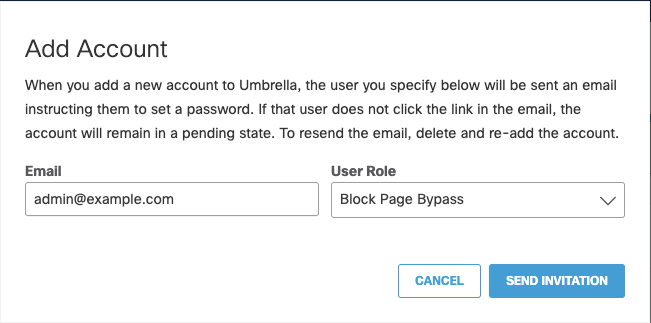
4. Click 'Send Invitation'. The account is displayed in the list of accounts as 'Pending'.
5. Have the restricted parent admin open their email, and click on the 'Confirm Invite' button.
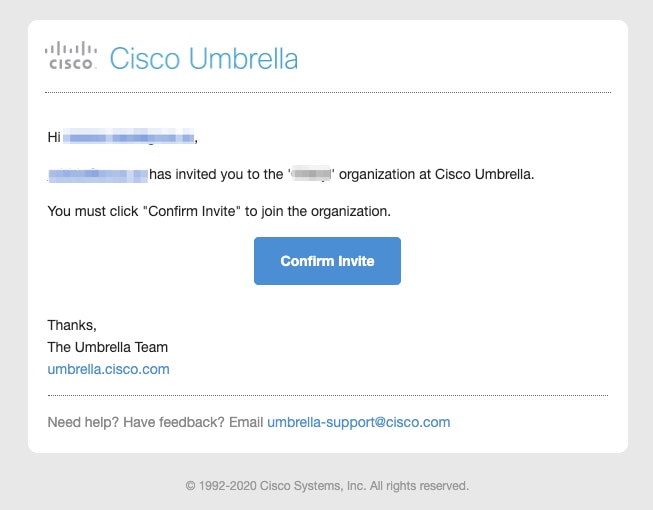
6. The restricted parent admin must be redirected to Multi-Org console (after logging in if they are not already logged in).
Once these steps are complete, if the restricted parent admin attempts to open the child org, they are simply redirected to the Multi-Org console.

 Feedback