UBA - Splunk UBA Postgres migration script failure
Available Languages
Applicability
UBA 5.4.XDescription
An error occurred during the execution of prerequisite commands for the Splunk UBA upgrade from version 5.4.1 to 5.4.2.
caspida@SERVER01 ~$ /opt/caspida/bin/migrate_psql_collate_ctype.sh -bChecking if /etc/caspida/conf/deployment/caspida-deployment.conf is present . . .
File - /etc/caspida/conf/deployment/caspida-deployment.conf is present
ERROR : Should be run only from the postgres node, exiting
This error is expected only when the command is executed on a node other than the PostgreSQL node. However, in this case, the command was executed on the PostgreSQL node, yet it still failed with the message indicating that it must be run on the Postgres node.
This behaviour is unexpected and indicates an issue with the script’s node validation logic.
Investigation
The environment review uncovered that the system hostname's casing did not match the value in the UBA configuration. The deployment setup was run with a differently cased hostname, so although the initial setup completed and UBA ran normally, the issue surfaced when the migration setup script was run because the file performed a case-sensitive hostname check.
/opt/caspida/bin/migrate_psql_collate_ctype.shFrom the analysis of the migration script, it was found that the precheck required the current node's hostname to match the database node defined in the "caspida" deployment configuration, and the comparison was case-sensitive.
The command must be executed on the Postgres node, which is node 2 in 20-node deployments and node 1 in non–20-node deployments.
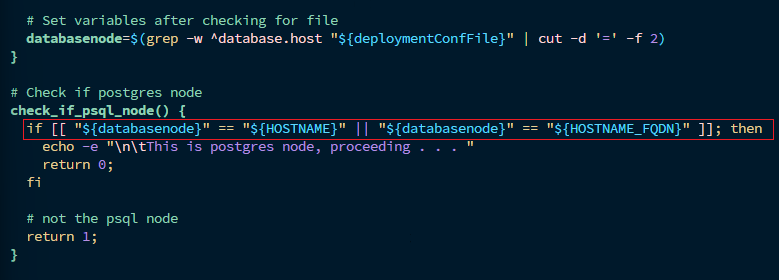
The 'check_if_psql_node()' function compared the database node (case-sensitive) against '${HOSTNAME}' and '${HOSTNAME_FQDN}' to verify whether they were the same. During verification, if the hostnames match, the process proceeded to the next step.
However, if they did not match (including any case mismatches), the function concluded that it ran on the wrong node and stopped the process, returning the error below.

To verify exactly which value the script read from caspida-deployment.conf, the below command could be used.
grep -w '^database.host' /opt/caspida/conf/deployment/caspida-deployment.conf | cut -d '=' -f 2Resolution
It was identified that the failure was caused by the script’s case-sensitive comparison. The UBA functionality remained unaffected, as it was not a functional issue. To handle hostname casing differences, the script was modified to implement a case-insensitive comparison as shown below.
Step 1: Open the migration script from this location.
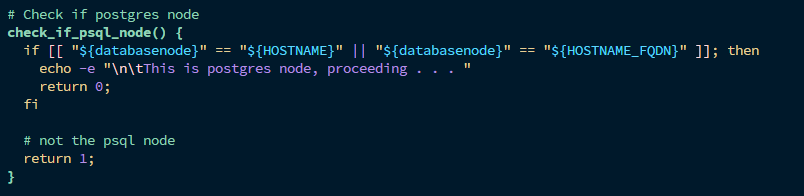
/opt/caspida/bin/migrate_psql_collate_ctype.shStep 2: Navigate to line 130, where the host comparison occurs.
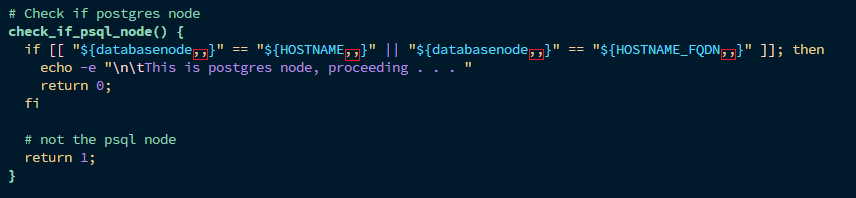
Step 3: Add ,, to the end of each variable in the comparison.
For example, change ${databasenode} to ${databasenode,,} and do the same for ${HOSTNAME,,} and ${HOSTNAME_FQDN,,}.
Before the edit, the snippet should appear as shown below.
The snippet after the edit looked as shown below.
After making the changes, execute the script below. Ensure that the UBA services are stopped before running the script.
/opt/caspida/bin/migrate_psql_collate_ctype.sh -bAdditional notes, this script backs up and deletes database data. The UBA UI will remain down until the restore is completed.
The screenshot below depicts the successful execution of the script.

Related Links
Splunk document - Reference
Revision History
| Revision | Publish Date | Comments |
|---|---|---|
1.0 |
01-Oct-2026
|
Initial Release |
 Feedback
