UBA - Support tools: uba_pre_check.sh and uba_health_check.sh
Available Languages
Applicability
UBADescription
To gather information on a UBA deployment, Splunk UBA Support often requests running two scripts: uba_pre_check.sh and uba_health_check.sh. These scripts capture UBA configuration and current state, respectively.Both tools are maintained by UBA Engineering outside of the normal product release cycle, as it is revised as new Support issues are raised. The version that ships with a UBA platform release is what is available at code freeze that is weeks before GA and revisions will occur.
Investigation
Download the scripts from Google Drive:
- uba_pre_check.sh :
- uba_health_check.sh :
Copy the scripts on node1:
Connect to the node1 (the master node in a cluster) via SSH as caspida user.
Save a copy of the currently installed scripts executing:
cd /opt/caspida/bin/utils/
cp -p uba_pre_check.sh uba_pre_check.sh.OLD
cp -p uba_health_check.sh uba_health_check.sh.OLD
Copy the downloaded new scripts in the default location /opt/caspida/bin/utils/ replacing the existing ones, then make them executables:
cd /opt/caspida/bin/utils/
chmod 755 uba_pre_check.sh
chmod 755 uba_health_check.sh
NOTE: Sometimes ^M characters get added to these scripts when downloading to Windows systems. Here are the commands that can be used to remove the ^M characters:
cd ~/bin
tr -d '\r' < uba_pre_check.sh > /tmp/x
cp /tmp/x uba_pre_check.shtr -d '\r' < uba_health_check.sh > /tmp/x
cp /tmp/x uba_health_check.shrm /tmp/x
In a cluster environment, sync the files in /opt/caspida/bin/utils/ across the nodes by executing:
/opt/caspida/bin/Caspida sync-cluster /opt/caspida/bin/utils/
Running the scripts when the UI is available:
To run the scripts and collect the output files by using the UBA UI, click on "System --> Download Diagnostics"
On the pop-up window set 1 in "Past Days".
Deselect every item in the list but "Scripts":
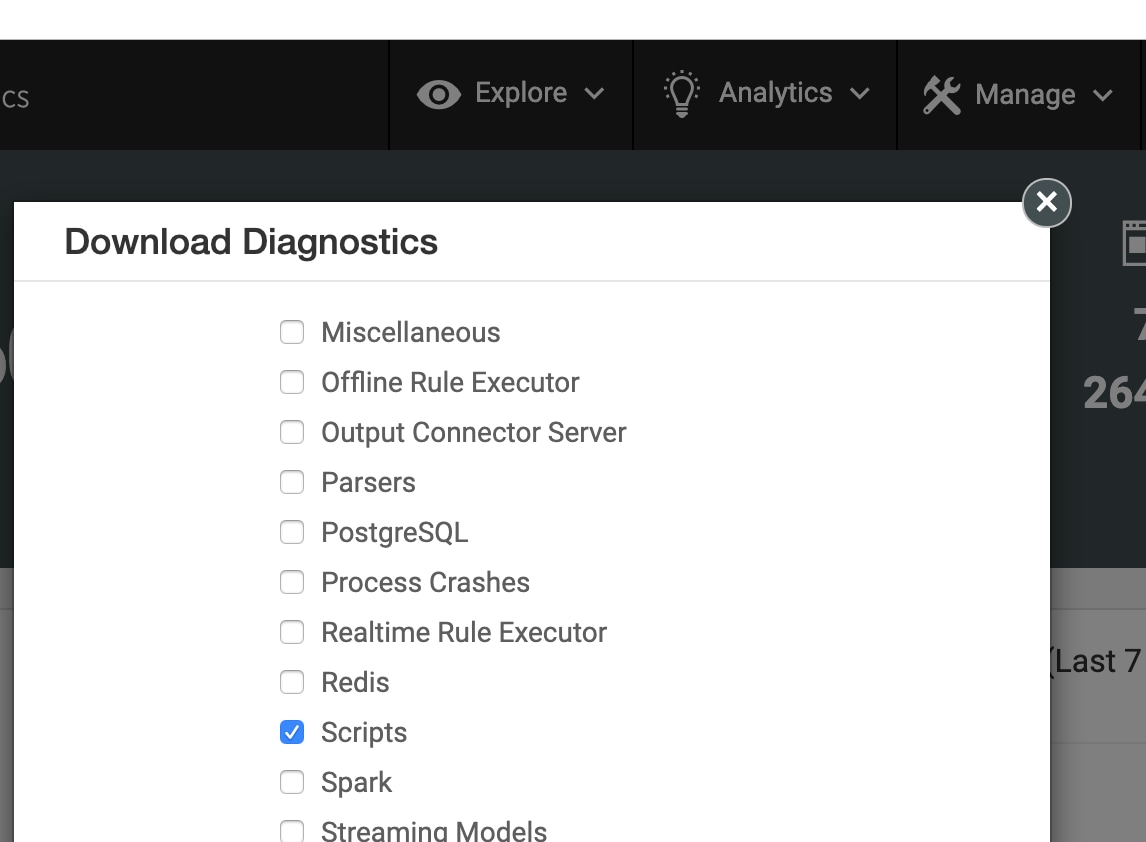
Then press OK. Script execution can take a while to complete.
A message will appear to let you know that the diagnostic file is ready for download.
Upload the diagnostic file to the case so it can be analysed by support.
Connect to the node1 (the master node in a cluster) via SSH as caspida user and execute these commands:
On the pop-up window set 1 in "Past Days".
Deselect every item in the list but "Scripts":
Then press OK. Script execution can take a while to complete.
A message will appear to let you know that the diagnostic file is ready for download.
Upload the diagnostic file to the case so it can be analysed by support.
Manually executing the scripts when the UI is unavailable:
Connect to the node1 (the master node in a cluster) via SSH as caspida user and execute these commands:cd /opt/caspida/bin/utils/ ./uba_pre_check.sh ./uba_health_check.shBoth scripts will produce output files as /var/log/caspida/check/u*.txt that includes hostname and time stamp.
Collect the following files and upload them to the case so they can be analysed by support:
/var/log/caspida/check/uhc*<last_time_stamp>
/var/log/caspida/check/upc*<last_time_stamp>
Resolution
Both scripts are constantly improved and updated, so it is highly advisable to download and run the latest version available.They are backward compatible with all supported UBA releases.
Latest revisions may contain logic for early access or future releases.
Related Links
Download the following scripts from Google Drive:- uba_pre_check.sh :
- uba_health_check.sh :
Revision History
| Revision | Publish Date | Comments |
|---|---|---|
1.0 |
28-Sep-2026
|
Initial Release |
 Feedback