SOAR: Global Field Mappings Changes Are Not Honored in Splunk App for SOAR Export
Available Languages
Applicability
Splunk App for SOAR Export 4.3.13 and aboveDescription
Starting with Splunk App for SOAR Export v4.3.13, a change introduced as part of bug fix PAPP-32614 enforces the display of only custom-mapped field names in the Artifacts tab. This hardcoding of 41 CIM-to-CEF fields prevents modifications to these fields through the Global Field Mappings page in the GUI, such as renaming or deletion.
Affected fields include commonly used ones like src, src_ip, dest, and dest_port, which are replaced by their mapped equivalents (e.g., sourceAddress and destinationPort).
This issue does not occur in environments running Splunk App for SOAR Export versions prior to 4.3.13. The workaround involves manually editing the cim_cef.json file to restore the original field names in artifacts.
Investigation
To confirm the issue in your environment, follow these steps:
1. Check for Missing Original Fields in SOAR Artifacts
Identify if original fields (e.g., src, src_ip) from forwarded events (e.g., ES notables) are missing in SOAR artifacts. Instead of displaying these fields, artifacts may show only mapped fields like sourceAddress.
2. Test Changes in Global Field Mappings
Attempt to delete the src and src_ip field definitions from the Global Field Mappings page in the Splunk App for SOAR Export GUI. If the artifacts still display only the mapped fields (e.g., sourceAddress), this confirms the issue.
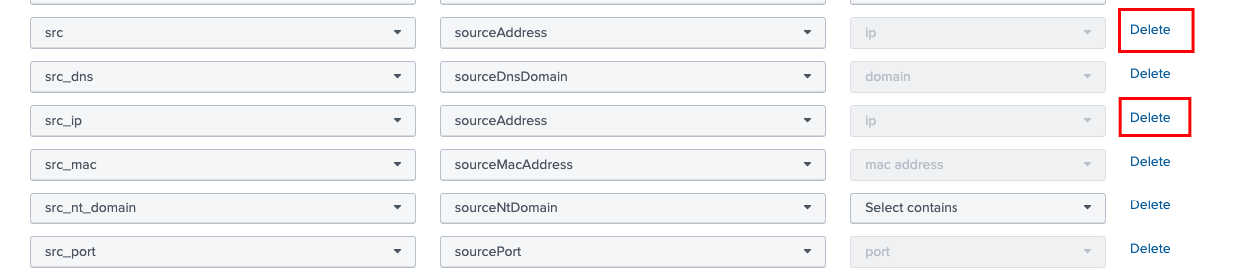
3. Validate Against the Hardcoded Default CIM-to-CEF Fields
Verify if the missing original fields match the 41 hardcoded CIM-to-CEF fields. Use the following command to review the cim_cef.json file:
[phantom@my-splunk-instance bin]$ cat /opt/splunk/etc/apps/phantom/bin/cim_cef.json | grep -v null
{
    "action": "act",
    "action_name": "act",
    "app": "app",
    "bytes_in": "bytesIn",
    "bytes_out": "bytesOut",
    "category": "cat",
    "dest": "destinationAddress",
    "dest_ip": "destinationAddress",
    "dest_mac": "destinationMacAddress",
    "dest_nt_domain": "destinationNtDomain",
    "dest_port": "destinationPort",
    "dest_translated_ip": "destinationTranslatedAddress",
    "dest_translated_port": "destinationTranslatedPort",
    "direction": "deviceDirection",
    "dns": "destinationDnsDomain",
    "dvc": "dvc",
    "dvc_ip": "deviceAddress",
    "dvc_mac": "deviceMacAddress",
    "file_create_time": "fileCreateTime",
    "file_hash": "fileHash",
    "file_modify_time": "fileModificationTime",
    "file_name": "fileName",
    "file_path": "filePath",
    "file_size": "fileSize",
    "message": "message",
    "protocol": "transportProtocol",
    "request_payload": "request",
    "request_payload_type": "requestMethod",
    "src": "sourceAddress",
    "src_dns": "sourceDnsDomain",
    "src_ip": "sourceAddress",
    "src_mac": "sourceMacAddress",
    "src_nt_domain": "sourceNtDomain",
    "src_port": "sourcePort",
    "src_translated_ip": "sourceTranslatedAddress",
    "src_translated_port": "sourceTranslatedPort",
    "src_user": "sourceUserId",
    "transport": "transportProtocol",
    "url": "requestURL",
    "user": "destinationUserName",
    "user_id": "destinationUserId",
}
Resolution
To restore the display of original field names for the hardcoded 41 CIM-to-CEF fields:
1. Backup the cim_cef.json File:
Take a backup of the current file to ensure changes can be reverted if needed:
cp /opt/splunk/etc/apps/phantom/bin/cim_cef.json /opt/splunk/etc/apps/phantom/bin/cim_cef.json.orig
2. Modify the cim_cef.json File:
Edit the file located at /opt/splunk/etc/apps/phantom/bin/cim_cef.json to remove the hardcoded fields that you want to display as their original names. Save the changes.
3. Verify Changes:
Forward new events from Splunk and verify that original fields, such as src and dest, are displayed in the artifacts.
Related Links
Splunk SOAR 4.3.13 Release Notes
Revision History
| Revision | Publish Date | Comments |
|---|---|---|
1.0 |
29-Sep-2026
|
Initial Release |
 Feedback
Contact Cisco
- Open a Support Case

- (Requires a Cisco Service Contract)
Related Articles
- SOAR - Splunk App for SOAR Export cannot save Event Forwarding events
- Splunk App for SOAR Export Not Sending Events to Splunk SOAR With Connection TimeOut Error.
- Splunk App for SOAR intermittently failed creating SOAR containers
- Understanding the Save and Preview popup Logic for Event Forwarding in Splunk App for SOAR Export