SOAR pairing breaks when ES is upgraded to 8.7.0
Available Languages
Applicability
Splunk Enterprise Security, Splunk SOAR
Description
After upgrading Splunk Enterprise Security (ES) from 8.6.1 to 8.7 on Splunk Enterprise 10.0.9, Splunk ES cannot reliably pairs with SOAR on both v8.6 and v8.7.
Investigation
Errors:
Unpair failure:Unable to unpair: Unpairing failed: [HTTP 403] Client is not authorized to perform requested action
https://127.0.0.1:8089/services/authorization/tokens/soar_proxy_user?output_mode=json
Pairing failure:Unable to pair - Finish pairing failed: [HTTP 403] Client is not authorized to perform requested action
https://127.0.0.1:8089/services/authorization/tokens?output_mode=json
Log Evidence:Review of python.log and splunkd.log identified the following authorization failure:Role=mc_soar_proxy is not grantable by user splunk-system-user
Resolution
Workaround:
Preserve the existing grantableRoles values configured for splunk-system-role and append mc_soar_proxy.
Important: Do not overwrite the existing grantableRoles list. Existing values must be retained and mc_soar_proxy added to that list.
1. Check the current grantableRoles on splunk-system-role:
curl -ku "$ES_ADMIN_USER" "https://${ES_URL}:8089/services/authorization/roles/splunk-system-role?output_mode=json"2. Then append (don't overwrite) es_soar_proxy:
curl -ku admin -X POST "https://127.0.0.1:8089/services/authorization/roles/splunk-system-role" -d grantable_roles=<existing_values> -d grantable_roles=mc_soar_proxy
The new role should be added and displayed like this:
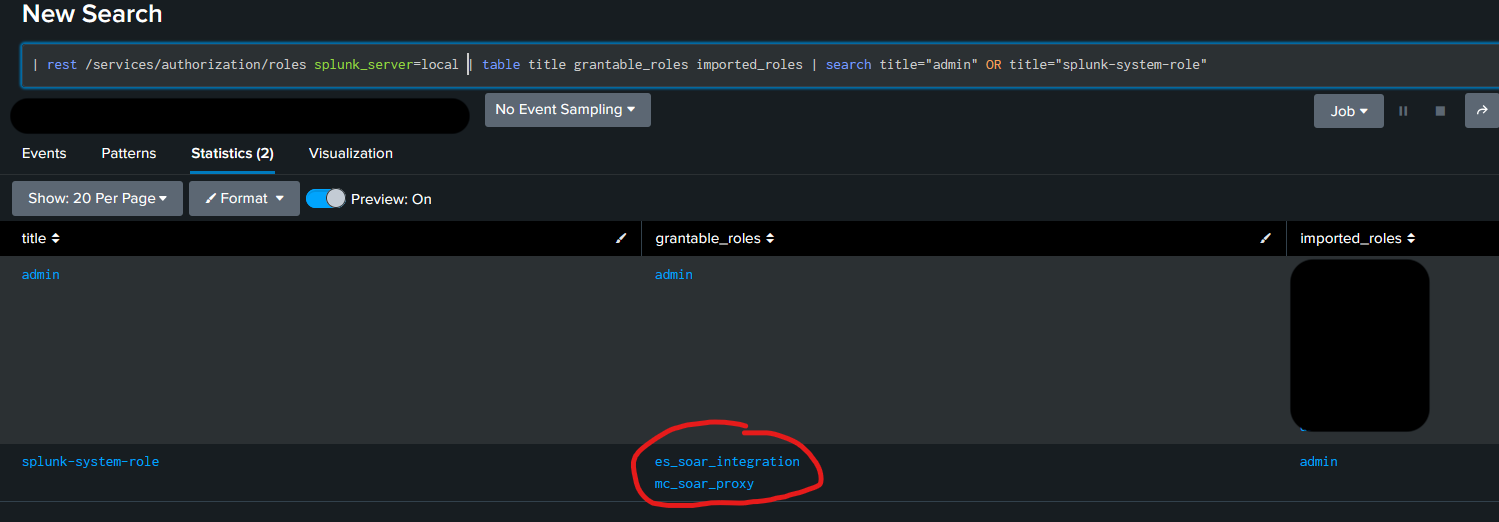
After updating the role configuration:
1. Confirm that mc_soar_proxy is now included in the role’s grantable-role list:curl -ku "$ES_ADMIN_USER" \
"https://${ES_URL}:8089/services/authorization/roles/splunk-system-role?output_mode=json" \
| grep -i grantable2. Check the overall ES/SOAR pairing health:
curl -ku "$ES_ADMIN_USER" \
"https://${ES_URL}:8089/servicesNS/nobody/missioncontrol/v1/soar/health?output_mode=json"3. The following four fields should report healthy status:
• is_soar_paired
• soar_connectivity
• token_modinput_enabled
• jwk_healthy4. Confirm that no additional "is not grantable" messages occur in python.log or splunkd.log after the change. Also confirm a fresh successful execution of the token modular input in the mc_create_ingest_soar_tokens.log:
message="Checkpointing this successful run"
This behavior is associated with known issues:
A permanent fix is not confirmed.
Related Links
Revision History
| Revision | Publish Date | Comments |
|---|---|---|
1.0 |
14-Oct-2026
|
Initial Release |
 Feedback
Contact Cisco
- Open a Support Case

- (Requires a Cisco Service Contract)