Secure Firewall FTD High Memory Due to High Access-List Element Count
Available Languages
Contents
Issue
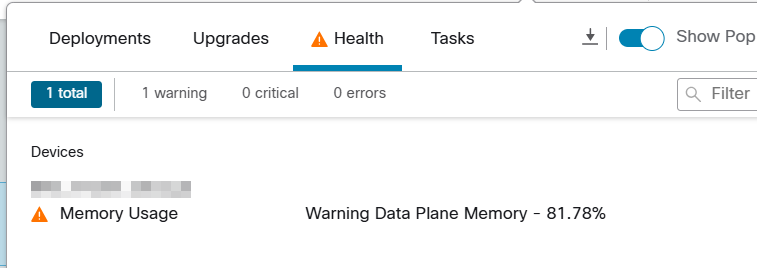
FTD shows persistent high Data Plane Memory utilization alerts of more than 80%. The memory utilization remains at this elevated level after policy deployments that significantly increased access-list element counts by more than what the platform can accommodate.
In FTD High Availability configurations, the issue impacts both units but shows higher memory usage on the active FTD.
FMC alerts show high memory usage on Data Plane for the FTD:
The FTD CLI also confirms high memory usage:
firepower# show memory
Free memory:        2590897856 bytes (18%)
Used memory:       11746269504 bytes (82%)
-------------     ------------------
Total memory:      14337167360 bytes (100%)
The access-list element count shows 1 million or more elements in the FTD CLI:
firepower# show access-list element-count
Total number of access-list elements: 3223691
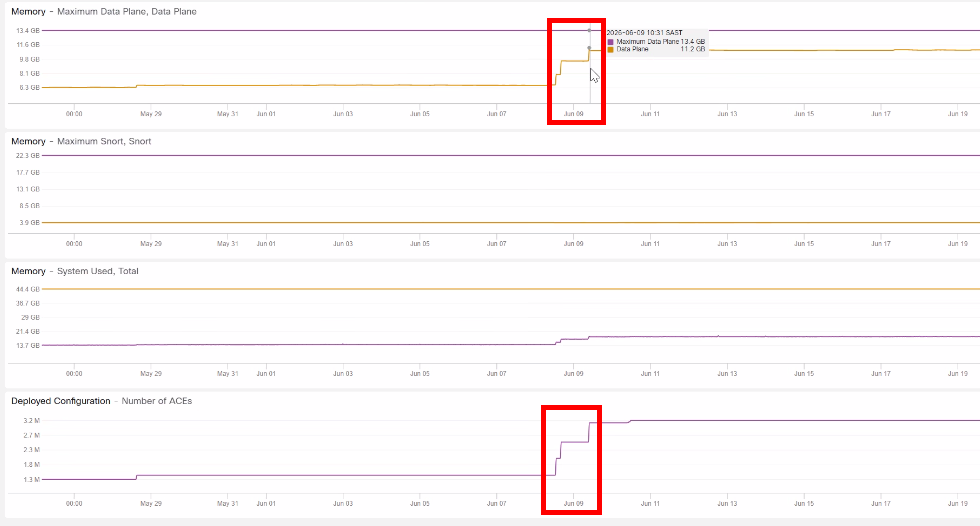
In the FMC Health monitoring graphs for the FTD, there is a sharp rise in memory correlating with ACE deployments:
On a High Availability peer FTD, memory usage can get stuck at a high level due to uncleared memory:
firepower# failover exec standby show memory
Free memory:        3278441368 bytes (23%)
Used memory:       11058725992 bytes (77%)
-------------     ------------------
Total memory:      14337167360 bytes (100%)
Environment
Cisco Firepower 2130 Threat Defense in High Availability Configuration
FTD Software Version: 7.4.2
FMC Software Version: 7.6.2
High access-list element counts near 1 million or more
Resolution
1. In FTD High Availability configurations, reboot the peer FTD during a pre-planned time to clear retained memory stores that could have previously accumulated.
2. After the reboot, verify that:
The peer FTD properly re-synchronizes into the High Availability pair.
Memory utilization shows normal levels.
The FTD memory alert clears from the FMC UI.
3. Navigate to Devices > Device Management and click on the Edit icon for the FTD.
4. Click the Device tab near the top left (Summary tab for FTD HA) and scroll down to the Advanced Settings section, then click the Edit icon.
5. Check the box for Object Group Search to enable this feature and click Save.
6. Deploy the configuration changes to the FTD HA pair and monitor the health monitor for several minutes to observe memory usage changes.
firepower# show memory
Free memory:        6948343576 bytes (48%)
Used memory:        7388823784 bytes (52%)
-------------     --------------------------
Total memory:      14337167360 bytes (100%)
Additional Considerations
If memory utilization becomes a sustained performance concern even after Object Group Search enablement, consider optimization strategies such as:
Reviewing top hit-count rules using FMC Connection Events.
Reducing unnecessary inspection on high-volume, trusted traffic.
Evaluating whether all rules require intrusion inspection.
Considering platform upgrade to higher-capacity Firepower platforms (FPR4K or FPR9K series).
Cause
The high Data Plane Memory utilization is caused by a combination of retained memory on the FTD and increased access-list element processing overhead after policy deployments. Significate access-list element counts correlate directly with the memory utilization spikes. Dramatically increased ACL processing requirements without Object Group Search optimization contribute to sustained high memory usage.
Related Content
Revision History
| Revision | Publish Date | Comments |
|---|---|---|
1.0 |
04-Nov-2026
|
Initial Release |

 Feedback
Contact Cisco
- Open a Support Case

- (Requires a Cisco Service Contract)