Change FTD Manager Access Data Interface
Available Languages
Introduction
This document describes the steps to change the Secure Firewall Threat Defense (FTD) manager access data interface.
Prerequisites
Requirements
- Basic product knowledge.
- Familiarity with FTD management and management over data interfaces.
Components Used
The information in this document was created from the devices in a specific lab environment. All of the devices used in this document started with a cleared (default) configuration. If your network is live, ensure that you understand the potential impact of any command.
The information in this document is based on these software and hardware versions:
- Secure Firewall 4200
- Secure Firewall Threat Defense (FTD) 10.0.x, 7.6.4
- Secure Firewall Management Center (FMC) 10.0.x
Initial Configuration
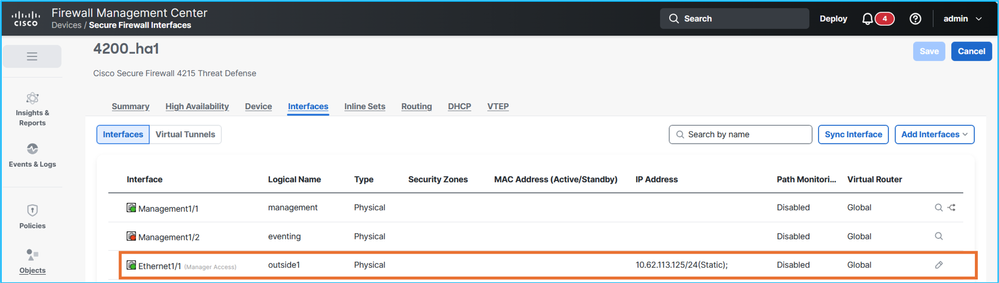
1. The FMC manages FTD in high availability (HA) via data interface Ethernet1/1 with the nameif outside1, using active and standby IP addresses 10.62.113.125 and 10.62.113.126 respectively:
Verification on FTD CLISH:
> show network management-data-interface

Physical Interface               Name of the Interface
Ethernet1/1              outside1

> show network
===============[ System Information ]===============
Hostname                  : CSF4215-3
..
DNS from router           : enabled
Management port           : 8305
IPv4 Default route
  Gateway                 : data-interfaces
…
======[ System Information - Data Interfaces ]======
DNS Servers               : 192.0.2.100
Interfaces                : Ethernet1/1

==================[ Ethernet1/1 ]===================

State                     : Enabled
Link                      : Up
Name                      : outside1
MTU                       : 1500
MAC Address               : 40:F4:9F:3D:5A:0E
----------------------[ IPv4 ]----------------------
Configuration             : Manual
Address                   : 10.62.113.125
Netmask                   : 255.255.255.0
Gateway                   : 10.62.113.1
…
2. sftunnel connections are established between the FTD HA unit and the FMC:
> sftunnel-status-brief
PEER:fmc.example.org
        SFTunnel Status:-
                Channel A: Connected
                Channel B: Connected
        Peer channel Channel-A is valid  type (CONTROL), using 'tap_nlp', connected to '198.51.100.23' via '169.254.1.3'
        Peer channel Channel-B is valid  type (EVENT), using 'tap_nlp', connected to '198.51.100.23' via '169.254.1.3'
        Registration: Completed.
        IPv4 Connection to peer 'fmc.example.org' Start Time: Fri Jul 17 08:22:31 2026 UTC
        Heartbeat Send Time:     Fri Jul 17 08:52:42 2026 UTC
        Heartbeat Received Time: Fri Jul 17 08:53:03 2026 UTC
        Last disconnect time   : Fri Jul 17 08:22:16 2026 UTC
        Last disconnect reason : Process shutdown due to stop request from PM
3. FTD relies on DNS resolution to connect to FMC. The manager is configuration based on the fully qualified domain name (FQDN):
> show managers
Type                      : Manager
Host                      : fmc.example.org
Display name              : fmc.example.org
Version                   : 10.0.1 (Build 1)
Identifier                : 6d86efc4-c095-11f0-9244-48f1a7894b18
Registration              : Completed
Management type           : Configuration and analytics

> show network
===============[ System Information ]===============
Hostname                  : KSEC-FPR-4215-3
Domains                   : example.org
DNS Servers               : 192.0.2.100
DNS from router           : enabled
Management port           : 8305
IPv4 Default route
  Gateway                 : data-interfaces
…
The DNS servers are reachable via the outside1 interface.
4. sftunnel connections are established via the Lina engine:
> show conn all port 8305
26 in use, 32 most used
Inspect Snort:
        preserve-connection: 0 enabled, 0 in effect, 0 most enabled, 0 most in effect

TCP nlp_int_tap  10.62.113.125(169.254.1.3):8305 outside1  198.51.100.23:45647, idle 0:00:03, bytes 2129062, flags UIO
TCP nlp_int_tap  10.62.113.125(169.254.1.3):37141 outside1  198.51.100.23:8305, idle 0:00:04, bytes 148581, flags UxIO
Configuration Steps
The goal is to move the manager access from the current outside1 to the target outside2 interface. The active and standby outside2 IP addresses are 10.62.114.51/24 and 10.62.114.52/24 respectively.
Note that FTD versions 7.7.0 or later support redundant manager access data interfaces, which allow the configuration and deployment of more than 1 manager access interfaces. This feature is not supported in versions earlier than 7.7.0.
Due to this fact, specific steps are skipped or contain different actions.
- It is recommended to have console access to the FTDs:
- In the case of Firepower 4100/9300, you can connect to the chassis using SSH, and then connect to the native FTD console using the connect module x console command, where x is the slot/security module ID.
- In the case of Firepower 4100/9300 running FTD in multi-instance (MI) mode, you can connect to the chassis using SSH, and then connect to the native FTD console using the connect module x telnet command, where x is the slot/security module ID. Then connect to FTD instance using the connect ftd <ftd_id> command.
- In the case of Secure Firewall 3100/4200 in MI mode you can connect to the chassis using SSH and then connect to the FTD console using the connect ftd <identifier> command.
- Deploy pending policies.
- It is strongly recommended to take FTD and FMC backups. In the case of FTD HA, take the backup of both units.
- Configure the target interface nameif, IP address, security zone and other interface-related settings, if applicable.
- Configure the target interface standby IP address.
- If the FTD software version is 7.7.0 or later, enable manager access on the target interface and adjust the management access networks as needed:
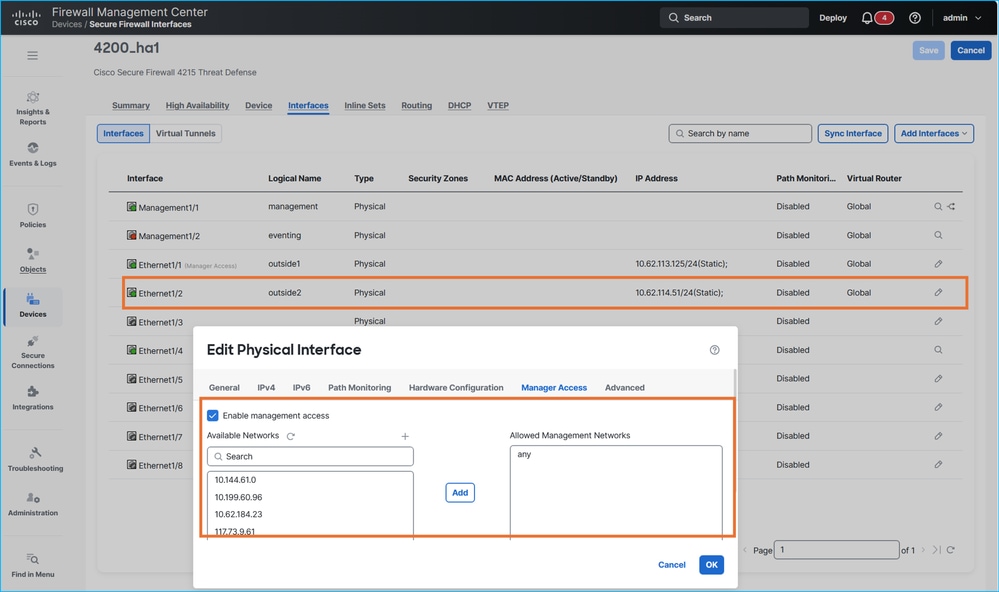
Note that FTD versions earlier than 7.7.0 do not support redundant manager access data interfaces. Attempting to configure second manager access interface results in this error message:
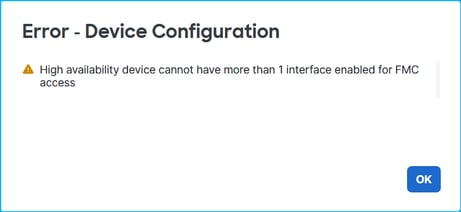
Ensure that you skip steps 7 and 8 for FTD versions earlier than 7.7.0.
7. Deploy the policies and verify the settings on the FTD CLISH. In this example, Ethernet1/2 interface with nameif outside2 has IP addresses 10.62.114.51 and 10.62.114.52 respectively:
> show ip
System IP Addresses:
Interface                Name                   IP address      Subnet mask     Method
Ethernet1/1              outside1               10.62.113.125   255.255.255.0   manual <- source interface
Ethernet1/2              outside2               10.62.114.51    255.255.255.0   manual <- target interface
Ethernet1/4              fover                  10.9.0.21       255.255.255.0   unset
The outside2 interface is added to the sftunnel configuration:
> show running-config sftunnel
sftunnel interface outside2 <- target interface
sftunnel interface outside1 <- source interface
sftunnel port 8305
sftunnel route-map FMC_GEN_19283746_RBD_DUAL_WAN_RMAP_91827346
Although additional rules are installed in the Network Address Translation (NAT) table, the rules with the outside1 interface are in use:
> show nat detail
Manual NAT Policies Implicit (Section 0)
1 (nlp_int_tap) to (outside1) source static nlp_server__sftunnel_0.0.0.0_intf5 interface  destination static 0_0.0.0.0_5 0_0.0.0.0_5 service tcp 8305 8305
    translate_hits = 1448, untranslate_hits = 1448
    Source - Origin: 169.254.1.3/32, Translated: 10.62.113.125/24
    Destination - Origin: 0.0.0.0/0, Translated: 0.0.0.0/0
    Service - Protocol: tcp Real: 8305 Mapped: 8305
2 (nlp_int_tap) to (outside2) source static nlp_server__sftunnel_0.0.0.0_intf6 interface  destination static 0_0.0.0.0_9 0_0.0.0.0_9 service tcp 8305 8305
    translate_hits = 0, untranslate_hits = 0
    Source - Origin: 169.254.1.3/32, Translated: 10.62.114.51/24
    Destination - Origin: 0.0.0.0/0, Translated: 0.0.0.0/0
    Service - Protocol: tcp Real: 8305 Mapped: 8305
3 (nlp_int_tap) to (outside1) source static nlp_server__sftunnel_::_intf5 interface ipv6  destination static 0_::_6 0_::_6 service tcp 8305 8305
    translate_hits = 0, untranslate_hits = 0
    Source - Origin: fd00:0:0:1::3/128, Translated:
    Destination - Origin: ::/0, Translated: ::/0
    Service - Protocol: tcp Real: 8305 Mapped: 8305
4 (nlp_int_tap) to (outside2) source static nlp_server__sftunnel_::_intf6 interface ipv6  destination static 0_::_10 0_::_10 service tcp 8305 8305
    translate_hits = 0, untranslate_hits = 0
    Source - Origin: fd00:0:0:1::3/128, Translated:
    Destination - Origin: ::/0, Translated: ::/0
    Service - Protocol: tcp Real: 8305 Mapped: 8305
5 (nlp_int_tap) to (outside1) source dynamic nlp_client_0_intf5 interface
    translate_hits = 653, untranslate_hits = 0
    Source - Origin: 169.254.1.3/32, Translated: 10.62.113.125/24
6 (nlp_int_tap) to (outside2) source dynamic nlp_client_0_intf6 interface
    translate_hits = 0, untranslate_hits = 0
    Source - Origin: 169.254.1.3/32, Translated: 10.62.114.51/24
7 (nlp_int_tap) to (outside1) source dynamic nlp_client_0_ipv6_intf5 interface ipv6
    translate_hits = 0, untranslate_hits = 0
    Source - Origin: fd00:0:0:1::3/128, Translated:
8 (nlp_int_tap) to (outside2) source dynamic nlp_client_0_ipv6_intf6 interface ipv6
    translate_hits = 0, untranslate_hits = 0
    Source - Origin: fd00:0:0:1::3/128, Translated:
8. Verify high availability status and interface monitoring:
> show monitor-interface
        This host: Primary - Active
                Interface management (203.0.113.130): Normal (Monitored)
                Interface outside1 (10.62.113.125): Normal (Monitored)
                Interface outside2 (10.62.114.51): Normal (Monitored)
        Other host: Secondary - Standby Ready
                Interface management (203.0.113.131): Normal (Monitored)
                Interface outside1 (10.62.113.126): Normal (Monitored)
                Interface outside2 (10.62.114.52): Normal (Monitored)
9. If you plan to manage the FTDs over the outside2 interface, ensure that access in the SSH Access section of the platform settings is allowed.
10. Make necessary changes to allow connectivity over the target interface to domain name servers (DNS) and FMC:
- If domain name resolution (DNS) is required for connectivity between FMC and FTDs, then ensure that the FTDs have reachability over the target interface to the next hop used to reach the DNS servers. DNS resolution must also be allowed in the transit path.
- Ensure that FTDs have reachability over the target interface to the next hop to be used to reach FMC.
- Ensure that bidirectional connectivity between FMC and FTDs over TCP port 8305 is allowed in the transit path over the target interface. The connection must be allowed in both directions.
In this case, IP 10.62.114.1 needs to be used as the default gateway over the target interface. The next hop IP address is reachable using Internet Control Message Protocol (ICMP):
> ping 10.62.114.1
Please use 'CTRL+C' to cancel/abort...
Sending 5, 100-byte ICMP Echos to 10.62.114.1, timeout is 2 seconds:
!!!!!
Success rate is 100 percent (5/5), round-trip min/avg/max = 1/2/10 ms
If ICMP is administratively blocked in the transit path or the next hop, ensure that the Media Access Control (MAC) address of the next hop is visible in the output of the show arp command and is valid:
> show arp
        fover 10.9.0.22 4c01.f7e9.e111 13275
        outside1 10.62.113.1 c02c.1782.2cbf 1
        outside1 10.62.113.126 4c01.f7e9.e10e 5453
        outside2 10.62.114.1 c02c.1782.2cbf 0
        outside2 10.62.114.52 4c01.f7e9.e10f 5453
11. Perform these steps depending on the FTD version:
- Version 7.7.0 or later: on FMC, disable manager access over the source interface (outside1), adjust routing, including routing to DNS servers (if DNS is used to access FMC) and FMC over the target interface (outside2). For example, either configure specific static routes or configure default gateway over the target interface.
- Version earlier than 7.7.0: on FMC, disable manager access over the source interface (outside1), enable manager access over the target interface (outside2), adjust routing, including routing to DNS servers (if DNS is used to access FMC) and FMC over the target interface (outside2). For example, either configure specific static routes or configure default gateway over the target interface.
12. Deploy policies.
13. Verify on FTD CLISH:
> show route 0.0.0.0

Routing entry for 0.0.0.0 0.0.0.0, supernet
  Known via "static", distance 1, metric 0, candidate default path
  Routing Descriptor Blocks:
  * 10.62.114.1, via outside2 <- default route over outside2
      Route metric is 0, traffic share count is 1


> show running-config sftunnel
sftunnel interface outside2 <- sftunnel is enabled only over outside2
sftunnel port 8305


> show nat detail
Manual NAT Policies Implicit (Section 0)
1 (nlp_int_tap) to (outside2) source static nlp_server__sftunnel_0.0.0.0_intf6 interface  destination static 0_0.0.0.0_9 0_0.0.0.0_9 service tcp 8305 8305
    translate_hits = 3, untranslate_hits = 3
    Source - Origin: 169.254.1.3/32, Translated: 10.62.114.51/24
    Destination - Origin: 0.0.0.0/0, Translated: 0.0.0.0/0
    Service - Protocol: tcp Real: 8305 Mapped: 8305
2 (nlp_int_tap) to (outside2) source static nlp_server__sftunnel_::_intf6 interface ipv6  destination static 0_::_10 0_::_10 service tcp 8305 8305
    translate_hits = 0, untranslate_hits = 0
    Source - Origin: fd00:0:0:1::3/128, Translated:
    Destination - Origin: ::/0, Translated: ::/0
    Service - Protocol: tcp Real: 8305 Mapped: 8305
3 (nlp_int_tap) to (outside2) source dynamic nlp_client_0_intf6 interface
    translate_hits = 407, untranslate_hits = 0
    Source - Origin: 169.254.1.3/32, Translated: 10.62.114.51/24
4 (nlp_int_tap) to (outside2) source dynamic nlp_client_0_ipv6_intf6 interface ipv6
    translate_hits = 0, untranslate_hits = 0
    Source - Origin: fd00:0:0:1::3/128, Translated:


> show conn all port 8305
31 in use, 42 most used
Inspect Snort:
        preserve-connection: 0 enabled, 0 in effect, 0 most enabled, 0 most in effect

TCP nlp_int_tap  10.62.114.51(169.254.1.3):56853 outside2  198.51.100.23:8305, idle 0:00:06, bytes 33008, flags UxIO  <- connectivity over outside2
TCP nlp_int_tap  10.62.114.51(169.254.1.3):32905 outside2  198.51.100.23:8305, idle 0:00:00, bytes 1595942, flags UxIO <- connectivity over outside2
14. If the DNS servers in the output of the 'show network' CLISH command need to be changed, configure the new DNS servers:
> configure network dns servers 192.0.2.184
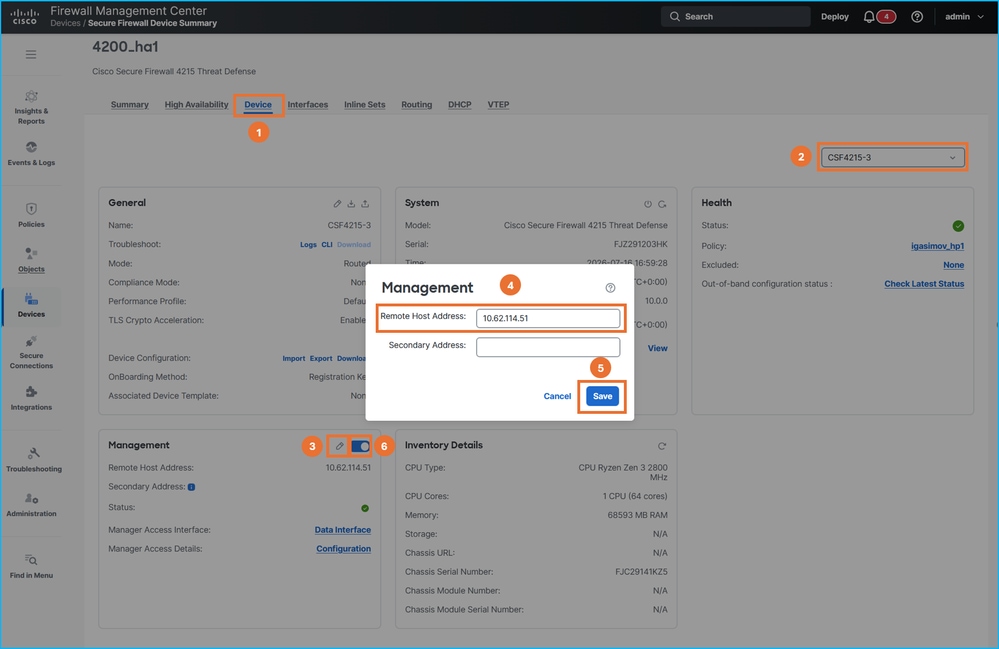
15. On FMC change FTD management IP address to the outside2 IP address, then disable and re-enable the connectivity using the slider. Repeat this step for both units in HA:
16. Verify sftunnel connectivity on all FTDs:
> sftunnel-status-brief
PEER:198.51.100.23
        SFTunnel Status:-
                Channel A: Connected
                Channel B: Connected
        Peer channel Channel-A is valid  type (CONTROL), using 'tap_nlp', connected to '198.51.100.23' via '169.254.1.3'
        Peer channel Channel-B is valid  type (EVENT), using 'tap_nlp', connected to '198.51.100.23' via '169.254.1.3'
        Registration: Completed.
        IPv4 Connection to peer '198.51.100.23' Start Time: Thu Jul 16 16:37:14 2026 UTC
        Heartbeat Send Time:     Thu Jul 16 16:38:13 2026 UTC
        Heartbeat Received Time: Thu Jul 16 16:39:13 2026 UTC
        Last disconnect time   : Thu Jul 16 16:37:11 2026 UTC
        Last disconnect reason : Both control and event channel connections with peer went down

> show conn all port 8305
32 in use, 42 most used
Inspect Snort:
        preserve-connection: 0 enabled, 0 in effect, 0 most enabled, 0 most in effect

TCP nlp_int_tap  10.62.114.51(169.254.1.3):8305 outside2  198.51.100.23:36383, idle 0:00:00, bytes 235757, flags UIO  <- new connection over different source port
TCP nlp_int_tap  10.62.114.51(169.254.1.3):8305 outside2  198.51.100.23:50963, idle 0:00:01, bytes 12319, flags UIO <- new connection over different source port
17. If DNS servers in platforms settings need to be changed, make appropriate configuration changes and deploy policies.
Troubleshoot Management Connection
Use these commands for verifications:
- show network – shows configuration of management interface.
- sftunnel-status-brief – shows sftunnel connectivity status.
- show run sftunnel – shows sftunnel configuration in the firewall engine (Lina).
- show conn all port 8305 – shows sftunnel connections via the Lina engine.
To troubleshoot management connections issues, refer to the Troubleshooting the Management Connection section in the official guide.
References
- Cisco Secure Firewall Management Center Device Configuration Guide, 10.x
- Change the Manager Access Interface
- Troubleshooting the Management Connection
Revision History
| Revision | Publish Date | Comments |
|---|---|---|
1.0 |
07-Aug-2026
|
Initial Release |

 Feedback
Contact Cisco
- Open a Support Case

- (Requires a Cisco Service Contract)