Disable SIP Inspection on FTD
Available Languages
Contents
Issue
A firewall administrator wants to disable SIP (Session Initiation Protocol) inspection on a Firewall Threat Defense (FTD) device.
Environment
FTD running software version 7.4.4. Other software versions are also affected.
Firewall Management Center (FMC) running software version 7.7.12. Other software versions are also affected.
Session Initiation Protocol (SIP) inspection is enabled on FTD.
Resolution
There are 2 ways to globally disable SIP inspection:
Solution 1: Disable SIP from FTD CLISH CLI
Use this command:
> configure inspection sip disable
Building configuration...
Cryptochecksum: ef7528dc 7338986d 6714a3a2 4770528e

7818 bytes copied in 0.250 secs
[OK]
Verification
> show running-config policy-map | include sip

>
Solution 2: Disable SIP using FlexConfig
On FMC navigate to Devices > FlexConfig and create a FlexConfig object with this content:
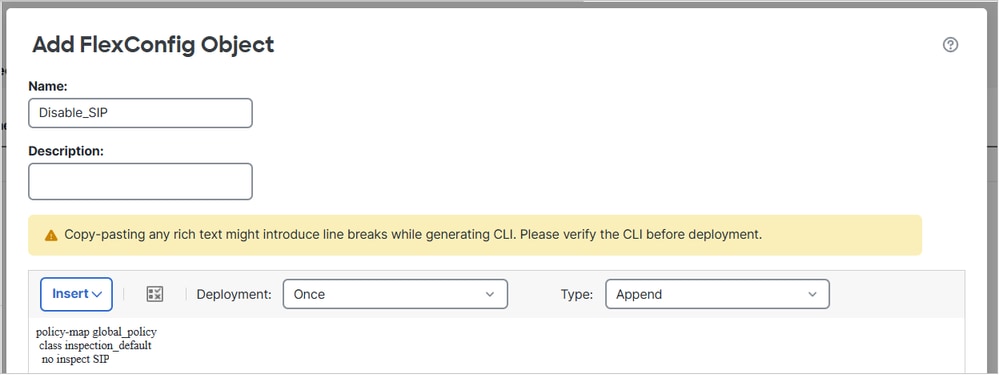
The CLI to be deployed:
policy-map global_policy
 class inspection_default
  no inspect sip
Apply the FlexConfig policy and select Preview Config in order to preview it:
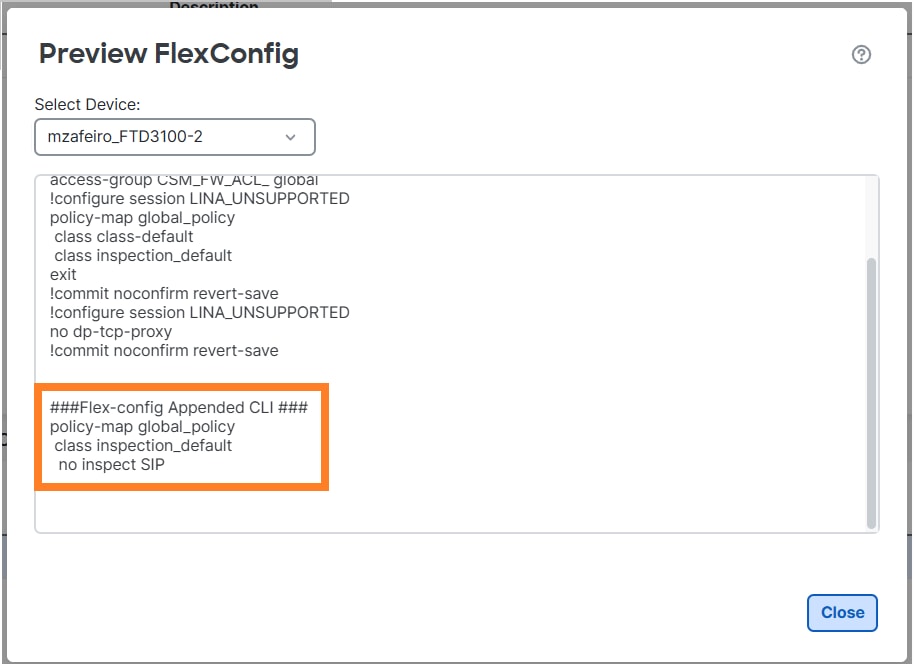
Finally, Deploy the policy.
Verification
firewall# show run policy-map | include sip
firewall#

Note: You need to clear the existing SIP connection from LINA connection table so that the connections are re-established without SIP inspection. You can use this command in order to verify the existing SIP connections:
firewall# show conn port 5060
Disable SIP inspection for specific hosts
To disable SIP inspection for specific hosts check https://www.cisco.com/c/en/us/support/docs/security/secure-firewall-threat-defense/225969-configure-firewall-threat-defense.html#toc-hId-2007972800
Cause
Disabling SIP inspection on FTD can be done in 2 ways:
FTD CLI
Using FlexConfig
Related Content
Revision History
| Revision | Publish Date | Comments |
|---|---|---|
1.0 |
27-May-2026
|
Initial Release |

 Feedback
Contact Cisco
- Open a Support Case

- (Requires a Cisco Service Contract)