Troubleshoot Multicast Traffic Not Passing through FTD Firewall with Bidir PIM Configuration
Available Languages
Contents
Issue
All of these symptoms are seen:
Multicast traffic stopped working on Firewall Threat Defense (FTD) for a specific multicast group.
There are no multicast routes (mroutes) on the FTD for the group (224.2.2.2 in this example).
device# show mroute 224.2.2.2
No mroute entries found.
device#
Environment
First seen in FTD version 7.4. Other software versions including Adaptive Security Appliance (ASA) can be also affected.
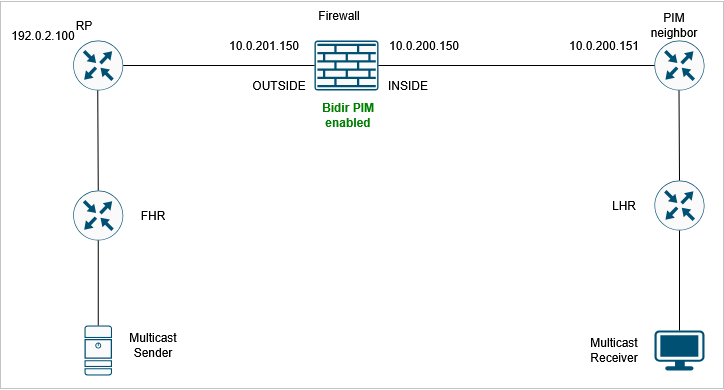
Bidirectional Protocol Independent Multicast (PIM) is enabled on the firewall.
Topology
 inline_image_0.png
Resolution
Step 1: Review the current multicast configuration.
Examine the existing multicast routing configuration on all devices in the network path to identify any misconfigurations or missing settings that could prevent multicast traffic from traversing the firewall.
On the firewall there is bidirectional PIM configuration :
device# show run pim
pim rp-address 192.0.2.100 bidir
Step 2: Verify the PIM neighbors.
Confirm that multicast neighbors are properly shown on the firewall:
device# show pim neighbor
Neighbor Address  Interface          Uptime    Expires DR pri Bidir
10.0.200.151      INSIDE             19:13:30  00:01:24 1 (DR)
10.0.201.200      OUTSIDE            00:01:31  00:01:42 1 (DR) B
In the output notice that neighbor 10.0.201.200 has the Bidir B flag, while the 10.0.200.151 neighbor does not have it.
Step 3: Enable PIM debug for multicast group 224.2.2.2:
FPR3100-14# debug pim group 224.2.2.2
IPv4 PIM group debugging is on
 for group 224.2.2.2
The debug shows that there is a PIM Join/Prune packet that is discarded due to 'no bidir df election':
IPv4 PIM: J/P entry: Join root: 192.0.2.100 group: 224.2.2.2 flags:  RPT WC S
IPv4 PIM: (*,224.2.2.2) J/P with RP 192.0.2.100 on INSIDE discarded, no bidir df election-state on this intf
Step 4: Enable PIM captures towards the 10.0.200.151 PIM neighbor. The goal is to get more visibility on the packet contents:
device# capture CAPI interface INSIDE trace match pim host 10.0.200.151 any
Step 5: Collect the firewall capture from the FTD device:
device# copy /pcap capture:CAPI CAPI.pcap
Source capture name [CAPI]?
Destination filename [CAPI.pcap]?
%Warning:There is a file already existing with this name
Do you want to over write? [confirm]
!
28 packets copied in 0.0 secs
Collect the pcap file from FMC using the procedure described at https://www.cisco.com/c/en/us/support/docs/security/firepower-ngfw/212474-working-with-firepower-threat-defense-f.html
Step 6: Capture analysis.
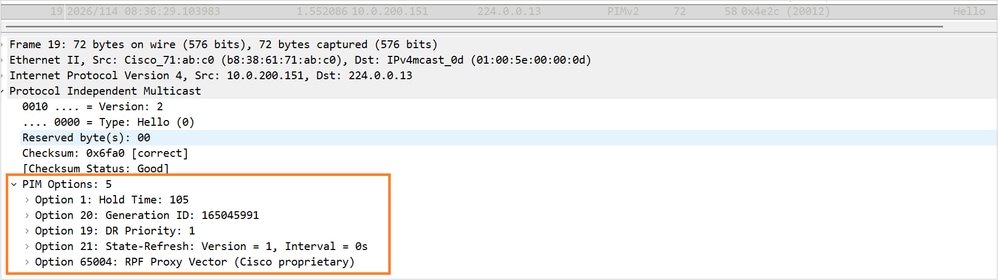
The PIM Hello packet contains these options:
 PIM_Hello_Options_no-bidir-capable.png
Notice the absence of the Bidir-capable flag.
Step 7: Enable bidirectional PIM on the 10.0.200.151 neighbor.
Now, the PIM Bidir B flag is shown for both neighbors:
device# show pim neighbor
Neighbor Address  Interface          Uptime    Expires DR pri Bidir
10.0.200.151      INSIDE             19:34:26  00:01:38 1 (DR) B
10.0.201.200      OUTSIDE            00:22:27  00:01:23 1 (DR) B
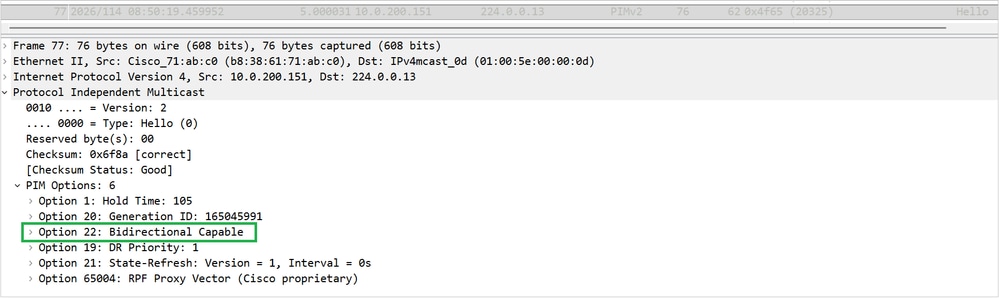
Step 8: Collect a new capture and check the PIM Hello options for neighbor 10.0.200.151. PIM option 22 (Bidirectional Capable) is shown:
 PIM_Hello_Options_option22.png
Step 9: Verify that the mroute for multicast group 224.2.2.2 is now shown:
device# show mroute
Multicast Routing Table
Flags: D - Dense, S - Sparse, B - Bidir Group, s - SSM Group,
       C - Connected, L - Local, I - Received Source Specific Host Report,
       P - Pruned, R - RP-bit set, F - Register flag, T - SPT-bit set,
       J - Join SPT
Timers: Uptime/Expires
Interface state: Interface, State
(*, 224.0.1.40), 19:41:44/never, RP 0.0.0.0, flags: DPC
  Incoming interface: Null
  RPF nbr: 0.0.0.0
  Immediate Outgoing interface list:
    INSIDE, Null, 19:41:44/never
(*, 224.2.2.2), 00:06:29/00:02:53, RP 192.0.2.100, flags: B
  Bidir-Upstream: OUTSIDE
  RPF nbr: 10.0.201.200
  Immediate Outgoing interface list:
    INSIDE, Forward, 00:06:29/00:02:53
Cause
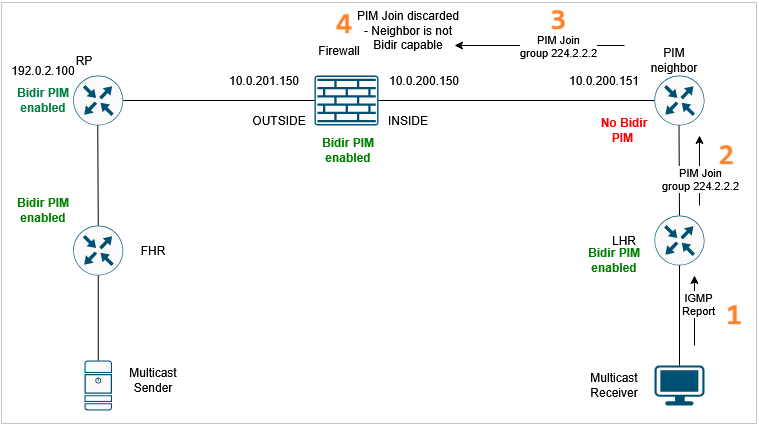
The multicast traffic failure was caused by incorrect or incomplete multicast and bi-directional PIM configuration on the adjacent network device. The specific configuration issue resulted in FTD discarding the PIM Join/Prune message for the specific multicast group. As a result, the firewall could not create the mroute for the multicast traffic. For multicast data traffic to flow through the firewall data plane, the control plane (PIM) has to establish the proper mroute.
 Cause.png
Related Content
Revision History
| Revision | Publish Date | Comments |
|---|---|---|
1.0 |
27-Apr-2026
|
Initial Release |

 Feedback
Contact Cisco
- Open a Support Case

- (Requires a Cisco Service Contract)