Migrate On-prem FMC to Cloud (cdFMC) with Security Cloud Control
Available Languages
Issue
A user needs assistance with migrating their production Firewall Management Center (FMCv300) virtual appliance to cloud-delivered FMC (cdFMC) in the Security Cloud Control (SCC) tenant. The specific concerns include:
Understand which parts of the migration process can cause downtime and how to minimize production impact.
Get step-by-step guidance for the migration workflow.
Determine what to do with the FMCv300 after migration completion.
Plan a phased migration approach for multiple Firewall Threat Defense (FTD) devices in High Availability (HA) configurations.
Clarify whether on-premises FMC configuration must be manually imported into cdFMC before triggering the migration wizard.
Environment
Source FMC: FMCv300 virtual appliance, version 7.6.5. Other hardware (HW) and software (SW) platforms can also be deployed.
Target: cdFMC tenant provisioned.
Managed devices are FTDs from different HW and SW versions, for example:
2x Secure Firewall 3130, FTD 7.6.4, configured in HA pair.
2x Firepower 2130, FTD 7.4.4, configured in HA pair.
1x FTDv in Azure, 7.6.4, standalone configuration.
Resolution
Migration Prerequisites and Version Validation
The environment versions satisfy the prerequisites for migration to cdFMC:
FMC 7.6.5 meets the documented minimum requirement for the migration workflow.
FTD versions 7.6.4 and 7.4.4 meet the documented minimum for migration.
cdFMC supports the FTD release trains in the environment.
Pre-Migration Validation Steps
Before initiating the migration, validate these prerequisites:
No pending deployments on FMCv300.
Both HA pairs healthy and synchronized.
FMCv300 backup completed.
Adequate FMC disk space available (at least 10% free).
DNS resolution working from the FTD management path.
Outbound connectivity allowed from FTD management interfaces to cdFMC over required cloud management ports (TCP 443 and TCP 8305).
FMCv300 has outbound HTTPS access to SCC.
Configuration Import Process
The on-premises FMCv300 configuration does not need to be manually imported into cdFMC before running the migration wizard. The "Migrate FTD to cdFMC" workflow handles configuration import as part of the migration job:
SCC connects to the on-prem FMCv300.
It exports the relevant configuration from the on-prem FMC.
It imports shared policies/objects into cdFMC.
It imports device-specific configuration, such as interfaces and routing.
It registers the selected FTD devices to cdFMC.
The 14-day evaluation period starts after the migration completes.
If you manually create policies or objects in cdFMC before migration with the same names as items on the FMCv300, the migration workflow can use the existing cdFMC item instead of importing the on-prem version, which can cause unexpected results.
Recommended Migration Sequence
Phase 1: Pre-Migration Setup
Deploy cdFMC in your SCC tenant.
Onboard the current FMCv300 to SCC.
Confirm Smart Licensing for cdFMC.
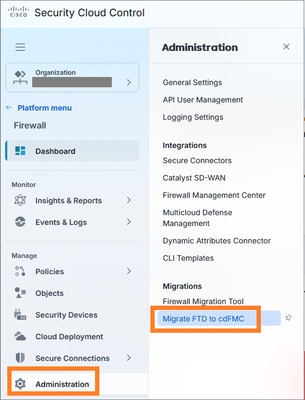
Start the migration workflow from Firewall > Administration > Migrations > Migrate FTD to cdFMC:
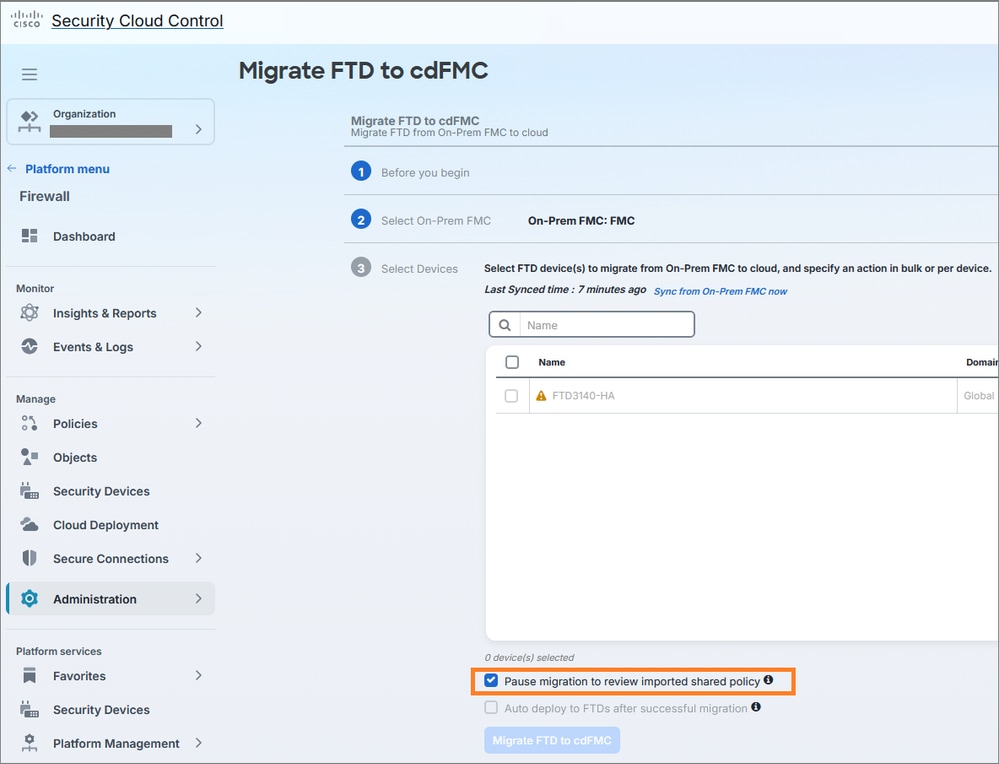
Use the option to pause after shared policy import for review:
Phase 2: Migration Execution
During the maintenance window, migrate devices using a phased approach:
Start with the standalone FTD (lowest impact).
Migrate the first HA pair.
Validate device health and functionality.
Migrate the second HA pair.
Phase 3: Post-Migration Validation
After each device or HA pair migration:
Confirm device health in cdFMC.
Confirm HA state where applicable.
Review deployment preview/warnings.
Deploy from cdFMC.
Validate traffic and event visibility.
Three-Phase Migration Plan with Configuration Freeze
The recommended approach involves executing FTD migrations in three phases, each occurring on separate dates, with a minimum of three days of post-cutover monitoring per phase. This approach reduces risk and provides time to validate:
Policy deployment from cdFMC.
Device health status.
HA status for both HA pairs.
Event/analytics visibility in cloud.
Any operational issues before proceeding to the next phase.
Configuration Freeze Implementation
Implement a configuration freeze during the migration/evaluation period with this approach:
Best option: Freeze all FTD-related configuration changes across FMCv300 and cdFMC until each phase is validated and committed.
Minimum option: Freeze the devices being migrated plus any shared policies/objects used by both migrated and non-migrated devices.
Avoid editing the same shared policies/objects in both FMCv300 and cdFMC during the phased migration.
Avoid major changes during the evaluation period.
Emergency Change Process
For emergency changes during migration:
Apply the change only on the current authoritative manager for that device:
Devices not yet migrated: FMCv300.
Devices already migrated: cdFMC.
Document the change, affected policy/object, timestamp, and device scope.
Reconcile the change after the phase is completed, especially if it affects shared objects or shared policies.
Evaluation Period Management
Important considerations for the 14-day evaluation window:
Track the 14-day evaluation window for each migration phase/job.
Do not let any phase reach auto-commit unintentionally.
If the three-day monitoring is successful, commit that phase manually rather than waiting for the full 14 days.
FMCv300 Decommission Process
Do not power off or remove FMCv300 immediately after device migration. Keep FMCv300 available until:
All FTD devices are migrated successfully.
cdFMC deployments are successful.
Cloud analytics/events are confirmed.
The migration is committed.
Any log/event retention requirements are satisfied.
A final FMCv300 backup is retained according to organizational policy.
After these conditions are met, FMCv300 can be removed from active use and decommissioned according to standard virtual machine retirement processes.
Cause
This is a planned migration from on-premises FMC to cdFMC. The migration is driven by the need to leverage cloud-based management capabilities and decommission the existing FMCv300 virtual appliance.
Related Content
Revision History
| Revision | Publish Date | Comments |
|---|---|---|
1.0 |
14-Sep-2026
|
Initial Release |

 Feedback
Contact Cisco
- Open a Support Case

- (Requires a Cisco Service Contract)