Troubleshoot Custom CA List Certificate Expiration Alerts on ESA
Available Languages
Introduction
This document describes custom CA certificate expiration alerts on a Secure Email Gateway (ESA) after an upgrade to AsyncOS 14.x.
Overview
The symptom is expiration alerts for certificates that were appended to the Custom Certificate Authority (CA) list during the upgrade. The impact is limited to informational alerts because expiration of certificates in the custom list does not affect certificates in the system list. The resolution is to verify the certificate source and either replace the required custom CA certificate or remove the expired certificate from the custom list.
Components Used
This document is based on Cisco Secure Email Gateway running AsyncOS 14.0 or later.
The information in this document was created from the devices in a specific lab environment. All of the devices used in this document started with a cleared (default) configuration. If your network is live, ensure that you understand the potential impact of any command.
Background Information
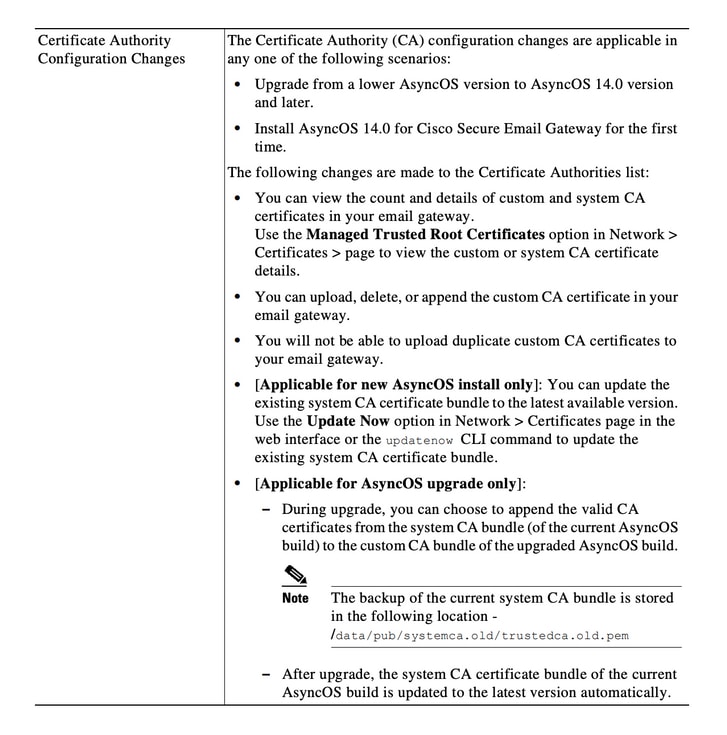
During the upgrade process to AsyncOS 14.x, customers are prompted to confirm whether they want to append older system certificates to the custom CA list. This behavior is also documented in the AsyncOS 14.0 release notes, as shown in Image 1. See the Cisco Secure Email Gateway Release Notes for AsyncOS 14.0.
Image 1. Release notes excerpt that shows the upgrade prompt to append older system certificates to the custom CA list.
Problem
After an upgrade to AsyncOS 14.x, older system certificates that were appended to the custom list can expire over time and generate alerts such as this example.
26 Jun 2021 11:27:29 -0400 Your certificate CA:Root CA Generalitat Valenciana expires in 5 days (s).
These alerts are indicative of either older system certificates expiring which were appended to the custom list at the time of upgrade or a custom certificate previously used nearing expiration.
Solution
The alerts for older system certificates in the custom list are informational, and you can choose to remove them from the custom list or allow them to expire.
This condition does not affect service, but the alert can be undesirable.
If you see alerts for a custom CA certificate that is required by your organization and is not currently part of the system list, contact the CA for an updated certificate and replace it as described in the Cisco Secure Email Gateway Admin Guide certificate management procedure.
The system CA certificate bundle is updated automatically after an upgrade and periodically thereafter. Expiration of certificates in the custom list does not affect certificates in the system list.
To verify that the system list and custom list are both enabled, navigate to Network > Certificates > Certificate Authorities > Edit Settings.
You can also export the system and custom lists from the same menu, or use the CLI commands certconfig and certauthority to review certificates in both lists as needed.
If you want to remove the certificate that generates alerts in the custom CA list, complete these steps as an administrator over SSH to the appliance.
- Run certconfig.
- Enter certauthority, then enter custom.
- Enter delete and select the certificate that matches the alert.
- Confirm the deletion and then run commit to save the change.
This CLI example shows the workflow.
example.com> certconfig

Choose the operation you want to perform:
- CERTIFICATE - Import, Create a request, Edit or Remove Certificate Profiles
- CERTAUTHORITY - Manage System and Customized Authorities
- CRL - Manage Certificate Revocation Lists
[]> certauthority

Certificate Authority Summary
Custom List: Enabled
System List: Enabled

Choose the operation you want to perform:
- CUSTOM - Manage Custom Certificate Authorities
- SYSTEM - Manage System Certificate Authorities
[]> custom

Choose the operation you want to perform:
- DISABLE - Disable the custom certificate authorities list
- IMPORT - Import the list of custom certificate authorties
- EXPORT - Export the list of custom certificate authorties
- DELETE - Remove a certificate from the custom certificate authorty list
- PRINT - Print the list of custom certificate authorties
- CHECK_CA_FLAG - Check CA flag in uploaded custom CA certs
[]> delete

You must enter a value from 1 to 104.
...
59. [Root CA Generalitat Valenciana] <<< Select this certificate based on the sample alert in this example
...
93. [thawte Primary Root CA]

Select the custom CA certificate you want to delete
[]> 59

Are you sure you want to delete "Root CA Generalitat Valenciana"? [N]> Y
Custom CA certificate "Root CA Generalitat Valenciana" removed

Choose the operation you want to perform:
- DISABLE - Disable the custom certificate authorities list
- IMPORT - Import the list of custom certificate authorties
- EXPORT - Export the list of custom certificate authorties
- DELETE - Remove a certificate from the custom certificate authorty list
- PRINT - Print the list of custom certificate authorties
- CHECK_CA_FLAG - Check CA flag in uploaded custom CA certs
[]> [ENTER]

Certificate Authority Summary
Custom List: Enabled
System List: Enabled
Choose the operation you want to perform:
- CUSTOM - Manage Custom Certificate Authorities
- SYSTEM - Manage System Certificate Authorities
[]> [ENTER]

Choose the operation you want to perform:
- CERTIFICATE - Import, Create a request, Edit or Remove Certificate Profiles
- CERTAUTHORITY - Manage System and Customized Authorities
- CRL - Manage Certificate Revocation Lists
[]> [ENTER]

example.com> commit
Ensure that you run commit at the end.
Related Information
Revision History
| Revision | Publish Date | Comments |
|---|---|---|
2.0 |
07-Jul-2026
|
Recertification. |
1.0 |
29-Jun-2021
|
Initial Release |

 Feedback
Contact Cisco
- Open a Support Case

- (Requires a Cisco Service Contract)