Validate Secure Access Domain Bypass on Secure Client
Available Languages
Issue
Organizations using Cisco Secure Access often configure Bypass domains to allow specific websites, applications, or services to connect directly to the internet without being sent to Secure Access or processed by the Secure Web Gateway. While these bypass rules can appear correctly configured in the Secure Access dashboard, administrators frequently face challenges confirming whether the bypass policies are actually being applied and enforced on the Cisco Secure Client endpoints.
Environment
Cisco Secure Access with Roaming Security Modules along with Domain Bypass.
Resolution
When we configure a Domain with:
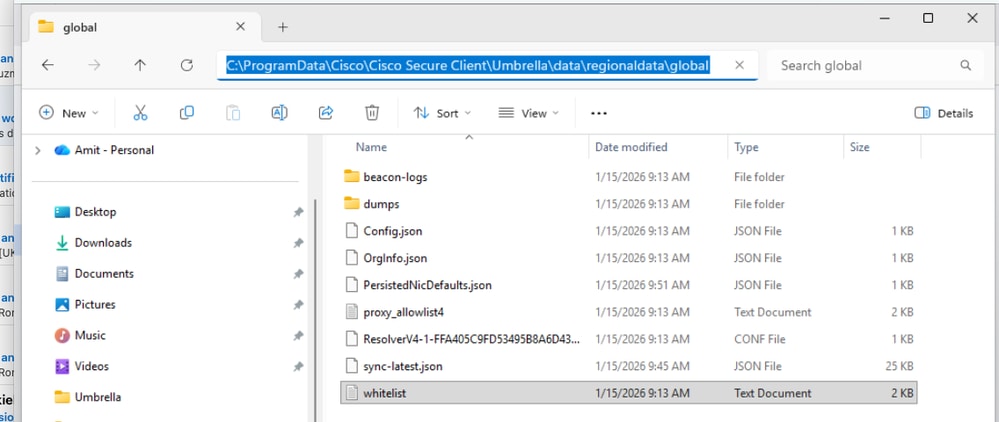
Bypass Secure access, the configuration is pushed to the client in the file allowlist.txt under C: > Program Data > Cisco > Cisco Secure Client > Umbrella > Data > Regional Data > Global Folder.
 inline_image_0.png
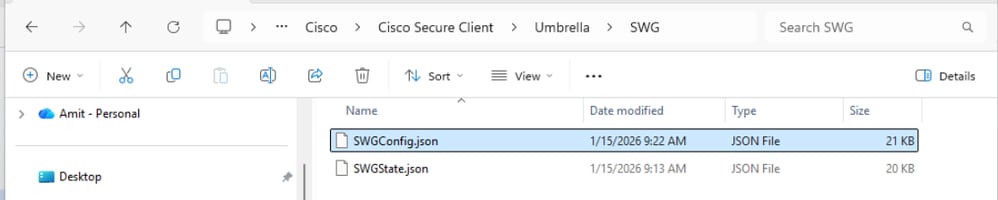
Bypass SWG, the configuration is pushed to the client in the SWGConfig.json file under C: > Program Data > Cisco > Cisco Secure Client > Umbrella > SWG:
 inline_image_1.png
Note: Sync Timer between Client and the cloud is approximately 25 min but if you want to override it you can restart the Umbrella Services.
Cause
The root cause of the issue was that the user checked the incorrect file for SWG Bypass.
Related Content
Revision History
| Revision | Publish Date | Comments |
|---|---|---|
1.0 |
24-Mar-2026
|
Initial Release |

 Feedback
Contact Cisco
- Open a Support Case

- (Requires a Cisco Service Contract)