Remove Expired Internal OCSP Responder Certificates in ISE
Available Languages
Contents
Introduction
This document describes how to delete Expired and/or about to Expire OCSP Responder Certificates in Cisco Identity Service Engine (ISE).
Prerequisites
Requirements
Cisco recommends that you have knowledge of these topics:
- Basic knowledge of the Identity Service Engine (ISE).
- Basic knowledge of Certificates.
- Online Certificate Status Protocol (OCSP)
Components Used
The information in this document is based on these software and hardware versions:
- Cisco Identity Service Engine 3.x
The information in this document was created from the devices in a specific lab environment.All ofthe devices used in this document started with a cleared (default) configuration. If your network is live, ensure that you understand the potential impact of any command.
Background Information
A common issue faced by customers using Cisco Identity Services Engine (ISE) is receiving alarms indicating that a certificate has expired, specifically when the OCSP responder certificate is expired or about to expire and the certificate cannot be found. This situation often leads customers to open TAC cases for assistance. The goal of this guide is to empower customers to locate and delete these expired or soon-to-expire OCSP responder certificates themselves, thereby avoiding the need to raise a TAC case.
The Online Certificate Status Protocol (OCSP) is a protocol that is used for checking the status of x.509 digital certificates. This protocol is an alternative to the Certificate Revocation List (CRL) and addresses issues that result in handling CRLs. Cisco ISE has the capability to communicate with OCSP servers over HTTP to validate the status of certificates in authentications. The OCSP configuration is configured in a reusable configuration object that can be referenced from any certificate authority (CA) certificate that is configured in Cisco ISE.
In every Cisco ISE deployment, OCSP (Online Certificate Status Protocol) Responder certificates are present by default as part of the Internal CA (Certificate Authority) infrastructure. These certificates are issued by the Cisco ISE Internal CA on the PPAN (Primary Policy Administration Node) and are automatically generated for each node in the deployment, including the PAN and all PSNs (Policy Service Nodes).
Managing these OCSP Responder certificates is important because expired or about-to-expire certificates can trigger Certificate Expired alarms in the Cisco ISE dashboard. Although Cisco ISE automatically regenerates new OCSP Responder certificates, the expired entries remain in the Trusted Certificate Store until they are manually removed.
Configuration
Step 1 - Verify the Expired OCSP Certificate
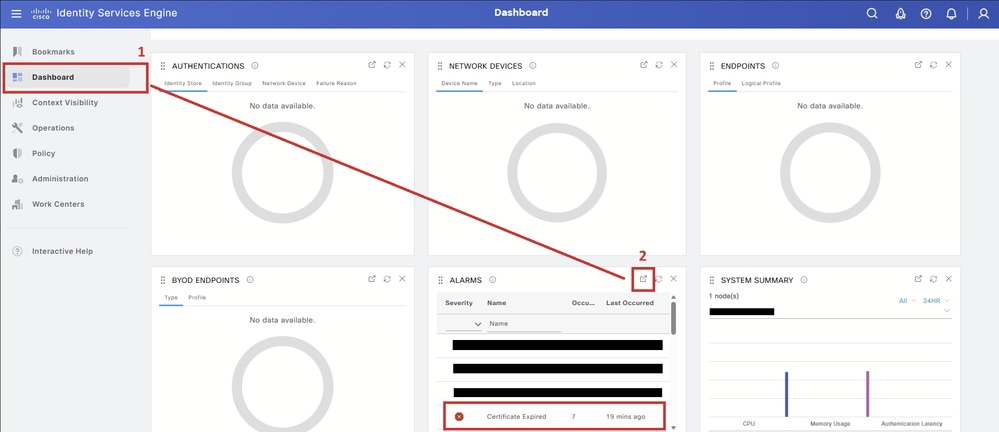
In the PPAN (Primary Policy Administration Node) GUI, navigate to the Dashboard tab (1). In the Alarms dashlet, click the Detach button (2) to expand the alarm table.
Click the Certificate Expired alarm to expand the table and display the certificate entries associated with the alarm.
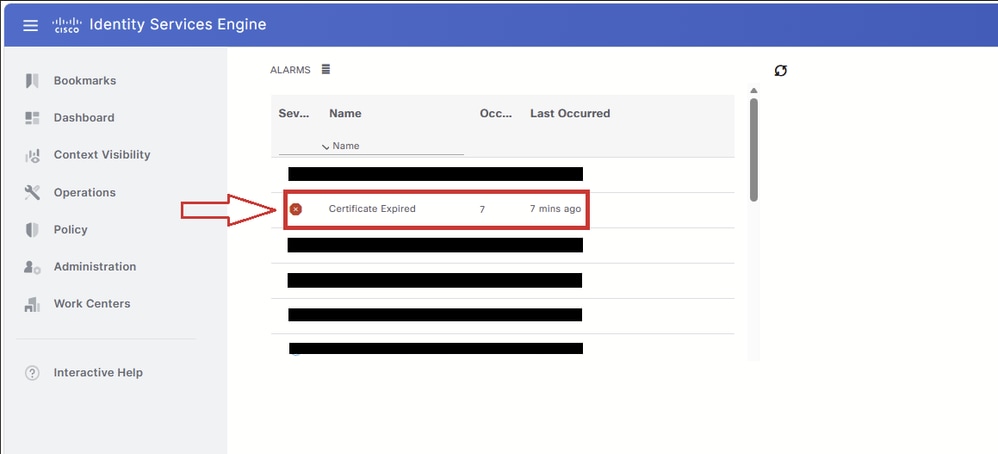
All certificates that triggered the Certificate Expired alarm are displayed in this table. This guide focuses only on OCSP Responder certificates. If the table includes other expired certificate types, such as EAP, SAML, Admin, or other system certificates, refer to the relevant Cisco documentation and Cisco ISE Administrator Guide for guidance on those certificate types.
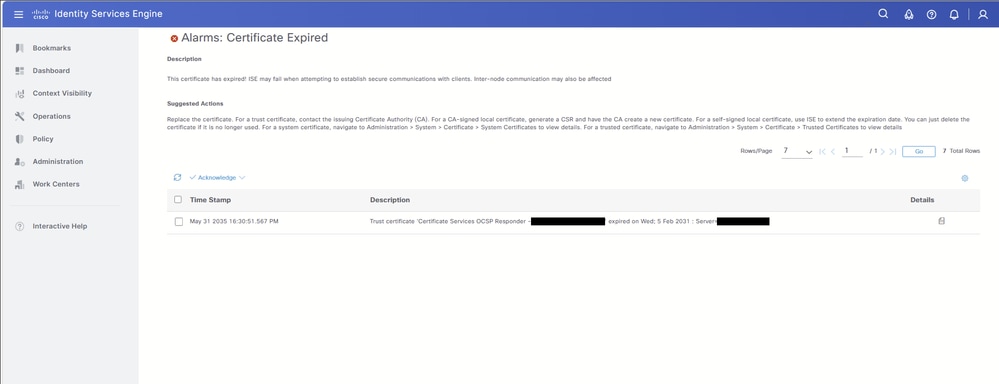
Review the alarm description to identify the certificate that is expired or, in some scenarios, about to expire.
In this example, the expired certificate is: Certificate Services OCSP Responder - <node-name>#00004.
Take note of the certificate name. This name is used in the next steps to locate and delete the certificate from the Trusted Certificate Store.

Step 2 - Find and Delete the Expired OCSP Certificate
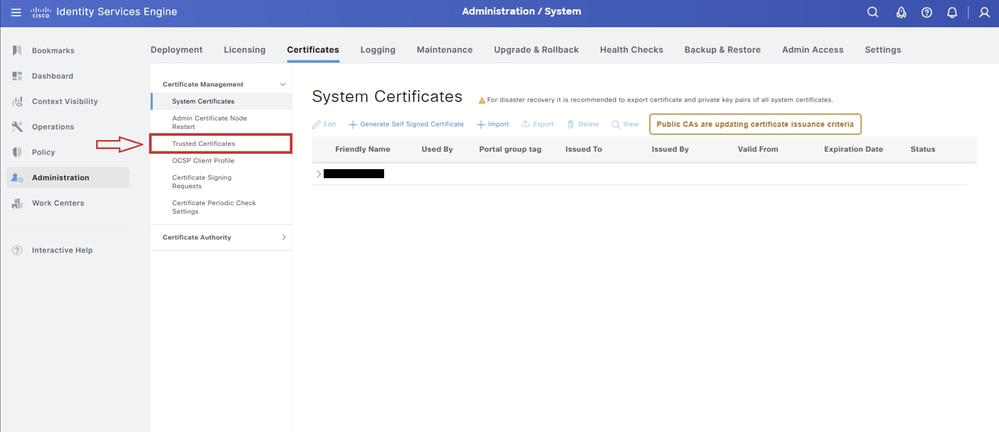
Navigate to: Administration > System > Certificates:
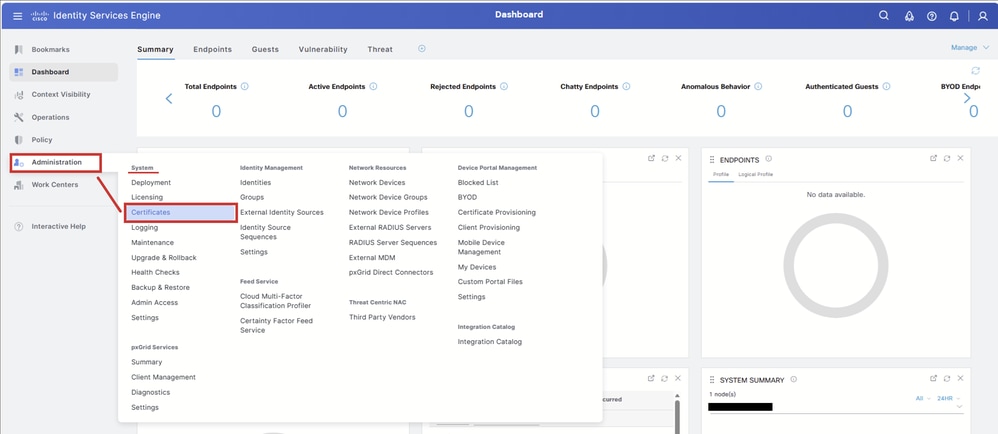
Select the Trusted Certificates tab.
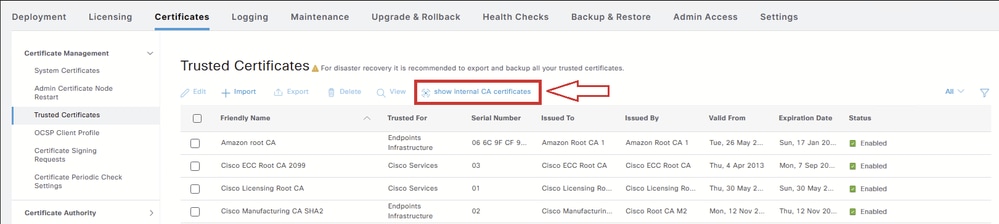
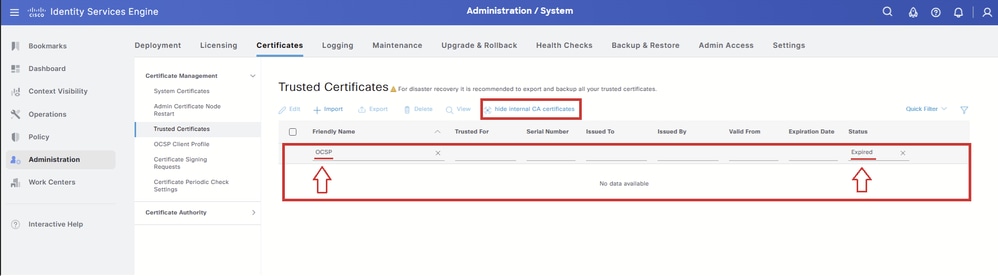
On the Trusted Certificates page, select show internal CA certificates. This displays the Cisco ISE Internal CA (Certificate Authority) certificates, including the OCSP Responder certificates that are hidden by default.
Once selected, the button changes to hide internal CA certificates.

Warning: This step is required. If show internal CA certificates is not selected, the OCSP Responder certificate does not appear in the Trusted Certificate Store table.
In the Trusted Certificate Store table, select the Filter icon to search for the certificate that must be deleted.

If the OCSP Responder certificate is about to expire, filter only by OCSP under Friendly Name. If the OCSP Responder certificate is already expired, continue with the next action.

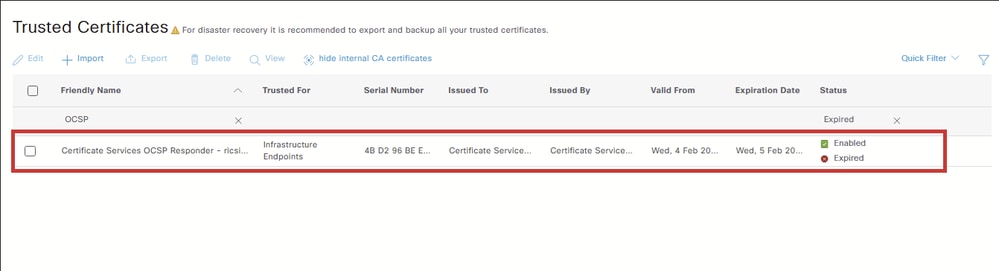
To locate an expired OCSP Responder certificate, enter these filters:
- Friendly Name: OCSP
- Status: Expired

The table displays the expired OCSP Responder certificates.

Tip: If you are searching for an OCSP Responder certificate that is about to expire, multiple certificates can be displayed, especially in deployments with multiple Cisco ISE nodes. To identify the correct certificate, do not filter only by OCSP. Instead, filter by the full certificate name that was shown in the alarm details in Step 1.
Select the checkbox next to the OCSP Responder certificate that must be removed and click Delete.
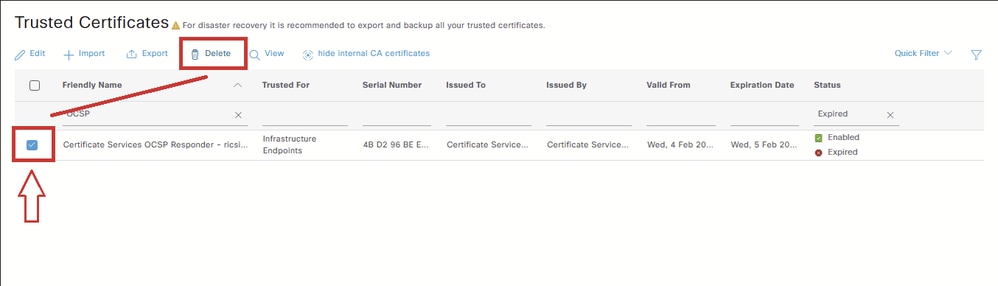
Select OK on the confirmation warning to continue with deleting the certificate.
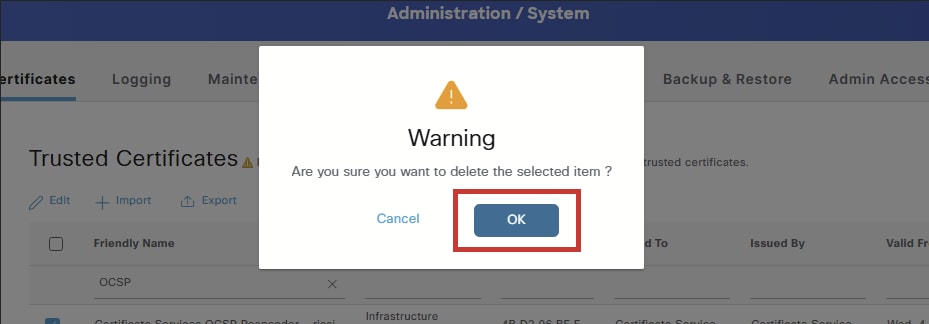
Before you delete the certificate, it is important to understand that the OCSP Responder certificate is part of the ISE Internal CA infrastructure.
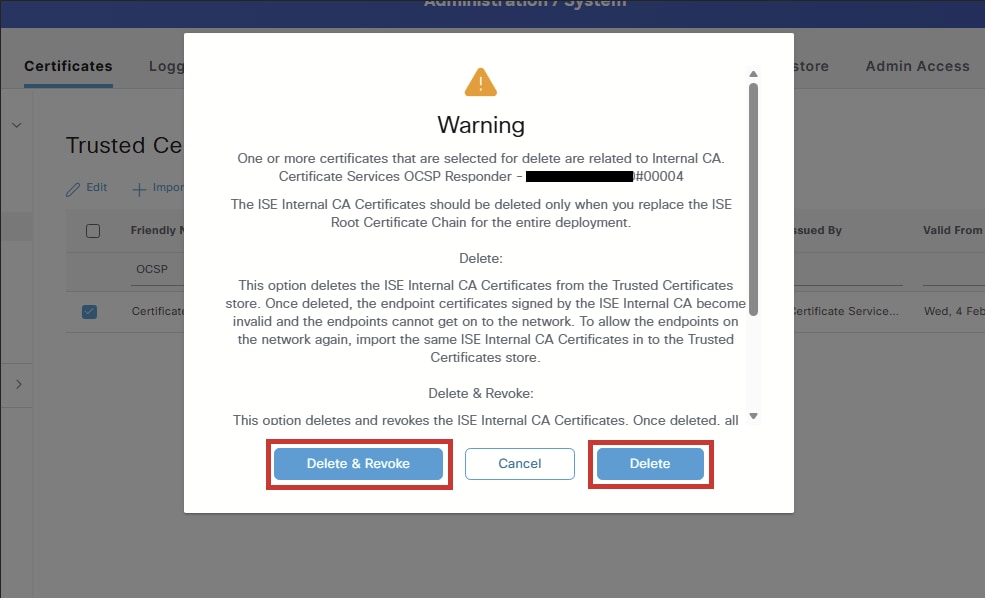
The warning that appears during deletion is generic and applies to all Internal CA-related certificates. Its purpose is to caution against deleting certificates within the Internal CA hierarchy, since some of these certificates sign endpoint certificates used for services such as BYOD, pxGrid, or other functions that rely on certificates issued by the ISE Internal CA.
An expired OCSP Responder certificate can also affect certificates issued by the ISE Internal CA. When a client or service queries the status of a certificate issued by that CA, the OCSP service returns an error because the OCSP Responder certificate is expired, which can cause certificate status validation to fail.
When you select Delete, two options are presented:
- Delete certificate: This option deletes the Cisco ISE Internal CA certificate from the Trusted Certificates store. When the Internal CA certificate is deleted, all endpoint certificates signed by that CA become invalid, and the affected endpoints cannot access the network. This action is reversible: you can restore network access by importing the same Internal CA certificate back into the Trusted Certificates store.
- Delete & Revoke certificate: This option deletes and revokes the Cisco ISE Internal CA certificate. As with the Delete option, all endpoint certificates signed by the Internal CA become invalid, and the affected endpoints lose network access. However, this operation is irreversible. After revocation, you must replace the entire Cisco ISE root certificate chain for the deployment to restore functionality.
Which Option to Select for an Expired OCSP Responder Certificate?
The impact described applies to Internal CA certificates that actively sign endpoint certificates. The OCSP Responder certificate does not sign endpoint certificates, it is used for OCSP communication. While an expired OCSP Responder certificate can cause certificate status validation to fail for certificates issued by the Internal CA, the certificate is already expired and is therefore no longer providing valid OCSP responses. Deleting it does not introduce any additional impact.
Because the OCSP Responder certificate in this scenario is already expired, it is no longer valid. In this case, both Delete and Delete & Revoke produce the same result, since there is nothing valid left to revoke.
For these reasons, Delete is the recommended option, as it is the simpler action and avoids generating an unnecessary revocation entry.

Note: OCSP Responder certificates are not regenerated during normal operation. They are regenerated only when a patch is installed:
- In a multi-node deployment, the certificates are regenerated when the patch is installed through the GUI.
- In a standalone deployment, the certificates are regenerated when the patch is installed through either the GUI or the CLI.
A new OCSP Responder certificate is generated only at the next patch installation.

Caution: Ensure that the affected node has an active, valid OCSP Responder certificate in the Trusted Certificate Store. If a valid certificate is not present and OCSP is used to validate certificates signed by ISE Internal CA, that validation fails until a new OCSP Responder certificate is generated.
If a valid OCSP Responder certificate is not present, renew the OCSP Responder certificates from the PPAN (Primary Policy Administration Node) as described here:
1. Access the ISE PPAN GUI.
2. Go to Administration > System > Certificates.
3. Select Certificate Signing Requests on the left.
4. Click Generate CSR. For Usage, select Renew ISE OCSP Responder.
5. Click Renew ISE OCSP Responder Certificates to complete the process.
After the certificate is deleted, a Server Response notification appears indicating that the trusted certificate was deleted successfully:

Verify
After the certificate is deleted, you can use one or both of these methods to verify that the operation was successful.
Option 1 - Verify from the Dashboard Alarms
Navigate to the Dashboard page.
In the Alarms dashlet, locate the Configuration Changed alarm. Select the alarm to display the details.
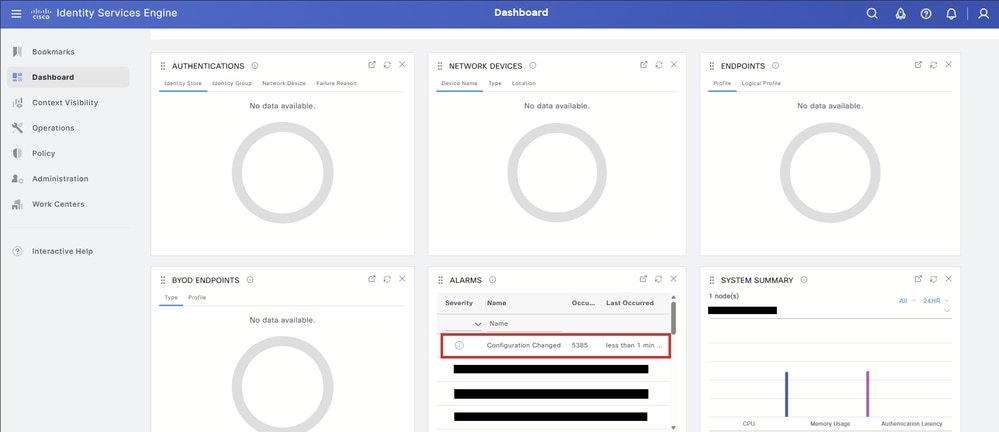
An entry must appear indicating that a configuration object was deleted. The object name must match the OCSP Responder certificate that was removed.
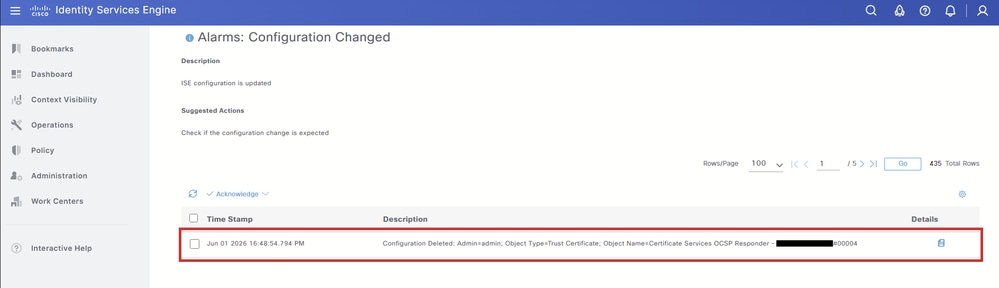
Option 2 - Verify from the Trusted Certificate Store
As an additional step, navigate back to the Trusted Certificate Store table and filter for the OCSP Responder certificate. Since the certificate has been deleted, the table must display No data available.
Note: Remember to select show internal CA certificates.
Revision History
| Revision | Publish Date | Comments |
|---|---|---|
1.0 |
06-Jul-2026
|
Initial Release |

 Feedback
Contact Cisco
- Open a Support Case

- (Requires a Cisco Service Contract)