Integrate ISE 3.3 with JAMF as an MDM Server
Available Languages
Contents
Introduction
This document describes procedures that are necessary to implement Identity Services Engine v3.3 with JAMF PRO instance 10.48.X.
Prerequisites
Requirements
Cisco recommends knowledge in these topics:
- Identity Services Engine (ISE)
- JAMF as an MDM Solution
Components Used
The information in this document is based on these software and versions:
- Cisco Identity Services Engine (ISE) v3.3
- JAMF PRO v10.48.1-t1689600654
The information in this document was created from the devices in a specific lab environment. All of the devices used in this document started with a cleared (default) configuration. If your network is live, ensure that you understand the potential impact of any command.
Background Information
Cisco ISE supports JAMF as an MDM Server for managing Windows computers. When these computers (managed by JAMF) they are connected and authenticated, ISE retrieves compliance information from JAMF Servers to retrieve further information for the security posture of those devices.
It uses the information to enforce secure access security by allowing/denying those computers, depending on the criteria and conditions configured in ISE. Therefore, this implementation helps to identify potential vulnerabilities and security weaknesses that could be exploited by attackers.
Configure
Preparing JAMF PRO for the MDM Connection
Step 1. Log in with your JAMF cloud with the account for admin privileges at: https://YOUR_ACCOUNT.jamfcloud.com/index.html.
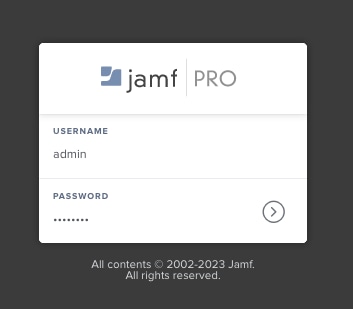 JAMF PRO login page
Step 2. From the Main Menu, select the gear icon.
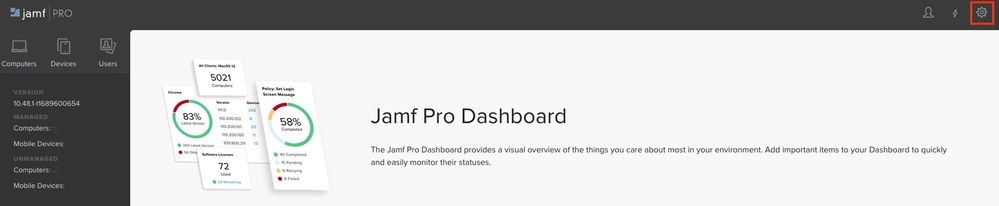 JAMF PRO Dashboard
Step 3. On the Main Menu, choose System > Useraccounts and groups.
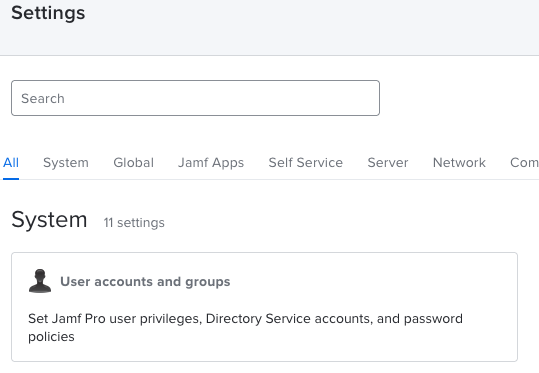 JAMF PRO System Settings
Step 4. Select the option Password Policy.
 JAMF PRO Users accounts and groups
Step 5. In this section, confirm you have the option Allow Basic Authentication in addition to Bearer Token Authentication.

Note: Starting with JAMF PRO v10.35, the basic authentication for the API is not enabled by default. Therefore, you must enable these features to ensure the MDM integration is working.
For more information please review Classic API Authentication Changes.
Step 6. Once you have the last feature enabled, go to the Menu Settings described in Step 3, then look for the Network IntegrationMenu, and select it.
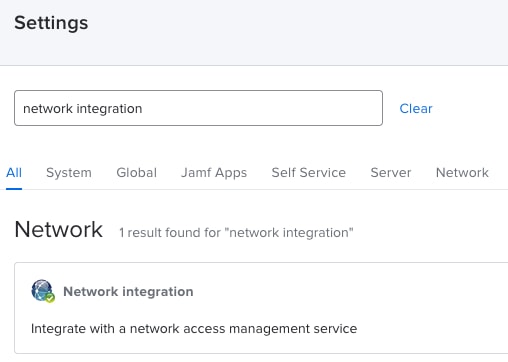 JAMF PRO Network integration
Step 7. Proceed to select + New to add a new instance for ISE 3.3.
 JAMF PRO Network integration settings
Step 8. In the drop-down menu under Network Access Management Service, leave the option marked as Cisco ISE.
- Next provide a name in the menu Display Name as it is shown in this example.
- For the initial settings and the connection for ISE, the configuration can be left with these standard configurations.
- Proceed to Save the configuration.
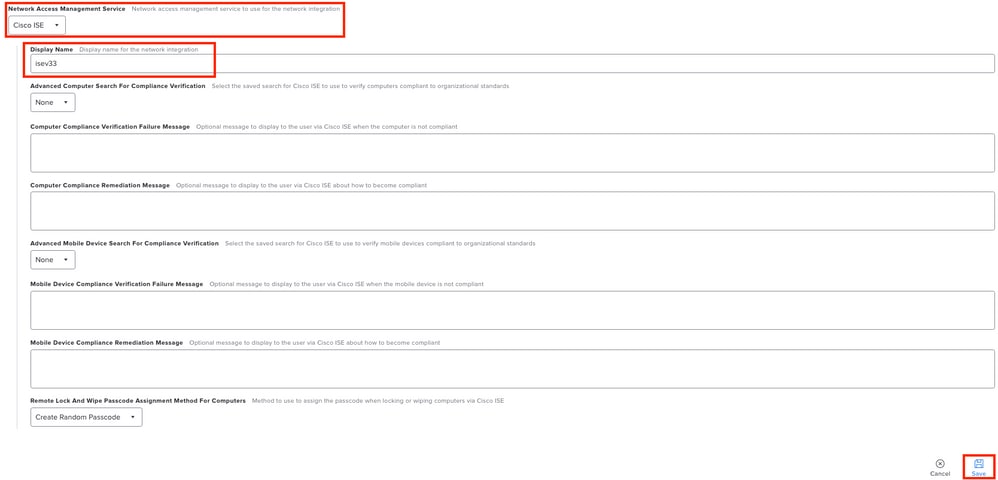 Configuration sample Network integration with ISE
Step 9. The integration generates a Network Integration URL with this format: https://YOUR_ACCOUNT.jamfcloud.com/networkIntegrationEndpoint/ID. Save this URL because you must use it later to connect with ISE.
Preparing ISE for the MDM connection
Step 1. Select the Menu > Administration > Network Resources > External MDM, and then click Add.
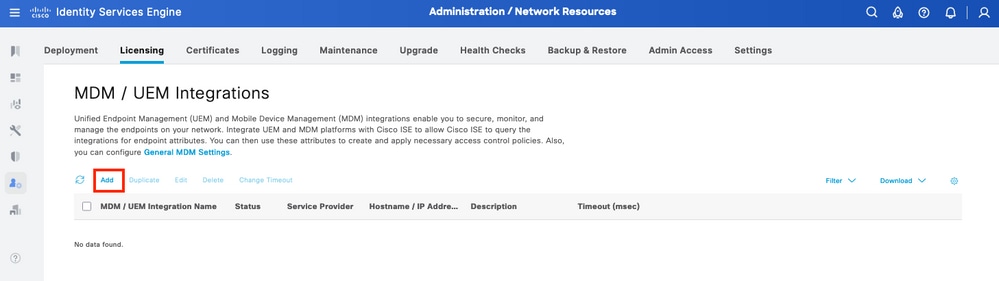 ISE MDM integration menu
Step 2. Name the installation within the MDM / UEM Integration Name segment.
- In the section Hostname / IP Address, select YOUR_ACCOUNT.jamfcloud.com from the URL generated in previous steps.
- In Port, select the 443 for the HTTPS connection with your JAMF PRO instance.
- In the section Instance Name, proceed to enter the values with the section missing from the URL created (in this case: /networkIntegrationEndpoint/ID).
- Input a Username with full access to the JAMF PRO instance alongside the corresponding Password.
- Change the Status of the MDM server to Enabled.
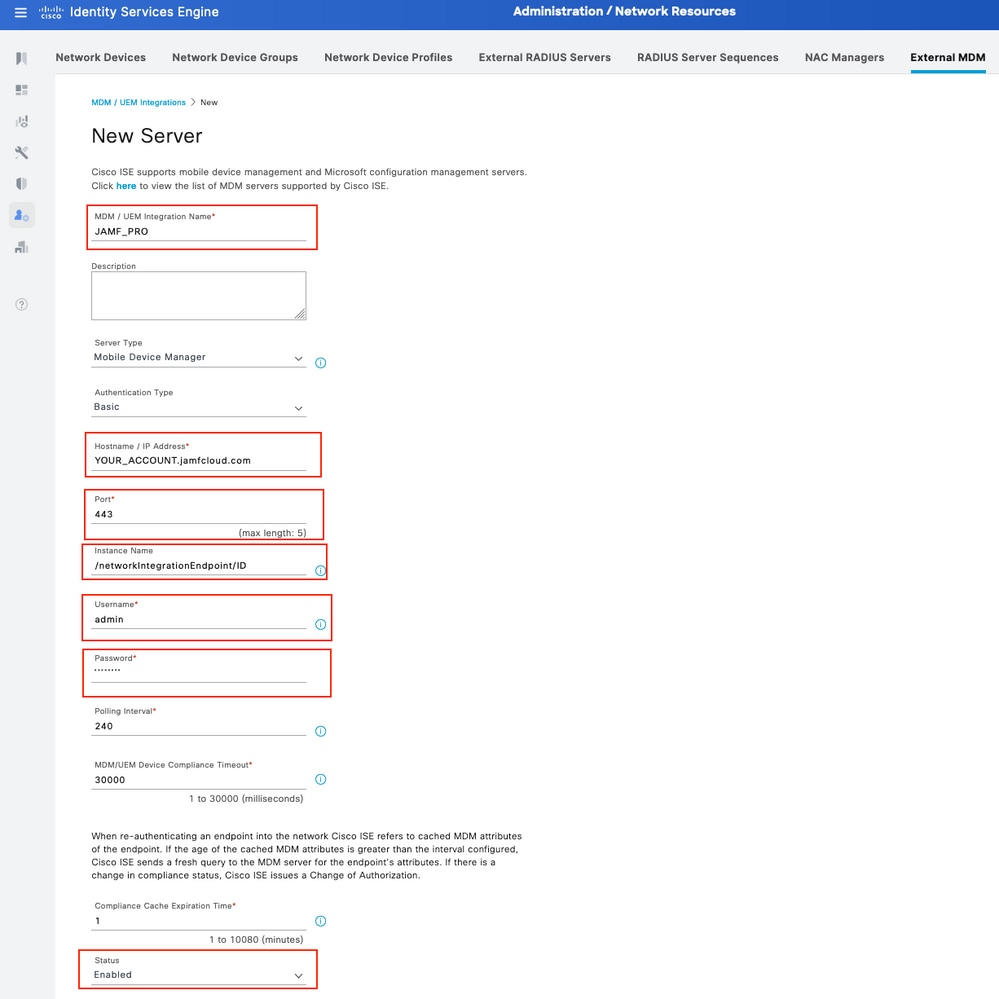 ISE MDM JAMF PRO configuration example
Step 3. Scroll down and proceed to Test Connection. If the connection is successful, this image is displayed. If you do not receive the same output, please refer to the Troubleshooting Section in this document.
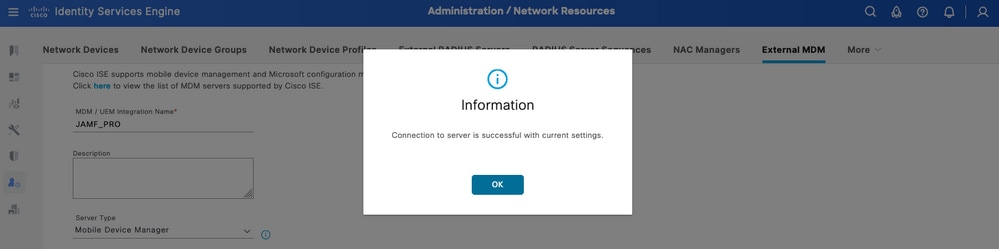 Successful connection with the MDM JAMF account
Step 4. Select OK in the option previously. At the bottom of the page, find the Device Identifier where the ISE associate of the session of the endpoint.
- Depending on your scenario, you can select the MAC address of the device or the attributes of the certificate.
- Once you have customized this section, Save the configuration.
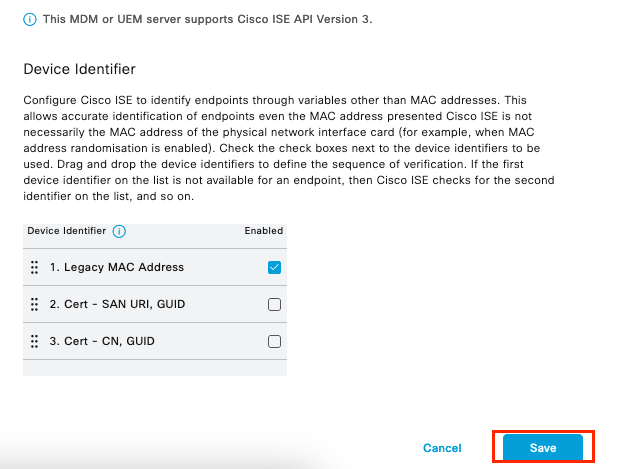 Additional configuration for MDM server
Verify the Initial Connectivity of the integration with JAMF PRO instance.
Packet Capture: In the case of a successful connectivity, you can view the HTTPS traffic that is sent from the ISE PAN server to the JAMF PRO instance:
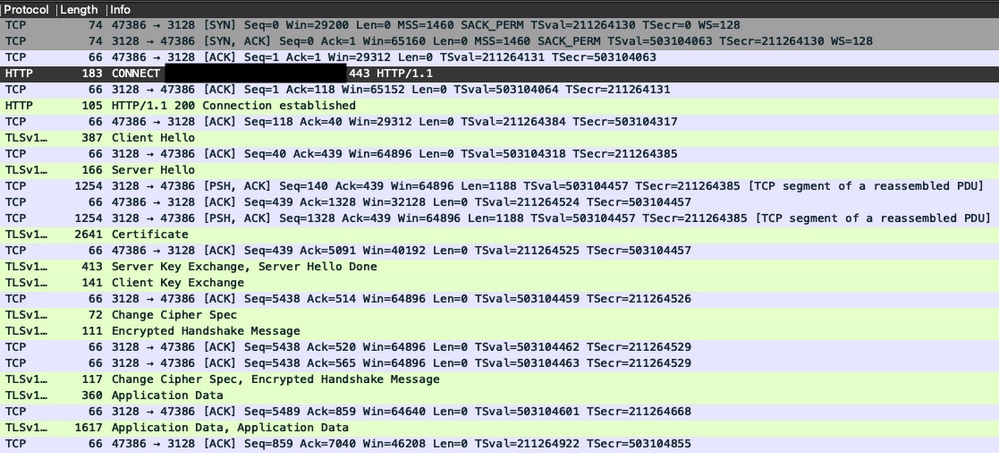 Packet capture example of connectivity with JAMF instance
Logs on ISE: The ISE processes and analyzes the data correspondingly as shown in the ise-psc.log:
DEBUG [admin-http-pool16][[]] cisco.cpm.mdm.api.MdmServerInfoApi -:::::- inside the method : callMdmServerInfoApiOnMdmServer()
TRACE [admin-http-pool16][[]] cisco.cpm.mdm.apiimpl.MDMVerifyServer -:::::- Inside MDMVerifyServer.verify, connectToServer is called
DEBUG [admin-http-pool16][[]] cisco.cpm.mdm.apiimpl.MDMVerifyServer -:::::- apiVersionSb : 3, mdmApiVersionSb : , tryWithV3 : false
DEBUG [admin-http-pool16][[]] cisco.cpm.mdm.apiimpl.MDMVerifyServer -:::::- MDM Rest API Server Query String -> /ciscoise/mdminfo/?ise_api_version=3
DEBUG [admin-http-pool16][[]] cisco.cpm.mdm.apiimpl.MDMVerifyServer -:::::- MDM Rest API Server Query PATH String -> /ciscoise/mdminfo/?ise_api_version=3
DEBUG [admin-http-pool16][[]] cisco.cpm.mdm.apiimpl.MDMVerifyServer -:::::- 1. Connecting to the MDM server host YOUR_ACCOUNTusing apiVersion 3
DEBUG [admin-http-pool16][[]] cisco.cpm.mdm.util.MdmRESTClient -:::::- sendGETRequestDom: start  HTTP request - connectionsUsed: 1, connectionsAvailable: 199
DEBUG [admin-http-pool16][[]] cisco.cpm.mdm.util.MdmRESTClient -:::::- sendGETRequestDomNonComp: start  HTTP request - connectionsUsed: 0, connectionsAvailable: 200
DEBUG [admin-http-pool16][[]] cisco.cpm.mdm.util.MdmRESTClient -:::::- ===mdmFlowInfo===null,=====serverType=====MobileDeviceManager,===serverAuthType===Basic
DEBUG [admin-http-pool16][[]] cisco.cpm.mdm.util.MdmRESTClient -:::::- QueryType is heartbeatQuery
DEBUG [admin-http-pool16][[]] cisco.cpm.mdm.util.MdmRESTClient -:::::- using httpClient for http query - [parameters={http.route.default-proxy=http://PROXY_IP:PORT, http.socket.timeout=30000, http.connection.timeout=5000}]
INFO  [admin-http-pool16][[]] cisco.cpm.mdm.util.MdmRESTClient -:::::- GET: MDM Server URL: https://YOUR_ACCOUNT:443//networkIntegrationEndpoint/ID/ciscoise/mdminfo/?ise_api_version=3
DEBUG [admin-http-pool16][[]] cisco.cpm.mdm.util.MdmRESTClient -:::::- Proxy Config in request  = [,PROXY_IP,PORT,nullnull2fpwHJhtoIMf+jKzFKazgg==%/ZFdElAGn4odZaRIZxeiZQ==]
.
.
INFO  [admin-http-pool16][[]] cisco.cpm.mdm.util.MdmRESTClient -:::::- MDM Server Response Code: 200
TRACE [admin-http-pool16][[]] cisco.cpm.mdm.util.MdmRESTClient -:::::-
Response data received from the MDM server : <?xml version="1.0" encoding="UTF-8"?><ise_api><name>mdminfo</name><api_version>3</api_version><api_path>/networkIntegrationEndpoint/ID/ciscoise/v3</api_path><redirect_url>https://YOUR_ACCOUNT.jamfcloud.com/enroll</redirect_url><query_max_size>1000</query_max_size><messaging_support>true</messaging_support><vendor>JAMF Software</vendor><product_name>JSS</product_name><product_version>10.48.1-t1689600654</product_version></ise_api>
DEBUG [admin-http-pool16][[]] cisco.cpm.mdm.util.MdmRESTClient -:::::- sendGETRequestDom: end  HTTP request - connectionsUsed: 1, connectionsAvailable: 199
DEBUG [admin-http-pool16][[]] cisco.cpm.mdm.util.MdmRESTClient -:::::- sendGETRequestDomNonComp: end  HTTP request - connectionsUsed: 0, connectionsAvailable: 200
TRACE [admin-http-pool16][[]] cisco.cpm.mdm.apiimpl.MDMVerifyServer -:::::- isMdmSettingsIdNotNull flag Value : false,tryWithV3 : false, isMdmSettingsUpdateRequired : false
DEBUG [admin-http-pool16][[]] cisco.cpm.mdm.api.MdmServerInfoApi -:::::- returning from the method : callMdmServerInfoApiOnMdmServer() -> com.cisco.cpm.mdm.api.MdmServerInfoData Object {
  apiPath: /ID/ciscoise/v3
  redirectUrl: https://YOUR_ACCOUNT.jamfcloud.com/enroll
  queryMaxSize: 1000
  apiVersion: 3
  vendor: JAMF Software
  productName: JSS
  productVersion: 10.48.1-t1689600654
  COMMA: ,
  errorMsg: null
  errorOccurred: false
}
Troubleshooting MDM Server is not Reachable
The base of this integration consists of queries that ISE performs periodically to the JAMF-PRO instance. The point of reference where troubleshooting is performed (in this instance) is the Primary Administration Node (PAN). The PAN node is where the connectivity method is configured to reach the MDM server. This same method is replicated in all nodes for the implementation.
The next steps can be applied for troubleshooting reachability problems.
Step 1. Enable the component external-mdm at the TRACE level on the PAN node.
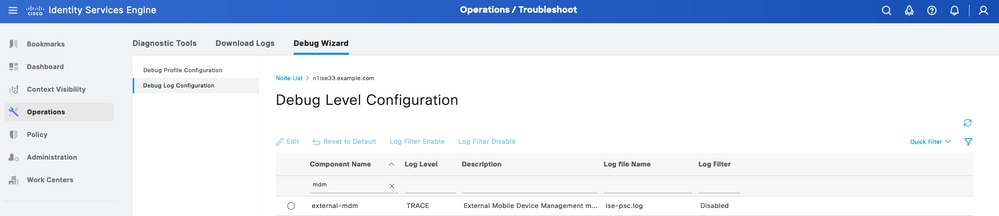 External MDM component in TRACE level to troubleshoot
Step 2. Setup a capture from the PAN node and Save your configuration.
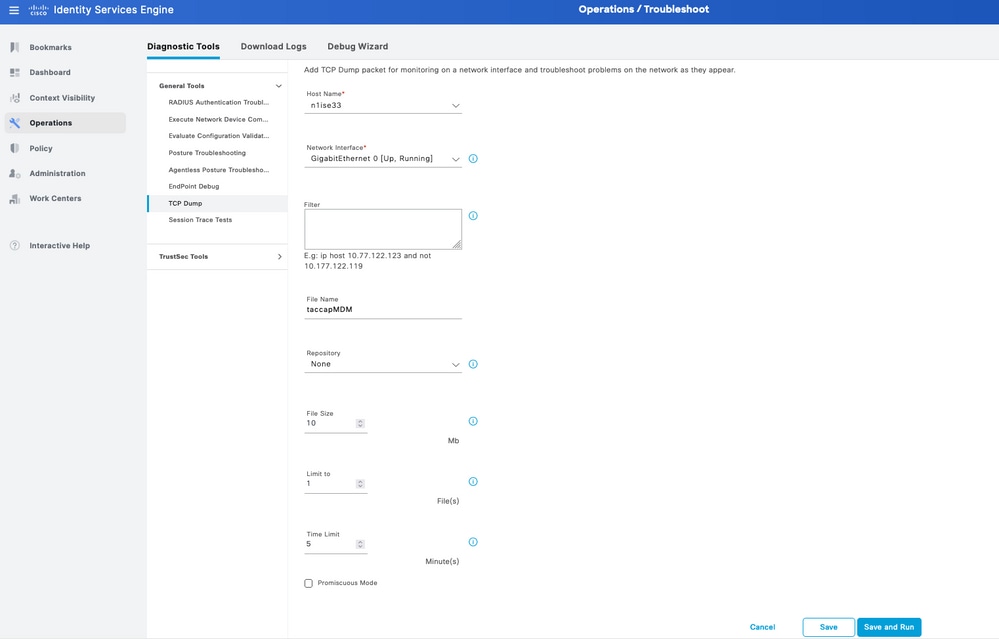 Packet capture example to collect information of MDM connection
Step 3. Navigate through the External MDM Menu. Run the capture from Step 2 and select the button Test Connection. Wait for the error to appear.
Step 4. Stop the capture from Step 2. Review the logs corresponding ise-psc.log to analyze the behavior.
Scenario 1. A Connection Timeout Occurred
In the scenario, when you receive this error in ISE while testing the connection with JAMF:
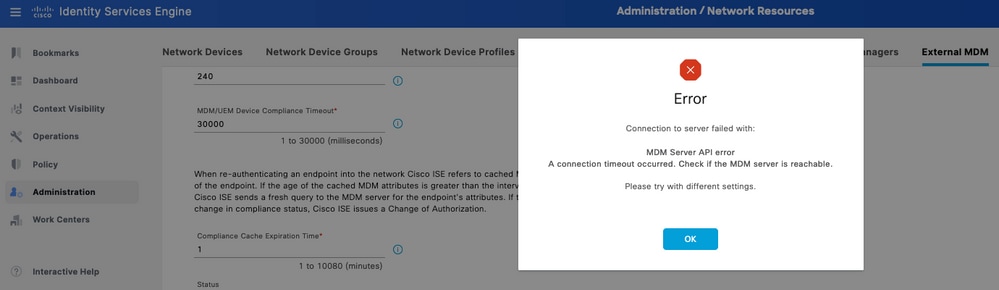 MDM error connection timeout
The logs related to external MDM reveal this information:
TRACE [admin-http-pool26][[]] cisco.cpm.mdm.apiimpl.MDMVerifyServer -:::::- Inside MDMVerifyServer.verify, connectToServer is called
DEBUG [admin-http-pool26][[]] cisco.cpm.mdm.apiimpl.MDMVerifyServer -:::::- API version retrieved from MDM server : 3
DEBUG [admin-http-pool26][[]] cisco.cpm.mdm.apiimpl.MDMVerifyServer -:::::- apiVersionSb : 3, mdmApiVersionSb : 3, tryWithV3 : false
DEBUG [admin-http-pool26][[]] cisco.cpm.mdm.apiimpl.MDMVerifyServer -:::::- MDM Rest API Server Query String -> /ciscoise/mdminfo/?ise_api_version=3
DEBUG [admin-http-pool26][[]] cisco.cpm.mdm.apiimpl.MDMVerifyServer -:::::- MDM Rest API Server Query PATH String -> /ciscoise/mdminfo/?ise_api_version=3
DEBUG [admin-http-pool26][[]] cisco.cpm.mdm.apiimpl.MDMVerifyServer -:::::- 1. Connecting to the MDM server host YOUR_ACCOUNT.jamfcloud.com using apiVersion 3
DEBUG [admin-http-pool26][[]] cisco.cpm.mdm.util.MdmRESTClient -:::::- sendGETRequestDom: start  HTTP request - connectionsUsed: 0, connectionsAvailable: 200
DEBUG [admin-http-pool26][[]] cisco.cpm.mdm.util.MdmRESTClient -:::::- sendGETRequestDomNonComp: start  HTTP request - connectionsUsed: 0, connectionsAvailable: 200
DEBUG [admin-http-pool26][[]] cisco.cpm.mdm.util.MdmRESTClient -:::::- ===mdmFlowInfo===null,=====serverType=====MobileDeviceManager,===serverAuthType===Basic
DEBUG [admin-http-pool26][[]] cisco.cpm.mdm.util.MdmRESTClient -:::::- QueryType is heartbeatQuery
DEBUG [admin-http-pool26][[]] cisco.cpm.mdm.util.MdmRESTClient -:::::- using httpClient for http query - [parameters={http.socket.timeout=30000, http.connection.timeout=5000}]
INFO  [admin-http-pool26][[]] cisco.cpm.mdm.util.MdmRESTClient -:::::- GET: MDM Server URL: https://YOUR_ACCOUNT:443//networkIntegrationEndpoint/ID/ciscoise/mdminfo/?ise_api_version=3
INFO  [Timer-12][[]] cisco.mnt.common.utility.AlarmMessageDiskQueue -:::::- Inside dequeue
INFO  [Timer-12][[]] cisco.mnt.common.utility.AlarmMessageDiskQueue -:::::- root exists
INFO  [Timer-12][[]] cisco.mnt.common.utility.AlarmMessageDiskQueue -:::::- alarm.1692086243915 deleted true
INFO  [admin-http-pool26][[]] cisco.cpm.mdm.util.MdmServersCache -:::::- MDM server - Status : Active, mdm server id : ID and mdm server name : JAMF_PRO
ERROR [admin-http-pool26][[]] cisco.cpm.mdm.util.MdmRESTClient -:::::- Error message while connecting to MDM server :
Connection Failed to the MDM server host – YOUR_ACCOUNT.jamfcloud.com, and port - 443 : Connection timeout occurred. Check if the MDM server is reachable : SocketTimeoutException message = connect timed out
DEBUG [admin-http-pool26][[]] cisco.cpm.mdm.util.MdmRESTClient -:::::- sendGETRequestDom: end  HTTP request - connectionsUsed: 0, connectionsAvailable: 200
DEBUG [admin-http-pool26][[]] cisco.cpm.mdm.util.MdmRESTClient -:::::- sendGETRequestDomNonComp: end  HTTP request - connectionsUsed: 0, connectionsAvailable: 200
ERROR [admin-http-pool26][[]] cisco.cpm.mdm.apiimpl.MDMVerifyServer -:::::- Exception occurred while connecting to the MDM server A connection timeout occurred. Check if the MDM server is reachable.
ERROR [admin-http-pool26][[]] cisco.cpm.mdm.api.MdmClient -:::::- A connection timeout occurred. Check if the MDM server is reachable.
DEBUG [admin-http-pool26][[]] cisco.cpm.mdm.api.MdmServerInfoApi -:::::- returning from the method : callMdmServerInfoApiOnMdmServer() -> com.cisco.cpm.mdm.api.MdmServerInfoData Object {
  apiPath: null
  redirectUrl: null
  queryMaxSize: null
  apiVersion: null
  vendor: null
  productName: null
  productVersion: null
  COMMA: ,
  errorMsg: null
  errorOccurred: true
}
From the packet capture, review the next information:
DNS Traffic - The ISE performs a query towards your JAMF related instance if you input the hostname in the setup portion of the integration. If you do not see the resolution of the hostname, attempt to use the IP address. This option is available to configure instead of the hostname.
 DNS traffic in a MDM flow
Retransmissions in the MDM Connection Port - If you query the IP address directly (provided either in the DNS query or the MDM setup), you can possibly see the repeated SYN packets. This indicates no direct route to the JAMF instance or an external device interfering with communications on the 443 port.
 Connection to MDM timeout example
Scenario 2. Connection Failed: 404
This event indicates you have connectivity to your JAMF account that you configured while setting up the MDM server. However, the instance you indicated to connect does not exist or contains an error as it is not found.
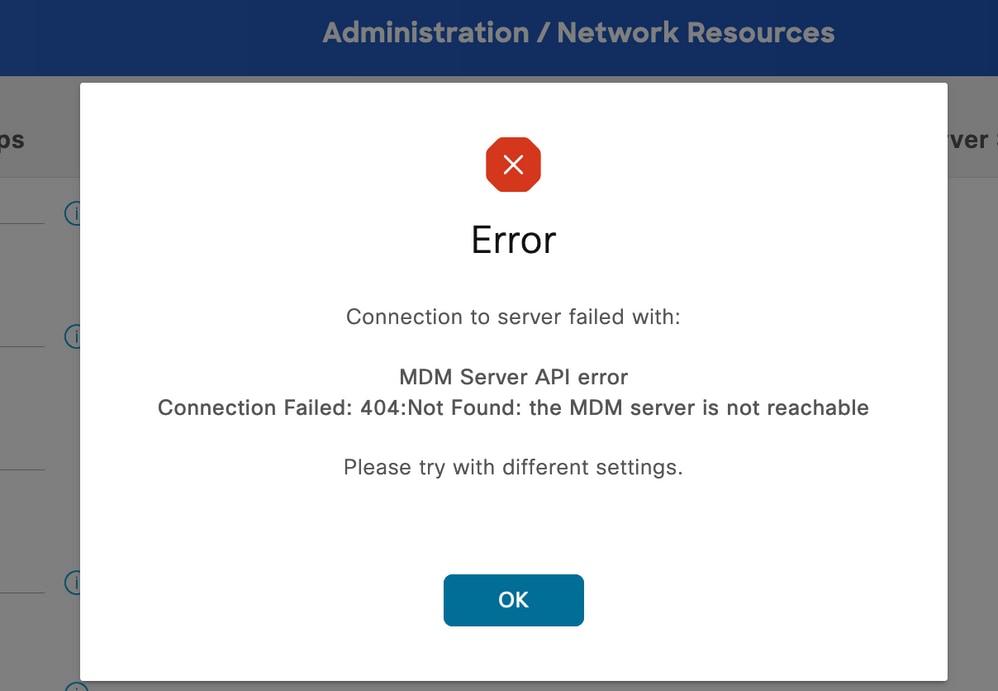 MDM error 404 example
The logs corresponding to this event are displayed:
DEBUG [admin-http-pool32][[]] cisco.cpm.mdm.api.MdmServerInfoApi -:::::- inside the method : callMdmServerInfoApiOnMdmServer()
TRACE [admin-http-pool32][[]] cisco.cpm.mdm.apiimpl.MDMVerifyServer -:::::- Inside MDMVerifyServer.verify, connectToServer is called
DEBUG [admin-http-pool32][[]] cisco.cpm.mdm.apiimpl.MDMVerifyServer -:::::- API version retrieved from MDM server : 3
DEBUG [admin-http-pool32][[]] cisco.cpm.mdm.apiimpl.MDMVerifyServer -:::::- apiVersionSb : 3, mdmApiVersionSb : 3, tryWithV3 : false
DEBUG [admin-http-pool32][[]] cisco.cpm.mdm.apiimpl.MDMVerifyServer -:::::- MDM Rest API Server Query String -> /ciscoise/mdminfo/?ise_api_version=3
DEBUG [admin-http-pool32][[]] cisco.cpm.mdm.apiimpl.MDMVerifyServer -:::::- MDM Rest API Server Query PATH String -> /ciscoise/mdminfo/?ise_api_version=3
DEBUG [admin-http-pool32][[]] cisco.cpm.mdm.apiimpl.MDMVerifyServer -:::::- 1. Connecting to the MDM server host YOUR_ACCOUNT.jamfcloud.com using apiVersion 3
DEBUG [admin-http-pool32][[]] cisco.cpm.mdm.util.MdmRESTClient -:::::- sendGETRequestDom: start  HTTP request - connectionsUsed: 1, connectionsAvailable: 199
DEBUG [admin-http-pool32][[]] cisco.cpm.mdm.util.MdmRESTClient -:::::- sendGETRequestDomNonComp: start  HTTP request - connectionsUsed: 0, connectionsAvailable: 200
DEBUG [admin-http-pool32][[]] cisco.cpm.mdm.util.MdmRESTClient -:::::- ===mdmFlowInfo===null,=====serverType=====MobileDeviceManager,===serverAuthType===Basic
DEBUG [admin-http-pool32][[]] cisco.cpm.mdm.util.MdmRESTClient -:::::- QueryType is heartbeatQuery
DEBUG [admin-http-pool32][[]] cisco.cpm.mdm.util.MdmRESTClient -:::::- using httpClient for http query - [parameters={http.route.default-proxy=http://PROXY_IP:PROXY_PORT, http.socket.timeout=30000, http.connection.timeout=5000}]
INFO  [admin-http-pool32][[]] cisco.cpm.mdm.util.MdmRESTClient -:::::- GET: MDM Server URL: https://YOUR_ACCOUNT.jamfcloud.com:443//networkIntegrationEndpoint/1/ewe/ciscoise/mdminfo/?ise_api_version=3
DEBUG [admin-http-pool32][[]] cisco.cpm.mdm.util.MdmRESTClient -:::::- Proxy Config in request  = [,PROXY_IP,PROXY_PORT,nullnullglhhcSIWnCC7y8FvGQvm/Q==%fZ4PXgBMdoIDfbwdgIhSeA==]
INFO  [admin-http-pool37][[]] cpm.admin.infra.spring.ISEAdminControllerUtils -::admin:::- mapping path found in global-forwards, forwarding to: /pages/jsonResponse.jsp
INFO  [admin-http-pool37][[]] cpm.admin.infra.spring.ISEAdminControllerUtils -::admin:::- mapping path found in global-forwards, forwarding to: /pages/jsonResponse.jsp
INFO  [admin-http-pool32][[]] cisco.cpm.mdm.util.MdmServersCache -:::::- MDM server - Status : Active, mdm server id : ID and mdm server name : JAMF_PRO
ERROR [admin-http-pool32][[]] cisco.cpm.mdm.util.MdmRESTClient -:::::- Error message while connecting to MDM server : Failed to connect to MDM Server JAMF_PRO : 404
DEBUG [admin-http-pool32][[]] cisco.cpm.mdm.util.MdmRESTClient -:::::- sendGETRequestDom: end  HTTP request - connectionsUsed: 1, connectionsAvailable: 199
DEBUG [admin-http-pool32][[]] cisco.cpm.mdm.util.MdmRESTClient -:::::- sendGETRequestDomNonComp: end  HTTP request - connectionsUsed: 0, connectionsAvailable: 200
ERROR [admin-http-pool32][[]] cisco.cpm.mdm.apiimpl.MDMVerifyServer -:::::- Exception occurred while connecting to the MDM server Connection Failed: 404:: the MDM server is not reachable
ERROR [admin-http-pool32][[]] cisco.cpm.mdm.api.MdmClient -:::::- Connection Failed: 404:: the MDM server is not reachable
DEBUG [admin-http-pool32][[]] cisco.cpm.mdm.api.MdmServerInfoApi -:::::- returning from the method : callMdmServerInfoApiOnMdmServer() -> com.cisco.cpm.mdm.api.MdmServerInfoData Object {
  apiPath: null
  redirectUrl: null
  queryMaxSize: null
  apiVersion: null
  vendor: null
  productName: null
  productVersion: null
  COMMA: ,
  errorMsg: null
  errorOccurred: true
}
DEBUG [admin-http-pool32][[]] cisco.cpm.mdm.util.MdmServersCache -:::::- mdm Guid: GUID is found in cache and status is: false
The packet capture at this time provides an HTTPS connection that contains application data that is being transferred between the JAMF site and the ISE server.
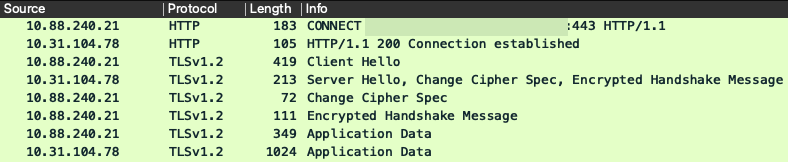 Packets involved in error 404 MDM
Scenario 3. Connection Failed: 401
This error in the connection indicates a problem with the user that you are deploying in the MDM setup to integrate.
Verify that the user:
- Exists within the JAMF account.
- Has the appropriate privileges to complete the integration with ISE.
- And can be used to perform API authentication (as described earlier in this guide).
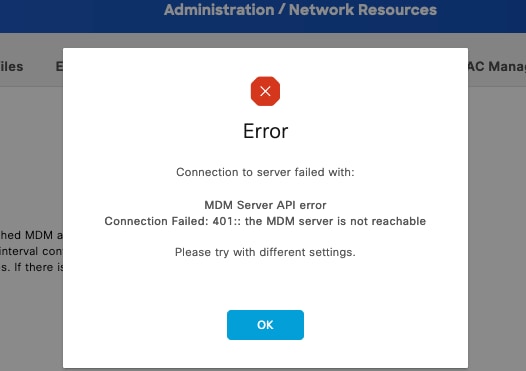 MDM connection error code 401
The logs on ISE indicate this behavior:
INFO  [admin-http-pool8][[]] cisco.cpm.mdm.util.MdmRESTClient -:::::- GET: MDM Server URL: https://YOUR_ACCOUNT.jamfcloud.com:443/networkIntegrationEndpoint/1/79fu/ciscoise/mdminfo/?ise_api_version=3
DEBUG [admin-http-pool8][[]] cisco.cpm.mdm.util.MdmRESTClient -:::::- Proxy Config in request  = [,PROXY_PORT,PROXY_PORT,nullnull2fpwHJhtoIMf+jKzFKazgg==%/ZFdElAGn4odZaRIZxeiZQ==]
ERROR [admin-http-pool8][[]] cisco.cpm.mdm.util.MdmRESTClient -:::::- Error message while connecting to MDM server : Failed to connect to MDM Server YOUR_ACCOUNT.jamfcloud.com : 401
DEBUG [admin-http-pool8][[]] cisco.cpm.mdm.util.MdmRESTClient -:::::- sendGETRequestDom: end  HTTP request - connectionsUsed: 4, connectionsAvailable: 196
DEBUG [admin-http-pool8][[]] cisco.cpm.mdm.util.MdmRESTClient -:::::- sendGETRequestDomNonComp: end  HTTP request - connectionsUsed: 0, connectionsAvailable: 200
DEBUG [admin-http-pool8][[]] cisco.cpm.mdm.apiimpl.MDMVerifyServer -:::::- retry connecting using api v2 after 5 seconds.
DEBUG [admin-http-pool8][[]] cisco.cpm.mdm.apiimpl.MDMVerifyServer -:::::- MDM Rest API Server Query String -> /ciscoise/mdminfo/?ise_api_version=2
DEBUG [admin-http-pool8][[]] cisco.cpm.mdm.apiimpl.MDMVerifyServer -:::::- MDM Rest API Server Query PATH String -> /ciscoise/mdminfo/?ise_api_version=2
DEBUG [admin-http-pool8][[]] cisco.cpm.mdm.apiimpl.MDMVerifyServer -:::::- 2. On Error : re-connecting to the MDM server host YOUR_ACCOUNT.jamfcloud.com using api version-2
DEBUG [admin-http-pool8][[]] cisco.cpm.mdm.util.MdmRESTClient -:::::- sendGETRequestDom: start  HTTP request - connectionsUsed: 4, connectionsAvailable: 196
DEBUG [admin-http-pool8][[]] cisco.cpm.mdm.util.MdmRESTClient -:::::- sendGETRequestDomNonComp: start  HTTP request - connectionsUsed: 0, connectionsAvailable: 200
DEBUG [admin-http-pool8][[]] cisco.cpm.mdm.util.MdmRESTClient -:::::- ===mdmFlowInfo===null,=====serverType=====MobileDeviceManager,===serverAuthType===Basic
DEBUG [admin-http-pool8][[]] cisco.cpm.mdm.util.MdmRESTClient -:::::- QueryType is heartbeatQuery
DEBUG [admin-http-pool8][[]] cisco.cpm.mdm.util.MdmRESTClient -:::::- using httpClient for http query - [parameters={http.route.default-proxy=http://PROXY_IP:PROXY_PORT, http.socket.timeout=30000, http.connection.timeout=5000}]
INFO  [admin-http-pool8][[]] cisco.cpm.mdm.util.MdmRESTClient -:::::- GET: MDM Server URL: https://YOUR_ACCOUNT.jamfcloud.com:443/networkIntegrationEndpoint/1/79fu/ciscoise/mdminfo/?ise_api_version=2
DEBUG [admin-http-pool8][[]] cisco.cpm.mdm.util.MdmRESTClient -:::::- Proxy Config in request  = [,PROXY_IP,PROXY_PORT,nullnull2fpwHJhtoIMf+jKzFKazgg==%/ZFdElAGn4odZaRIZxeiZQ==]
ERROR [admin-http-pool8][[]] cisco.cpm.mdm.util.MdmRESTClient -:::::- Error message while connecting to MDM server : Failed to connect to MDM Server YOUR_ACCOUNT.jamfcloud.com : 401
DEBUG [admin-http-pool8][[]] cisco.cpm.mdm.util.MdmRESTClient -:::::- sendGETRequestDom: end  HTTP request - connectionsUsed: 4, connectionsAvailable: 196
DEBUG [admin-http-pool8][[]] cisco.cpm.mdm.util.MdmRESTClient -:::::- sendGETRequestDomNonComp: end  HTTP request - connectionsUsed: 0, connectionsAvailable: 200
DEBUG [admin-http-pool8][[]] cisco.cpm.mdm.apiimpl.MDMVerifyServer -:::::- retry connecting using api v1 after 5 seconds.
The packet capture reveals a similar behavior like in this image:
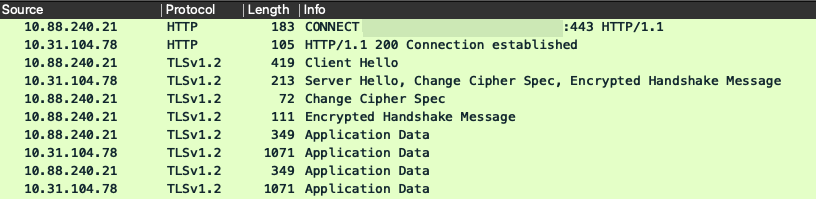 MDM packets involved in error 401
Related information
- JAMF Integration with ISE 2.X as MDM
- Troubleshoot and Enable Debugs on ISE
- How to Enable Debugs on ISE 3.x Versions.
Revision History
| Revision | Publish Date | Comments |
|---|---|---|
2.0 |
16-Jun-2026
|
Updated spelling, spacing, grammar, sentence structure, Introduction, alt text, updated URLs, title, etc. |
1.0 |
18-Aug-2023
|
Initial Release |

 Feedback
Contact Cisco
- Open a Support Case

- (Requires a Cisco Service Contract)