Deregister a Node from an ISE Deployment
Available Languages
- Issue
- Environment
- Resolution
- Impact Assessment:
- Before Deregistering:
- Deregistration Steps:
- Cause
- Related Content
Issue
You need to deregister a target node from the Cisco Identity Services Engine (ISE) deployment.
Environment
Cisco ISE version: version 3.1 and later
Deployment type: Distributed
Policy Administration Node (PAN)
Monitoring Node (MNT)
Policy Service Node (PSN)
Network Access Device (NAD), for example, switch or wireless controller
Resolution
Impact Assessment:
If deregistering the Primary PAN, promote a Secondary PAN to Primary first.
The Primary PAN cannot be deregistered directly.
If deregistering a PSN:
Confirm a remaining PSN is available.
Confirm NADs are configured to direct the RADIUS and TACACS+ authentications to remaining PSNs.
Test authentication with remaining PSNs.
If deregistering an MNT:
Confirm a remaining Monitoring node is available.
Verify no sync operations are in progress on remaining nodes.
Before Deregistering:
If you intend to rebuild and/or reregister the deregistered target node later, you must document the target node configuration before deregistering.
Deregistration Steps:
Log in to the Primary PAN GUI.
Navigate to Administration > System > Deployment.
Select the target node to be removed.
Click Deregister.
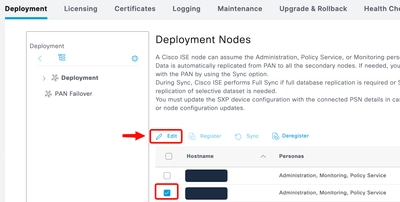
Confirm the action when prompted.
Verify the node no longer appears in Administration > System > Deployment.
Cause
This process can be required for:
Decommissioning or rebuilding ISE nodes.
Hardware replacement.
Topology changes.
Resolving persistent synchronization / replication failures.
Related Content
Revision History
| Revision | Publish Date | Comments |
|---|---|---|
2.0 |
16-Sep-2026
|
Updated Alt Text and Formatting. |
1.0 |
19-Aug-2026
|
Initial Release |

 Feedback
Contact Cisco
- Open a Support Case

- (Requires a Cisco Service Contract)