Configure Firepower Chassis Manager Registration to a Smart Software Manager On-Prem
Available Languages
Introduction
This document describes step-by-step instructions to register a Firepower Chassis Manager (FCM) on Firepower 4100/9300 platforms to a SSM On-Prem.
Prerequisites
Requirements
Cisco recommends that you have knowledge of these topics:
- Firepower Chassis Manager onFirepower 4100/9300 series
- Smart Software Manager (SSM) On-Prem
- Smart licensing model for Firepower products
Components Used
The information in this document is based on these software/hardware versions:
- Firepower Chassis Manager 2.7(1.92)
- Smart Software Manager On-Prem 7
The information in this document was created from the devices in a specific lab environment. All of the devices used in this document started with a cleared (default) configuration. If your network is live, ensure that you understand the potential impact of any command.
Background Information
Cisco Smart Software Manager On-Prem (formerly known as Cisco Smart Software Manager satellite) is a component of Cisco Smart Licensing that works in conjunction with Cisco Smart Software Manager. It offers near real-time visibility and reporting of the Cisco licenses you purchase and consume, while giving security-sensitive organizations a way to access a subset of Cisco SSM functionality without using a direct internet connection to manage their install base.
Procedure
Once you have Smart Software Manager On-Prem registered to your smart account, use these steps to register it on the FCM.
Step 1. On the FCM, navigate to System > Licensing > Call Home, edit and save the call home settings using the address:
https://[FQDN of On-Prem server]/Transportgateway/services/DeviceRequestHandler

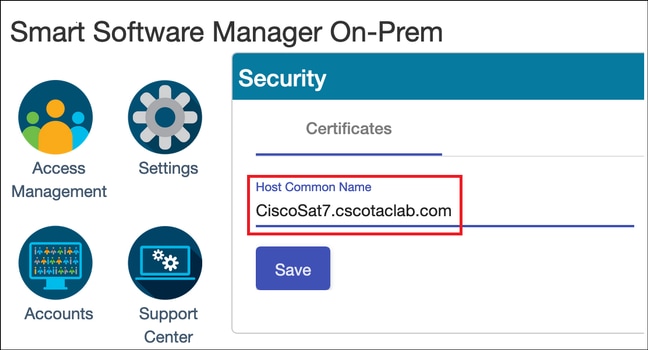
The Fully Qualified Domain Name (FQDN) of On-Prem server must match the Host Common Name configured on the SSM.
To check the configured Host Common Name on the SSM On-Prem 7, log into the SSM Administration workspace and navigate to Security tab.
MCPrT:~ user$ openssl s_client -connect 10.48.23.171:443
CONNECTED(00000003)
depth=2 O = Cisco, CN = Cisco Licensing Root CA
verify error:num=19:self signed certificate in certificate chain
verify return:0
---
Certificate chain
 0 s:/CN=CiscoSat7.cscotaclab.com/OU=TC/C=US/O=Cisco
   i:/C=US/O=Cisco/CN=TG SSL CA
 1 s:/C=US/O=Cisco/CN=TG SSL CA
   i:/O=Cisco/CN=Cisco Licensing Root CA
 2 s:/O=Cisco/CN=Cisco Licensing Root CA
   i:/O=Cisco/CN=Cisco Licensing Root CA
---
[...]
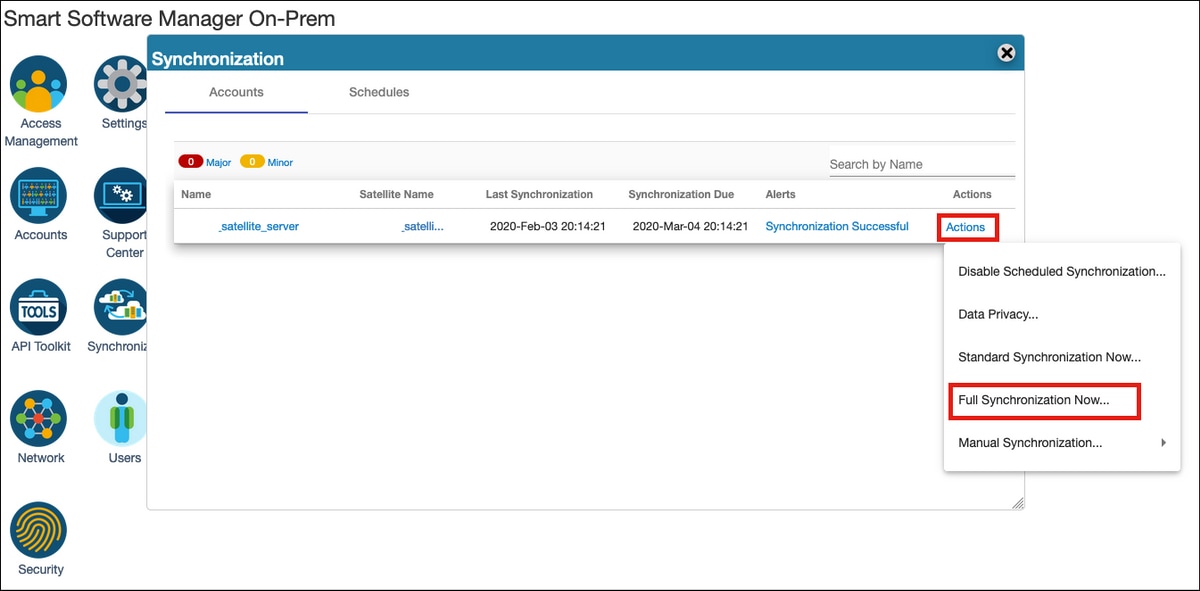
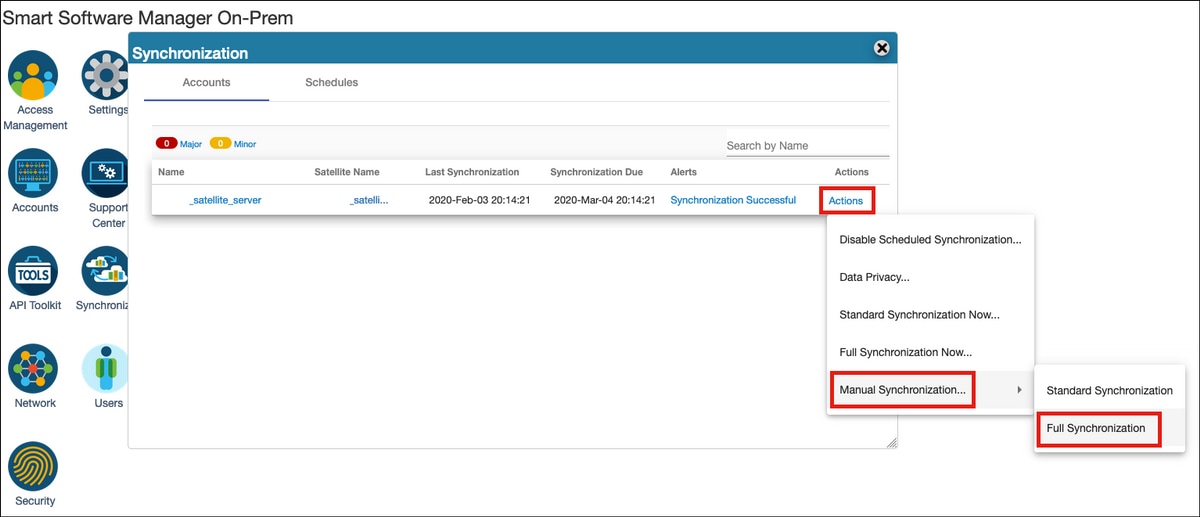
Ensure that FQDN is resolved by the DNS server configured on the FCM.
FPR4110# connect local-mgmt
FPR4110(local-mgmt)# ping CiscoSat7.cscotaclab.com
PING CiscoSat7.cscotaclab.com (10.48.23.171) from 10.62.148.38 eth0: 56(84) bytes of data.
64 bytes from 10.48.23.171: icmp_seq=1 ttl=53 time=47.9 ms
64 bytes from 10.48.23.171: icmp_seq=2 ttl=53 time=47.9 ms
Step 2. Log in to the SSM On-Prem 7 Licensing workspace and navigate to Smart Licensing > Inventory > General.
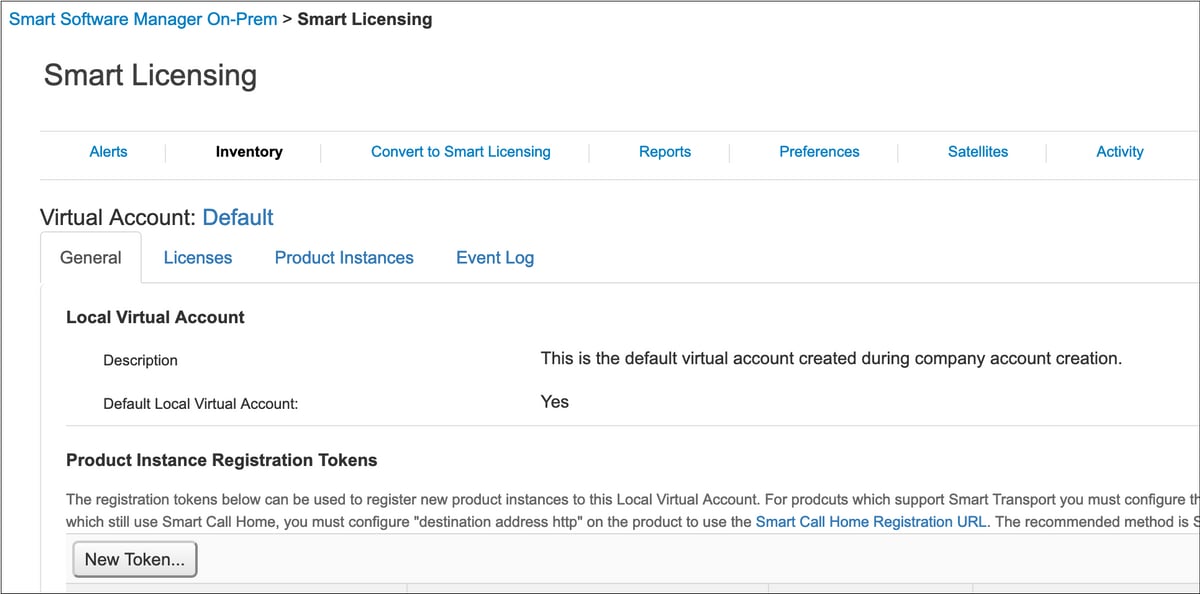
Step 3. Select New Token to generate a token.

Step 4. Enter description, expiration time for a token and select Create Token.
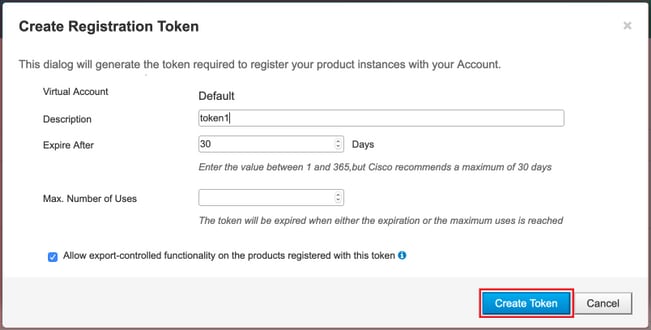
Step 5. Copy the token to the clipboard.
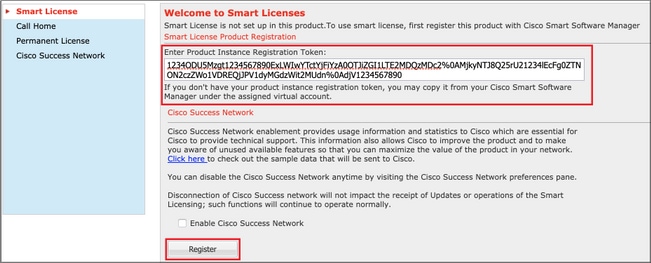
Step 6. Navigate to FCM System > Licensing > Smart License, paste the token and select Register.
Verify
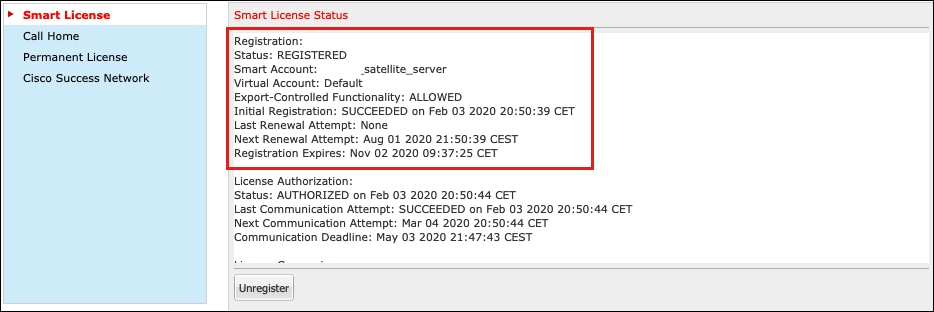
The license status can be confirmed when you navigate to System > Licensing > Smart License or run the command show license techsupport on the FCM CLI:
FPR4110# show license techsupport

Smart Licensing Tech Support info

Smart Licensing Status
======================

Smart Licensing is ENABLED

Registration:
  Status: REGISTERED
  Smart Account: _satellite_server
  Virtual Account: Default
  Export-Controlled Functionality: ALLOWED
  Initial Registration: SUCCEEDED on Feb 03 2020 20:50:39 CET
  Last Renewal Attempt: None
  Next Renewal Attempt: Aug 01 2020 21:50:39 CEST
  Registration Expires: Nov 02 2020 09:37:25 CET

License Authorization:
  Status: AUTHORIZED on Feb 03 2020 20:50:44 CET
  Last Communication Attempt: SUCCEEDED on Feb 03 2020 20:50:44 CET
  Next Communication Attempt: Mar 04 2020 20:50:44 CET
  Communication Deadline: May 03 2020 21:47:43 CEST
[...]
Related Information
- Smart Licensing Overview
- Firepower 4100/9300 FXOS Firepower Chassis Manager Configuration Guide
- Smart Software Manager On-Prem User Guide
Revision History
| Revision | Publish Date | Comments |
|---|---|---|
2.0 |
03-Jun-2026
|
Updated Title, Alt Text, Style Requirements, and Formatting. |
1.0 |
04-Feb-2020
|
Initial Release |

 Feedback
Contact Cisco
- Open a Support Case

- (Requires a Cisco Service Contract)