Configure Mailbox Auto Remediation for AsyncOS 13.0+
Available Languages
Contents
Issue
This document describes how to configure Mailbox Auto Remediation (MAR) features in AsyncOS 13.0 and later for Exchange Online, Exchange on-premises, hybrid, and multi-tenant deployments.
MAR was introduced in AsyncOS 10.0 and only supported Microsoft Office 365 Online.
AsyncOS 13.0 and newer capabilities include:
- Microsoft Exchange Online – mailbox hosted on Microsoft Office 365
- Microsoft Exchange on-premises – a local Microsoft Exchange server
- Hybrid and multi-tenant configurations – a combination of mailboxes configured across Microsoft Exchange Online and Microsoft Exchange on-premises deployments
Initial setup steps are available in the original MAR setup guide for Microsoft Office 365, along with an addendum that describes changes in AsyncOS 13.0 and newer.
The original article remains valid and covers an explanation of the feature, as well as steps to generate certificates for the Microsoft Office 365 Azure implementation, ESA settings, and general troubleshooting.
How to Configure Azure AD and Office 365 Mailbox Settings for ESA
New changes to Azure API permissions for 13.0
The current User Guide provides more detailed information about the Auto Remediation feature.
See the chapter titled, Automatically Remediating Messages in Mailboxes.
Environment
- AsyncOS 13.0 or newer for ESA
- License keys for File Reputation and File Analysis
- Microsoft Office 365 or Microsoft Exchange on-premises deployment
Resolution
- For Exchange Online account profiles, use these Azure configuration articles first to create the Azure application, certificates, and API permissions required by AsyncOS 13.0 and newer:
- Create the required account profiles in the ESA.
- Configure domain mapping for each profile.
- If the deployment is hybrid or multi-tenant, configure chained profiles.
- Test each account profile.
ESA 13.0 and newer support multiple account profiles created with Exchange Online, Exchange on-premises, or both:
- Organizations with complex setups can use multiple account profiles when domains are segregated and reside on different deployments.
- Organizations that absorb a new acquisition can include the acquired domain in the MAR feature.
- Creating multiple account profiles provides more flexibility than previous ESA capabilities.
Configure Exchange Online Microsoft Office 365 Profile
Instructions to create an account profile for Microsoft Office 365 in Azure are included in the referenced articles in the Issue section.
Select Office 365 Hybrid Graph API to configure a mailbox deployed on Exchange Online and enter these details:
- Client ID and Tenant ID for the application registered in the Azure Management Portal.
- The certificate thumbprint (the value of $base64Thumbprint).
- Click Choose File and select the .pem file to upload the private key for the certificate.
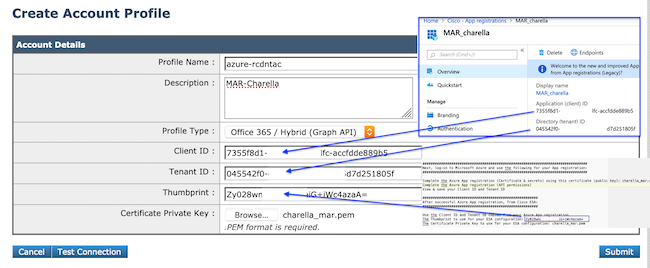 Sample Profile connecting to O365Exchange Online account profile example
Configure Exchange On-premises Profile
Creating an account profile for an Exchange on-premises instance requires a user account with the ApplicationImpersonation role and a valid host value.
This method requires the designated Exchange on-premises service account with the ApplicationImpersonation role.
- In a browser, open the Exchange Admin Center URL for your Exchange on-premises environment. For example: https://
mail.example.com/ecp/. - After you log in, navigate to Permissions > Admin Roles.
- Click Add to create a new role group.
- If a role group already exists, add the designated user account as a member.
- Enter the role group name and description.
- Under Roles, click Add.
- Select ApplicationImpersonation, and then click Add.
- Click OK.
- Return to the newly created role group, click Members: +, locate the designated user account, and add it for use on the ESA.
- Commit all changes in Exchange. For more details, refer to the Microsoft Support documentation.
- In the ESA web interface, navigate to System Administration > Account Settings.
- Create the account profile, and then enter the profile name and description.
- From the Profile Type drop-down list, select Exchange On-Premise.
- Enter the username, password, and Host value.
- Enter a valid Exchange server host name for the Host value.
- Click Submit, then Commit Changes.
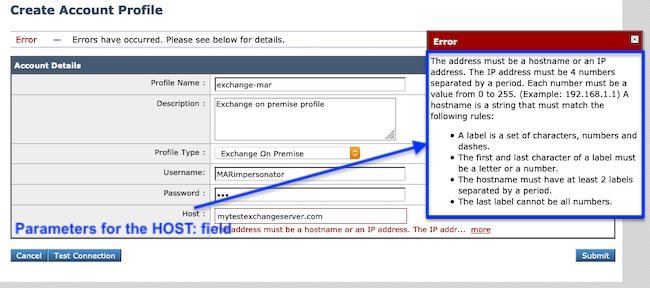 Sample Exchange On-Premise ProfileExchange on-premises account profile example
 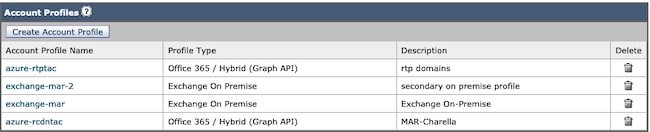 Samples of MAR Account ProfilesSamples of MAR account profiles
Configure Domain Mapping
Domain mapping is the assignment of one or more domains to an account profile.
Every implementation requires at least one domain mapping:
- In the ESA web interface, navigate to System Administration > Account Settings > Create Domain Mapping.
- Enter the domain names separated by commas. Acceptable domain formats are shown in the image.
- If there is only one account profile in the configuration, enter ALL in the Domain Name field.
- A domain can only be used once.
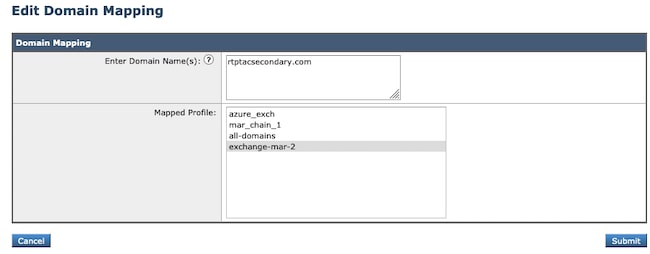 Domain Mapping SampleDomain mapping example
 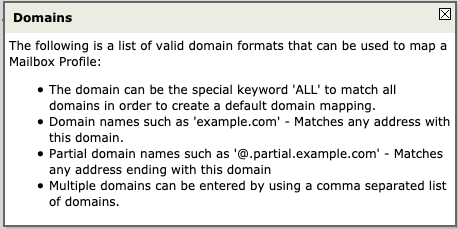 Image 1. Acceptable Domain FormatsAcceptable domain formats
  Domain Mapping SampleDomain mapping example
Configure Chained Profiles
Configure chained profiles only when you remediate messages in mailboxes that are part of a hybrid or multi-tenant deployment.
Add the profiles in priority order, with the most heavily used domain profile first.
- In the ESA web interface, navigate to System Administration > Account Settings > Create Chained Profiles.
- Enter the Profile Name and Description.
- Select a domain from the MAR Profile drop-down list.
- Click Add Account Profile to add another domain profile until all required profiles are added.
- Click Submit, then Commit Changes.
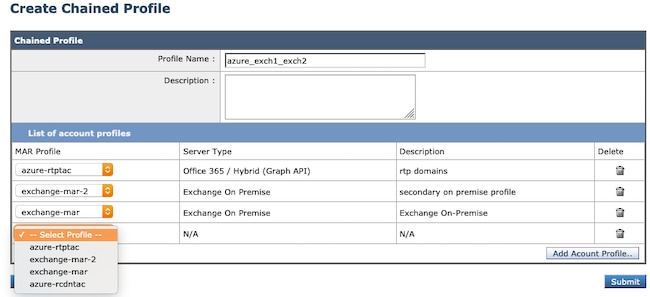 Chain Profile Creation.Chained profile creation
Test each Account Profile
Confirm each account profile by clicking the Test Connection button in the individual profile.
- In the ESA web interface, navigate to System Administration > Account Settings, then choose one of the account profiles.
- Click the Test Connection button in the lower-left corner.
- Enter the email address in the Email Address field, then click Test Connection.
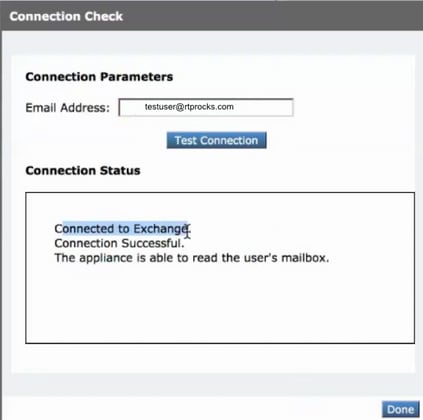 Test each Profile to verify successful connectivityTest connection for an account profile
Troubleshooting
Logs contain:
- mail_logs: Final remediation action and summary
- mar_logs: The sequence in which remediation was performed
- Test Connection option in the UI: used to verify connectivity and permissions
A lot of information can be determined by the email test from Account Settings.
Troubleshooting using Test Connection
The SMTP address has no mailbox associated with it.
The user mailbox that is being used does not exist.
Access is denied. Check credentials and try again.
The application configured in Microsoft Azure does not have the required API permissions to access the Microsoft Office 365 mailbox.
Application with identifier <client_id> was not found in the directory <tenant_id>.
Client ID on the Account Profile Settings page is invalid.
No service namespace named <tenant_id> was found in the data store.
Tenant ID on the Account Profile Settings page is invalid.
Error validating credentials. Credential validation failed.
- Certificate Thumbprint on the Account Profile page is invalid.
- The profile type used to access the mailbox can be incorrect. For example, an on-premises mailbox is accessed by using a Microsoft Office 365 profile.
- The required permissions to access the mailbox can be missing.
Invalid username or password entered for the exchange server.
Impersonator Account Username and Password entered in the profile are not valid.
The account does not have permission to impersonate the requested user.
Impersonator Role privileges are not assigned to the user account configured in the profile.
Please check host <hostname> is a valid exchange server address.
The On-prem Exchange server Hostname entered in the profile is invalid.
The mailbox cannot be accessed using this profile or the required permissions can be missing.
A valid mailbox is being accessed by using the wrong type of profile. For example, an on-premises mailbox is accessed by using a Microsoft Office 365 profile.
Sample of successful remediation for a single profile:
Fri Aug 30 11:57:30 2019 Info: Process ready for Mailbox Remediation
Fri Aug 30 12:29:54 2019 Info: MID: 782107 Attempting to remediate using `o365-profile-1` profile for recipient user@example.com. Attempt number : 1
Fri Aug 30 12:29:54 2019 Info: MID: 782107 Trying to perform the forward and delete action on Office 365 or Hybrid exchange for SHA256:
1e6f324982d4eb71ad967e79261a6435aef928b57bc523dbb3e7de4ed65941ab recipient's (user@example.com) mailbox.
Fri Aug 30 12:29:58 2019 Info: MID: 782107 Message forwarded successfully to admin@example.com.
Fri Aug 30 12:29:58 2019 Info: MID: 782107 Message deleted successfully from user@example.com mailbox.
Fri Aug 30 12:29:58 2019 Info: MID: 782107 Remediation succeeded with `o365-profile-1` profile for recipient user@example.com.
Sample of successful remediation for a chained profile:
Mon Oct 14 15:01:01 2019 Info: MID: 24 Attempting to remediate using 'o365-profile-1' profile for recipient user@example.com. Attempt number : 1
Mon Oct 14 15:01:01 2019 Info: MID: 24 Trying to perform the delete action on Office 365 or Hybrid exchange for SHA256: 1e6f324982d4eb71ad967e79261a6435aef928b57bc523dbb3e7de4ed65941ab
recipient's (user@example.com) mailbox
Mon Oct 14 15:01:09 2019 Info: MID: 24 Unable to read message(s) from the recipient's (user@example.com) mailbox. Error: The mailbox cannot be accessed using this profile or the required
permissions can be missing
Mon Oct 14 15:01:09 2019 Info: MID: 24 Attempting to remediate using 'exchange-profile-1' profile for recipient user@example.com. Attempt number : 1
Mon Oct 14 15:01:09 2019 Info: MID: 24 Trying to perform the delete action on Exchange on-premises for SHA256: 1e6f324982d4eb71ad967e79261a6435aef928b57bc523dbb3e7de4ed65941ab
recipient's (user@example.com) mailbox.
Mon Oct 14 15:01:16 2019 Info: MID: 24 Message deleted successfully from user@example.com mailbox.
Mon Oct 14 15:01:16 2019 Info: MID: 24 Remediation succeeded with 'exchange-profile-1' profile for recipient user@example.com. Not trying further profile.
Cause
AsyncOS 13.0 and newer introduce expanded MAR deployment support. This expanded support requires additional account profile, domain mapping, and chained profile configuration depending on whether the Exchange deployment is Exchange Online, Exchange on-premises, hybrid, or multi-tenant.
Related Content
- How-to configure Azure AD and Office 365 mailbox settings for ESA
- Cisco Technical Support and Documentation
- Cisco Email Security Appliance - Product Support
- Cisco Email Security Appliance - Release Notes
- Cisco Email Security Appliance - End-User Guides
- Cisco Content Security Management Appliance - Product Support
- Cisco Content Security Management Appliance - Release Notes
- Cisco Content Security Management Appliance - End-User Guides
Revision History
| Revision | Publish Date | Comments |
|---|---|---|
2.0 |
30-Sep-2026
|
Recertification - Updated SEO, Alt Text, Style Requirements, and Formatting. |
1.0 |
17-Feb-2020
|
Initial Release |

 Feedback
Contact Cisco
- Open a Support Case

- (Requires a Cisco Service Contract)