Troubleshoot the Error "Unscannable Category = Message Error, Unscannable Reason = Archive Error" in ESA
Available Languages
Contents
Introduction
This document describes how to troubleshoot the error "Unscannable Category = Message Error, Unscannable Reason = Archive Error: Exceeded the total size limit of the unarchived files" in a Cisco ESA.
Prerequisites
Requirements
Cisco recommends that you have knowledge of these topics:
- Cisco Email Security Appliance (ESA)
- Cisco Advanced Malware Protection (AMP)
Components Used
This document is not restricted to specific software and hardware versions.
The information in this document was created from devices in a specific lab environment. All devices used in this document started with a cleared (default) configuration. Review the potential impact of any change before applying it in a production network.
Background Information
When a message with an attachment reaches Advanced Malware Protection (AMP) in the mail processing pipeline, that is, the ESA stage where attachment scanning occurs, ESA attempts to parse the attachment. ESA also checks the message headers for compliance with Request for Comments (RFC) 2045 (RFC 2045). If the message is not fully compliant, ESA still makes a best-effort attempt to parse the attachment.
Next, ESA checks whether the attachment is an archive file. If it is, ESA attempts to unpack it. ESA evaluates multiple factors in order to estimate the uncompressed size and ensure that the archive is valid. ESA also detects suspicious archives, such as highly compressed files.
If no file reputation verdict is available from the cloud reputation lookup, and the file meets the criteria for analysis, ESA quarantines the file and uploads it to the AMP sandbox, that is, the cloud-based file analysis environment.
ESA then opens a connection to the AMP servers, uploads the file, and waits for verdict updates, as shown in the image:
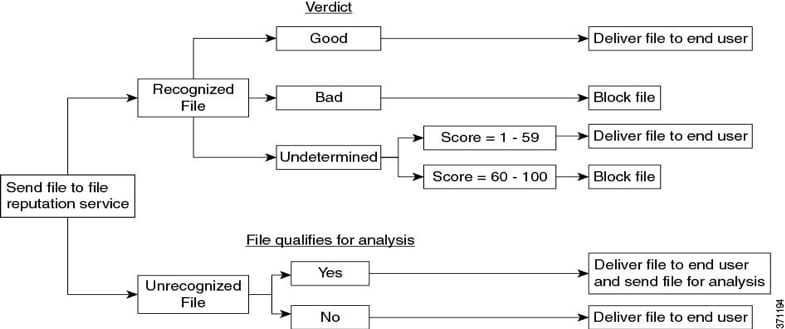
ESA provides a verdict based on these scenarios:
- If one of the extracted files is malicious, the file reputation service returns a verdict of 'Malicious' for the compressed or the archive file.
- If the compressed or archive file is malicious and all the extracted files are clean, the file reputation service returns a verdict of 'Malicious' for the compressed or the archive file.
- If the verdict of any of the extracted files is unknown, the extracted files are optionally (if configured and the file type is supported for file analysis) sent for file analysis.
- If the verdict of any of the extracted files or attachments is low risk, the file is not sent for file analysis.
- If extraction fails for a compressed or archive file during decompression, the file reputation service returns a verdict of unscannable for that compressed or archive file. If one of the extracted files is malicious in this scenario, the file reputation service returns a verdict of 'Malicious' for the compressed or archive file. The malicious verdict takes precedence over the unscannable verdict.
Highly compressed files such as CSV, XML, and TXT can exceed the maximum file size that is hardcoded into ESA. Compression algorithms such as Lempel-Ziv, generate a digital map that counts the number and position of characters within the full document. This process can produce very small archive file sizes.
By contrast, files that contain graphics or formats such as PDF, JPG, and PNG are not compressed in the same way. As a result, they usually remain close to their original file size.
Issue
ESA logs an AMP unscannable verdict for a compressed attachment with the reason "Archive Error: Exceeded the total size limit of the unarchived files."
Environment
- Cisco ESA
- AMP enabled for attachment scanning
Cause
The attachment is a compressed archive that expands beyond the ESA hardcoded limit for the total size of unarchived files. Highly compressible file types (for example, CSV, XML, and TXT) can produce small archives that expand significantly when unpacked, which can trigger an 'Unscannable' verdict.
Solution
Use one of these options based on the desired handling: user notification, or containment and review. The verification steps shown help determine which option to use.
In order to confirm the condition, locate the mentioned type of mail log entry.
Example mail log entry:
Info: The attachment could not be scanned. File Name = 'ACTS Chopped ISO 88591 encod_NoSchema.XML.zip', MID = 226, SHA256 = 7efa6154b7519872055cff10a69067dcad88562f708b284a390a9abcf5e99b8f, Unscannable Category = Message Error, Unscannable Reason = Archive Error: Exceeded the total size limit of the unarchived filesBefore You Begin: Verify and Choose an Option
- In ESA, navigate to Monitor > Mail Logs.
- Locate the message ID (MID) that shows Unscannable Reason = Archive Error: Exceeded the total size limit of the unarchived files.
- Confirm that the attachment is a compressed archive, for example, a .zip file, and that it expands significantly when unpacked.
- Choose Option 1 if the message must be delivered and the recipient only needs a warning in the subject line.
- Choose Option 2 if the message must be contained for review in the Policy Virus and Outbreak (PVO) quarantine.
- After applying the change, send a test message with a representative archive. Verify the expected behavior in Monitor > Mail Logs and, if used, in the Policy Virus and Outbreak (PVO) quarantine.
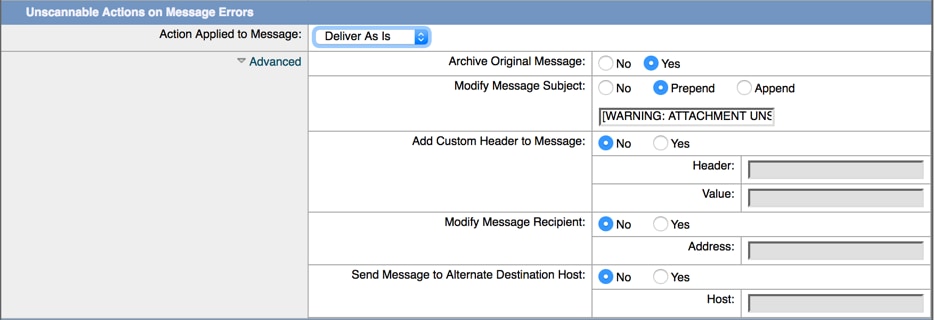
Option 1. Prepend a Subject Tag for Unscannable Attachments
- In ESA, navigate to Mail Policies > Incoming Mail Policies or Outgoing Mail Policies, depending on where AMP scanning is enabled.
- Click the policy that handles the affected message.
- In the AMP settings for the policy, locate the action for Unscannable attachments.
- Set Modify Message Subject to Prepend.
- In the subject text field, enter the prefix [AMP Unscannable] or another approved warning tag.
- Click Submit and commit the change.
- Send a test message with a representative archive and verify that ESA delivers the message with the prepended subject tag.

Note: Use this option when message delivery must continue but recipients need a clear warning that AMP did not analyze the attachment.
Option 2. Quarantine Unscannable Messages in the Policy Virus and Outbreak Quarantine
- In ESA, navigate to Mail Policies > Incoming Mail Policies or Outgoing Mail Policies, depending on where AMP scanning is enabled.
- Click the policy that handles the affected message.
- In the AMP settings for the policy, locate the action for Unscannable attachments.
- Set the unscannable message action to Quarantine.
- Choose the Policy Virus and Outbreak (PVO) quarantine as the quarantine destination.
- Click Submit and commit the change.
- Send a test message with a representative archive and verify that ESA places the message in the Policy Virus and Outbreak (PVO) quarantine for analyst review.
Note: Use this option when the message must be contained for further analysis instead of being delivered to the recipient.
Related Information
- Best Practice Guide for Advanced Malware Protection on ESA
- Verifying File Analysis Uploads on ESA
- Troubleshoot "The File Reputation Service Is Not Reachable" Error on Cisco ESA
- Cisco Technical Support & Downloads
Revision History
| Revision | Publish Date | Comments |
|---|---|---|
1.0 |
29-Oct-2019
|
Initial Release |

 Feedback
Contact Cisco
- Open a Support Case

- (Requires a Cisco Service Contract)