Test Advanced Malware Protection on Email Security Appliance
Available Languages
Introduction
This document describes how to test and verify the advanced malware Protection (AMP) features on the Cisco Email Security Appliance (ESA).
Background Information
Before you begin, verify that the File Reputation and File Analysis feature keys are active and that AMP is enabled in an Incoming Mail Policy. This procedure validates that the ESA scans attachments and applies the expected action, such as drop or rewrite, when malware is detected. Confirm the results in mail_logs for AMP verdict entries and in the GUI at Message Tracking and Monitor > Advanced Malware Protection.
Test AMP on the ESA
With the release of AsyncOS 8.5 for the ESA, AMP performs file reputation scans and file analysis to detect malware in attachments.
Feature Keys
To implement AMP, you must have a valid and active ESA feature key for File Reputation and File Analysis. Visit System Administration> Feature Keys on the GUI, or use featurekeys on the CLI to verify the feature keys.
Security Services
To enable the service from the GUI, navigate to Security Services > File Reputation and Analysis. From the CLI, you can run ampconfig. Submit and commit your changes to the configuration.
Incoming Mail Policies
Once you have enabled the service, you must have this service tied to an incoming mail policy.
- Navigate to Mail Policies > Incoming Mail Policies.
- Select your Default Policy or preconfigured policy as needed. The Advanced Malware Protection column on the Incoming Mail Policies page displays.
- Select the Disabled link for the column, and Enable File Reputation and Enable File Analysis on the options page.
- You can make any further configuration enhancements to message scanning, actions for un-scannable attachments, and actions for positively identified messages, as needed.
- Submit and commit your changes to the configuration.
Test
Your incoming mail policy is now enabled to scan and detect malware. You must have a true malware sample with which to test. If you need valid examples, visit the European Institute for Computer Antivirus Research (eicar) downloads page.
Send the attachment through your ESA and normal processing using a valid preconfigured email account. You can use the CLI of the ESA and tail mail_logs to monitor the mail as it processes. You can see the Message ID (MID) listed in the mail logs. Output similar to this displays:
Thu Sep 18 16:17:38 2014 Info: New SMTP ICID 16488 interface Management
(192.168.0.199) address 65.55.116.95 reverse dns host blu004-omc3s20.hotmail.com
verified yes
Thu Sep 18 16:17:38 2014 Info: ICID 16488 ACCEPT SG UNKNOWNLIST match sbrs
[-1.0:10.0] SBRS 5.5
Thu Sep 18 16:17:38 2014 Info: Start MID 1653 ICID 16488
Thu Sep 18 16:17:38 2014 Info: MID 1653 ICID 16488 From: <joe_user@hotmail.com>
Thu Sep 18 16:17:38 2014 Info: MID 1653 ICID 16488 RID 0 To:
<any.one@mylocal_domain.com>
Thu Sep 18 16:17:38 2014 Info: MID 1653 Message-ID '<BLU437-SMTP10E1315A60354F2
906677B9DB70@phx.gbl>'
Thu Sep 18 16:17:38 2014 Info: MID 1653 Subject 'Your Daily Update''
Thu Sep 18 16:17:38 2014 Info: MID 1653 ready 2313 bytes from
<joe_user@hotmail.com>
Thu Sep 18 16:17:38 2014 Info: MID 1653 matched all recipients for per-recipient
policy DEFAULT in the inbound table
Thu Sep 18 16:17:38 2014 Info: ICID 16488 close
Thu Sep 18 16:17:39 2014 Info: MID 1653 interim verdict using engine:
CASE spam negative
Thu Sep 18 16:17:39 2014 Info: MID 1653 using engine: CASE spam negative
Thu Sep 18 16:17:39 2014 Info: MID 1653 AMP file reputation verdict : MALWARE
Thu Sep 18 16:17:39 2014 Info: Message aborted MID 1653 Dropped by amp
Thu Sep 18 16:17:39 2014 Info: Message finished MID 1653 done
The previous example shows that AMP detected the malware attachment and dropped as the final action per the default settings.
The same details are also seen in Message Tracking from the GUI:

If you choose to deliver positively identified malware, or other advanced options in the AMP configuration from the Incoming Mail Policies, you can possibly see this mail processing outcome:
Thu Sep 18 21:54:30 2014 Info: MID 1655 AMP file reputation verdict : MALWARE
Thu Sep 18 21:54:30 2014 Info: MID 1655 rewritten to MID 1656 by AMP
The reputation verdict is still positive for MALWARE as shown. The rewritten action is per the message modification actions and subject line prepending of [WARNING: MALWARE DETECTED].
A clean file, or a file that has not been identified at processing time as malware, has this verdict written to the mail logs:
Thu Sep 18 21:58:33 2014 Info: MID 1657 AMP file reputation verdict : CLEAN
Advanced Message Tracking for AMP+ Messages
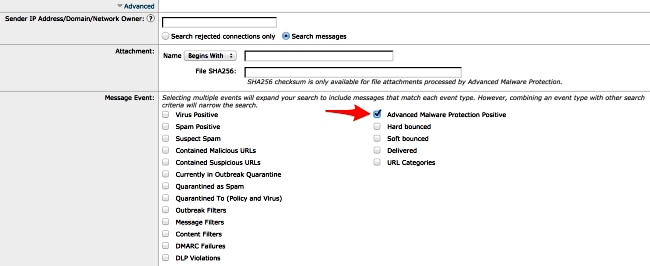
Also from the GUI, when you use Message Tracking and the Advanced drop-down menu, you can choose to search for an Advanced Malware Protection Positive message directly:
Advanced Malware Protection Reports
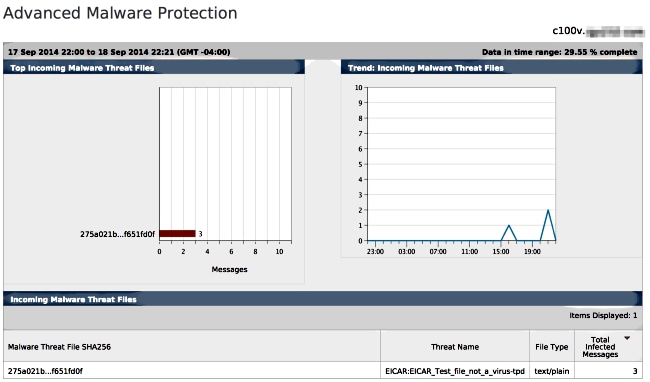
From the ESA GUI, you also see report tracking for positively identified messages through AMP. Navigate to Monitor > Advanced Malware Protection and modify the time range as needed. You now see similar, with the previous examples for input:
Troubleshoot
If you do not see a known, true malware file that is positively scanned by AMP, review the mail logs in order to assure that another service did not take action on the message and/or attachment before AMP scanned the message.
From the earlier example used, when Sophos Anti-virus is enabled, it actually catches and takes action on the attachment:
Thu Sep 18 22:15:34 2014 Info: New SMTP ICID 16493 interface Management
(192.168.0.199) address 65.55.116.95 reverse dns host blu004-omc3s20.hotmail.com
verified yes
Thu Sep 18 22:15:34 2014 Info: ICID 16493 ACCEPT SG UNKNOWNLIST match sbrs
[-1.0:10.0] SBRS 5.5
Thu Sep 18 22:15:34 2014 Info: Start MID 1659 ICID 16493
Thu Sep 18 22:15:34 2014 Info: MID 1659 ICID 16493 From: <joe_user@hotmail.com>
Thu Sep 18 22:15:34 2014 Info: MID 1659 ICID 16493 RID 0 To:
<any.one@mylocal_domain.com>
Thu Sep 18 22:15:34 2014 Info: MID 1659 Message-ID '<BLU437-SMTP2399199FA50FB
5E71863489DB40@phx.gbl>'
Thu Sep 18 22:15:34 2014 Info: MID 1659 Subject 'Daily Update Final'
Thu Sep 18 22:15:34 2014 Info: MID 1659 ready 2355 bytes from
<joe_user@hotmail.com>
Thu Sep 18 22:15:34 2014 Info: MID 1659 matched all recipients for per-recipient
policy DEFAULT in the inbound table
Thu Sep 18 22:15:35 2014 Info: ICID 16493 close
Thu Sep 18 22:15:35 2014 Info: MID 1659 interim verdict using engine:
CASE spam negative
Thu Sep 18 22:15:35 2014 Info: MID 1659 using engine: CASE spam negative
Thu Sep 18 22:15:37 2014 Info: MID 1659 interim AV verdict using Sophos VIRAL
Thu Sep 18 22:15:37 2014 Info: MID 1659 antivirus positive 'EICAR-AV-Test'
Thu Sep 18 22:15:37 2014 Info: Message aborted MID 1659 Dropped by antivirus
Thu Sep 18 22:15:37 2014 Info: Message finished MID 1659 done
The Sophos Anti-virus configuration settings on the incoming mail policy are set to drop for virus infected messages. In this instance, AMP is never reached to scan or take action on the attachment.
This is not always the case. A review of the mail logs and Message IDs (MIDs) can be necessary to assure that another service OR a content/message filter did not take action against the MID before AMP processing and an action was reached.
Related Information
- Best Practice Guide for Advanced Malware Protection on ESA
- Cisco Email Security Appliance Administrator Guide - Advanced Malware Protection
- Cisco Email Security Appliance - End-User Guides
- Technical Support & Documentation - Cisco Systems
Revision History
| Revision | Publish Date | Comments |
|---|---|---|
1.0 |
14-Nov-2014
|
Initial Release |

 Feedback
Contact Cisco
- Open a Support Case

- (Requires a Cisco Service Contract)