Configure Zoho Mail with ESA / CES
Available Languages
Introduction
This document describes the procedure to configure and integrate Zoho mail with Cisco ESA / CES.
Prerequisites
Working knowledge and admin access to Zoho Dashboard.
Knowledge and access to Email Security appliance.
Configure Gateway on Zoho Admin Portal
-
Navigate to Portal > Mail Settings.
-
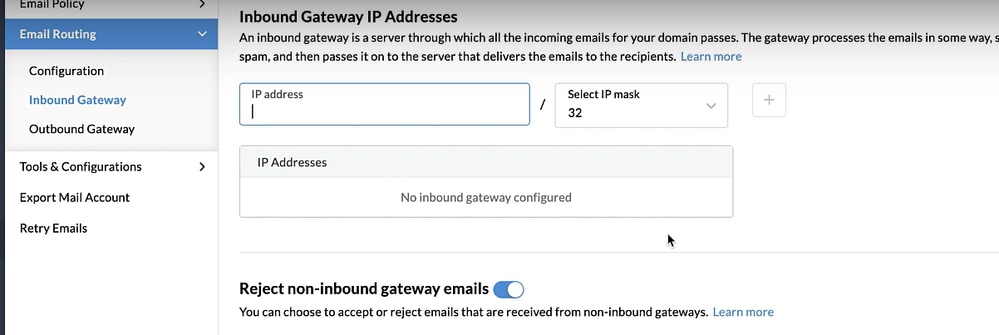
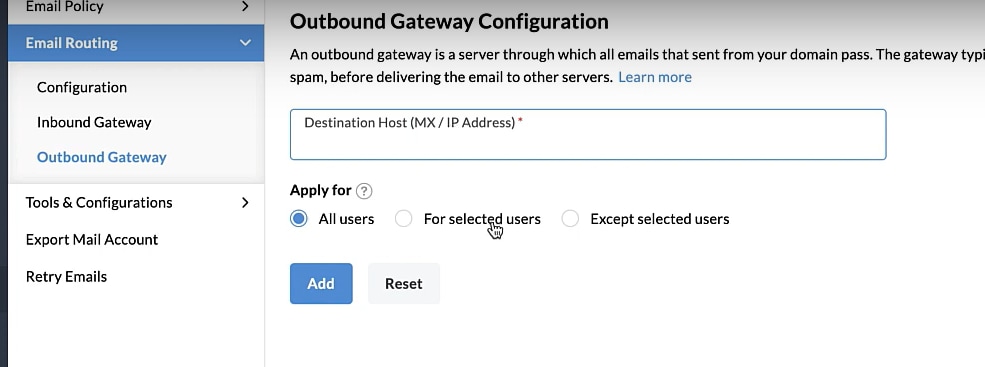
Configure your inbound and outbound gateway.
Inbound Gateway:
Add the IP addresses of Cisco ESA servers that receive emails for the domain configured in your Zoho account
.
Outbound Gateway:
Specify the destination host (MX record or IP address) for your outgoing emails.
Configure Cisco Email Gateway for both Inbound and Outbound
Configure Mail from Cisco Secure Email to Zoho Mail (Inbound)
Recipient Access Table
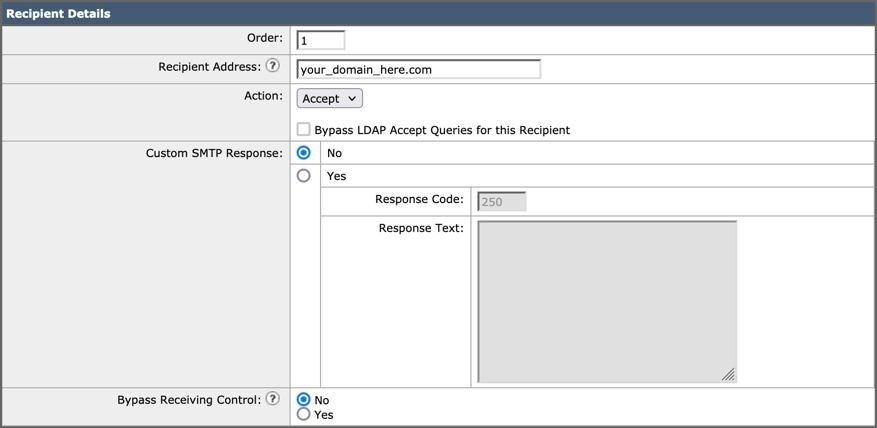
Configure Recipient Access Table (RAT) to accept mail for your domains:
- Navigate to Mail Policies > Recipient Access Table (RAT).
- Click Add Recipient.
- Add your domains in the Recipient Address field.
- Choose the default action of Accept.
- Click Submit.
- Click Commit Changes in the upper right-hand of the UI to save your configuration changes.
SMTP Routes
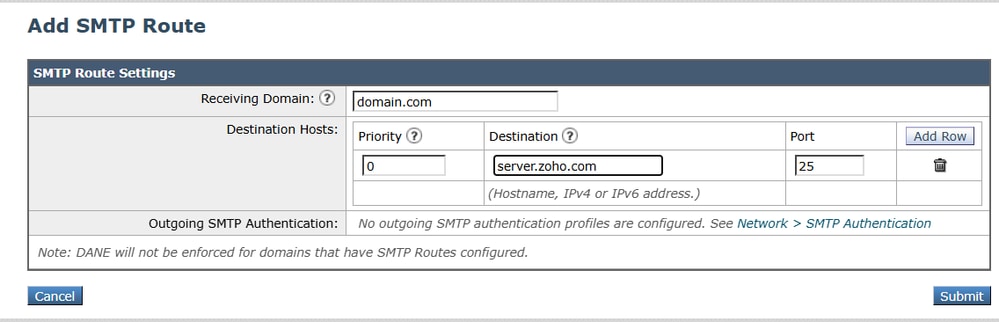
Set the SMTP route to deliver mail from Cisco Secure Email to your Zoho Mail domain:
- Navigate to Network > SMTP Routes.
- Click Add Route...
- Receiving Domain: enter your domain name.
- Destination Hosts: add your original Zoho Mail MX record.
- Click Submit.
- Click Commit Changes in the upper right-hand of the UI to save your configuration changes.
Destination Controls
Impose a self-throttle to a delivery domain in your Destination Controls as you do not want any throttling by Zoho due to its unknown reputation.
- Log in to your Gateway.
- Navigate to Mail Policies > Destination Controls.
- Click Add Destination and configure settings:
- Destination: enter your domain name
- Concurrent Connections: 10
- Maximum Messages Per Connection: 20
- TLS Support: Preferred
- Click Submit.
- Click Commit Changes in the upper right-hand of the User Interface (UI) to save your configuration changes.
DNS (MX Record) Configuration
You are ready to cut over the domain through a Mail Exchange (MX) record change. Work with your DNS administrator to resolve your MX records to the IP addresses for your Cisco Secure Email Cloud instance, as provided in your Cisco Secure Email welcome letter.
Configure Mail from Zoho Mail to Cisco Secure Email (Outbound)
Configure RELAYLIST on Cisco Secure Email Gateway
Refer to your Cisco Secure Email welcome letter. In addition, a secondary interface is specified for outbound messages via your Gateway.
- Log in to your Gateway.
- Navigate to Mail Policies > HAT Overview.

Note: Make sure the Listener is for Outgoing. OutgoingMail, or MailFlow-Ext etc are most common names used.
- Click Add Sender Group...
- Configure the Sender Group as:
- Name: RELAY_ZOHO
- Comment: <<enter a comment if you wish to notate your sender group>>
- Policy: RELAYED
- Click Submit and Add Senders.
- Sender: hostname of your zoho based domain (e.g .zoho.com) Note: The . (dot) at the beginning of the sender domain name is required.
- Click Submit.
- Click Commit Changes in the upper right-hand of the UI to save your configuration changes.
Enable TLS
- Click <<Back to HAT Overview.
- Click the Mail Flow Policy RELAYED. Under section Encryption and Authentication. For TLS, choose: Preferred.
- Click Submit.
- Click Commit Changes in the upper right-hand of the UI to save your configuration changes.
Verify
Test your Inbound and/or Outbound mail traffic:
Validate the mail logs in Message Tracking on your Cisco Secure Email and Web Manager (also known as SMA) for mail logs tested for both inbound and outbound traffic.
Troubleshoot
1. Check for IP address and hostname used on both Zoho and Cisco CES
2. Check if the RAT, SMTP Routes is all configured correctly.
Revision History
| Revision | Publish Date | Comments |
|---|---|---|
1.0 |
01-Jul-2026
|
Initial Release |

 Feedback
Contact Cisco
- Open a Support Case

- (Requires a Cisco Service Contract)