Integrate AMP for Endpoints with FMC Data Feed
Available Languages
Introduction
This document describes how to integrate AMP for Endpoints with FMC for event data integration.
Issue
Integrate AMP for Endpoints with FMC so FMC can receive AMP for Endpoints event data.
Environment
- Firepower Management Center (FMC) with access to the AMP menu.
- Advanced Malware Protection (AMP) for Endpoints account with valid credentials for the appropriate AMP cloud (for example, US, EU, APJC).
- Browser access from the FMC UI to the AMP for Endpoints cloud for the authorization redirect.
- FMC version 6.x ,7.X.
- The article references the legacy navigation path AMP > AMP Management > Add AMP Cloud Connection, which corresponds to Firepower Management Center 6.x and applies generally across FMC 6.0 through 7.x
Resolution
Complete these steps to register the AMP for Endpoints cloud connection in FMC:
1. Confirm access to the FMC and the AMP menu.
2. Confirm valid AMP for Endpoints credentials for the AMP cloud to register.
3. From FMC, click AMP > AMP Management.
 image.png
4. Click Add AMP Cloud Connection.
 image.png
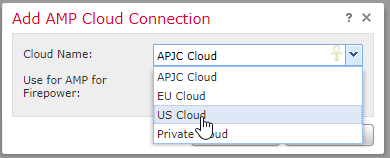
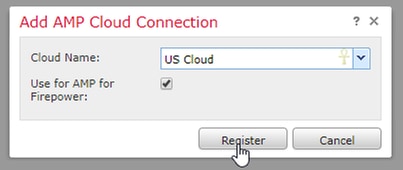
5. Select the AMP cloud used for AMP for Endpoints and click Register.
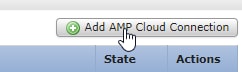 image.png
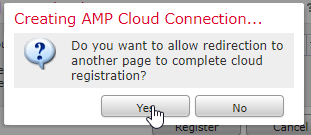
6. Click Yes to allow redirection to the AMP for Endpoints console.
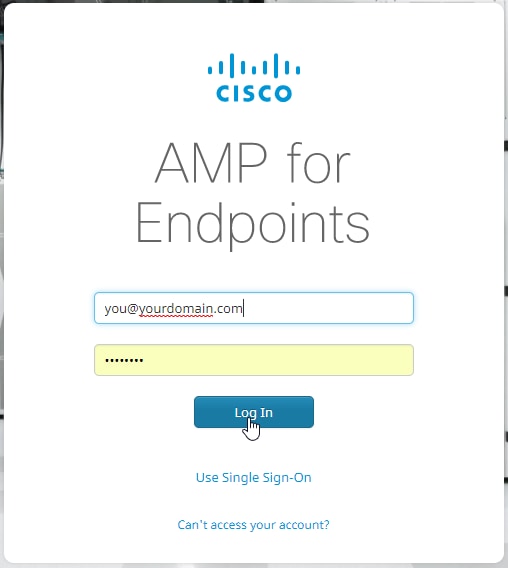
- Log in to AMP for Endpoints.
- Click Allow to authorize the AMP to FMC connection.
- Return to the FMC browser tab.
- Verify that the Cisco AMP Solution Type field displays AMP for Endpoints and AMP for Networks and that the State field shows a blue checkmark.
Related Content
- Technical Support & Documentation - Cisco Systems
- Cisco AMP for Endpoints - TechNotes
- Cisco AMP for Endpoints - User Guide
Revision History
| Revision | Publish Date | Comments |
|---|---|---|
2.0 |
26-Oct-2026
|
Recertification |
1.0 |
29-Mar-2019
|
Initial Release |

 Feedback
Contact Cisco
- Open a Support Case

- (Requires a Cisco Service Contract)