Reset the Username and Password of the Offline VBond/VSmart
Available Languages
Contents
Introduction
This document describes how to reset the username and password of the SD-WAN offline vBond/vSmart.
Prerequisites
Requirements
Cisco recommends that you have knowledge of these topics:
- Cisco Software-defined Wide Area Network (SD-WAN).
Components Used
The information in this document is based on Cisco vManager version 20.9.4
The information in this document was created from the devices in a specific lab environment. All of the devices used in this document started with a cleared (default) configuration. If your network is live, ensure that you understand the potential impact of any command.
Problem
Access to vBonds and vSmarts has been lost. This happens when you do not know or remember your credentials or access is locked after excessive and unsuccessful attempts to log into either interface. At the same time, the Control Connections between vManage, vSmarts, and vBonds are interrupted.Offline vbond and vsmart cannot be operated through the vmanage GUI.
Basic Concept
Ciscotac User Access
The Cisco Edge software provides two users—ciscotacro and ciscotacrw—that are for use only by the Cisco Support team. These users are available for both cloud and on-premises installations. They operate on a consent-token challenge and token response authentication in which a new token is required for every new login session. The ciscotacro and ciscotacrw users can use this token to log in to Cisco SD-WAN Manager web server as well as the SSH Terminal on Cisco SD-WAN Manager. These users can also access Cisco SD-WAN Validator, Cisco SD-WAN Controllers, and Cisco vEdge devices using the SSH Terminal on Cisco SD-WAN Manager.
The default CLI templates include the ciscotacro and ciscotacrw user configuration. These users are enabled by default. However, a you can disable these users, if needed.
-
ciscotacro User: This user is part of the operator user group with only read-only privileges. This user can only monitor a configuration but cannot perform any operation that modify the configuration of the network.
-
ciscotacrw User: This user is part of the netadmin user group with read-write privileges. This user can modify a network configuration. In addition, only this user can access the root shell using a consent token.

Note: The "ciscotac" user account was introduced and is included by default starting with Cisco SD-WAN software releases around version 20.x.
Solution
Step 1.Use ciscotacrw to access vBond or vSmart via SSH login
- Input ciscotacrw as the username.
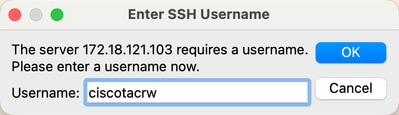
- Click OK,the Consent Token Challenge phrase is generated accordingly.

- You need to provide the "Consent Token Challenge phrase" to TAC via SR case. TAC then return the corresponding "sdwanchallenge-response token".
- Input “sdwanchallenge-response token”
Step 2.Reset the existing user password
After logging into the offline vBond/vSmart through the ciscotacrw account (using the consent-token for authentication), you can restore or reset the username and password.
- Enter the configuration mode and reset the password for the existing user (such as admin):
vBond# config terminal
vBond(config)# system aaa user admin password <new password>
vBond(config)# commit
Note: After submission, the system automatically encrypt the plaintext password.
Step 3.Add a new Netadmin user (optional)
If a new administrator account needs to be created:
vBond(config)# system aaa user <new username> password <new password>
vBond(config)# system aaa user <new username> group netadmin
vBond(config)# commit
Step 4.Unlock the locked account (if applicable)
If your account is locked due to multiple failed logins, you can unlock it using the command:
request aaa unlock-user <username>
Step 5.Verify Configuration
- Use show running-config system aaa command to check if the user configuration is applied correctly.
- Try to log in with the new credentials to confirm the successful recovery.
Note: Since vBond is in an offline state (not associated with vManage or disconnected), it is recommended to complete the configuration directly via CLI rather than by issuing the template from vManage.

Warning: After completion, if you need to re-establish a management connection with vManage, please ensure that the credentials are consistent with the configuration in vManage.
Related Information
Revision History
| Revision | Publish Date | Comments |
|---|---|---|
1.0 |
04-Aug-2026
|
Initial Release |

 Feedback
Contact Cisco
- Open a Support Case

- (Requires a Cisco Service Contract)