Clear vManage Stuck Task with an API Call
Available Languages
Introduction
This document describes how to clear a vManage task that has been stuck with the help of an API Call.
Background Information
Stuck Task(s) are tasks that are scheduled and were not completed when an action is completed in vManage. If your vManage version is 16.3+ and newer, you can clear a stuck task. Examples include software image push to vEdge (software upgrade) that takes too long or if the template push to a device is not successful. Stuck Task(s) can be seen in the "Tasks" view on your vManage Dashboard.
You must have netadmin privilege level to use the required API call. Typically a default user admin is a member of this group.
Clear vManage Stuck Task with an API Call
Use the following API call to retrieve information about currently scheduled or potentially stalled tasks. Note: While this example uses port 8443, it is optional; you may use a direct IP address or domain name.
Note: This process is not supported for configuration groups.
https://<vmanage-ip:8443>/dataservice/device/action/status/tasks
Here is the output:
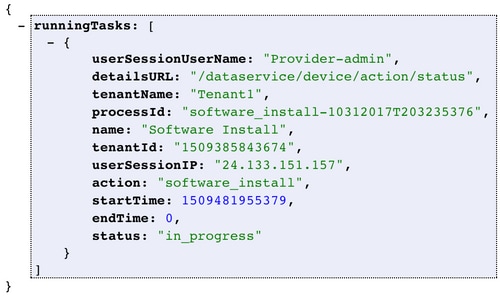
When you run the command Process_ID, the value is shown as a "running task" capture. Take the value and input it after clean?processId= as part of the URL in this URL: https://<vmanage-ip:8443>/dataservice/device/action/status/tasks/clean?processId=<id_from_previous_call>.
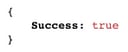
The result is:
Revision History
| Revision | Publish Date | Comments |
|---|---|---|
2.0 |
28-May-2026
|
Updated spelling, grammar, and inserted new image (prior one was blurry). |
1.0 |
18-Oct-2019
|
Initial Release |

 Feedback
Contact Cisco
- Open a Support Case

- (Requires a Cisco Service Contract)