Introduction
This document describes why an Overlay Management Protocol (OMP) route can remain invalid when set tloc-action is used in a centralized control polic
Topology
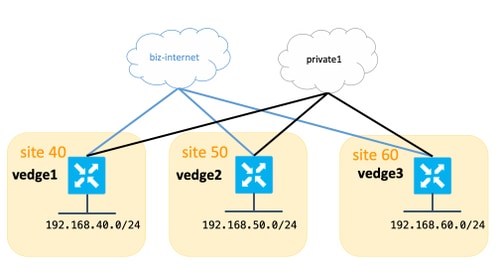
In this example, traffic between site 40 and site 60 is steered through site 50. The policy sets the intermediate TLOC on vEdge2 and uses tloc-action primary so that traffic prefers the biz-internet path through the intermediate site.
Background
tloc-action in a centralized control policy does not work, even though data-plane tunnels appear to be up, and describes how to correct the configuration.
Configuration
The information in this document was created from the devices in a specific lab environment. All of the devices used in this document started with a cleared (default) configuration. If your network is live, ensure that you understand the potential impact of any command. For the purpose of this article, vEdge and the Controllers Software version 18.3.5 was used.
All sites have connection to biz-internet and private colors, this table summarizes the configuration.
| hostname |
site-id |
system-ip |
ip-address on biz-internet link |
ip-address on private1 link |
| vEdge1 |
40 |
192.168.30.104
|
192.168.109.181
|
192.168.110.181
|
| vEdge2 |
50 |
192.168.30.105
|
192.168.109.182
|
192.168.110.182
|
| vEdge3 |
60 |
192.168.30.106
|
192.168.109.183
|
192.168.110.183
|
| vSmart |
1 |
192.168.30.103
|
|
|
There are no special configurations on vEdges. Configuration with two default routes is pretty simple and omitted here for brevity.
On vSmart, this configuration was applied:
 lists
  vpn-list VPN_40
   vpn 40
  !
  site-list sites_40_60
   site-id 40
   site-id 60
  !
  prefix-list SITE_40
   ip-prefix 192.168.40.0/24
  !
  prefix-list SITE_60
   ip-prefix 192.168.60.0/24
  !
 !
control-policy REDIRECT_VIA_VEDGE2
  sequence 10
   match route
    prefix-list SITE_40
   !
   action accept
    set
     tloc-action primary
     tloc 192.168.30.105 color biz-internet encap ipsec
    !
   !
  !
  sequence 20
   match route
    prefix-list SITE_60
   !
   action accept
    set
     tloc-action primary
     tloc 192.168.30.105 color biz-internet encap ipsec
    !
   !
  !
  default-action accept
 !
apply-policy
 site-list sites_40_60
  control-policy REDIRECT_VIA_VEDGE2 out
 !
!
The goal is to redirect traffic between site 40 and site 60 through site 50 and prefer the biz-internet TLOC.
Problem
From the show omp routes output, you see that routes via biz-internet can not be installed on vEdge1, vEdge3 and status is set to Invalid and unresolved (Inv,U😞
vedge1# show omp routes | b PATH
                                            PATH                      ATTRIBUTE
VPN    PREFIX              FROM PEER        ID     LABEL    STATUS    TYPE       TLOC IP          COLOR            ENCAP  PREFERENCE
--------------------------------------------------------------------------------------------------------------------------------------
40     192.168.40.0/24     0.0.0.0          68     1002     C,Red,R   installed  192.168.30.104   biz-internet     ipsec  -
                           0.0.0.0          81     1002     C,Red,R   installed  192.168.30.104   private1         ipsec  -
40     192.168.50.0/24     192.168.30.103   4      1002     C,I,R     installed  192.168.30.105   biz-internet     ipsec  -
                           192.168.30.103   10     1002     C,I,R     installed  192.168.30.105   private1         ipsec  -
40     192.168.60.0/24     192.168.30.103   8      1002     Inv,U     installed  192.168.30.105   biz-internet     ipsec  -
                           192.168.30.103   9      1002     C,I,R     installed  192.168.30.106   biz-internet     ipsec  -
vedge3# show omp routes | b PATH
PATH ATTRIBUTE
VPN PREFIX FROM PEER ID LABEL STATUS TYPE TLOC IP COLOR ENCAP PREFERENCE
--------------------------------------------------------------------------------------------------------------------------------------
40 192.168.40.0/24 192.168.30.103 19 1002 Inv,U installed 192.168.30.105 biz-internet ipsec -
192.168.30.103 20 1002 C,I,R installed 192.168.30.104 biz-internet ipsec -
40 192.168.50.0/24 192.168.30.103 16 1002 C,I,R installed 192.168.30.105 biz-internet ipsec -
192.168.30.103 21 1002 C,I,R installed 192.168.30.105 private1 ipsec -
40 192.168.60.0/24 0.0.0.0 68 1002 C,Red,R installed 192.168.30.106 biz-internet ipsec -
0.0.0.0 81 1002 C,Red,R installed 192.168.30.106 private1 ipsec - At the same time, you see data plane tunnels on biz-internet up and running between vEdge1 and vEdge3:
vedge1# show bfd sessions
                                      SOURCE TLOC      REMOTE TLOC                                      DST PUBLIC                      DST PUBLIC         DETECT      TX
SYSTEM IP        SITE ID  STATE       COLOR            COLOR            SOURCE IP                       IP                              PORT        ENCAP  MULTIPLIER  INTERVAL(msec) UPTIME          TRANSITIONS
-------------------------------------------------------------------------------------------------------------------------------------------------------------------------------------------------------------
192.168.30.105   50       up          biz-internet     biz-internet     192.168.109.181                 192.168.109.182                 12366       ipsec  7           1000           0:02:52:22      0
192.168.30.105   50       up          private1         private1         192.168.110.181                 192.168.110.182                 12366       ipsec  7           1000           0:00:00:12      1
192.168.30.106   60       up          biz-internet     biz-internet     192.168.109.181                 192.168.109.183                 12366       ipsec  7           1000           0:02:52:22      0
192.168.30.106   60       up          private1         private1         192.168.110.181                 192.168.110.183                 12366       ipsec  7           1000           0:00:56:28      0
vedge3# show bfd sessions
SOURCE TLOC REMOTE TLOC DST PUBLIC DST PUBLIC DETECT TX
SYSTEM IP SITE ID STATE COLOR COLOR SOURCE IP IP PORT ENCAP MULTIPLIER INTERVAL(msec) UPTIME TRANSITIONS
-------------------------------------------------------------------------------------------------------------------------------------------------------------------------------------------------------------
192.168.30.104 40 up biz-internet biz-internet 192.168.109.183 192.168.109.181 12366 ipsec 7 1000 0:02:54:25 0
192.168.30.104 40 up private1 private1 192.168.110.183 192.168.110.181 12366 ipsec 7 1000 0:00:58:30 0
192.168.30.105 50 up biz-internet biz-internet 192.168.109.183 192.168.109.182 12366 ipsec 7 1000 0:02:54:25 0
192.168.30.105 50 up private1 private1 192.168.110.183 192.168.110.182 12366 ipsec 7 1000 0:00:57:26 0 In the show omp route detailed output, you see the tloc set properly and also the untimate-tloc is set, but status is Inv,U and loss reason is invalid:
vedge3# show omp routes 192.168.40.0/24 detail

---------------------------------------------------
omp route entries for vpn 40 route 192.168.40.0/24
---------------------------------------------------
            RECEIVED FROM:
peer            192.168.30.103
path-id         19
label           1002
status          Inv,U
loss-reason     invalid
lost-to-peer    192.168.30.103
lost-to-path-id 20
    Attributes:
     originator       192.168.30.104
     type             installed
     tloc             192.168.30.105, biz-internet, ipsec
     ultimate-tloc    192.168.30.104, biz-internet, ipsec -- primary
     domain-id        not set
     overlay-id        1
     site-id          40
     preference       not set
     tag              not set
     origin-proto     connected
     origin-metric    0
     as-path          not set
     unknown-attr-len not set
            RECEIVED FROM:
peer            192.168.30.103
path-id         20
label           1002
status          C,I,R
loss-reason     not set
lost-to-peer    not set
lost-to-path-id not set
    Attributes:
     originator       192.168.30.104
     type             installed
     tloc             192.168.30.104, biz-internet, ipsec
     ultimate-tloc    not set
     domain-id        not set
     overlay-id        1
     site-id          40
     preference       not set
     tag              not set
     origin-proto     connected
     origin-metric    0
     as-path          not set
unknown-attr-len not setNote: An ultimate-tloc is the TLOC to which the intermediate hop builds data plane tunnel (IPsec or Generic Routing Encapsulation (GRE)) in order to get to the final destination.
Note: tloc-action is only supported end-to-end if there is a data plane tunnel set up from the same TLOC on the intermediate hop to the source as the TLOC from which the intermediate hop builds the tunnel to the final (ultimate) destination. If the TLOC used to reach the intermediate hop from a site is different from the TLOC used from the intermediate hop to reach the final (ultimate) destination, this results in a policy failure with TLOC action. This is also known as disjoint underlay.
You can see that the main goal is not achieved and the traffic follows the direct path, as can be seen on the host from 192.168.40.0/24 subnet:
traceroute -n 192.168.60.20
traceroute to 192.168.60.20 (192.168.60.20), 30 hops max, 60 byte packets
 1  192.168.40.104  0.288 ms  0.314 ms  0.266 ms
 2  192.168.60.106  0.911 ms  1.045 ms  1.140 ms
 3  192.168.60.20  1.213 ms !X  1.289 ms !X  1.224 ms !X
Solution
If the action is accept set tloc-action, configure service TE on the intermediate router.
Note: When service TE is enabled, the intermediate router advertises TE-related path information that the source router uses to validate the steered path. In practical terms, this allows the source router to verify that the exact intermediate-hop TLOC selected by policy has an operational data-plane tunnel toward the ultimate destination.
Note: It is important to avoid describing vSmart as the component that performs end-to-end tracking of the data-plane path. In this workflow, vSmart distributes the control-plane information, while the source router uses the advertised TE-related path information to determine whether the steered path is valid. This mechanism applies to a single intermediate hop. It does not provide chained validation across multiple intermediate routers.
Hence, in currect scenario service TE configuration is required on vEdge2 in order to make centralized control policy work because you use Traffic Engineering (TE) essentially by steering via an arbitrary path:
vedge2(config)# vpn 40
vedge2(config-vpn-40)# service ?
Possible completions:
  FW  IDP  IDS  TE  netsvc1  netsvc2  netsvc3  netsvc4
vedge2(config-vpn-40)# service TE
vedge2(config-vpn-40)# commit
Commit complete.
After service TE is enabled, the intermediate router advertises the required TE service information, and the policy-steered route can be installed successfully.
vsmart1# show omp services | b PATH
                                                 PATH
VPN    SERVICE  ORIGINATOR      FROM PEER        ID     LABEL    STATUS
---------------------------------------------------------------------------
40     VPN      192.168.30.104  192.168.30.104   68     1002     C,I,R
                                192.168.30.104   81     1002     C,I,R
40     VPN      192.168.30.105  192.168.30.105   68     1002     C,I,R
                                192.168.30.105   81     1002     C,I,R
40     VPN      192.168.30.106  192.168.30.106   68     1002     C,I,R
                                192.168.30.106   81     1002     C,I,R
40     TE       192.168.30.105  192.168.30.105   68     1007     C,I,R
                                192.168.30.105   81     1007     C,I,R
Note that the status policy-steered route is set to C,I,R:
vedge3# show omp routes 192.168.40.0/24 detail

---------------------------------------------------
omp route entries for vpn 40 route 192.168.40.0/24
---------------------------------------------------
            RECEIVED FROM:
peer            192.168.30.103
path-id         19
label           1002
status          C,I,R
loss-reason     not set
lost-to-peer    not set
lost-to-path-id not set
    Attributes:
     originator       192.168.30.104
     type             installed
     tloc             192.168.30.105, biz-internet, ipsec
     ultimate-tloc    192.168.30.104, biz-internet, ipsec -- primary
     domain-id        not set
     overlay-id        1
     site-id          40
     preference       not set
     tag              not set
     origin-proto     connected
     origin-metric    0
     as-path          not set
     unknown-attr-len not set
            RECEIVED FROM:
peer            192.168.30.103
path-id         20
label           1002
status          R
loss-reason     tloc-action
lost-to-peer    192.168.30.103
lost-to-path-id 19
    Attributes:
     originator       192.168.30.104
     type             installed
     tloc             192.168.30.104, biz-internet, ipsec
     ultimate-tloc    not set
     domain-id        not set
     overlay-id        1
     site-id          40
     preference       not set
     tag              not set
     origin-proto     connected
     origin-metric    0
     as-path          not set
     unknown-attr-len not set
vedge3# show ip routes 192.168.40.0/24 | b PROTOCOL
                                            PROTOCOL  NEXTHOP     NEXTHOP          NEXTHOP
VPN    PREFIX              PROTOCOL         SUB TYPE  IF NAME     ADDR             VPN      TLOC IP          COLOR            ENCAP  STATUS
---------------------------------------------------------------------------------------------------------------------------------------------
40     192.168.40.0/24     omp              -         -           -                -        192.168.30.105   biz-internet     ipsec  F,S

 Feedback