Configure NetFlow Secure Event Logging on Firepower Threat Defense

Available Languages
Introduction
This document describes how to configure NetFlow Secure Event Logging (NSEL) on Firepower Threat Defense (FTD) via Firepower Management Center (FMC).
Prerequisites
Requirements
Cisco recommends that you have knowledge of these topics:
- Knowledge of FMC
- Knowledge of FTD
- Knowledge of the FlexConfig Policy
Components Used
The information in this document is based on these software and hardware versions:
- FTD version 6.6.1
- FMC version 6.6.1
The information in this document was created from the devices in a specific lab environment. All of the devices used in this document started with a cleared (default) configuration. If your network is live, ensure that you understand the potential impact of any command.
Background Information
This document describes how to configure NetFlow Secure Event Logging (NSEL) on Firepower Threat Defense (FTD) via Firepower Management Center (FMC).
The FlexConfig text objects are associated with variables used in the predefined FlexConfig objects. Predefined FlexConfig objects and associated text objects are found in FMC to configure NSEL. There are four predefined FlexConfig objects within the FMC and three predefined text objects. Predefined FlexConfig objects are read-only and cannot be modified. To modify the parameters of NetFlow, the objects can be copied.
The four predefined objects are listed in the table:

The three predefined text objects are listed in the table:

Configure
This section describes how to configure NSEL on FMC through a FlexConfig Policy.
Step 1. Set the parameters of the Text Objects for Netflow.
- To set the variable parameters, navigate to Objects > FlexConfig > Text Objects.
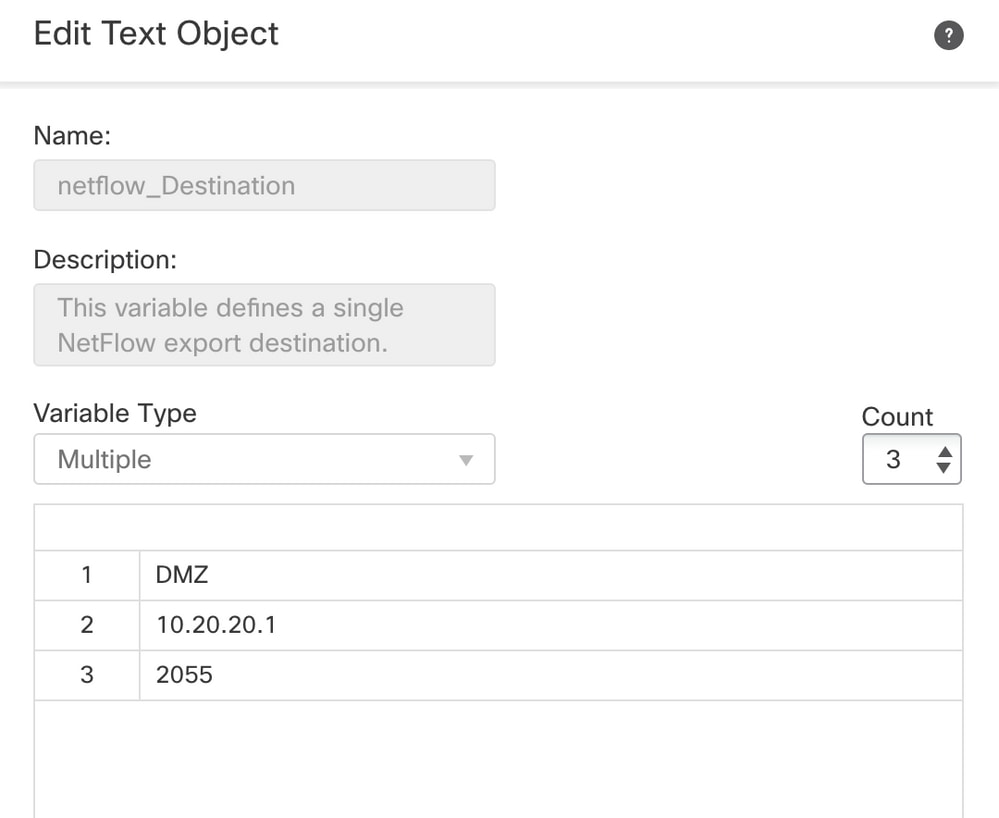
- Edit the netflow_Destination object.
- Define the multiple variable type and count set to 3.
- Set the interface name, destination IP address and port. In this configuration example, the interface is DMZ, the NetFlow Collector IP address is 10.20.20.1 and the UDP port is 2055.
Step 2. Configure an Extended Access List Object to match specific traffic.
- To create an Extended Access List on FMC, navigate to Objects > Object Management and on the left menu, under Access List select Extended.
- Click Add Extended Access List.
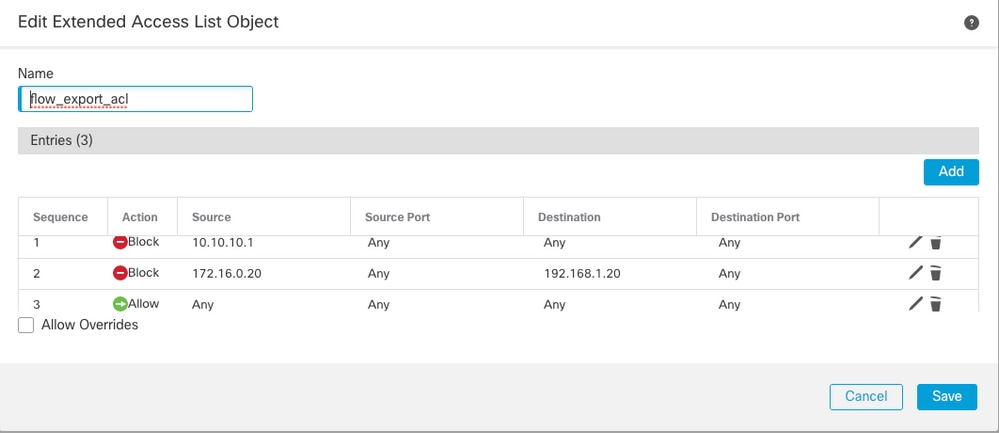
- Fill in the Name field. In this example, the name is flow_export_acl.
- Click Add.
- Configure the Access Control entries to match specific traffic. In this example, the traffic from host 10.10.10.1 to any destination and traffic between host 172.16.0.20 and 192.168.1.20 is excluded. Any other traffic is included.
Step 3. Configure a FlexConfig Object.
- To configure the FlexConfig Objects navigate to Objects > FlexConfig > FlexConfig Objects and click Add FlexConfig Object.
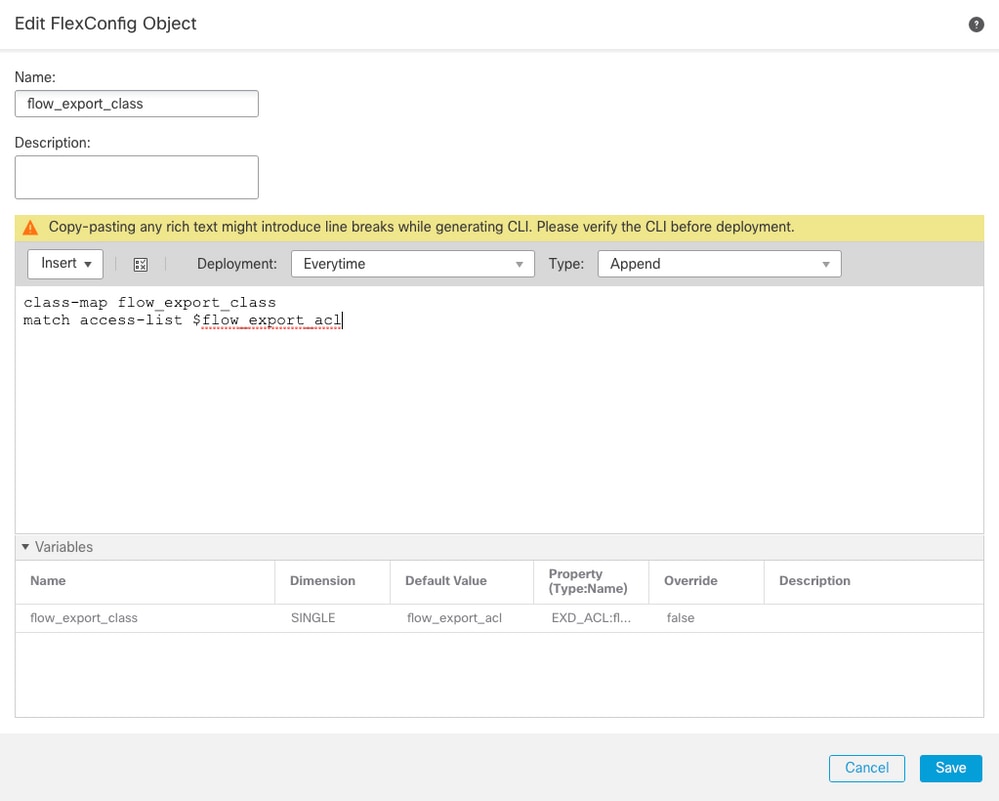
- Define the class map that identifies traffic for which NetFlow events must be exported.
- In this example, the name of the object is flow_export_class.
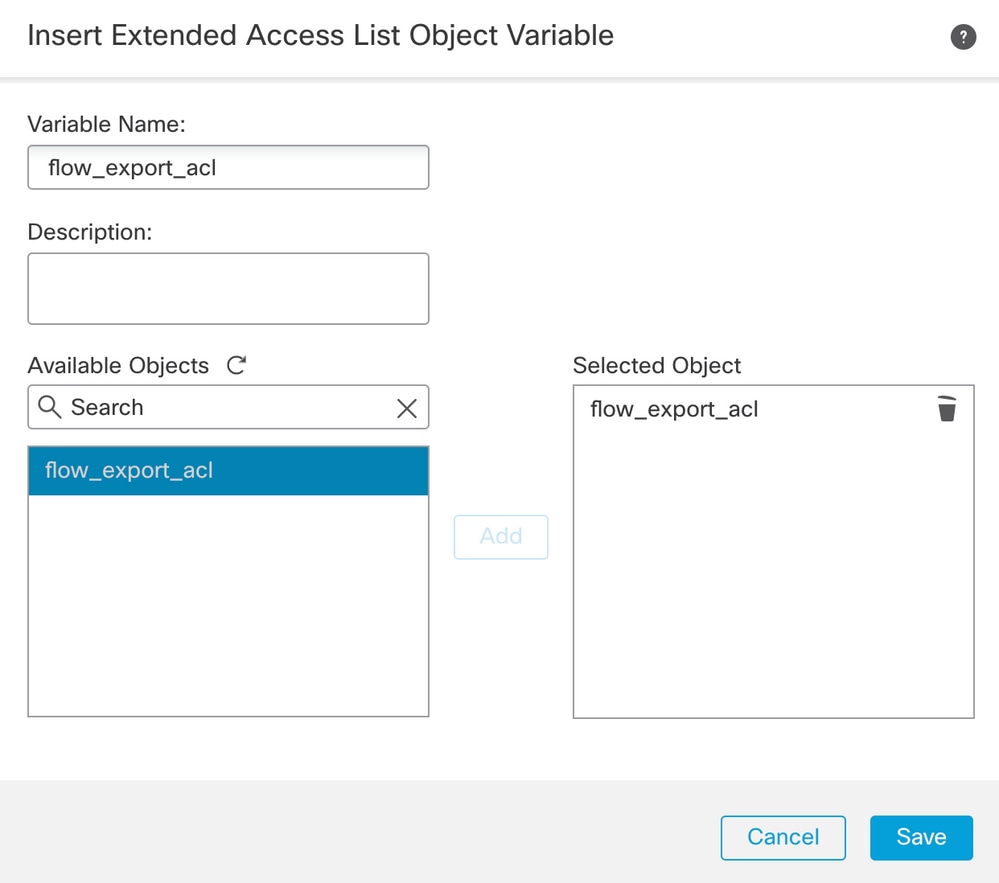
- Select the Access List created in Step 2.
- Click Insert > Insert Policy Object > Extended ACL Object and assign a name.
- Then, click Add. In this example, the name of the variable is flow_export_acl.
- Click Save.
Add the next configuration lines in the blank field right and include the variable previously defined ($flow_export_acl.) in the match access-list configuration line.
Notice that a $ symbol begins the variable name. This helps define a variable comes after it.
class-map flow_export_class
match access-list $flow_export_acl
Click on Save when finished.
Step 4. Configure the Netflow Destination
- To configure the Netflow Destination, navigate to Objects > FlexConfig > FlexConfig Objectsand filter by Netflow.
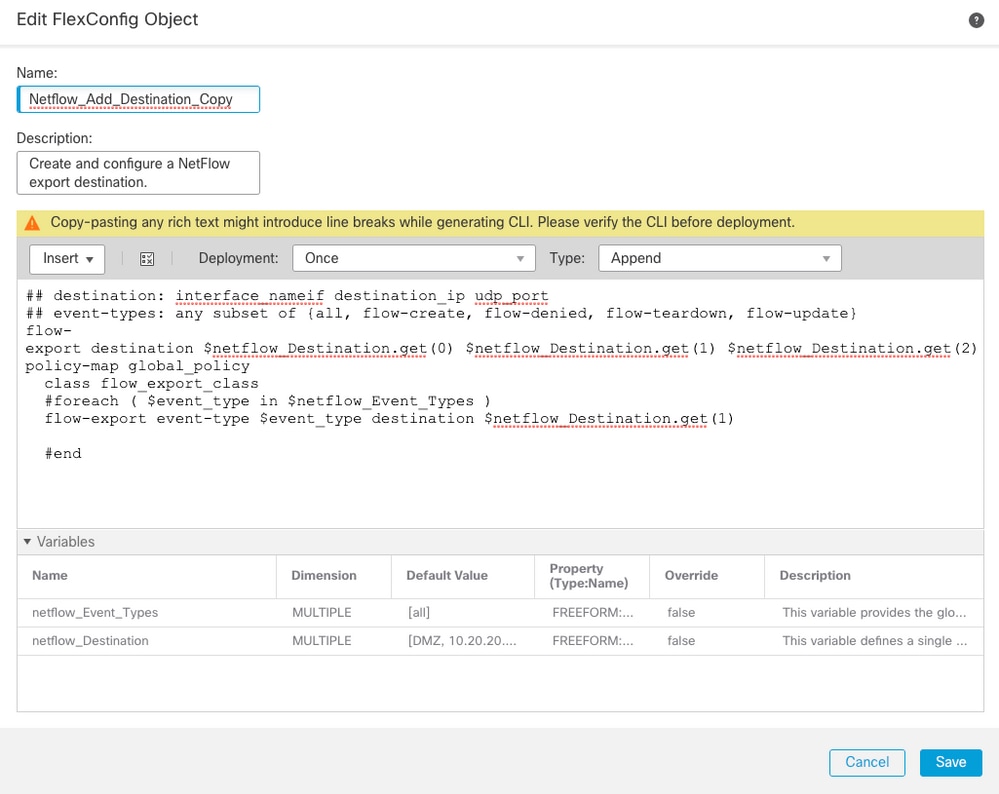
- Copy the object Netflow_Add_Destination. Now the Netflow_Add_Destination_Copy is created.
- Assign the class created in Step 3. You can create a new policy map to apply the flow-export actions to the defined classes. In this example, the class is inserted in the current policy (global policy).
## destination: interface_nameif destination_ip udp_port
## event-types: any subset of {all, flow-create, flow-denied, flow-teardown, flow-update}
flow-export destination $netflow_Destination.get(0) $netflow_Destination.get(1) $netflow_Destination.get(2)
policy-map global_policy
  class flow_export_class
  #foreach ( $event_type in $netflow_Event_Types )
  flow-export event-type $event_type destination $netflow_Destination.get(1)
  #end
4. Click on Save when finished.
Step 5. Assign the FlexConfig Policy to the FTD
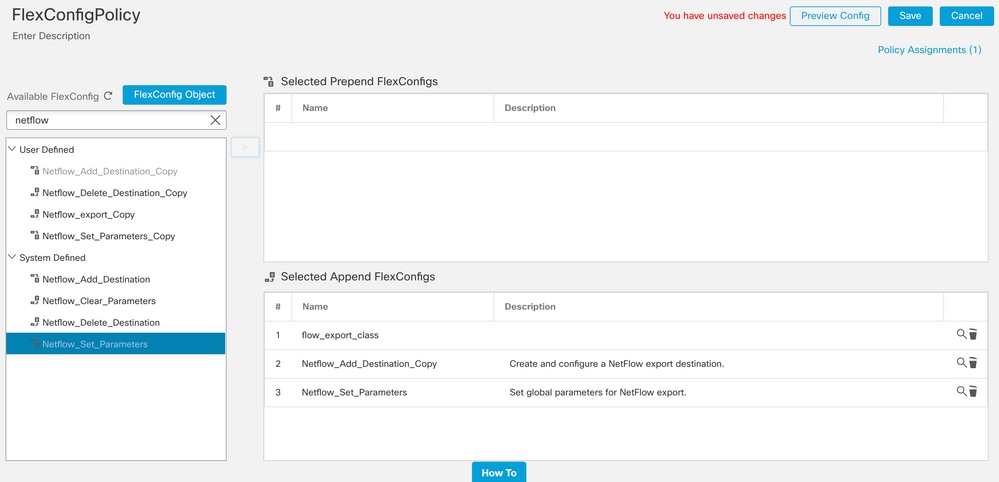
- Navigate to Devices > FlexConfig and create a new policy (unless there is already one created for another purpose and assigned to the same FTD). In this example, the FlexConfig is already created.
- Edit the FlexConfig Policy and Select the FlexConfig objects created in previous steps. In this example, the default Netflow export parameters are used, therefore, the Netflow_Set_Parameters is selected.
- Save your changes and deploy.
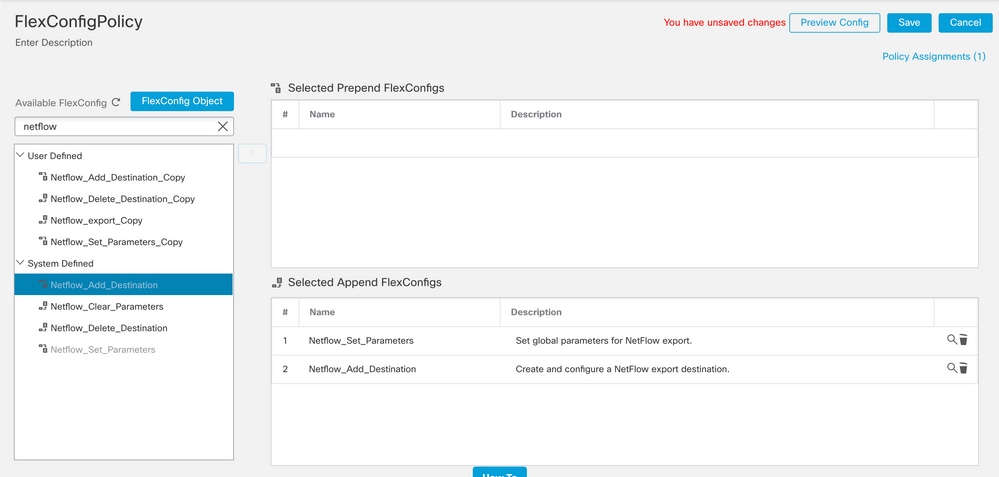

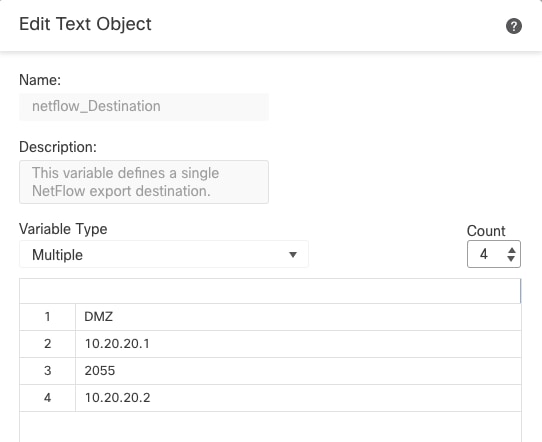
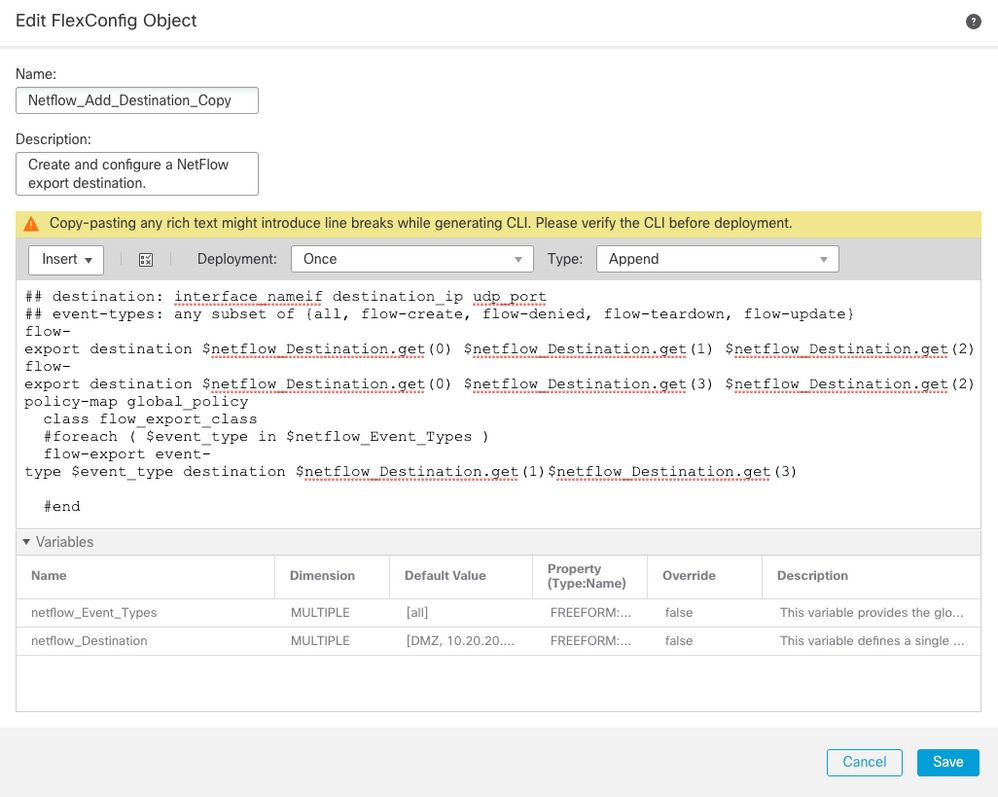
Note: To add a second NSEL collector where NetFlow packets are sent. In Step 1, add 4 variables to add to the second Netflow collector IP address.
In Step 4, add the configuration line: flow-export destination $netflow_Destination.get(0) $netflow_Destination.get(1) $netflow_Destination.get(2)
Edit the variable $netflow_Destination.get for the correspondence variable. In this example the variable value is 3. For example:
flow-export destination $netflow_Destination.get(0) $netflow_Destination.get(1) $netflow_Destination.get(2)
flow-export destination $netflow_Destination.get(0) $netflow_Destination.get(3) $netflow_Destination.get(2)
Also, add the second variable $netflow_Destination.get in the configuration line: flow-export event-type $event_type destination $netflow_Destination.get(1). For example:
flow-export event-type $event_type destination $netflow_Destination.get(1) $netflow_Destination.get(3)
Validate this configuration as seen in the image below:
Verify
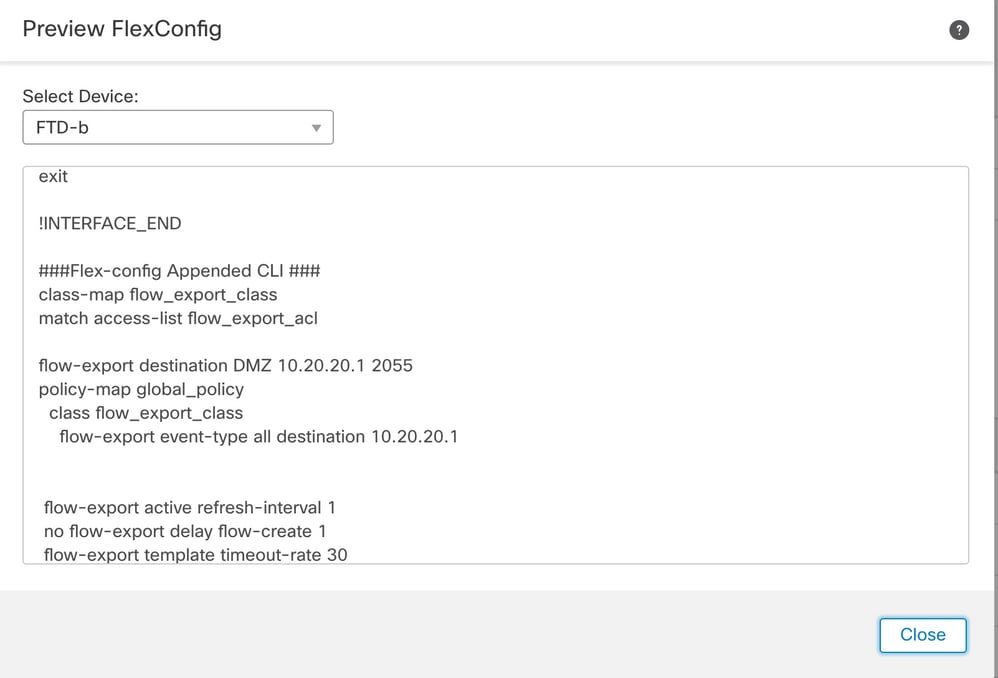
The NetFlow configuration can be verified within the FlexConfig Policy. To preview the configuration, click on Preview Config and Select the FTD and verify the configuration.
Access the FTD trough Secure Shell (SSH) and run the command system support diagnostic-cli and run these commands:
> system support diagnostic-cli
Attaching to Diagnostic CLI ... Press 'Ctrl+a then d' to detach.
Type help or '?' for a list of available commands.
firepower# show access-list flow_export_acl
access-list flow_export_acl; 3 elements; name hash: 0xe30f1adf
access-list flow_export_acl line 1 extended deny object-group ProxySG_ExtendedACL_34359742097 object 10.10.10.1 any (hitcnt=0) 0x8edff419
access-list flow_export_acl line 1 extended deny ip host 10.10.10.1 any (hitcnt=0) 0x3d4f23a4
access-list flow_export_acl line 2 extended deny object-group ProxySG_ExtendedACL_34359742101 object 172.16.0.20 object 192.168.1.20 (hitcnt=0) 0x0ec22ecf
access-list flow_export_acl line 2 extended deny ip host 172.16.0.20 host 192.168.1.20 (hitcnt=0) 0x134aaeea
access-list flow_export_acl line 3 extended permit object-group ProxySG_ExtendedACL_30064776111 any any (hitcnt=0) 0x3726277e
access-list flow_export_acl line 3 extended permit ip any any (hitcnt=0) 0x759f5ecf
firepower# sh running-config class-map flow_export_class
class-map flow_export_class
match access-list flow_export_acl
firepower# show running-config policy-map
!
policy-map type inspect dns preset_dns_map
parameters
message-length maximum client auto
message-length maximum 512
no tcp-inspection
policy-map type inspect ip-options UM_STATIC_IP_OPTIONS_MAP
parameters
eool action allow
nop action allow
router-alert action allow
policy-map global_policy
class inspection_default
inspect dns preset_dns_map
inspect ftp
inspect h323 h225
inspect h323 ras
inspect rsh
inspect rtsp
inspect sqlnet
inspect skinny
inspect sunrpc
inspect xdmcp
inspect sip
inspect netbios
inspect tftp
inspect icmp
inspect icmp error
inspect ip-options UM_STATIC_IP_OPTIONS_MAP
inspect snmp
class flow_export_class
flow-export event-type all destination 10.20.20.1
class class-default
set connection advanced-options UM_STATIC_TCP_MAP
firepower# show running-config | include flow
access-list flow_export_acl extended deny object-group ProxySG_ExtendedACL_34359742097 object 10.10.10.1 any
access-list flow_export_acl extended deny object-group ProxySG_ExtendedACL_34359742101 object 172.16.0.20 object 192.168.1.20
access-list flow_export_acl extended permit object-group ProxySG_ExtendedACL_30064776111 any any
flow-export destination DMZ 10.20.20.1 2055
class-map flow_export_class
match access-list flow_export_acl
class flow_export_class
flow-export event-type all destination 10.20.20.1
Related Information
Revision History
| Revision | Publish Date | Comments |
|---|---|---|
4.0 |
23-Jun-2026
|
Updated spelling, sentence structure, numbering for steps, and spacing. |
3.0 |
16-Oct-2023
|
Updated screenshot for multiple NetFlow objects with different IP address |
2.0 |
10-Feb-2023
|
Updated format. Corrected CCW alerts. Recertification. |
1.0 |
16-Oct-2020
|
Initial Release |
 Feedback