O365 Message Trace ingestion failure - HTTP 500 Errors due to message trace V1 API deprecation
Available Languages
Applicability
Splunk for Microsoft Office 365 Splunk EnterpriseDescription
Message Trace data ingestion fails immediately or during collection with repeated HTTP 500 errors.
The Splunk Add-on for Microsoft Office 365 attempts to retrieve message trace data from Microsoft's reporting API at reports.office365.com, but the endpoint consistently returns HTTP 500 (Internal Server Error) responses. The retry mechanism exhausts all attempts and ultimately fails.
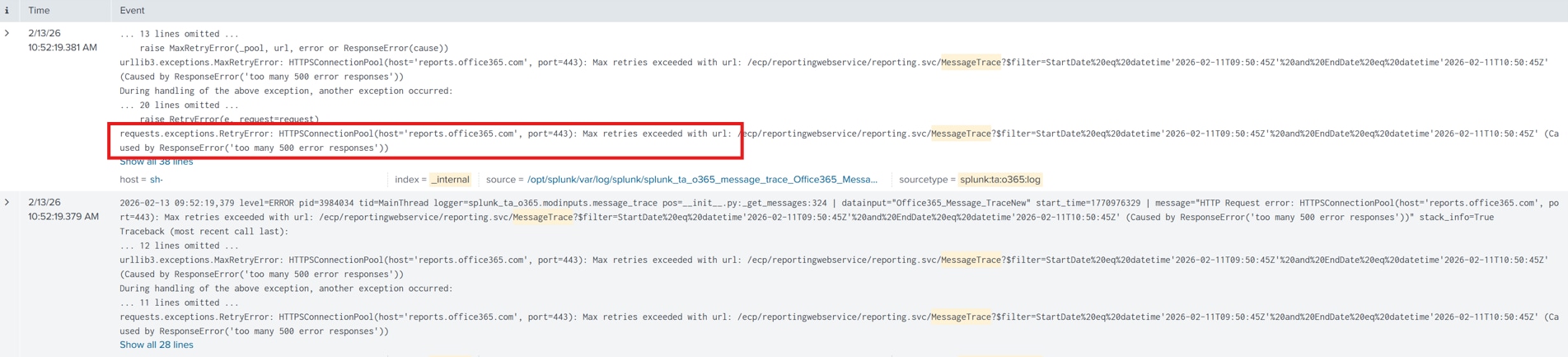
The following error appears in internal logs:
SPL:
index=_internal source=splunk_ta_o365* ERROR
Error Message:
2026-01-01 13:37:42.375 level=ERROR pid=1099757 tid=MainThread logger=splunk_ta_o365.modinputs.message_trace
datainput="Trace_Message_Logs" start_time=1767263845 message="An error occurred while collecting data" stack_info=True
The error chain follows this sequence:
- HTTPSConnectionPool exhausts all retry attempts.
- Multiple HTTP 500 responses are returned from reports.office365.com.
- The 120-second timeout limit is reached.
- The connection retry backoff mechanism activates.
- Final exception: MaxRetryError - "too many 500 error responses."
Investigation
Upon investigation, the below was found.
- Search internal logs for the HTTP 500 error referencing reports.office365.com:
- index=_internal sourcetype=splunk_ta_o365* "too many 500 error responses"
- Confirm the data input name (e.g., Trace_Message_Logs) and verify it uses the Message Trace V1 input type.
Error Message:
requests.exceptions.RetryError: HTTPSConnectionPool(host='reports.office365.com', port=443): Max retries exceeded with url: /ecp/reportingwebservice/reporting.svc/MessageTrace?
$filter=StartDate%20eq%20datetime'2025-12-28T11:31:52Z'%20and%20EndDate%20eq%20datetime'2025-12-28T20eq%2 (Caused by ResponseError('too many 500 error responses'))
It is caused by Microsoft's deprecation of the Message Trace V1 API. Microsoft announced in June 2025 that the V1 Message Trace API (reports.office365.com) is being deprecated. As Microsoft transitions to the new V2 API, the V1 endpoint has become increasingly unstable, resulting in persistent HTTP 500 errors.
- Verify the installed version of the Splunk Add-on for Microsoft Office 365.
- Navigate to Apps > Manage Apps and check the version number of the Splunk Add-on for Microsoft Office 365.
- If the version is below 6.0.0, the add-on is using the deprecated V1 API.
Resolution
The issue can be resolved by upgrading the Splunk Add-on for Microsoft Office 365 to version 6.0.0 or later.
- Follow the official migration guide to transition from the deprecated Message Trace V1 input to the supported Message Trace V2 input:
- Configure the new Message Trace V2 input parameters as described in the updated add-on documentation:
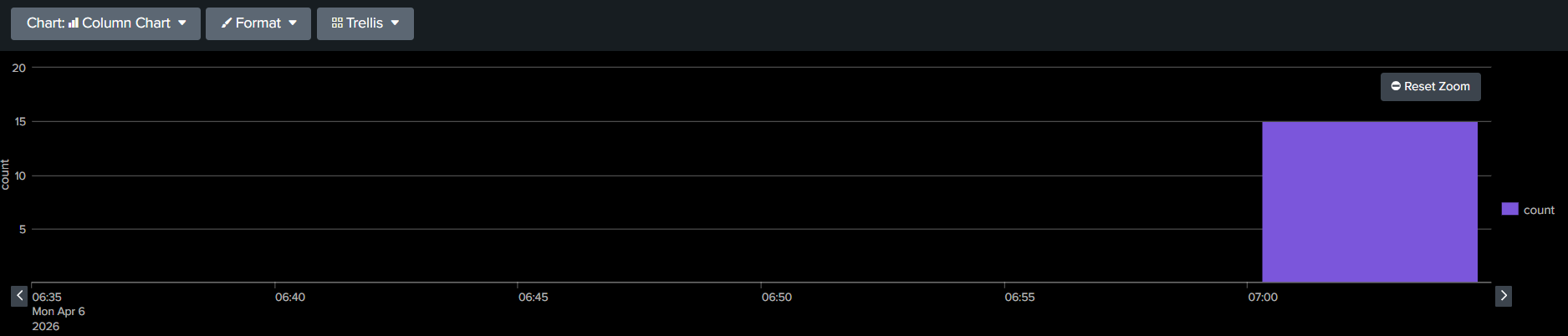
- Verify that data ingestion resumes successfully by checking the assigned index for new Message Trace events.
index=o365 | timechart count
Related Links
Splunk Documentation - Reference.
External Documentation - Reference.
Revision History
| Revision | Publish Date | Comments |
|---|---|---|
1.0 |
01-Oct-2026
|
Initial Release |
 Feedback
Contact Cisco
- Open a Support Case

- (Requires a Cisco Service Contract)
This Document Applies to These Products
Related Articles
- Splunk Add-on for Microsoft O365: Message Trace Input Error Due to KVStore Initialization Failure
- Message trace log ingestion failure in the Splunk Add-on for Microsoft Office 365 due to 'too many 500 error responses'
- Splunk Add-on for Microsoft Office 365 Message Trace ingestion fails with HTTP 500 from legacy Reporting Web Service API
- Message Trace Logs Stopped Ingesting After Splunk Add-on for Microsoft O365 Upgrade to v6.x