Unable to see any findings or investigations in Analyst queue on the Mission Control page
Available Languages
Applicability
Splunk Enterprise Splunk Enterprise Security 8.1Description
When navigating to Splunk Enterprise Security > Mission Control, there is no findings or investigations found in Analyst queue. It shows "Search did not return any findings or investigations.", screenshot is as follows:
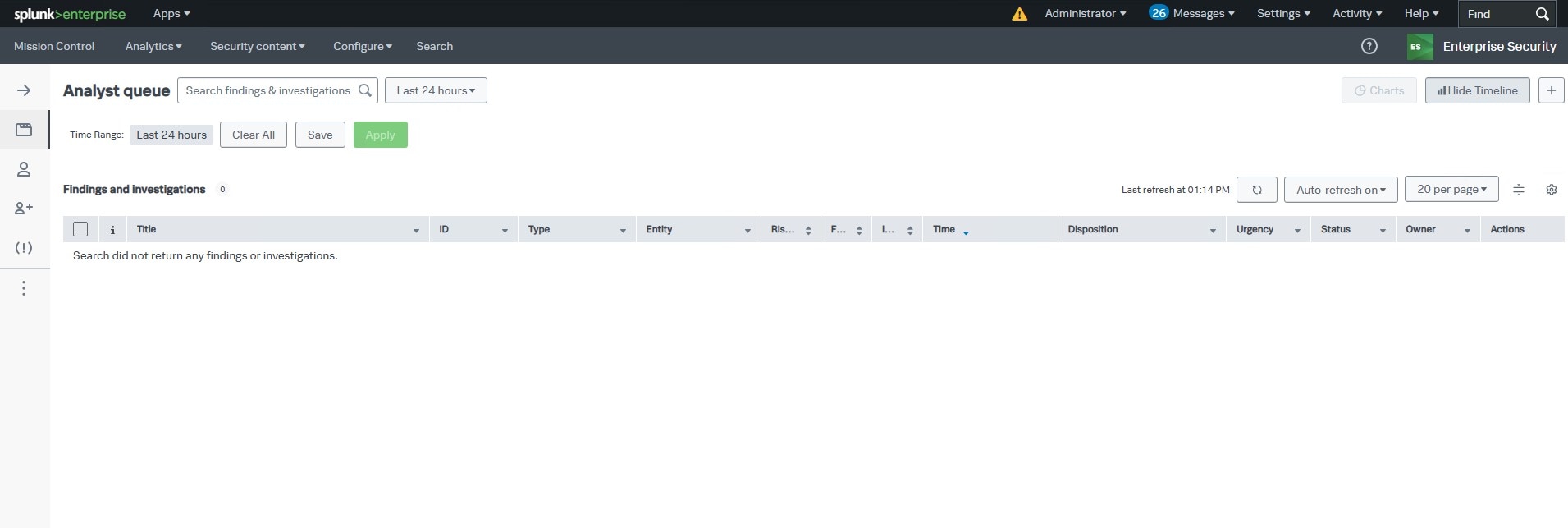
Even expend the Time Range, e.g., Last 30 days, there are no findings or investigations at all in the Analyst queue. All other pages or dashboards in Enterprise Security are working without any issue.
Investigation
1. Checked to see if the notable index contains findings. Search in Splunk Web against the notable index to determine if the finding exists but is being excluded from the Analyst queue on the Mission Control page using the following search:
index=notableChecked the suppressions filter, there is no suppressions filters defined, which could be preventing the findings from appearing in the Analyst queue.
2. As the Analyst queue page is populated by a saved search, run the saved search by: change the Time Range, e.g., Last 24 hours, then click the Apply button on the Analyst queue on the Mission Control page.
3. Immediately check the result of the saved search by going to: Activity > Jobs
4. Found the saved search "Incident Review - Main" is in 'Failed' status.
5. Checked the search.log of the saved search "Incident Review - Main", found the following error messages:
11-19-2025 09:25:17.929 WARN  CsvDataProvider [3209772 searchOrchestrator] - Unable to find filename property for lookup=mc_investigations_lookup will attempt to use implicit filename.
11-19-2025 09:25:17.929 WARN  CsvDataProvider [3209772 searchOrchestrator] - No valid lookup table file found for this lookup=mc_investigations_lookup
11-19-2025 09:25:17.929 ERROR CsvDataProvider [3209772 searchOrchestrator] - The lookup table 'mc_investigations_lookup' does not exist or is not available.
11-19-2025 09:25:17.929 WARN  CsvDataProvider [3209772 searchOrchestrator] - Unable to find filename property for lookup=mc_investigations_lookup will attempt to use implicit filename.
11-19-2025 09:25:17.929 WARN  CsvDataProvider [3209772 searchOrchestrator] - No valid lookup table file found for this lookup=mc_investigations_lookup
11-19-2025 09:25:17.929 ERROR CsvDataProvider [3209772 searchOrchestrator] - The lookup table 'mc_investigations_lookup' does not exist or is not available.
11-19-2025 09:25:17.929 ERROR LookupProcessor [3209772 searchOrchestrator] - Error in 'lookup' command: Could not construct lookup 'local=true, mc_investigations_lookup, _key, as, mc_investigation_guid, OUTPUTNEW'. See search.log for more details.
6. Checked the 'mc_investigations_lookup' in Settings > Lookups, found out it's permission is Application level: "This app only (missioncontrol)"; however, it should be Global: "All apps (system)".
Resolution
Changed the permission of 'mc_investigations_lookup' in Settings > Lookup to Global: "All apps (system)", Analyst queue was populated as expected.
Revision History
| Revision | Publish Date | Comments |
|---|---|---|
1.0 |
01-Oct-2026
|
Initial Release |
 Feedback
Contact Cisco
- Open a Support Case

- (Requires a Cisco Service Contract)