Splunk Universal Forwarder with Windows Server version 2012/2016, causes high memory and CPU usage.
Available Languages
Applicability
Splunk EnterpriseDescription
Splunk UF on the Windows servers utilizing high memory and CPU.
In this scenario, Splunk-owned processes were consuming up to 50% of the server's physical memory, making the server unstable. The task menu, shows it is due to the "Splunk-winevtlog.exe" service and the "Monitor Windows event Logs" Process.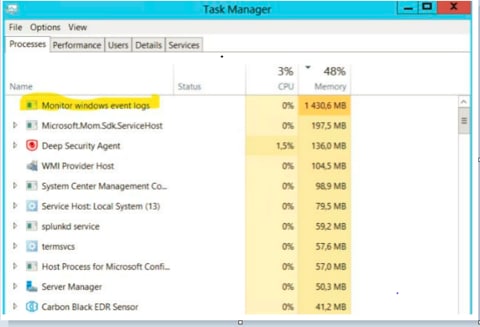
Investigation
The Splunk_TA_Windows application does not need SID translation in the Security Event Log. This is because Active Directory events already contain this information. To reduce the amount of memory that domain controllers use to perform SID translation, configure the Splunk Add-on for Windows (Splunk_TA_Windows) to disable SID translation.
The "evt_resolve_ad_obj" parameter has been seen to help reduce the CPU and memory usage on Universal Forwarders. After disabling the parameter in the inputs.conf file on the universal forwarders, a restart is needed for the changes to take effect. By disabling the evt_resolve_ad_obj , it will not do SID resolution which helps to reduce memory usage.
Resolution
To disable SID translation, change the setting evt_resolve_ad_obj to 0 for this stanza only in inputs.conf.
1. Navigate to the path: etc/apps/Splunk_TA_windows/local/inputs.conf
2. Append the following parameter:-
[WinEventLog://Security]
evt_resolve_ad_obj = 0
3. Restart the service.
$SPLUNK_HOME\bin\splunk restart
Related Links
Revision History
| Revision | Publish Date | Comments |
|---|---|---|
1.0 |
30-Sep-2026
|
Initial Release |
 Feedback
Contact Cisco
- Open a Support Case

- (Requires a Cisco Service Contract)