High CPU/Memory usage by splunk-MonitorNoHandle.exe process on Windows
Available Languages
Applicability
Splunk Enterprise 9.2.3Description
The splunk-MonitorNoHandle.exe process (SplunkMonNoHandle Control Program) memory consumption is seen to grow slowly over time until potentially all available system memory is used causing the system to hang :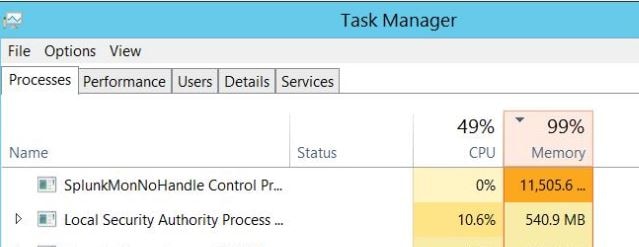
Setting up monitornohandle_max_heap_mb on it's own may not help.
Investigation
When MonitorNoHandle can't forward data, it keeps it in memory, the process intercepts writes going to the file using a kernel-mode filter driver rather than reading directly from the file, this allows Splunk to read open files in use by other applications. So, although this may look like a memory leak. The memory growth is caused by slower downstream pipelines that will cause kernel and monitornohandle to allocate more memory to store events from a monitored file in memory.
There can be different causes for this :
1. The maxKBps throughput limit is set too low, limiting the throughput of data forwarded (default 256KBps) causing more memory usage by MonitorNoHandle.
2. Use of Anti-Virus programs such as Trend Deep Security to monitor or scan Splunk processes and files can cause performance slowdowns resulting in high memory usage of the splunk-MonitorNoHandle.exe process (often seen happening with process splunk-winevtlog.exe also).
3. Other throughput limiting reasons such as network issues, busy or unavailable indexers/Heavy Forwarders etc.
Resolution
1. Increase maxKBps in limits.conf and ideally set it to 0 (unlimited) to ensure forwarded data throughput is not restricted:[thruput]
maxKBps = 02. Exclude monitoring and scanning of Splunk processes and files from AntiVirus software. This is a recommendation of Splunk as per the documentation HERE
3. Check for any of the following issues around the time when splunk-MonitorNoHandle.exe process consumed a lot of memory :
- Network performance issues.
- Splunk Indexer/Heavy Forwarder performance issues due to being busy or overloaded.
- Network or Splunk indexer/Heavy Forwarder outages or maintenance periods.
If any of these occur it will likely cause splunk-MonitorNoHandle.exe to grow as events are stored in memory.
4. Another option to prevent splunk-MonitorNoHandle.exe from consuming all available system memory and potentially causing a hang is to set the following options in limits.conf :
For example:
[inputproc]
monitornohandle_max_heap_mb=<value>
monitornohandle_max_driver_mem_mb=<value>
Note:
It is often necessary to set both of these, as only setting "monitornohandle_max_heap_mb" on its own, doesn't always work.
It's important to understand the implications of configuring the above settings:
Both settings will restrict splunk-MonitorNoHandle.exe and its driver from consuming more than the specified amount of memory in MB. By default, this is set to 0 (unlimited) hence, it can consume all available system memory. Restricting the maximum amount of memory that can be used can result in event data being dropped and not ingested when the specified limit is reached.
The value used for these settings should be determined by the amount of available memory you can spare on your system for storing event data should a downstream bottleneck to your indexers occur.
Revision History
| Revision | Publish Date | Comments |
|---|---|---|
1.0 |
29-Sep-2026
|
Initial Release |
 Feedback
Contact Cisco
- Open a Support Case

- (Requires a Cisco Service Contract)