Universal Forwarder (UF) stops forwarding events until manual restart.
Available Languages
Applicability
Splunk Enterprise, Universal ForwarderDescription
No logs coming from Universal Forwarder (UF) until manual restart.
Investigation
The user noticed that no log is coming from a particular UF host until manual restart splunkd on this host.
The UF has limits.conf thruput configured as below:
[thruput]
maxKBps = 64
Noticed WARN logs from TailReader thread:
02-02-2025 03:58:28.404 +0800 WARN TailReader [320935 tailreader0] - Enqueuing a very large file=/opt/syslog/xxxxxx.log in the batch reader, with bytes_to_read=4165495401, reading of other large files could be delayedThis log means that one log file can go as much as 4165495401 bytes (~4 GB). By default, batch reader is used when the file is over 20 MB in size, and it only processes one file at a time, which may cause delays to read other log files when it's overwhelmed reading large file.
Use the below SPL to check the average thruput on that universal forwarder:
index=_internal host=xxx source=*metrics.log* group=thruput name=thruput
|timechart span=10m avg(instantaneous_kbps) by host
The graph indicates that the UF is adhering to the maxKBps = 64 limit. However, each time it is restarted, the throughput spikes to over 1,000 kbps.
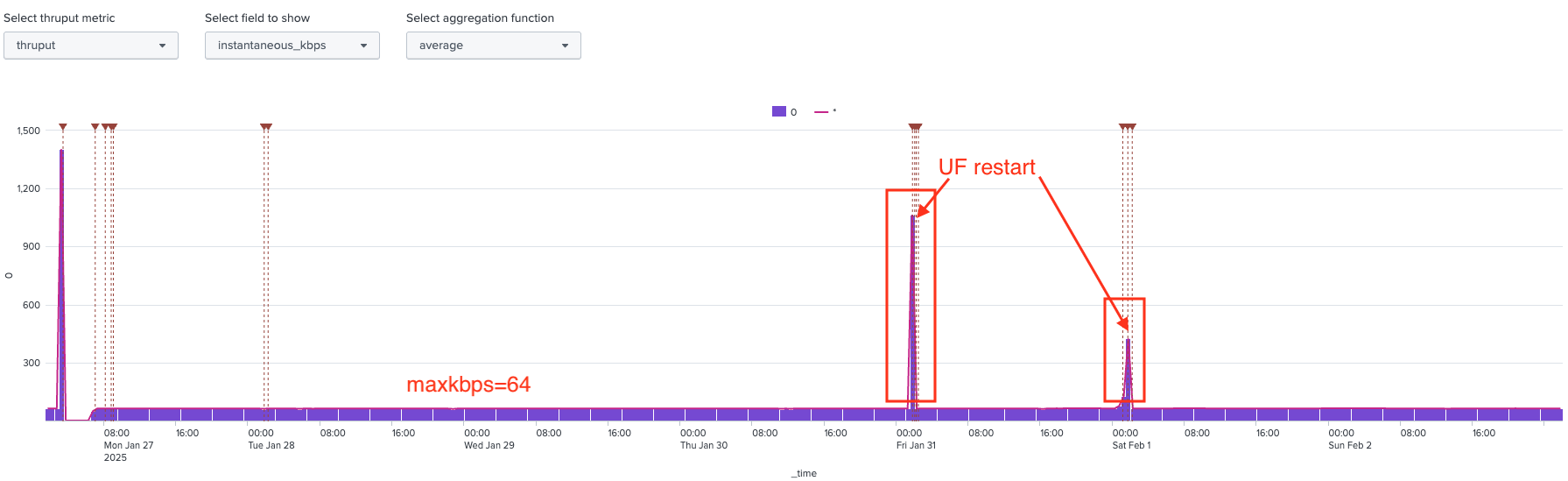
As confirmed by Splunk's Engineering team, the throughput spike observed after the Universal Forwarder (UF) restarts is expected behavior:
- During the first 60 seconds after a splunkd restart on the UF, throughput remains ulimited.
- The maxKBps limit only takes effect after this initial period, which explains the spikes in the graph each time the UF was restarted.
This also explains why logs were forwarded from the UF after each restart.
Resolution
Our investigation suggests that logs were not forwarded until the UF restarted is due to the low throughput limit. With maxKBps = 64, the UF can process approximately 5.27 GB of data per day, while a single log file can be as large as 4 GB, which likely caused the delay.
- To avoid delay from forwarder side, please try to reduce the file size per log file, try not to aggregate the source file to a very large file, change the log rotation so each log file is smaller.
- As higher thruput from the UF is needed to process the back pressure, the users can consider using a higher maxKBps value on the UF, or set it to 0 for ulimited:
[thruput]
maxKBps = 0
For more details on the warning message "Enqueuing a very large file=xxx", please refer to the following knowledge base article:
KB Article: WARN TailReader - Enqueuing a very large file.
Related Links
Limitsconf
WARN TailReader - Enqueuing a very large file.
Revision History
| Revision | Publish Date | Comments |
|---|---|---|
1.0 |
29-Sep-2026
|
Initial Release |
 Feedback
Contact Cisco
- Open a Support Case

- (Requires a Cisco Service Contract)
This Document Applies to These Products
Related Articles
- Splunk Universal Forwarder stops Forwarding events when installed on AIX - TcpOutEloop Segmentation Fault
- Splunk Universal Forwarder stops forwarding data during the day repeatedly
- Splunk Windows Universal Forwarder stops forwarding Windows Defender logs after Platform Update
- Troubleshoot High CPU Usage on Windows Universal Forwarder (UF)