File Integrity checks found 41 files that did not match the system-provided manifest.
Available Languages
Applicability
Splunk EnterpriseDescription
File integrity check fails and logged-in 'messages' via SplunkWeb.
There are 41 files missing in $SPLUNK_HOME\bin directory on Windows Server.
Investigation
The file integrity error is found in 'SplunkWeb > message' after the Splunk 9.4 upgrade - the symptoms happen both from Splunk Enterprise and Splunk UniversalForwarder.
Installed Files Integrity Checker:  File Integrity checks found 41 files that did not match the system-provided manifest.
Review the list of problems reported  by the InstalledFileHashChecker in splunkd.log
File Integrity Check View  ; potentially restore files from installation media, change practices to  avoid changing files, or work with support to identify the problem
Find the file list that fails the File Integrity Check by clicking the link for 'File Integrity Check View' in the message. The results of "Splunk validate files" look like the ones below. Those DLL files in question are not found in the bin directory - You need to visit the $SPLUNK_HOME\bin for Universal Forwarder to confirm;
Could not open 'C:\Program Files\Splunk\bin/api-ms-win-crt-environment-l1-1-0.dll': The system cannot find the file specified.
Could not open 'C:\Program Files\Splunk\bin/api-ms-win-crt-filesystem-l1-1-0.dll': The system cannot find the file specified.
Could not open 'C:\Program Files\Splunk\bin/api-ms-win-crt-heap-l1-1-0.dll': The system cannot find the file specified.
Could not open 'C:\Program Files\Splunk\bin/api-ms-win-crt-locale-l1-1-0.dll': The system cannot find the file specified.
Could not open 'C:\Program Files\Splunk\bin/api-ms-win-crt-math-l1-1-0.dll': The system cannot find the file specified.
Could not open 'C:\Program Files\Splunk\bin/api-ms-win-crt-multibyte-l1-1-0.dll': The system cannot find the file specified.
Could not open 'C:\Program Files\Splunk\bin/api-ms-win-crt-private-l1-1-0.dll': The system cannot find the file specified.
Could not open 'C:\Program Files\Splunk\bin/api-ms-win-crt-process-l1-1-0.dll': The system cannot find the file specified.
Could not open 'C:\Program Files\Splunk\bin/api-ms-win-crt-runtime-l1-1-0.dll': The system cannot find the file specified.
Could not open 'C:\Program Files\Splunk\bin/api-ms-win-crt-stdio-l1-1-0.dll': The system cannot find the file specified.
Could not open 'C:\Program Files\Splunk\bin/api-ms-win-crt-string-l1-1-0.dll': The system cannot find the file specified.
Could not open 'C:\Program Files\Splunk\bin/api-ms-win-crt-time-l1-1-0.dll': The system cannot find the file specified.
Could not open 'C:\Program Files\Splunk\bin/api-ms-win-crt-utility-l1-1-0.dll': The system cannot find the file specified.
Could not open 'C:\Program Files\Splunk\bin/ucrtbase.dll': The system cannot find the file specified.
Resolution
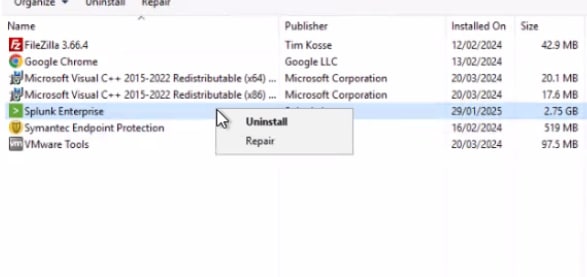
The cause of missing files during the upgrade remains unclear. The article suggests a workaround Based on the information from the article, "Repair apps and programs" that repairs apps and programs by comparing installed application files with those in the install package, resolving package integrity issues without a full uninstall and reinstallation. Download the install package before initiating the repair.
Steps to fix :
* Repair options from the Control Panel1. In the search box on the taskbar, enter control panel and select Control Panel from the results.2. Select Programs > Programs and Features.3. Right-click the program you want to fix and select Repair, or if that’s not available, select Change. Then follow the directions on the screen.
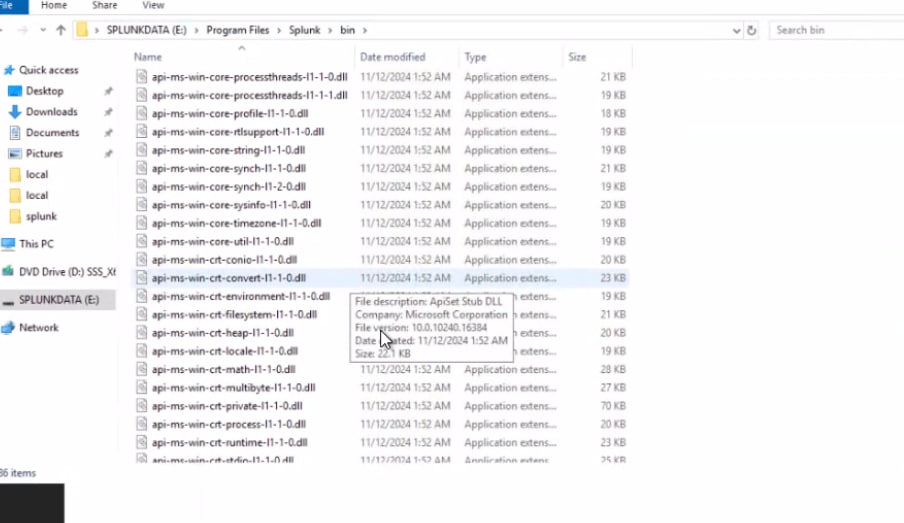
- After the App Repair process missing files are recovered and and appear in the file system
Related Links
Repair apps and programs in Windows
How to Repair Apps and Programs on Windows 10: A Complete Guide
Revision History
| Revision | Publish Date | Comments |
|---|---|---|
1.0 |
29-Sep-2026
|
Initial Release |
 Feedback
Contact Cisco
- Open a Support Case

- (Requires a Cisco Service Contract)