File Integrity Checks Found Files That Did Not Match the System-Provided Manifest
Available Languages
Applicability
Splunk Enterprise Splunk CloudDescription
This message is triggered when a default file shipped with the Splunk software (listed in the manifest file) is changed after installation. This can occur if a required application, such as the Launcher or Search app, is removed, or if custom settings are applied to any file located in $SPLUNK_HOME/etc/apps.
Additionally, users assigned the admin role may see these messages, as the role will show these messages that are not intended for view. These integrity warnings are non-impacting and can be ignored.
The following message appears when the Splunk service is started or in the Splunk Web UI under the Messages tab:

"MESSAGE:Installed Files Integrity Checker:  File Integrity checks found 1 files that did not match the system-provided manifest.
Review the list of problems reported  by the InstalledFileHashChecker in splunkd.log
File Integrity Check View  ; potentially restore files from installation media, change practices to  avoid changing files, or work with support to identify the problem"
Additionally, this can appear in splunkd.log and can be seeing if the following query is run:
index=_internal sourcetype=splunkd log_level=WARN component=InstalledFilesHashChecker
| bin span=1w _time
| stats count by _time event_message
Investigation
To check the affected file; perform the following steps:
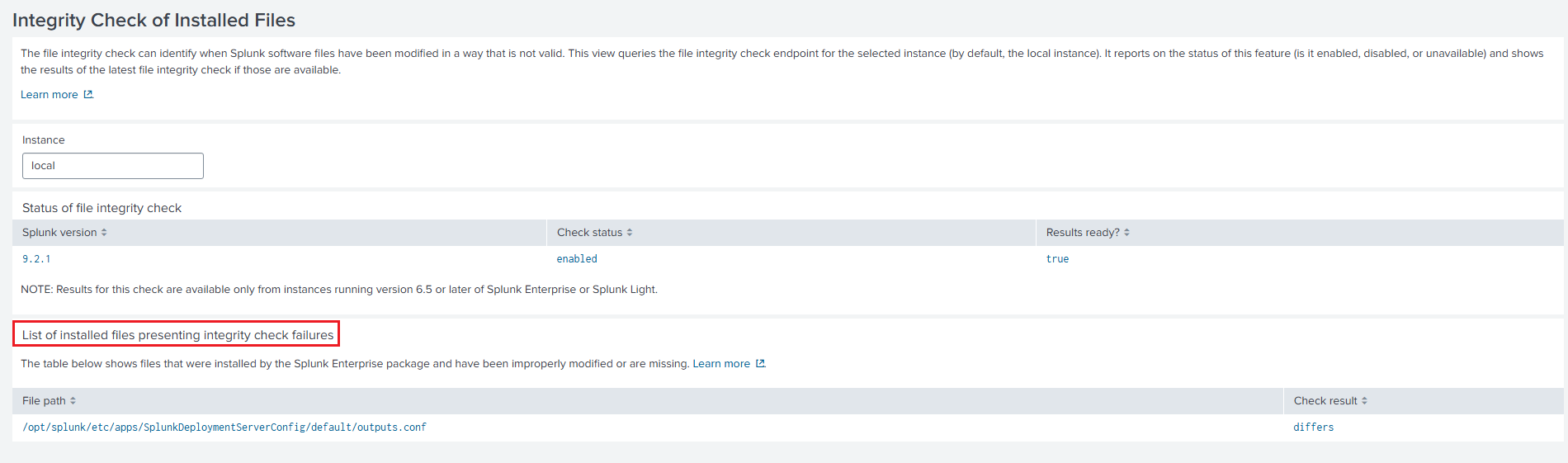
1.Check the File Integrity Check Dashboard on the Splunk UI.
- Log in to Splunk Web on the affected instance.
- Go to Search & Reporting app> Dashboards> Integrity Check of Installed Files.
- Alternatively, click the hyperlink that appears on the Messages tab for "File Integrity Check View".

- Review the files mentioned under "List of files presenting integrity check failures".
2. Check the conflicting file on the backend.
- Run the following command:
./splunk validate files
Resolution
To restore configuration files to their defaults if unwanted changes have been made, use one of the following options:
- Upgrade Splunk to a newer version or reinstall it, then copy over config files and apps.
- Manually modify the directories one by one.
- Deploy a "healthy" configuration using the deployment server.
NOTE: Use the same version of Splunk if doing a reinstall.
If changes to the default configuration files are intentional, the warning message can be suppressed by making the following change in $SPLUNK_HOME/etc/system/local/limits.conf:
[system_checks]
installed_files_integrity = disabled
NOTE: The default configuration files in $SPLUNK_HOME/etc/system/default will be overwritten by subsequent Splunk updates. For this reason, it is strongly recommended to make all configuration changes in $SPLUNK_HOME/etc/system/local instead.
The Integrity Checker can be run manually, or set up for automatic verification in limits.conf as shown in the following document:
Check the integrity of your Splunk software files
Related Links
Check the integrity of your Splunk software files
Revision History
| Revision | Publish Date | Comments |
|---|---|---|
1.0 |
29-Sep-2026
|
Initial Release |
 Feedback
Contact Cisco
- Open a Support Case

- (Requires a Cisco Service Contract)