Unable to configure SCIM in 9.2.1
Available Languages
Applicability
Splunk Enterprise 9.2.1Description
The System for Cross-domain Identity Management (SCIM) configuration does not appear in the WEB UI where it is supposed to be
Investigation
The documentation states that SCIM can be enabled and configured in the WEB UI by selecting the following options:
-
From the system bar, select Settings > Authentication Methods.
-
Select SAML settings.
-
Select SAML Configuration.
-
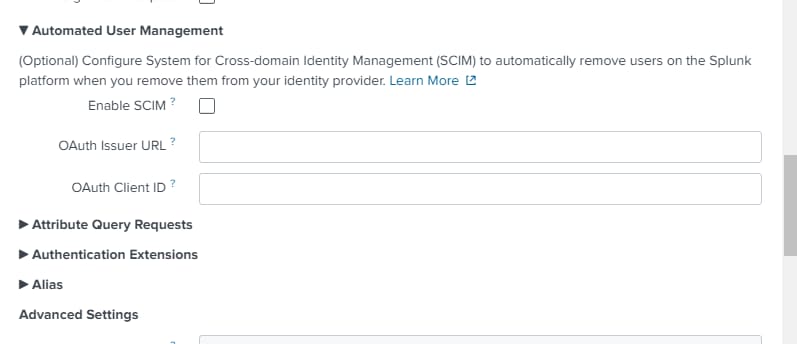
Select the triangle next to Automated User Management. Options for automated user management appear.
-
Select Enable SCIM
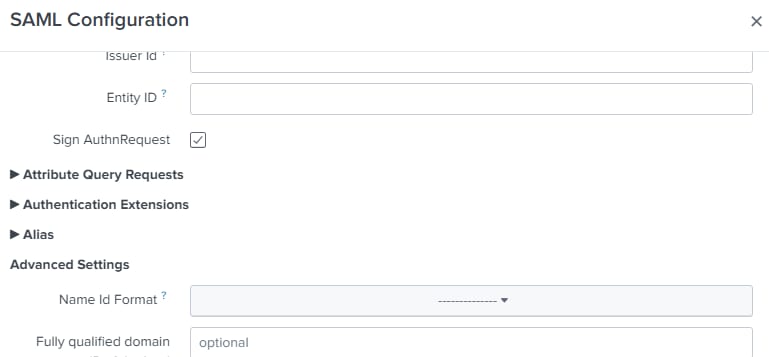
However, if a version previous than 9.3.0 is being used, the Automated User Management section does not show up by default
Resolution
Create or edit a web-features.conf file and add the following stanza:
[feature:identity_sidecar_scim]
enabled = true
After saving the file and restarting the instance, the Automated User Management section appears in the WEB UI
Related Links
Revision History
| Revision | Publish Date | Comments |
|---|---|---|
1.0 |
29-Sep-2026
|
Initial Release |
 Feedback
Contact Cisco
- Open a Support Case

- (Requires a Cisco Service Contract)