Windows Universal Forwarder high %CPU where Splunk user does not have read access to all of the files in the monitored directory
Available Languages
Applicability
Splunk Universal Forwarder for Windows 9.1.x and laterDescription
User found the ingestion of monitored IIS logs has stopped and the Splunk TailReader is reporting very high value of files_queued as follows:
08-05-2024 15:48:22.781 +0930 INFO Metrics - group=tailingprocessor, name=tailreader0, current_queue_size=8, max_queue_size=11, files_queued=558705, new_files_queued=2, fd_cache_size=0Having checked the monitored IIS log directory, there are only around 200 files, so the large number of queued files doesn't make sense.
There are 2 symptoms of this issue:
- High CPU utilization for splunkd.exe process, e.g., 40%-50%.
- High numbers of files_queued for TailReader, e.g., > 500K.
Investigation
1. Checking what has been monitored by the Universal Forwarder by running the following CLI command:
splunk list monitor
From the CLI command output, it's showing the monitored files are: D:\logs-iis\W3SVC*\*.log
There are sub-directories such as W3SVC1 and other directories under D:\logs-iis. Inside each sub-directories, there are .log files.
2. It's confirmed that the Domain user running Splunk Universal Forwarder does not have Windows Administrator full privilege.
It is also found that the Domain user does not have Read permission to all the files under D:\logs-iis directory. For example, it has Read permission to D:\logs-iis\W3SVC1\*.log, but has no Read permission to other sub-directories and files.
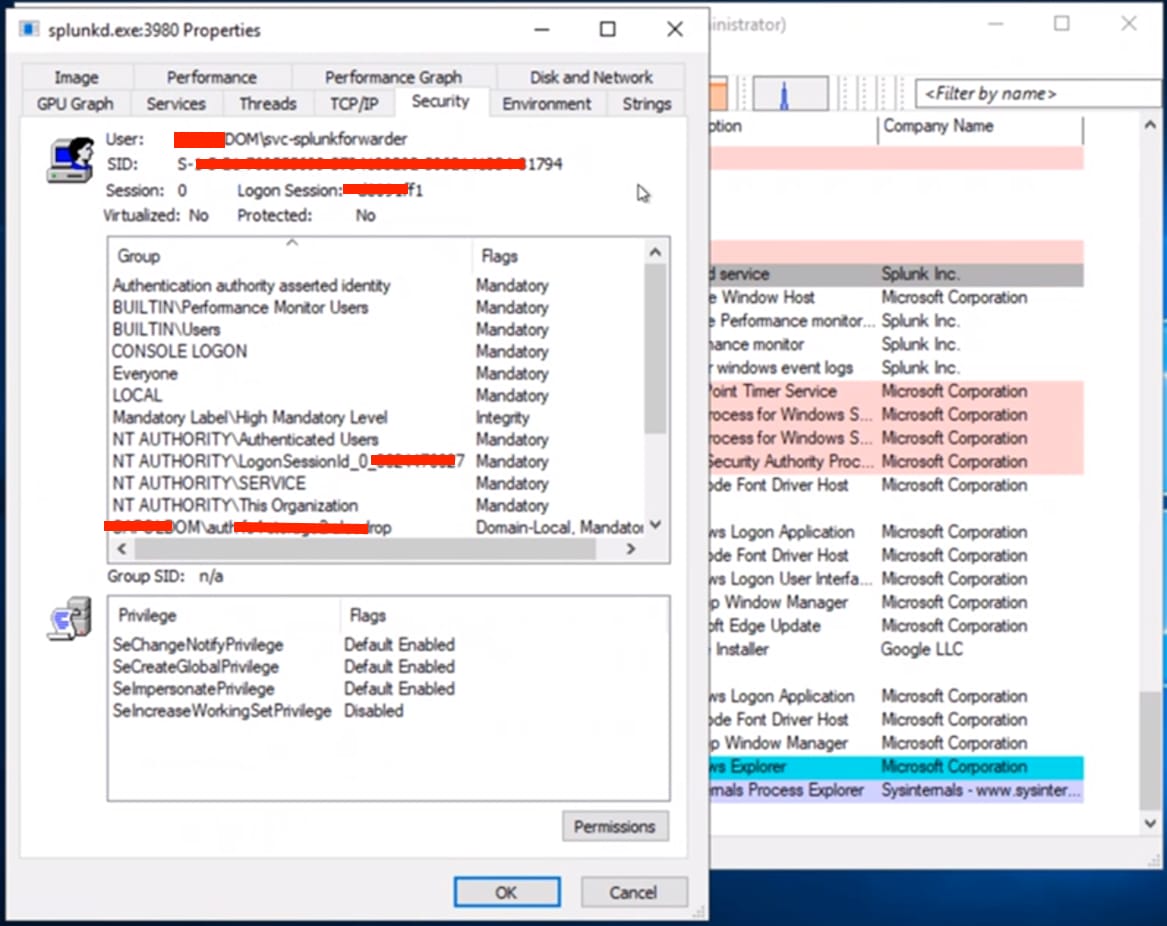
3. Checking splunkd.exe process's properties by Process Explorer, found out the Domain user running Splunk Universal Forwarder does not have the SeBackupPrivilege privilege, as shown below:
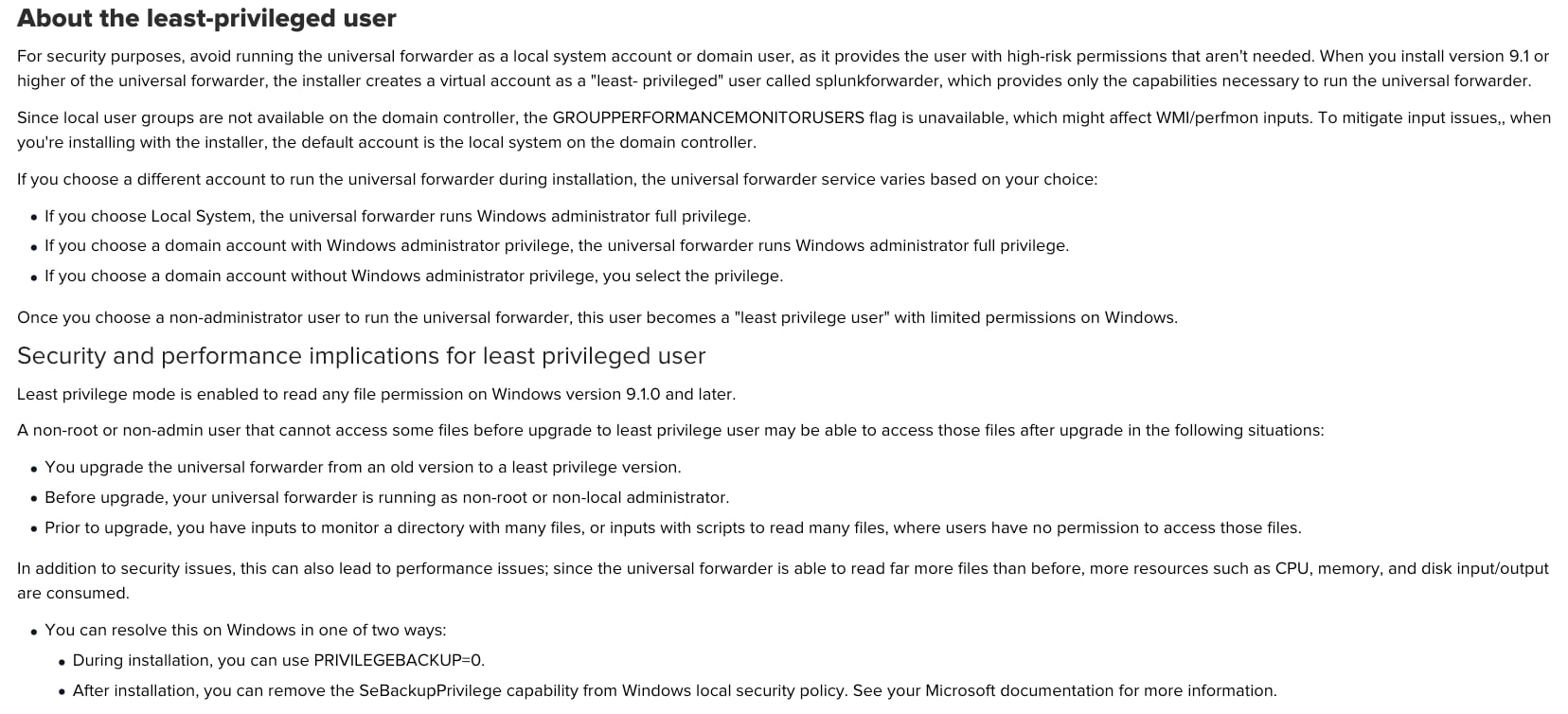
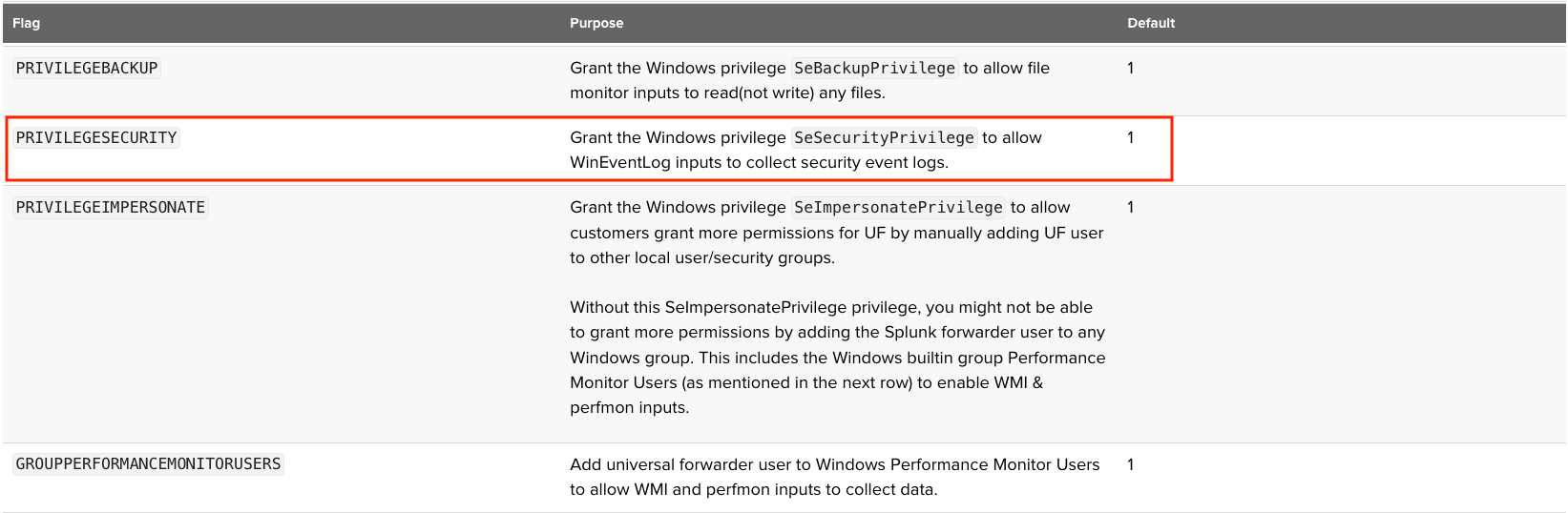
4. From Splunk Online documentation, the SeBackupPrivilege privilege is enabled by default for the 'least privilege user' on Windows version 9.1.0 and later:
5. It's confirmed the command line to install the Splunk Windows Universal Forwarder is as follows:
msiexec.exe /i C:\Temp\splunkforwarder-9.2.1-78803f08aabb-x64-release.msi INSTALLDIR="D:\SplunkUniversalForwarder" LOGON_USERNAME="domainname\svc-splunkforwarder" LOGON_PASSWORD="<password>" DEPLOYMENT_SERVER="<FQDN of DS>:8089" AGREETOLICENSE=Yes /quietWith these command line options, after the installation the Splunk Universal Forwarder user should have SeBackupPrivilege privilege.
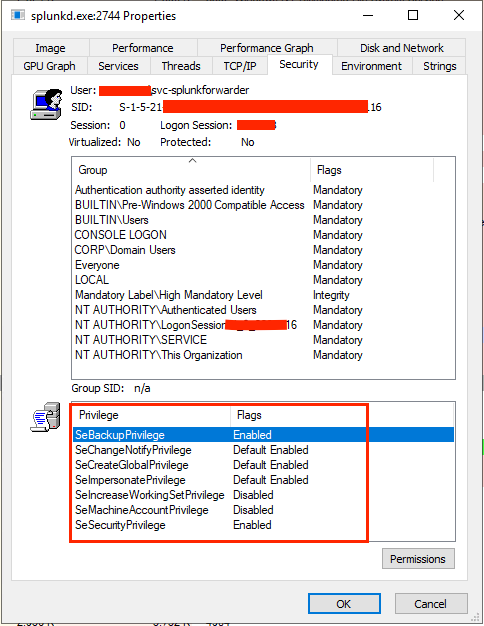
6. Tried to uninstall and reinstall the Splunk Windows Universal Forwarder with the same command line options. This time can see the SeBackupPrivilege privilege is grant to the 'least privilege user'.
7. However, after Splunk Universal Forwarder Service is restarted, the SeBackupPrivilege privilege is gone. Then splunkd.exe starts showing high %CPU again.
8. Tried to add PRIVILEGEBACKUP=1 to the installation command line, and reinstall Splunk Universal Forwarder again.
msiexec.exe /i C:\Temp\splunkforwarder-9.2.1-78803f08aabb-x64-release.msi INSTALLDIR="D:\SplunkUniversalForwarder" LOGON_USERNAME="domainname\svc-splunkforwarder" LOGON_PASSWORD="<password>" DEPLOYMENT_SERVER="<FQDN of DS>:8089" AGREETOLICENSE=Yes PRIVILEGEBACKUP=1 /quietHowever, after Splunk Universal Forwarder Service is restarted, the SeBackupPrivilege privilege is gone again. And splunkd.exe is showing high %CPU.
9. Further investigation found that user has strict Group Security Policy that had removed SeBackupPrivilege privilege from Splunk 'least privilege user' after installation.
After research, it was discovered that this is a known issue (SPL-259202) in Splunk Universal Forwarder for Windows. Basically, when the Splunk user does not have Administrator full privilege, nor SeBackupPrivilege privilege, if the Splunk user also does not have Read privilege to all the files it monitors, this issue happens. There are 2 symptoms of this issue:
- High CPU utilization for splunkd.exe process, e.g., 40%-50%.
- High numbers of files_queued for TailReader, e.g., > 500K.
Resolution
This issue has been fixed in releases 9.1.8, 9.2.5, 9.3.3 and 9.4.1
If the fixed version can't be installed for any particular reason, user has 2 options to workaround this issue:
1. If possible, use Local System or grant Administrator full privilege to the Splunk user running the Universal Forwarder on Windows.
2. If option 1 is not possible, try to use 'least privilege user' which is introduced in 9.1.0. With 'least privilege user', SeBackupPrivilege privilege is granted by default during installation.
However, if for some reason SeBackupPrivilege privilege is prohibited for 'Least Privileged user', user will have to give Read permission to all the files and directories monitored by Splunk Universal Forwarder.
Related Links
Install a Windows universal forwarder
Revision History
| Revision | Publish Date | Comments |
|---|---|---|
1.0 |
29-Sep-2026
|
Initial Release |
 Feedback
Contact Cisco
- Open a Support Case

- (Requires a Cisco Service Contract)