KVStore shows "Starting" status in Splunk Search Head
Available Languages
Applicability
Splunk EnterpriseDescription
KVStore shows "Starting" in the Splunk Search Head Cluster.
---------
[splunk@xxxxx ~]$ /opt/splunk/bin/splunk show kvstore-status --verbose
This member:
backupRestoreStatus : Ready
disabled : 0
featureCompatibilityVersion : An error occurred during the last operation ('getParameter', domain: '15', code: '13053'): No suitable servers found (`serverSelectionTimeoutMS` expired: [Failed to connect to target host: xxx019:8191] [Failed to connect to target host: xxx035:8191] [Failed to connect to target host: xxx018:8191])
guid : 3DE3E201-B8D7-4BA8-BBBF-xxxxxx
port : 8191
standalone : 0
status : starting
storageEngine : wiredTiger
Investigation
Issue #1: SSL Cert is expired
▶ Where are certs configured?
In server.conf
[sslConfig]
serverCert = $SPLUNK_HOME/etc/auth/server.pem
sslRootCAPath = $SPLUNK_HOME/etc/auth/cacert.pem
▶ How to test and verify?
Run the command below:
openssl x509 -enddate -noout -in /opt/splunk/etc/auth/server.pemnotAfter=Jan 16 04:29:56 2020 GMT
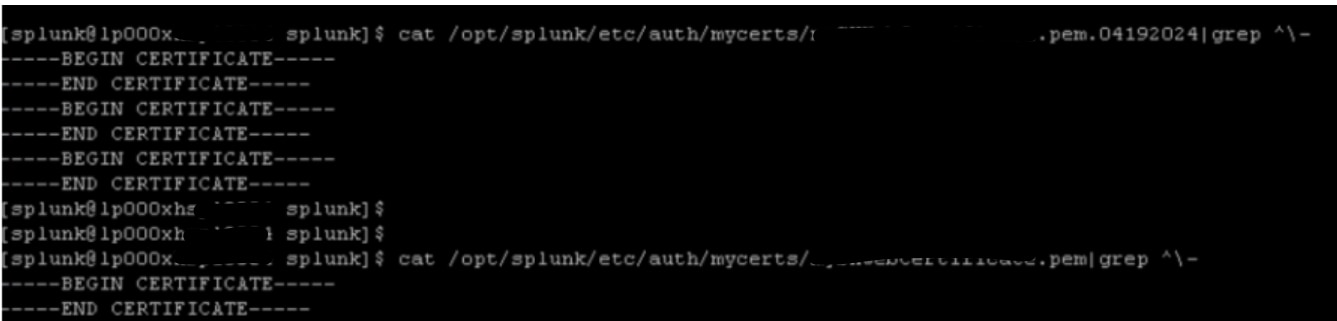
Issue #2: Wrong format of the PEM file is used
The PEM file is not in the correct format. The PEM should be merged from multiple PEM files
▶ How to test and verify?
Run the command below:
cat /opt/splunk/etc/auth/mycerts/xxxxx.pem| grep ^\-The incorrect format was found:
Issue #3: wrong "sslPassword" was configured in server.conf
- splunkd.log
06-20-2024 02:17:37.427 -0400 WARN SSLCommon [9285 webui] - Received fatal SSL3 alert. ssl_state='SSLv3 read client key exchange A', alert_description='certificate unknown'.- mongod.log
2024-06-20T06:08:10.561Z I NETWORK [initandlisten] waiting for connections on port 8191 ssl
▶ How to test and verify?
Here is the quick demo for how to run a quick test by using "openssl" command
[1] When use wrong password of the RSA key a "unable to load Private Key" message will appear
+ Example:
[root@sh1 splunker]# openssl rsa -in /opt/splunk/etc/auth/server.pem -text
Enter pass phrase for /opt/splunk/etc/auth/server.pem:
unable to load Private Key
140374627624768:error:06065064:digital envelope routines:EVP_DecryptFinal_ex:bad decrypt:crypto/evp/evp_enc.c:643:
[2] When use correct password of the RSA key, a Successful Decryption with RSA PRIVATE KEY message appear:
+Example:
[root@sh1 splunker]# openssl rsa -in /opt/splunk/etc/auth/server.pem -text
Enter pass phrase for /opt/splunk/etc/auth/server.pem:
RSA Private-Key: (2048 bit, 2 primes)
modulus:
....
-----BEGIN RSA PRIVATE KEY-----
MIIEowIBAAKCAQEArAhnVs42Qh0vC6kTnShiUxXfRAsMz12HvfqdG5bj7BvzjsIW
.......
-----END RSA PRIVATE KEY-----
Issue #4: non-WiredTiger collections (.ns files) are found
From mongod.log below, It shows Splunk instance's KVStore is trying to start using the WiredTiger storage engine, but the existing data files were created with the MMAPv1 storage engine. This mismatch is preventing the KVStore from starting.
2024-06-20T06:10:14.927Z I STORAGE [initandlisten] exception in initAndListen: Location28662: Cannot start server. Detected data files in /opt/splunk/var/lib/splunk/kvstore/mongo created by the 'mmapv1' storage engine, but the specified storage engine was 'wiredTiger'., terminating▶ How to test and verify?
What's the difference between data files created by the MMAPv1 and WiredTiger storage engine? How to check and verify?
[1] For example for mmap - local database in the listing below has got three files. *.ns is storing name spaces (names) used for collections etc
[splunker]$ ls -la /opt/splunk/var/lib/splunk/kvstore/mongo
-rw-------. 1 splunker splunker 16777216 Jan 1 02:49 local.0
-rw-------. 1 splunker splunker 268435456 Jan 1 02:51 local.1
-rw-------. 1 splunker splunker 16777216 Jan 1 02:51 local.ns
-rw-------. 1 splunker splunker 16777216 Jan 1 02:36 s_splunkG8S.0
-rw-------. 1 splunker splunker 16777216 Jan 1 02:36 s_splunkG8S.ns
[2] For wiredTiger the structure is different, it has *.wt
[splunker]$ ls -la /opt/splunk/var/lib/splunk/kvstore/mongo
-rw-------. 1 splunker splunker 4096 Feb 16 12:54 collection-0-1989659789672540973.wt
-rw-------. 1 splunker splunker 36864 Feb 16 12:58 collection-0--3798657299691354756.wt
-rw-------. 1 splunker splunker 4096 Feb 16 12:56 collection-0--4182461714989296416.wt
Resolution
[1] Fix for Issue #1: SSL Cert is expired
Renew existing TLS certificates
See the related links section for reference
[2] Fix for Issue #2: wrong format of PEM file is used
Combine PEM, when running the CLI below, this is the expected output
cat /opt/splunk/etc/auth/mycerts/xxxxx.pem| grep ^\-Expected Output:
-----BEGIN CERTIFICATE-----
-----END CERTIFICATE-----
-----BEGIN RSA PRIVATE KEY-----
-----END RSA PRIVATE KEY-----
-----BEGIN CERTIFICATE-----
-----END CERTIFICATE-----
-----BEGIN CERTIFICATE-----
-----END CERTIFICATE-----
See the related links section for reference.
[3] Fix for Issue #3: wrong "sslPassword" was configured in server.conf
Please confirm the correct password is configured for "sslPassword" in server.conf
The command below can be used to verify
splunk show-decrypted --value '<encrypted_value>'
[4] Fix for Issue #4: non-WiredTiger collections (.ns files) are found on Search Heads
- Clean the local KVstore on the members whose has non-WiredTiger collections (.ns files) under /opt/splunk/var/lib/splunk/kvstore/mongo
- Then reync KVstores from other members of the cluster whose migration had succeeded.\
-
Stop the search head that has the stale KV store member.
-
Run the command
splunk clean kvstore --local. -
Restart the search head. This triggers the initial synchronization from other KV store members.
-
Run the command
splunk show kvstore-statusto verify synchronization.
See the related links section for reference.
Related Links
How to prepare your signed certificates for Splunk #How_to_configure_a_certificate_chain
Revision History
| Revision | Publish Date | Comments |
|---|---|---|
1.0 |
29-Sep-2026
|
Initial Release |
 Feedback
Contact Cisco
- Open a Support Case

- (Requires a Cisco Service Contract)