A member of Search Head Cluster shows KVstore status down
Available Languages
Applicability
Splunk EnterpriseDescription
This is only seen from the KVstore captain. The Search Head itself show kvstore status ready, which is misleading.
Investigation
Run command
splunk show shcluster-status --verboseThe results cannot see an issue. All member's status is up and kvstore_status is ready
Run the command on the kvstore captain:
splunk show kvstore-status --verboseThe result shows the problematic SH's kvstore:
replicationStatus: downserverVersion: An error occurred during the last operation ('setServerVersion', domain:'15', code:'13053'): No suitable servers found ('serverSelectionTryOnce' set): [connection closed calling hello on 'xx.xx.xx.xx:8198']Run the command on the problematic SH:
splunk show kvstore-status --verboseThe result shows the status is "ready" but with fewer details. See this problem in the screenshot:
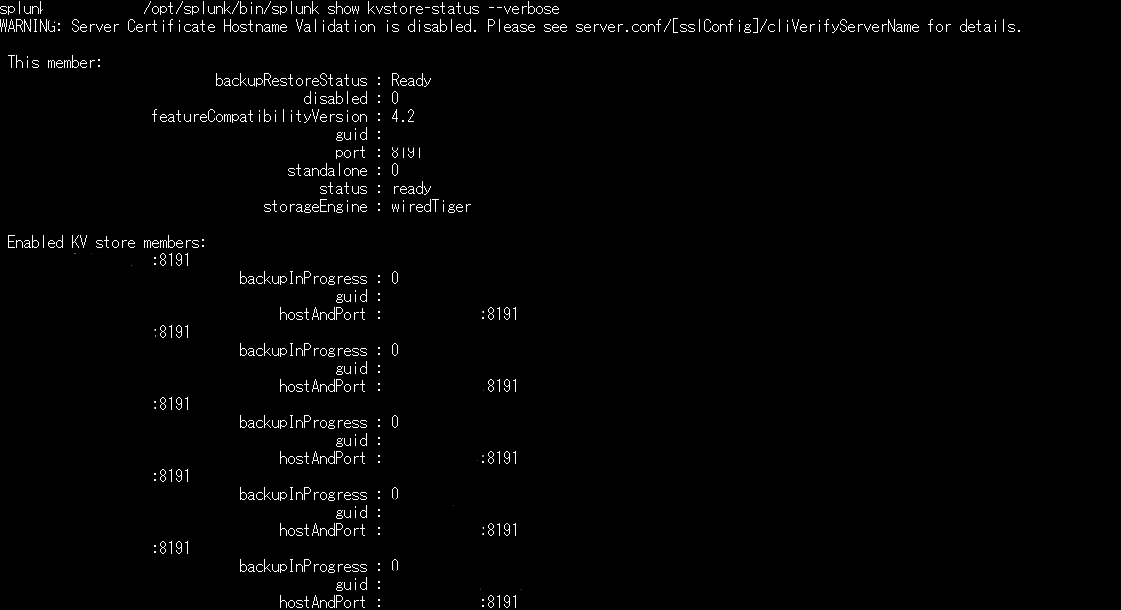
Usually this information should be shown:
oplogEndTimestamp
oplogEndTimestampSec
oplogStartTimestamp
oplogStartTimestampSec
Check the kvstore logs and mongod logs to find if there is any ERROR or WARN message.
If there are no available mongod and kvstore logs, check if mongod and kvstore port is working.
Check whether the 8191 port is listening or not.
Check Linux mongod process using command:
ps -ef | grep mongodThis checks if the kvstore and mongod is active or not.
Resolution
Before restarting the Splunkd service, a couple of things to check:
Check the user permission to splunk directory: $SPLUNK_HOME, if it's not correct, ensure it is correct:
chown -R Splunk-user:group <$SPLUNK_HOME>check this file's permission: $SPLUNK_HOME/var/lib/splunk/kvstore/mongo/splunk.key, if it's too open(higher than 600), change the splunk.key permission to 600
chmod 600 $SPLUNK_HOME/var/lib/splunk/kvstore/mongo/splunk.keyAfter restarting the Splunkd service, check the 8191 port is listening or not. And check the mongod service is active or not.
A couple of commands to check the SHC status and KVstore status:
On the Search Head captain:
$SPLUNK_HOME/bin/splunk show shcluster-status --verboseOn the kvstore captain:
$SPLUNK_HOME/bin/splunk show kvstore-status --verboseIf the kvstore status changes to "Recovering", wait for it to sync up. Or do
splunk clean kvstore --localThis operation drop local KV store database for initialization. After then, the kvstore status should restore as kvstore member.
Related Links
Mongodb not starting on search head
Revision History
| Revision | Publish Date | Comments |
|---|---|---|
1.0 |
29-Sep-2026
|
Initial Release |
 Feedback
Contact Cisco
- Open a Support Case

- (Requires a Cisco Service Contract)