How to Verify FIPS Mode and Configure KVStore for FIPS in Splunk Enterprise
Available Languages
Applicability
* Product: Splunk Enterprise * Use Case: FIPS 140-2 compliance with KVStore * Applicable Versions: Splunk 8.x and later (KVStore support in FIPS starts from 9.4.2)Description
What is FIPS
FIPS (Federal Information Processing Standards) are a set of standards that describe document processing, encryption algorithms and other information technology standards for use within non-military government agencies and by government contractors and vendors who work with the agencies.
FIPS 140-2 specifies validated encryption algorithms and modules. Splunk can operate in FIPS mode to meet compliance requirements.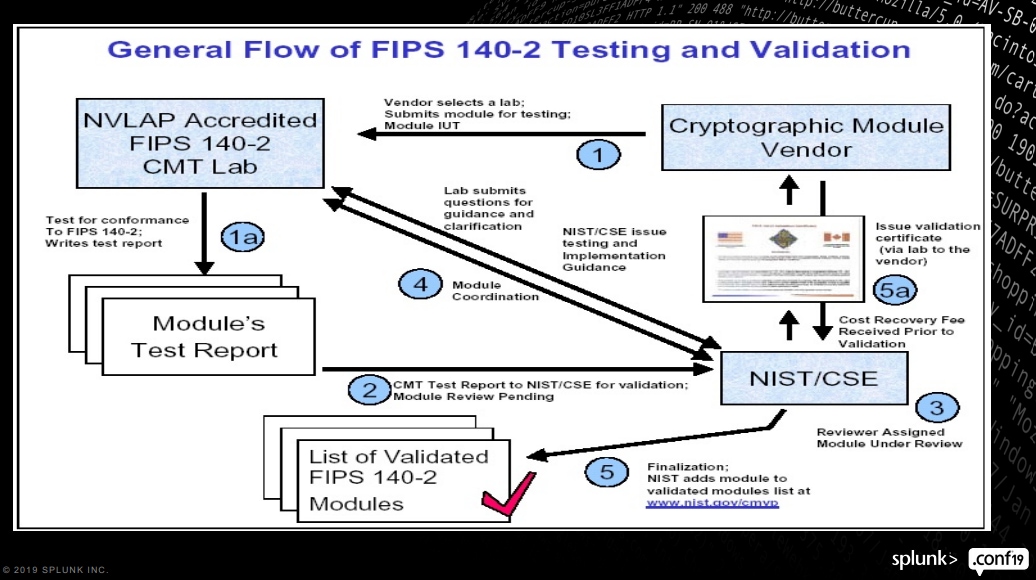
FIPS Support in Splunk
| Splunk Version | FIPS Support, Splunkd | FIPS Support, KV Store | OpenSSL version |
| 7.3.2 | Yes | No | |
| 9.x | Yes | No | OpenSSL 1.0.2 |
| 9.4.2 | Yes | Yes, requires Mongo v7.0 | OpenSSL 1.0.2 with FIPS 140-2 module |
| 10.0 | Yes | Yes, requires Mongo v7.0 | OpenSSL 3.0 (FIPS 140-2 & 140-3 compliant) |
- KVStore with FIPS is fully supported only in Splunk 9.4.2 and later
- In earlier versions (9.4.1 or below), enabling FIPS with KVStore may result in startup failure or SSL handshake errors
- 9.4.x can function with KV Store / Mongodb version 4.2.x
- It works best with version 7.0.x (delivered by default in new installs, and Splunk will attempt to upgrade to this version following upgrade to 9.4.x)
- Mongodb version 7.0 is required for KV Store to be FIPS compliant
- Regardless of FIPS status, KV Store / Mongodb must already be functioning on version 7.0.x before upgrading Splunk Enterprise to 10.x
Investigation
FIPS must be enabled before Splunk's FIRST start
If FIPS is not enabled before Splunk starts the first time, it cannot be enabled later, not even with an upgrade of Splunk. The only solution is to uninstall Splunk entirely and start over.
- On Linux: auto-detected from system, suggested to also set SPLUNK_FIPS=1 in splunk-launch.conf
- On Windows: must set in SPLUNK_FIPS=1 in splunk-launch.conf
How to Check if FIPS Mode is Enabled
OS Level
FIPS must be enabled at the OS level before Splunk has run for the first time in order for Splunk itself to run in FIPS mode. If the OS and Splunk are not in FIPS mode the first time Splunk runs, the only way to run it in FIPS mode is to completely uninstall Splunk. Splunk must be re-installed without starting it, then ensure OS is in FIPS mode and configure Splunk to run in FIPS mode
Linux
- Run the following command to confirm the OS is in FIPS mode. Output should say "FIPS mode is enabled":
fips-mode-setup --check - If FIPS is NOT enabled, then even if configured properly, Splunk cannot honor FIPS mode.
- Enable FIPS mode
sudo fips-mode-setup --enable - Reboot the server
sudo reboot now - After reboot, verify server is now in FIPS mode
fips-mode-setup --check
- Enable FIPS mode
Windows
Splunk will start in FIPS mode on Windows if OPENSSL_FIPS=1 is set in splunk-launch.conf before first startup. The following checks are optional:
Two methods available:
- Check Local Group Policy
- Open the Local Group Policy Editor by running
gpedit.msc. - Navigate to Computer Configuration > Windows Settings > Security Settings > Local Policies > Security Options.
- Find the policy setting named "System cryptography: Use FIPS compliant algorithms for encryption, hashing, and signing" and double-click it
- Check if the setting is Enabled. If it is, the server is operating in FIPS mode.
- Open the Local Group Policy Editor by running
- Windows documentation)
- Open a PowerShell window as an administrator.
- Run the following command:
If the server is in FIPS mode, the output will bePS C:\Windows\system32> [System.Security.Cryptography.Cryptoconfig]::AllowOnlyFipsAlgorithmsTrue. If it is not, the output will beFalse.
Splunk Level (before first start)
Linux
- Install Splunk using RPM or tarball, as per your usual process. Do not start Splunk!
- Verify the OS is running in FIPS mode.
- On first start, Splunk will detect FIPS mode as enabled by the OS and will automatically run in FIPS mode. However, Splunk Documentation also suggests adding the following to
splunk-launch.conf:OPENSSL_FIPS=1 - Start Splunk.
Windows
In Windows, Splunk must be installed using the CLI, as the GUI installer does not offer FIPS mode as an install option.
- Install with auto start disabled:
msiexec.exe /i Splunk.msi SPLUNKUSERNAME=admin SPLUNKPASSWORD=<password> LAUNCHSPLUNK=0 /quiet -
REQUIRED: Add the following to
splunk-launch.conf:OPENSSL_FIPS=1 - Reboot server, configure Splunk service is started automatically.
Splunk Level (after first start)
Command Line
This command captures whether Splunk and the OS were in FIPS mode the first time Splunk ever ran.
splunk show fips-modeREST Call
From command line:
curl -s -k -u https://localhost:(mgmt_port)/services/server/info | grep fips_modeFrom Search
"| rest splunk_server=local /services/server/info | fields fips_mode"OpenSSL with FIPS
Splunk recommends using the OpenSSL that comes with Splunk to create FIPS compliant Certs, and to avoid using your own openssl.cnf configuration file. Splunk is automatically configured to produce correct FIPS-enabled certificates out of the box.Confirm Splunk's Openssl version and whether it is FIPS-enabled
- Check Splunk's OpenSSL version:
$SPLUNK_HOME/bin/splunk cmd openssl version - If you plan to prepare custom certificates for Splunk, ensure these OpenSSL environment variables are set
- OPENSSL_FIPS - if not set, your certificates may not be FIPS-compliant even if the OS and Splunk are. Can be set and verified from either the OS level or Splunk level, does not matter which
- verify (output should be "1". If not enabled, output will be blank).
echo $OPENSSL_FIPS - set:
export OPENSSL_FIPS=1
- verify (output should be "1". If not enabled, output will be blank).
- OPENSSL_CNF - this tells OpenSSL what configuration file to use by default (openssl.cnf). Especially post 10.x where FIPS 140-2 and 140-3 become standard, the Splunk openssl.cnf should be used, should not require customization. It is NOT suggested to use a customized .cnf file.
- From the Splunk-delivered version of openssl:
printenv | grep SSLIf it is not set or points to another path (such as /home/built/build-home/openssl/openssl.cnf, to correct it, run this command:
export OPENSSL_CONF="/opt/openssl/openssl.conf"
- From the Splunk-delivered version of openssl:
- OPENSSL_FIPS - if not set, your certificates may not be FIPS-compliant even if the OS and Splunk are. Can be set and verified from either the OS level or Splunk level, does not matter which
Known Error Patterns
- When
sslPasswordis not configured (an encrypted key is optional for the KV Store, but if used, sslPassword must be defined):KVStoreConfigurationProvider - KV Store sslPassword is not specified. Please set it in the [kvstore] stanza in your server.conf - When using improperly issued third-party certs:
SSL peer certificate validation failed: unable to get issuer certificate SSLHandshakeFailed - If
server.conf/[kvstore]contains values for bothcaCertFileandserverCert, this may stop errors related to Mongo initialization. However, if the .pem or .crt file used does not have a password andsslPasswordis:- not set → Splunk logs the missing
sslPasswordinsplunkd.logas shown above, butmongod.logshows no errors. - set as blank or '' → Errors appear in
mongod.log:SSL peer certificate validation failed: unable to get issuer certificate SSLHandshakeFailed: SSL peer certificate validation failed: unable to get issuer certificate. Ending connection from 127.0.0.1:34340 (connection id: 617)These messages confirm a mismatch between SSL expectation and actual cert chain integrity.
- not set → Splunk logs the missing
- When certificate is not "dual purpose"
The KV Store uses a mongo database to save and manage collections. Mongodb works on a client/server model. The main Mongo process, "mongod" is a server process which communicates with its "mongoc" client processes. This communication is encrypted via SSL, so custom certs used with the KV Store must allow bothserverAuthandclientAuthcommunication.- Error messages with single-purpose certs (splunkd.log):
Error receiving request from client: SSLHandshakeFailed: SSL peer certificate validation failed: unsupported certificate purpose. Ending connection from x.x.x.x:xxxx (connection id: xx) -
CLI command to check server cert purpose:
$SPLUNK_HOME/bin/splunk cmd openssl x509 -noout -in </path/to/server-certificate.pem> -purpose | grep SSLOutput should look like this, with "Yes" at both "SSL client" and "SSL server". An incorrect cert will typically have a "Yes" only at "SSL Server". Such certificates must be rebuilt to be "dual purpose".
Certificate purposes:
SSL client : Yes
SSL client CA : No
SSL server : Yes
SSL server CA : No
- Error messages with single-purpose certs (splunkd.log):
Resolution
For any version higher than 7.3.1, the openssl FIPS crypto libraries are included with the Splunk install packages.
KV Store Settings in Server.conf
Regardless of whether your Splunk environment uses default or custom certificates, the following fields must be defined in server.conf for the KV Store:
[kvstore]
serverCert = </path/to/server/cert.pem>
sslPassword = <password>
KV Store Certificate Private Key
Similar to Splunk Web, the KV Store does not require an encrypted private key (password protected key), so sslPassword is required only if your certificate uses an encrypted private key. However, most Splunk customers use the same certificate for the KV Store as for Splunkd. And Splunkd DOES require an encrypted password. If the certificate built for your KV Store is password-protected, sslPassword is required. Leaving it undefined will prevent KVStore from starting. The examples here assume the same CA file is used for both splunkd and kvstore even if separate certificates are used. If your KV Store certificate uses a different CA file, then it must be included in [kvstore] also, with the caCertFile attribute.
Example full configuration in server.conf:
[sslConfig]
serverCert = /opt/splunk/etc/auth/mycerts/myServerCertificateCombined.pem
sslPassword = <password>
sslRootCAPath = /opt/splunk/etc/auth/mycerts/myCertAuthCertificate.pem[kvstore]
serverCert = /opt/splunk/etc/auth/mycerts/myServerCertificateCombined.pem
sslPassword = <password
NOTE: If $SPLUNK_HOME path does not work, try to use the full path as shown above.
How to Identify whether sslPassword is Required for a Private Key
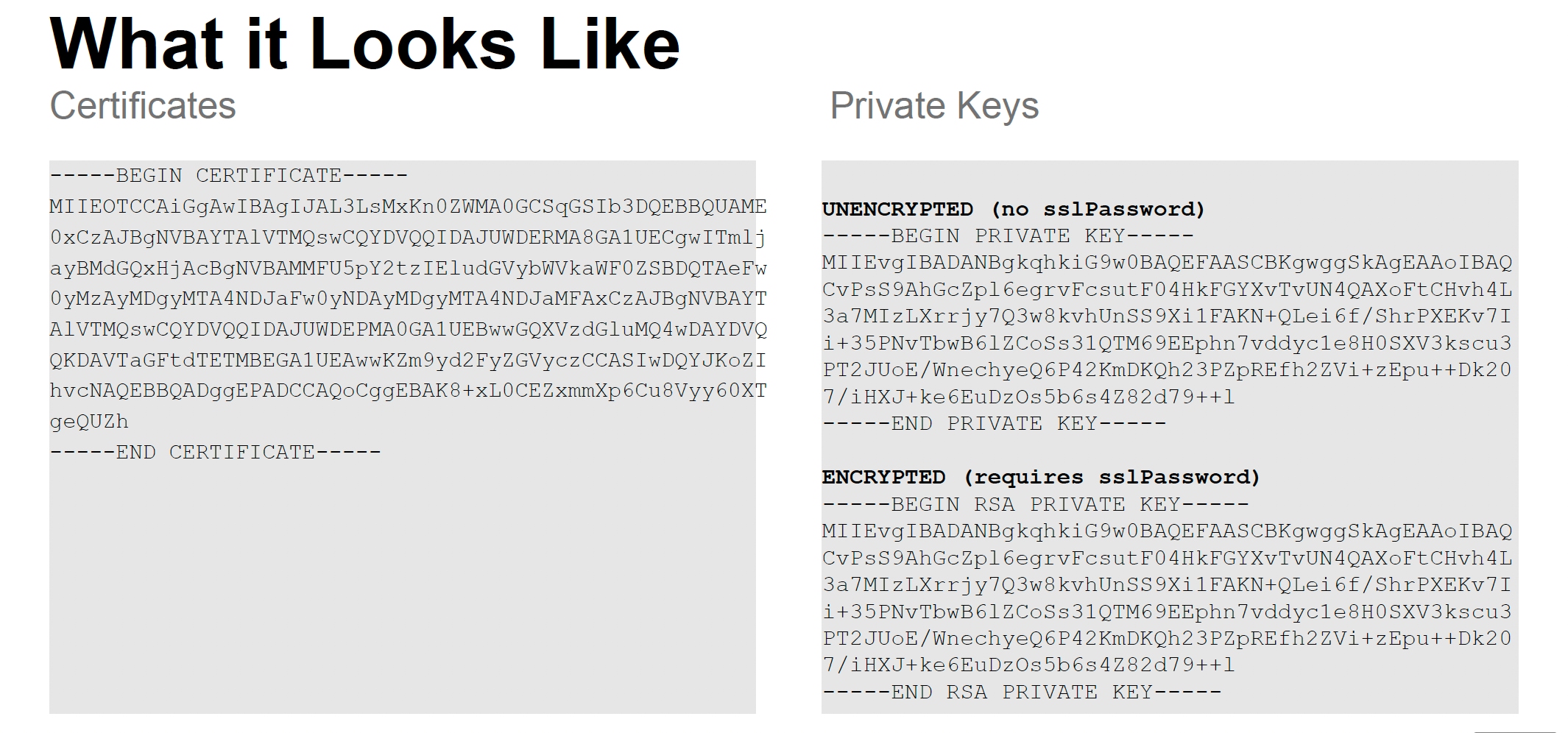
One of the most common mistakes during KVStore + SSL + FIPS setup is misidentifying whether a private key is encrypted. The simplest way to tell if a private key requires sslPassword is by looking at the file header:
UNENCRYPTED (Does NOT require sslPassword):
-----BEGIN PRIVATE KEY-----
...<key data>...
-----END PRIVATE KEY-----
ENCRYPTED (Requires sslPassword):
-----BEGIN RSA PRIVATE KEY-----
...<encrypted key data>...
-----END RSA PRIVATE KEY-----
If your key begins with RSA PRIVATE KEY, it's encrypted and will fail to start unless sslPassword is correctly defined in the [kvstore] stanza of server.conf.
Splunk KB Article on how to implement FIPS, as it walks through the process for creating self-signed certificates. Much of the process applies also to generating the .req files for submission to 3rd party or an internal authority.
Related Links
Splunk Documentation:
- Secure Splunk Enterprise with FIPS 9.x (starting with 9.2, delivered with OpenSSL 1.0.2 and FIPS 140-2 module)
- Secure Splunk Enterprise with FIPS 10.x (Splunk 10 documentation changes with OpenSLL 3.0 which is FIPS 140-2 and 140-3 compliant)
- Get certificates signed by a third-party for Splunk Web 9.x
- server.conf 9.x
- Preparing Custom Certs for KV Store
Splunk Community Posts
Splunk KB Articles
Other links
Revision History
| Revision | Publish Date | Comments |
|---|---|---|
1.0 |
29-Sep-2026
|
Initial Release |
 Feedback
Contact Cisco
- Open a Support Case

- (Requires a Cisco Service Contract)