KV Store failed
Available Languages
Applicability
Splunk Enterprise 9.1.1Description
When initializing the KVstore it was noticed, by using the command $SPLUNK_HOME/bin/splunk show kvstore-status found the following:
featureCompatibilityVersion : An error occurred during the last operation ('getParameter', domain: '15', code: '13053'): No suitable servers found: `serverSelectionTimeoutMS` expired: [Failed to connect to target host: 127.0.0.1:8191]

status:failed
Investigation
Below errors were observed -
I STORAGE [initandlisten] **************
old lock file: /splunk/splunk/var/lib/splunk/kvstore/mongo/mongod.lock. probably means unclean shutdown,
but there are no journal files to recover.
this is likely human error or filesystem corruption.
please make sure that your journal directory is mounted.
found 32 dbs.
*************

2022-02-02T17:40:01.161Z I STORAGE [initandlisten] exception in initAndListen: Location12596: old lock file, terminating
2022-02-02T17:40:01.161Z F - [initandlisten] Invariant failure globalStorageEngine src/mongo/db/service_context_d.cpp 272
2022-02-02T17:40:01.161Z F - [initandlisten]
***aborting after invariant() failure
2022-02-02T17:40:01.175Z F - [initandlisten] Got signal: 6 (Aborted).
The new data/events were not getting written in and it was showing only the old events
The new data were not getting written in and it was showing only the old events.
Since a lot of KV store issues are related to SSL certificates, check whether the certificate is valid or not.
$SPLUNK_HOME/bin/splunk cmd openssl x509 -enddate -noout -in /path/to/cert/server.pem
In this case, the certificate was valid.
Also, using the $SPLUNK_HOME/bin/splunk show kvstore-status command noticed the KV store status appeared as failed.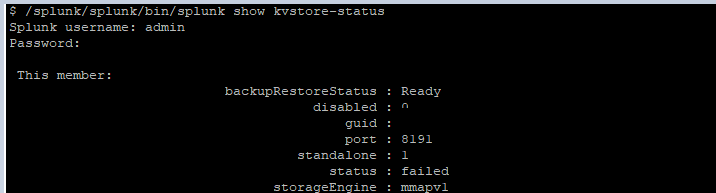
Resolution
To resolve this, follow the next steps:
1. Stop Splunk
2. Take a backup of the kvstore/mongo or move it
mv $SPLUNK_HOME/var/lib/splunk/kvstore/mongo /path/to/copy/kvstore/mongo_old
3. Start Splunk
As a result, a new mongo folder will be created including all its components.
This was done on the HF and CM.
The errors that were showing earlier will disappear, and the status should change from failed to ready.
Related Links
Why are we getting these errors: KV Store Process TerminatedRevision History
| Revision | Publish Date | Comments |
|---|---|---|
1.0 |
29-Sep-2026
|
Initial Release |
 Feedback
Contact Cisco
- Open a Support Case

- (Requires a Cisco Service Contract)