Renewing SAML Certificates on Splunk Cloud
Available Languages
Applicability
Splunk Cloud SAMLDescription
To ensure uninterrupted Single Sign-On (SSO) access, SAML security certificates for Splunk Cloud must be replaced prior to their expiration date. Certificate renewal is achieved through one of two primary methods:
- Obtaining a new certificate from Splunk Cloud support for implementation within the Identity Provider (IdP).
- Providing a new certificate from the IdP to Splunk Cloud.
Investigation
- Search heads display a notification when SAML certificates are within 60 days of expiration. Specifically, an expiration warning for the IdpCert.pem file is triggered when the remaining validity is 60 days or less.
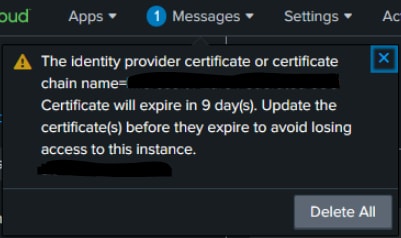
- Cloud Operations initiates the renewal process as the expiration date approaches. Certificate expiration dates can be verified by contacting the Identity Provider (IdP) or Splunk Cloud Support.
Resolution
Please note that both Splunk Cloud and the IdP must simultaneously posses the same certs in order to use SAML authentication for logins. Find below the two different ways in which you can renew the certificates.
SAML authentication requires that both Splunk Cloud and the Identity Provider (IdP) utilise identical certificates. The following methods are available for certificate renewal:
Method 1: Providing IDP with new metada file after Splunk-provided certificate renewal
To provide your IDP the new metada file after renewal of Splunk-provided certificate on your Search Head, follow these steps:
- Log in to a Splunk Cloud search head using a native or local administrator account.
- Navigate to Settings > Authentication Methods > SAML Settings.
- Download the updated metadata file to provide to the IdP.
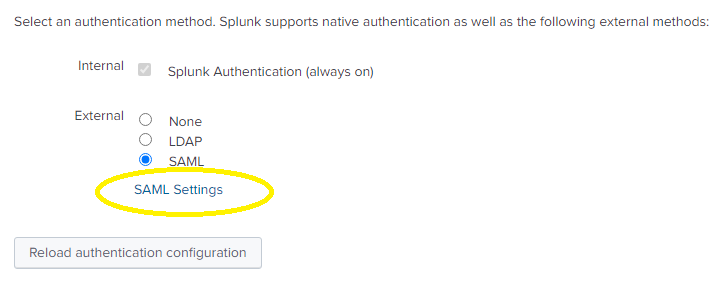
- Select the SAML Configuration button located in the upper right corner.

- From this interface, download the updated metadata file by selecting the Download File button.
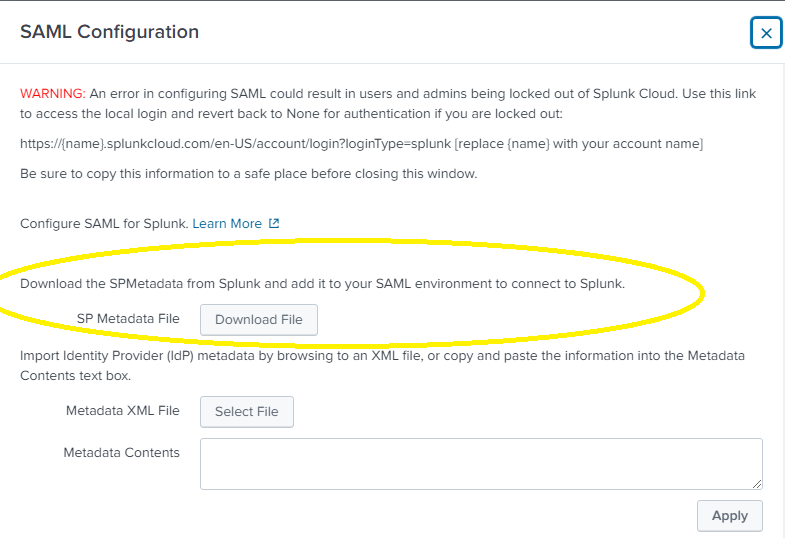
- Once downloaded, provide the file to the IdP to synchronize the security certificates between Splunk and the IdP, ensuring SAML authentication functions correctly with the renewed credentials.
Method 2: Renewing Certificates from the IdP
Alternatively, the IdP may provide new certificates to Splunk Cloud. In this scenario, the renewed certificate must be uploaded to Splunk Cloud while logged in with a native or local account.
- Navigate to the SAML configuration page as previously described.
- Select the Select File button to upload the new metadata file.
- Alternatively, copy and paste the contents of the XML file directly into the Metadata Contents field.
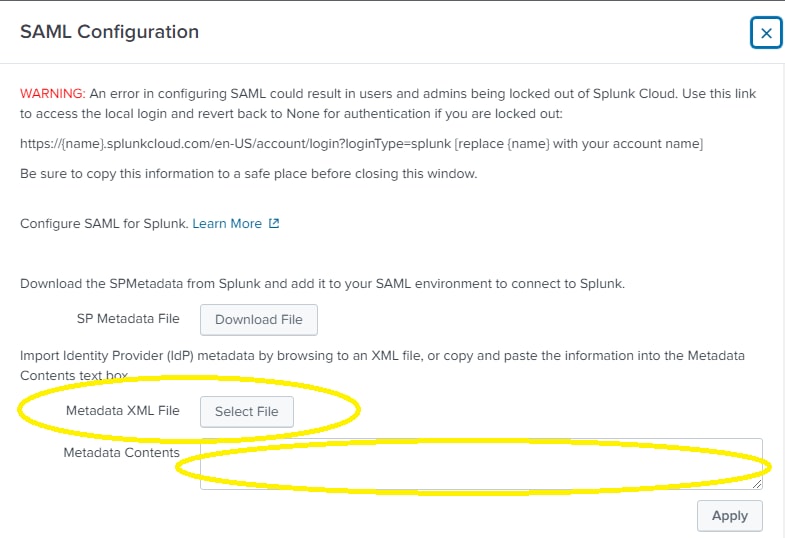
- To copy and paste just the new certificate, the certificate contents can be copied and pasted into the IdP certificate chains field:

- Regardless of the upload method utilized, click the Apply button to commit the changes to Splunk Cloud. Following this, the SAML configuration must be reloaded to finalize the process. Navigate to the Authentication Methods page and select the Reload authentication configuration button to ensure the updates take effect.
Notes:
Expiring SAML identity provider certificates must be refreshed individually on each search head using the Reload authentication configuration button. In a SHC environment this task must be done on each member of the SHC individually.
For example, certificates on the Ad-hoc search head and the Enterprise Security search head require separate updates, as they do not synchronize automatically between these instances.
Related Links
Refresh expiring SAML identity provider certificates
Revision History
| Revision | Publish Date | Comments |
|---|---|---|
1.0 |
30-Sep-2026
|
Initial Release |
 Feedback
Contact Cisco
- Open a Support Case

- (Requires a Cisco Service Contract)