Splunk delete command is not working
Available Languages
Applicability
Splunk CloudDescription
Using the delete command to delete specific events is not working and giving the following ""Error in 'delete' command: You have insufficient privileges to delete events" There may also be a message about "The search job has failed due to an error. You may be able view the job in the Job Inspector"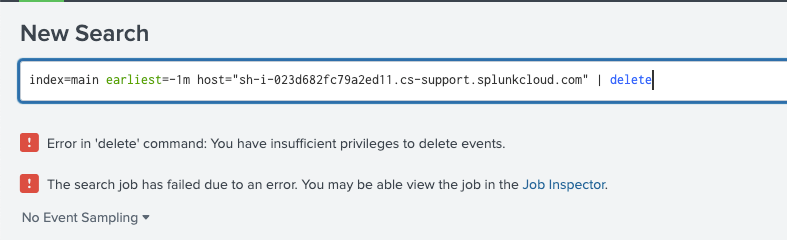
NOTE: The error message can display slightly differently on other version of Splunk.
Investigation
If a user does not have "can_delete" role associated with their user profile they will receive this message.You can verify a user's roles in Splunk app via Settings > Roles > roles will be listed here.
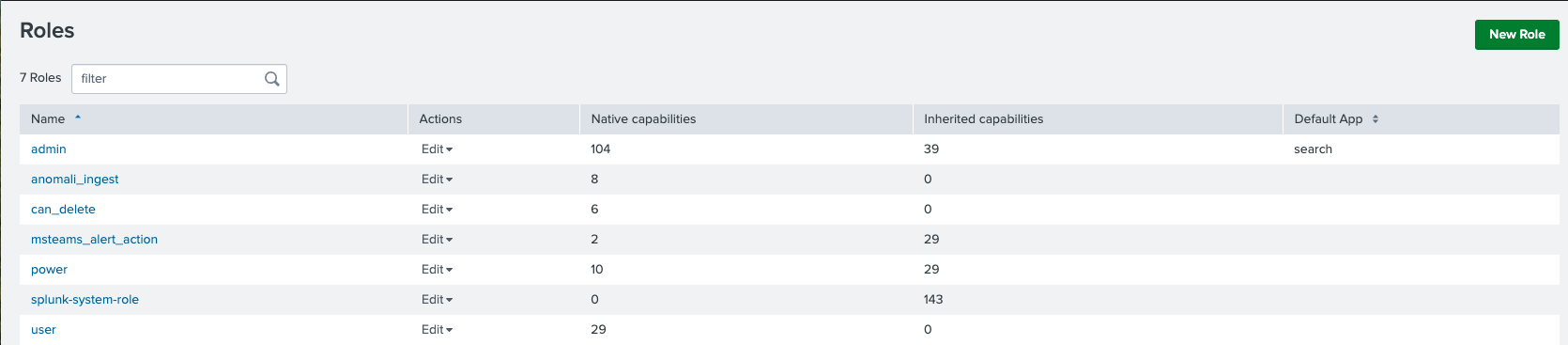
Resolution
Users can add the "can_delete" role to their profile in the Splunk app via Settings > User and then associate the role with the user.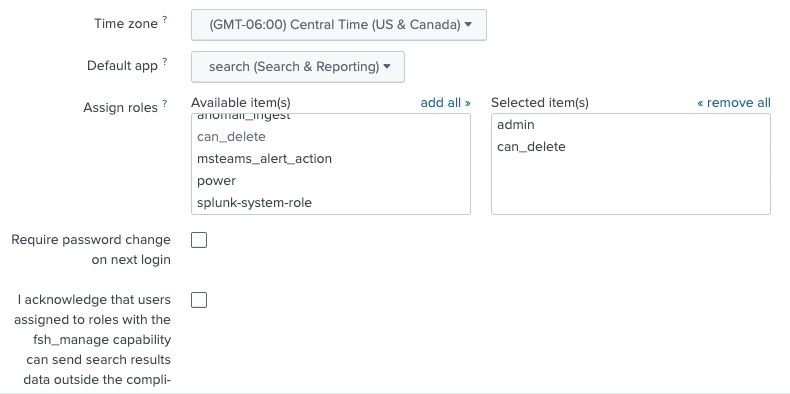
NOTE: You will also need to check the "I acknowledge that users assigned to roleswith the fsh_manage capability can send search results data outside the compli-"
Revision History
| Revision | Publish Date | Comments |
|---|---|---|
1.0 |
30-Sep-2026
|
Initial Release |
 Feedback
Contact Cisco
- Open a Support Case

- (Requires a Cisco Service Contract)