Splunk Infrastructure Monitoring Add-on (SIM) Add-On displays Error message - "Unable to retrieve access token. Try to re-enter it." due to pagination issues
Available Languages
Applicability
Splunk Infrastructure Monitoring Add-on Splunk Enterprise Splunk CloudDescription
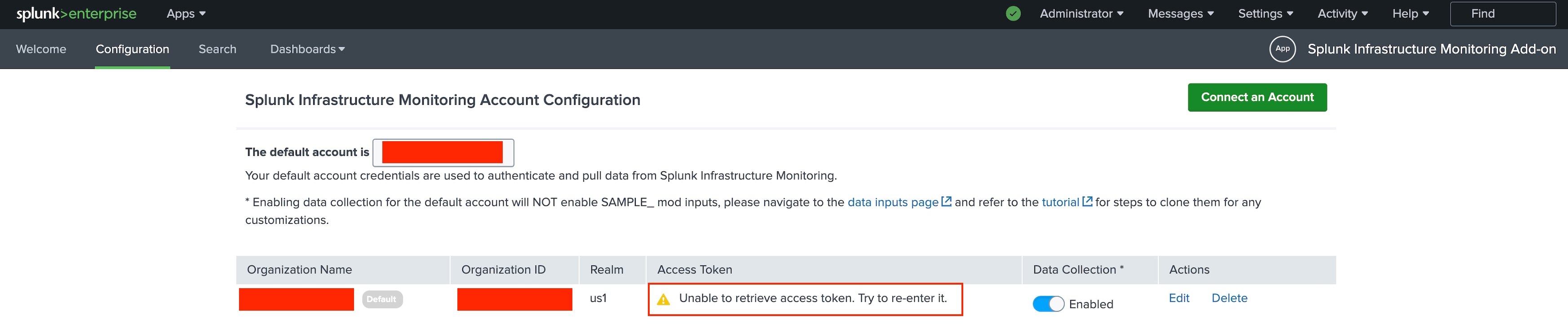
Experiencing issues with Splunk Infrastructure Monitoring Add-on and UI page displays a warning message that says,"Unable to retrieve access token. Try to re-enter it."However, while checking the configuration, it indicates that the "connection status" is connected. Added an Error Screenshot below for reference:
Investigation
1. Run the below SPL Query to check if there are any error messages in the _internal logs,
SPL:
index=_internal sourcetype=splunkd *sim*
The internal logs exclusively consist of INFO entries; no relevant ERROR or WARNING logs are present.
2. However, instead of the Warning message displayed in the Configuration tab ie. "Unable to retrieve access token. Try to re-enter it.", all the configured inputs were working as expected. Therefore, checked the response of the collections endpoint using the below URL where all the passwords are stored,
https://{host}:8089/servicesNS/nobody/splunk_ta_sim/storage/collections/data/sim_api_configAfter going through the response for the above sim_api_config endpoint, found that the access_token value is empty, ideally, access_token should be present in the response.
3. SIM UI uses the following endpoint - /servicesNS/nobody/splunk_ta_sim/storage/passwords to fetch the token related information and displays the details in the configuration page and if the data is not present it shows the above warning message (Unable to retrieve the access token).
https://{host}:8089/servicesNS/nobody/splunk_ta_sim/storage/passwords?output_mode=json
After going through the output of above endpoint, found that token details were not present on the first page, actually token were present on the next page as the endpoint already contains the 30 entries.Due to this, SIM Add-on was not able to fetch the tokens detail and currently the SIM Add-on doesn’t have paginated functionality to fetch and to retrieve all the data, it only fetches data from the first page of the endpoint and as the access_token details is not present on the first page so it throws the error message.
Additionally, the results of /servicesNS/nobody/splunk_ta_sim/storage/passwords endpoint, also contains the entries in the endpoint belong to different apps/add-ons not related to SIM TA.
Resolution
As a workaround, need to remove the unused configuration related to other Add-ons so that the token value can be shown on the first page of the sim_api_config endpoint.
Apart of the above workaround you can also use below Curl command to creating new token which will come in first page of endpoint.
curl -X POST -H "Authorization: Bearer $token" 'https://{stack_name}:8089/servicesNS/nobody/splunk_ta_sim/storage/passwords' -d name={org_id} -d password={sfx_token} -d realm=splunk_ta_sim
The development team would also be working on the permanent fix of the issue and it would be fixed in the upcoming versions of the SIM Add-on.
Revision History
| Revision | Publish Date | Comments |
|---|---|---|
1.0 |
29-Sep-2026
|
Initial Release |
 Feedback
Contact Cisco
- Open a Support Case

- (Requires a Cisco Service Contract)
This Document Applies to These Products
Related Articles
- Splunk Infrastructure Monitoring Add-on (SIM) Add-On Command Data Ingestion Latency
- Splunk Infrastructure Monitoring(SIM) Add-on v1.2.3 - Intermittent Modular input hang issues
- Splunk Infrastructure Monitoring Add-on: Data Ingestion Stopped in "sim_metrics" Index
- Splunk Infrastructure Monitoring Add-on (SIM) : Throws Failed to fetch account configurations Error on Account Configuration Page